Introduction
This manual provides instructions for the Elekpia NS-RC4NA-14 remote control, designed as a replacement for various Insignia LCD LED TV models. This remote control is pre-programmed and does not require any additional setup or pairing. Simply insert batteries, and it is ready for immediate use.
The NS-RC4NA-14 remote control is compatible with most 2013 and 2014 Insignia TV models, including but not limited to:
- NS-28ED200NA14, NS-50D400NA14, NS-19ED200NA14, 55E4400A14, NS-58E4400A14, NS-24E400NA14, NS-60E4400A14, NS-65E4400A14, NS-50L440NA14, NS-46D400NA14, NS-65D4400A14, NS-22E400NA14, NS-46L400NA14, NS-46E440NA14, NS-32E2000A14, NS-39D400NA14, NS-32DD2000A14, NS-39L400NA14, NS-55E4400A14, NS-19E200NA14, NS-50E440NA14, NS-24E200NA14, NS-32E400NA14, NS-32D200NA14, NS-55D440NA14
- NS-39D310NA15, NS-48D510NA15, NS-19E310NA15, NS-24D510NA15, NS-28D310NA15, NS-32D310NA15, NS-32D510NA15, NS-50D550NA15, NS-42D510NA15, NS-40D510NA15, NS-32D311NA15, NS-55D550NA15, NS-29D310NA15, NS-32D512NA15, NS-32D312NA15, NS-65D550NA15
- NS-32D200NA14, NS-46D400NA14, NS-28E200NA14, NS-32E830N14, NS-42E860N14, NS-50E860N14, NS-39E850N14, NS-50L440NA14, NS-39L700A12, NS-40D40SNA14, NS-24E40SNA14, NS-37D20SNA14, NS-32D20SNA14, NS-39D40SNA14, NS-32D201NA14, NS-46D40SNA14, NS-50DSNA14, NS-42D40SNA14, NS-19E310A13
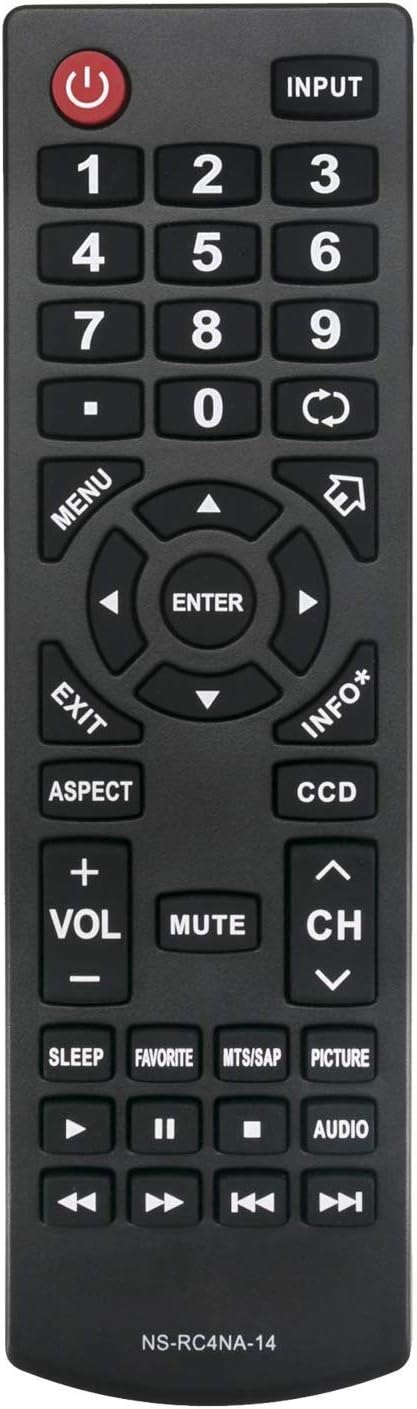
Figure 1: Front view of the NS-RC4NA-14 Remote Control.
Setup
Battery Installation
The NS-RC4NA-14 remote control requires two (2) 1.5V AAA alkaline batteries for operation. Batteries are not included with the remote control.
- Locate the battery compartment on the back of the remote control.
- Slide the battery compartment cover downwards or in the direction indicated by an arrow to open it.
- Insert two AAA batteries, ensuring that the positive (+) and negative (-) terminals align correctly with the markings inside the compartment. Incorrect insertion can prevent the remote from functioning.
- Slide the battery compartment cover back into place until it clicks securely.
Once batteries are installed, the remote control is ready for use with your compatible Insignia TV without any further programming or pairing.
Operating Instructions
This section details the functions of the buttons on your NS-RC4NA-14 remote control.

Figure 2: Angled view of the NS-RC4NA-14 Remote Control, showing button layout.
Basic Functions
- Power (⏻): Turns the TV on or off.
- INPUT: Cycles through available input sources (e.g., HDMI 1, AV, Component).
- Number Buttons (0-9): Directly select channels or input numerical values.
- Volume (+VOL-): Adjusts the sound volume. Press +VOL to increase, -VOL to decrease.
- MUTE: Silences the TV audio. Press again to restore audio.
- Channel (CH ∧/∨): Changes the TV channel. Press CH ∧ to go up, CH ∨ to go down.
Navigation and Menu Controls
- MENU: Opens the TV's main menu.
- Arrow Buttons (◄ ▲ ► ▼): Navigate through menu options and settings.
- ENTER: Confirms a selection or enters a sub-menu.
- EXIT: Closes the current menu or on-screen display.
- INFO*: Displays information about the current program or input.
Special Functions and Playback Controls
- ASPECT: Changes the screen aspect ratio (e.g., 16:9, 4:3).
- CCD: Activates or deactivates Closed Captioning.
- SLEEP: Sets a timer for the TV to automatically turn off.
- FAVORITE: Accesses favorite channels list.
- MTS/SAP: Selects Multi-channel Television Sound (MTS) or Secondary Audio Program (SAP) audio tracks.
- PICTURE: Adjusts picture modes (e.g., Standard, Movie, Dynamic).
- AUDIO: Adjusts audio modes or settings.
- Playback Controls (◄◄, ►►, ❚❚, ■, ►): Used for controlling media playback (e.g., rewind, fast forward, pause, stop, play) when connected to compatible devices or media.
Maintenance
Cleaning the Remote Control
To maintain the remote control's appearance and functionality, clean it regularly:
- Use a soft, dry cloth to wipe the surface of the remote control.
- For stubborn dirt, slightly dampen the cloth with water or a mild, non-abrasive cleaner. Avoid excessive moisture.
- Do not use harsh chemicals, abrasive cleaners, or solvents, as these can damage the remote's finish or internal components.
Battery Care
- Replace batteries when the remote control's response becomes sluggish or stops working.
- Always replace both batteries at the same time with new ones. Do not mix old and new batteries, or different types of batteries.
- If the remote control will not be used for an extended period, remove the batteries to prevent leakage and potential damage.
- Dispose of used batteries according to local regulations.
Troubleshooting
If you experience issues with your NS-RC4NA-14 remote control, refer to the following common problems and solutions:
| Problem | Possible Cause | Solution |
|---|---|---|
| Remote control is not working. | Batteries are dead or inserted incorrectly. | Replace batteries with new 1.5V AAA alkaline batteries. Ensure correct polarity (+/-). |
| Remote control has limited range or intermittent response. | Low battery power; Obstruction between remote and TV; Infrared sensor on TV is blocked. | Replace batteries. Ensure a clear line of sight between the remote and the TV's infrared sensor. Remove any obstructions. |
| Remote control does not control the TV. | TV is not a compatible Insignia model; Remote control is faulty. | Verify your TV model is listed in the compatible models section. This remote does not require programming; if it's not working with a compatible TV after new batteries, the remote may be defective. |
Note: This remote control is designed to work out of the box with compatible Insignia TVs and does not require any programming or pairing procedures.
Specifications
- Model Number: NS-RC4NA-14 (Elekpia Insignia-14)
- Brand: Elekpia
- Compatible Devices: Insignia LCD LED Televisions (specific models listed in Introduction)
- Power Supply: 2 x 1.5V AAA Alkaline Batteries (not included)
- Product Dimensions: 6.5 x 2 x 0.7 inches (approximately)
- Item Weight: 2.64 ounces (approximately)
- Color: Black
- Special Feature: Ergonomic design
Warranty and Support
Information regarding specific warranty terms or direct customer support contact for the Elekpia NS-RC4NA-14 remote control was not provided in the product details. For any issues or inquiries, please refer to the retailer or the original point of purchase for assistance.


