
1. Introduction
Thank you for purchasing the Monster PA X80 Portable Rechargeable Bluetooth LED Speaker. This all-in-one portable PA system is designed to deliver powerful audio with versatile connectivity options. Please read this manual carefully before using the product to ensure proper operation and to maximize its lifespan.

Front view of the Monster PA X80 Portable Speaker, showcasing its black finish, red accents, speaker grille, and LED display.
2. Safety Information
- Do not expose the speaker to rain or moisture to prevent fire or electric shock.
- Do not open the speaker enclosure. Refer all servicing to qualified personnel.
- Keep the speaker away from heat sources such as radiators, heat registers, stoves, or other apparatus that produce heat.
- Use only attachments/accessories specified by the manufacturer.
- Unplug the speaker during lightning storms or when unused for long periods.
- Ensure proper ventilation. Do not block any ventilation openings.
3. Package Contents
Carefully unpack your Monster PA X80 speaker and ensure all items are present:
- Monster PA X80 Speaker
- DC Power Adapter
- Remote Control
- Microphone
- User Manual (this document)
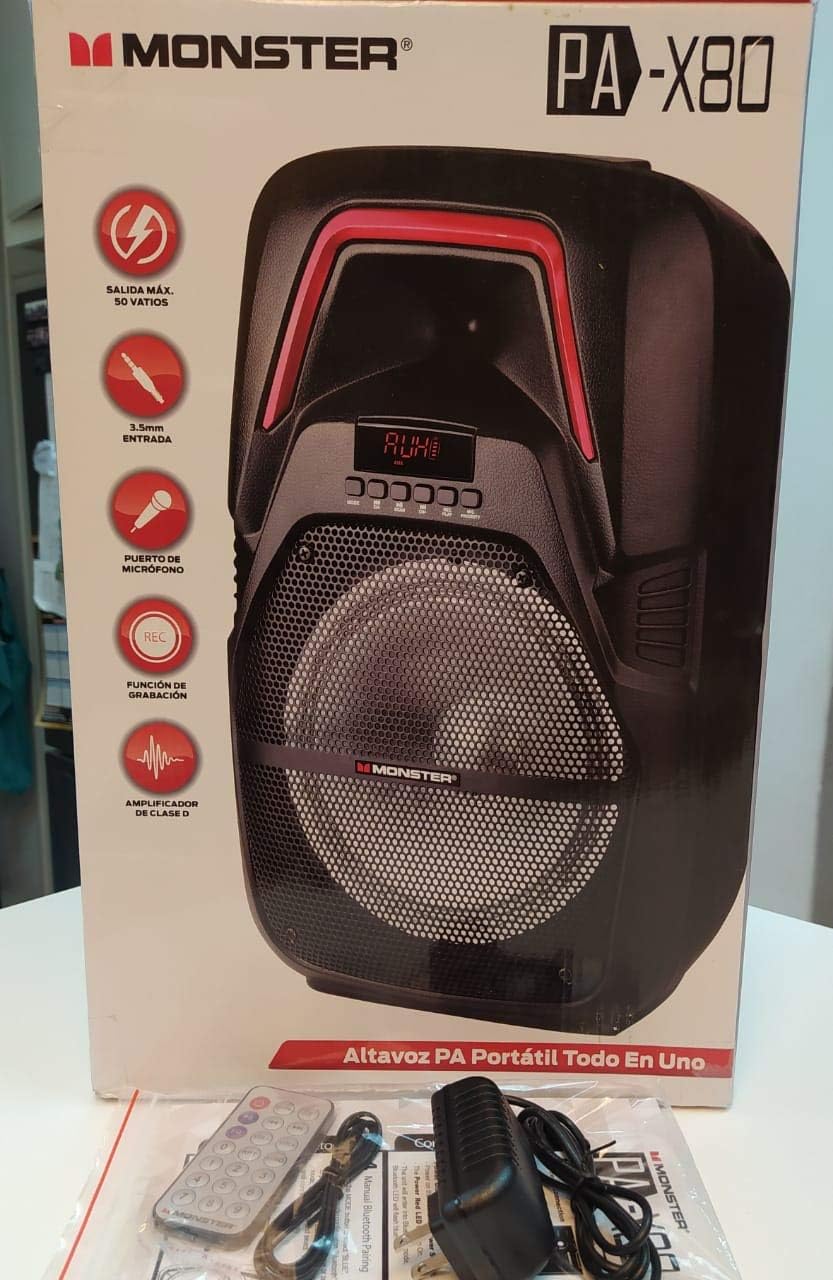
The Monster PA X80 speaker unboxed, displayed with its packaging, remote control, microphone, and power adapter.
4. Controls and Features
Familiarize yourself with the various controls and connection ports on your PA X80 speaker.
Front Panel
- LED Display: Shows current mode, track number, or FM frequency.
- Control Buttons: Play/Pause, Skip Forward/Backward, Mode selection, Record, Priority.
- Speaker Grille: Protects the main speaker driver.
Rear Panel
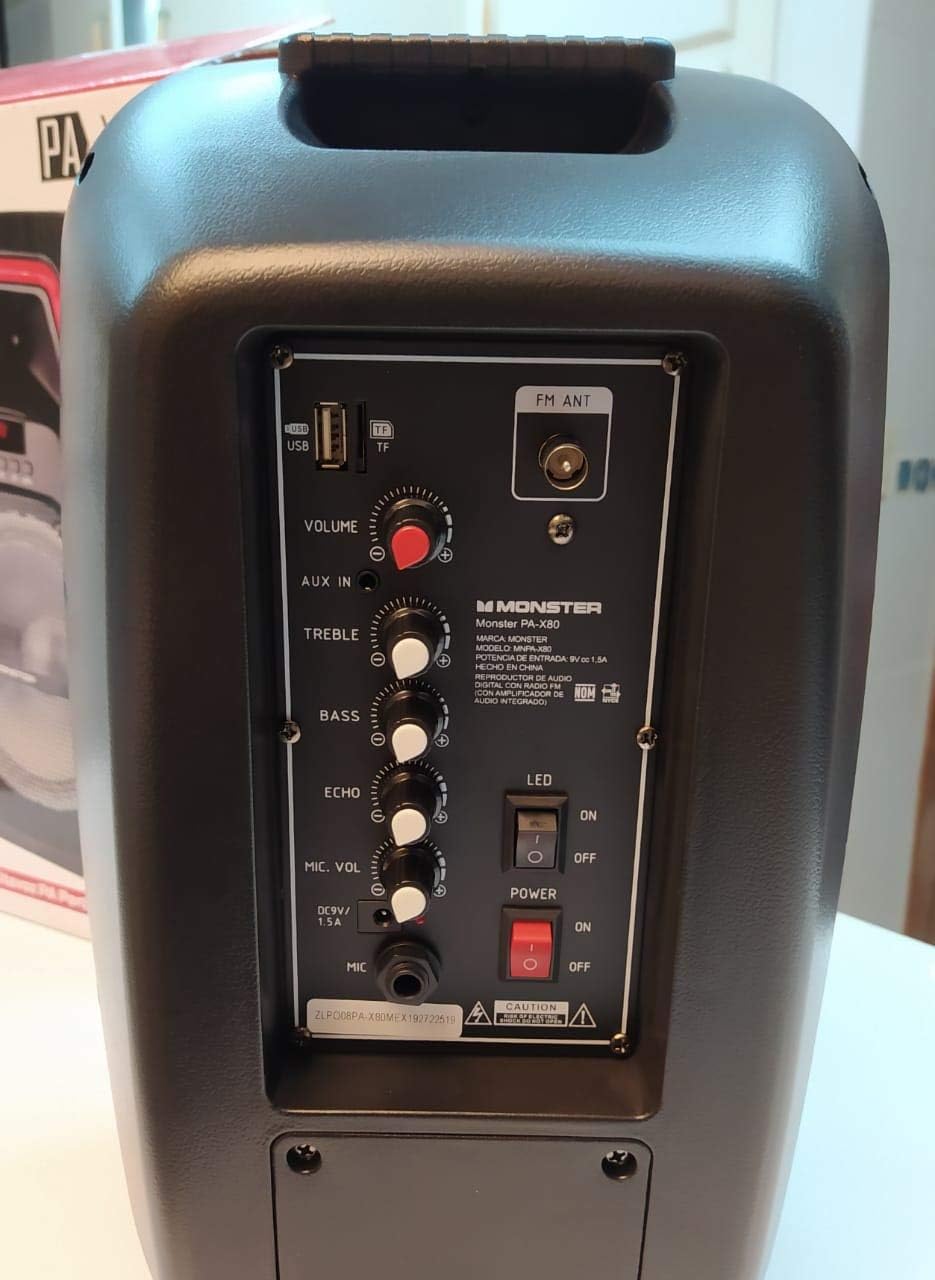
Detailed view of the Monster PA X80 speaker's rear control panel, showing inputs for USB, AUX, microphone, volume, treble, bass, echo, and power switches.
- USB Port: For playing audio from USB drives.
- TF Card Slot: For playing audio from TF (MicroSD) cards.
- FM ANT: External antenna connection for FM radio.
- VOLUME Knob: Adjusts the overall master volume.
- AUX IN: 3.5mm input for external audio devices.
- TREBLE Knob: Adjusts high-frequency sound.
- BASS Knob: Adjusts low-frequency sound.
- ECHO Knob: Adjusts the echo effect for the microphone.
- MIC. VOL Knob: Adjusts the microphone volume.
- MIC Input: 6.35mm input for a wired microphone.
- DC 9V 1.5A Input: Power input for charging and operating the speaker.
- LED Switch: Turns the LED lights on/off.
- POWER Switch: Turns the speaker on/off.

Diagram illustrating the key features of the Monster PA X80 speaker, including integrated handles, protective speaker grille, LED screen, and rear control panel.
5. Setup
5.1 Charging the Speaker
- Connect the provided DC power adapter to the DC 9V 1.5A input port on the rear panel of the speaker.
- Plug the adapter into a standard wall outlet.
- The LED display will indicate the charging status. The speaker is fully charged when the indicator changes or turns off (refer to the LED display for specific charging indicators).
- For optimal battery life, fully charge the speaker before first use.
5.2 Powering On/Off
Locate the POWER switch on the rear panel. Flip the switch to the 'ON' position to power on the speaker. Flip it to 'OFF' to power off.
6. Operation
6.1 Bluetooth Mode
- Power on the speaker. The speaker will automatically enter Bluetooth pairing mode, indicated by a flashing 'BT' on the LED display.
- On your mobile device (smartphone, tablet, etc.), enable Bluetooth and search for available devices.
- Select 'MONSTER PA X80' from the list of devices.
- Once paired, the speaker will emit a confirmation sound, and 'BT' on the LED display will stop flashing.
- You can now play audio from your device through the speaker.
6.2 AUX Input Mode
- Connect one end of a 3.5mm audio cable (not included) to the AUX IN port on the speaker's rear panel.
- Connect the other end of the cable to the headphone jack or audio output of your external device.
- Press the 'MODE' button on the speaker or remote control until 'AUX' is displayed on the LED screen.
- Play audio from your external device.
6.3 USB/TF Card Mode
- Insert a USB flash drive into the USB port or a TF (MicroSD) card into the TF card slot on the rear panel.
- The speaker will automatically switch to USB/TF mode and begin playing audio files (MP3, WAV, etc.). If not, press the 'MODE' button to select the correct input.
- Use the Play/Pause and Skip buttons to control playback.
6.4 Microphone Usage
- Connect the microphone to the MIC input port on the rear panel.
- Adjust the MIC. VOL knob to control the microphone's volume.
- Use the ECHO knob to add an echo effect to your voice.
6.5 LED Lights
Flip the 'LED' switch on the rear panel to 'ON' to activate the speaker's LED lights. Flip it to 'OFF' to turn them off.
7. Maintenance
7.1 Cleaning
Wipe the speaker with a soft, dry cloth. Do not use abrasive cleaners or solvents. Ensure no liquids enter the speaker openings.
7.2 Storage
When not in use for extended periods, store the speaker in a cool, dry place. It is recommended to charge the battery periodically (e.g., every 3 months) to maintain battery health.
8. Troubleshooting
| Problem | Possible Cause | Solution |
|---|---|---|
| No power | Battery drained; Power switch off; Adapter not connected | Charge the speaker; Turn power switch ON; Ensure adapter is securely connected |
| No sound | Volume too low; Incorrect mode selected; Device not connected | Increase volume; Press MODE button to select correct input; Reconnect device |
| Bluetooth not pairing | Speaker not in pairing mode; Device Bluetooth off; Too far from speaker | Ensure speaker is in BT mode (flashing 'BT'); Turn on device Bluetooth; Move device closer (within 10m) |
| Microphone not working | Microphone not connected; MIC. VOL too low | Ensure microphone is securely plugged in; Increase MIC. VOL knob |
9. Specifications
| Feature | Detail |
|---|---|
| Brand | Monster |
| Model | PA X80 |
| Power Source | Battery |
| Connectivity Technology | Bluetooth, AUX, USB, TF Card |
| Audio Input | Auxiliary, Microphone |
| Special Features | Bluetooth, LED Lights, Rechargeable |
| Compatible Devices | Laptop, Smartphone |
| Mounting Type | Floor Mount |
| Color | Black |
10. Warranty and Support
Monster products are designed and manufactured to the highest quality standards. This product is covered by a limited warranty against defects in materials and workmanship. For specific warranty terms and conditions, please refer to the warranty card included in your package or contact your local Monster authorized dealer.
For technical support or customer service inquiries, please visit the official Monster website or contact their customer support line. Keep your purchase receipt as proof of purchase.


