
1. Introduction
Thank you for choosing the JESLED Solar Powered Motion Sensor Light. This manual provides detailed instructions for the installation, operation, and maintenance of your new solar light. Designed for outdoor use, this light offers efficient and reliable illumination for gardens, fences, doors, yards, and pathways, enhancing security and convenience with its motion-sensing capabilities and multiple lighting modes.
2. Product Overview
2.1 Components
- JESLED Solar Motion Sensor Light Unit
- Instruction Manual
- Mounting Screws
2.2 Key Features
- Super Bright Illumination: Equipped with 90 high-power LED beads for excellent brightness.
- High-Efficiency Solar Panel: Absorbs and converts sunlight into electricity, storing it in a 2600mAh rechargeable battery.
- USB Charging Capability: Supports Type-C USB charging for versatile power options, especially during prolonged cloudy weather.
- 4 Adjustable Lighting Modes: Offers various operational modes to suit different needs and environments.
- Motion Sensor: Integrated PIR sensor detects motion for automatic light activation.
- Dusk-to-Dawn Photocell: Automatically turns the light on at dusk and off at dawn.
- Durable & Weatherproof: Constructed with robust materials and rated IP65 waterproof for outdoor use in various weather conditions.
- Energy Efficient: Class A energy efficiency, reducing electricity costs.

Figure 2.1: JESLED Solar Motion Sensor Light (Front View)
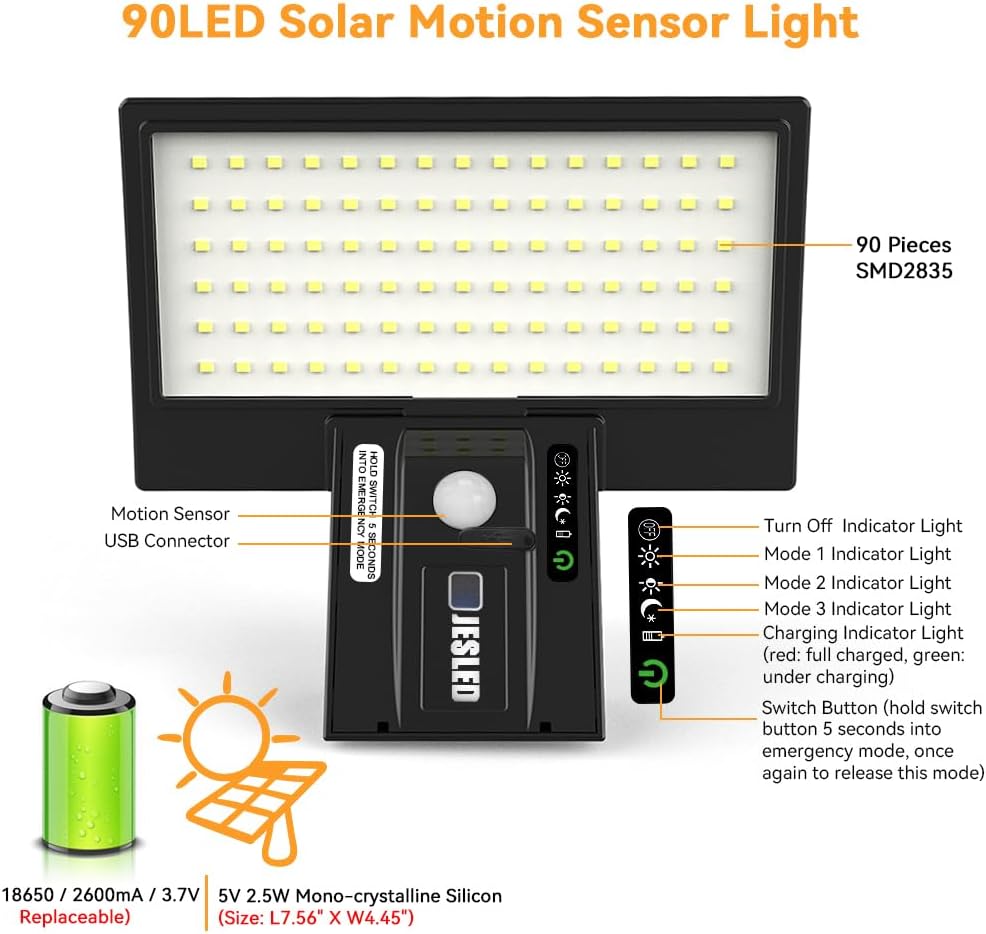
Figure 2.2: Detailed diagram showing the 90 LED beads, motion sensor, USB connector, and indicator lights.
3. Setup and Installation
The JESLED Solar Light is designed for easy installation. Follow these steps for optimal performance:
- Choose a Location: Select a location that receives direct sunlight for at least 6-8 hours a day to ensure maximum charging efficiency. The recommended installation height is between 8ft and 12ft (approximately 2.4m to 3.7m) for optimal motion detection and light spread.
- Mark Drill Holes: Use the provided screw hole template to mark the positions for drilling on your desired surface (wall, fence, etc.).
- Drill Holes: Drill holes at the marked positions. Insert the provided wall plugs if installing on masonry.
- Mount the Light: Align the light unit with the drilled holes and secure it using the provided screws. Ensure the solar panel faces upwards to capture sunlight.
- Initial Charge: For first-time use, it is recommended to fully charge the light via the USB-C port for approximately 1.5 hours, or allow it to charge under direct sunlight for a full day before first use.

Figure 3.1: Recommended installation height (8ft-12ft) and detection range (up to 33ft) for the solar light.
4. Operating Instructions
The JESLED Solar Light features 4 adjustable lighting modes. Press the power button on the unit to cycle through the modes. The light will automatically turn on/off via its dusk-to-dawn photocell.
4.1 Light Modes
- Infrared Sensing Mode (Mode 1):
The light remains off when no movement is detected. It illuminates brightly when motion is detected and turns off after approximately 15-20 seconds of no motion. - Infrared Sensing and Dimming Mode (Mode 2):
The light stays in a dim state when no motion is detected. It brightens significantly when motion is detected and returns to dim after approximately 15-20 seconds of no motion. - Dimming Mode (Mode 3):
The light maintains a continuous dim state throughout the night. The infrared motion sensor is inactive in this mode. - Emergency Mode (Mode 4):
The light constantly maintains maximum luminous output until the battery is depleted. To activate, hold the switch button for 5 seconds. Hold again for 5 seconds to release this mode. This mode is useful for emergency lighting or extended bright illumination.
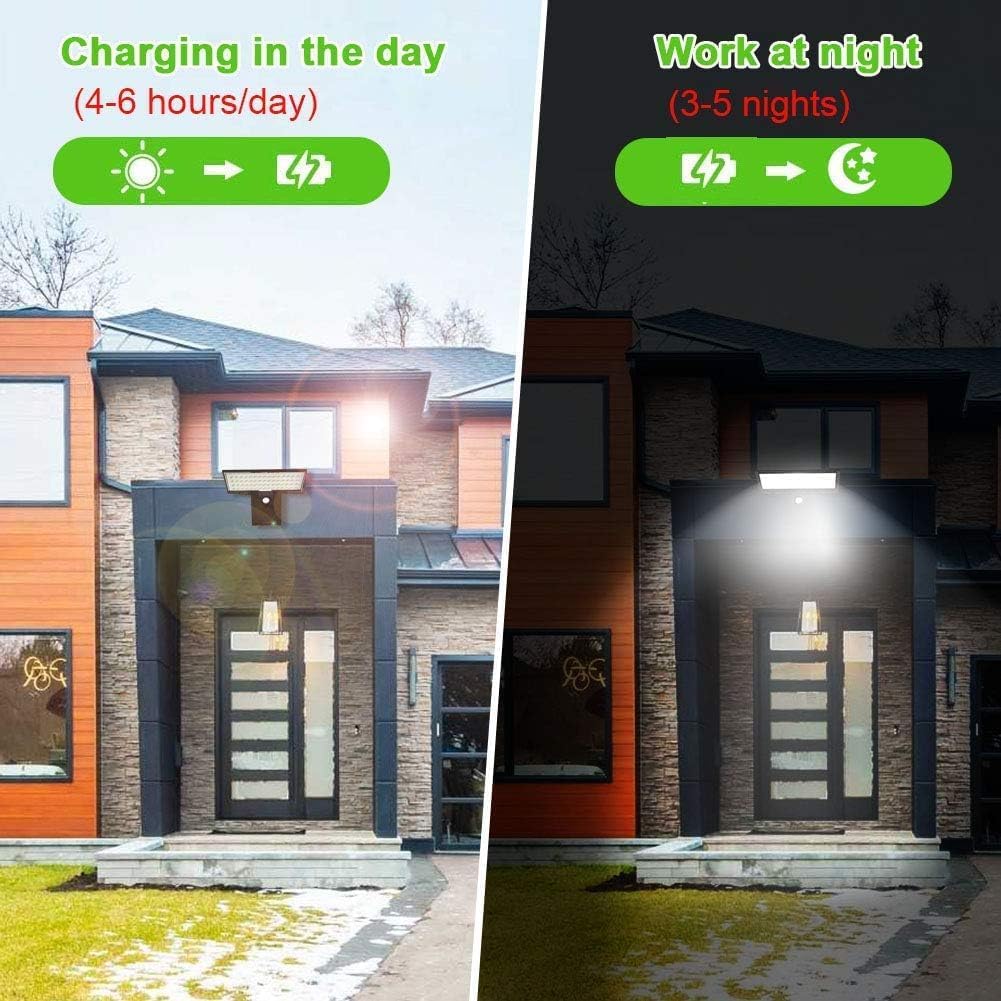
Figure 4.1: Visual representation of the four operational modes: Sensor Mode, Sensor & Dim Mode, Dim Mode, and Emergency Mode.
5. Charging
Your JESLED Solar Light is designed to charge efficiently using solar energy, but also offers a convenient USB charging option.
- Solar Charging: The integrated solar panel absorbs sunlight during the day (4-6 hours of direct sunlight recommended) and converts it into electricity, storing it in the internal 2600mAh battery. The light can run for 3-5 nights on a full charge, even during rainy days.
- USB-C Charging: For faster charging or during periods of insufficient sunlight, you can charge the light using a Type-C USB charger. This feature is particularly useful for ensuring the light is ready for use or for emergency lighting purposes.

Figure 5.1: The light supports USB-C charging for emergency or supplemental power.

Figure 5.2: Illustration of the solar light charging during the day and providing illumination at night.
6. Maintenance
To ensure the longevity and optimal performance of your JESLED Solar Light, follow these simple maintenance guidelines:
- Cleaning: Regularly wipe the solar panel and LED surface with a soft, damp cloth to remove dust, dirt, or debris. A clean solar panel ensures efficient charging.
- Weather Resistance: The light is IP65 waterproof, sunproof, and snowproof, designed to withstand various outdoor conditions. However, avoid submerging the unit in water.
- Battery Care: The rugged 2600mAh battery is engineered for a 5+ year lifespan (500+ charge cycles). For best battery health, ensure the light receives adequate sunlight for charging. If storing the light for an extended period, fully charge it and then store it in a cool, dry place.

Figure 6.1: The light's IP65 waterproof rating ensures durability in rainy conditions.
7. Troubleshooting
If you encounter issues with your JESLED Solar Light, refer to the following common problems and solutions:
| Problem | Possible Cause | Solution |
|---|---|---|
| Light does not turn on at night. | Insufficient solar charge. | Ensure the solar panel is exposed to direct sunlight for 6-8 hours daily. Clean the solar panel. Charge via USB-C if sunlight is consistently low. |
| Motion sensor not working or too sensitive. | Incorrect mode selected or sensor obstruction. | Check if the light is in Mode 1 or Mode 2. Ensure the sensor lens is clean and unobstructed. Adjust installation height if sensitivity is an issue. |
| Light is dim or turns off quickly. | Low battery charge. | Allow the light to charge for a full day in direct sunlight. If persistent, charge via USB-C. |
| Mounting screws broke during installation. | Material defect or improper installation. | Use alternative, higher-quality screws if the provided ones are insufficient for your mounting surface. |
8. Specifications
| Brand | JESLED |
| Model Number | SWL-90LED-CW |
| Part Number | SW-SWL108-02 |
| Product Dimensions | 19.2 x 11.18 x 5.84 cm |
| Item Weight | 244 g |
| Batteries | 1 CR5 battery required (included), 2600mAh |
| Number of LEDs | 90 |
| Material | Stainless Steel, Polypropylene, Glass, Silicone, Aluminium, Polycarbonate |
| Voltage | 3.7 Volts |
| Wattage | 4.2 watts |
| Luminous Flux | 520 Lumen |
| Colour Temperature | 6000 Kelvin |
| Special Features | Energy Efficient, Waterproof, Motion Sensor, Low Voltage |
| IP Rating | IP65 |
| Power Source | Solar Powered |
| EU Energy Efficiency Label | A |
9. Warranty and Support
JESLED is committed to providing high-quality products and excellent customer service.
- 2-Year Warranty: Your JESLED Solar Light is covered by a 2-year warranty from the date of purchase, protecting against manufacturing defects.
- 30-Day Free Return: Enjoy a 30-day free return policy if you are not satisfied with your purchase.
- 24/7 Support: For any questions, concerns, or technical assistance, please contact JESLED customer support.

Figure 9.1: JESLED After-Sale support details, including warranty and customer service.


