
Moman MFL-06RC
Moman MFL-06RC RGB LED Video Light User Manual
Model: MFL-06RC | Brand: Moman
1. Introduction
The Moman MFL-06RC RGB LED Video Light is a compact and versatile lighting solution designed for various photography and videography needs. It features adjustable color temperature from 3000K to 6500K, 0-360° RGB color adjustment, and dimmable brightness from 0% to 100%. With a high CRI of 96+, it ensures accurate color rendition. The device also includes a built-in 4500mAh battery and a power bank function for charging external devices.
Package Contents:
- 1 x MFL-06RC Video Light
- 1 x Snail Hot Shoe Mount
- 1 x Type-C Charging Cable
- 1 x Packing Bag
- 1 x User Manual
2. Product Overview
The MFL-06RC is engineered for portability and performance, offering a robust aluminum alloy construction in a slim form factor.

This image illustrates the Moman MFL-06RC RGB LED Video Light in various use cases. It shows the light attached to a camera via a hot shoe mount, highlighting its primary function. Additionally, it depicts the light connected to a smartphone via a USB-C cable, showcasing its power bank capability. A separate inset shows the light fitting into a pocket, emphasizing its portable design.

This image focuses on the physical dimensions of the MFL-06RC video light, displaying its 1cm (0.39in) thickness and 190g (0.41lb) weight. It emphasizes the device's compact and portable nature, suitable for easy transport.
3. Setup
3.1. Charging the Device
The MFL-06RC features a built-in 4500mAh battery and a Type-C charging port. Before first use, ensure the device is fully charged.
- Connect the provided Type-C charging cable to the light's DC IN port.
- Connect the other end of the Type-C cable to a compatible USB power adapter (not included) or a USB port.
- A full charge typically takes approximately 3 hours. The OLED screen will indicate charging status.
This image details the charging capabilities of the MFL-06RC. It shows the Type-C input port, the internal 4500mAh battery, and indicates a quick charge time of 3 hours. It also mentions a runtime of approximately 1.2 hours at 100% brightness and 14 hours at 5% brightness.
3.2. Mounting the Light
The MFL-06RC comes with a snail hot shoe mount for attachment to cameras or other compatible accessories.
- Securely attach the snail hot shoe mount to the 1/4-inch screw hole at the bottom of the MFL-06RC.
- Slide the hot shoe mount into your camera's hot shoe slot or a compatible light stand/tripod.
- Tighten the locking mechanism on the hot shoe mount to ensure stability.
4. Operating Instructions
4.1. Controls and Display
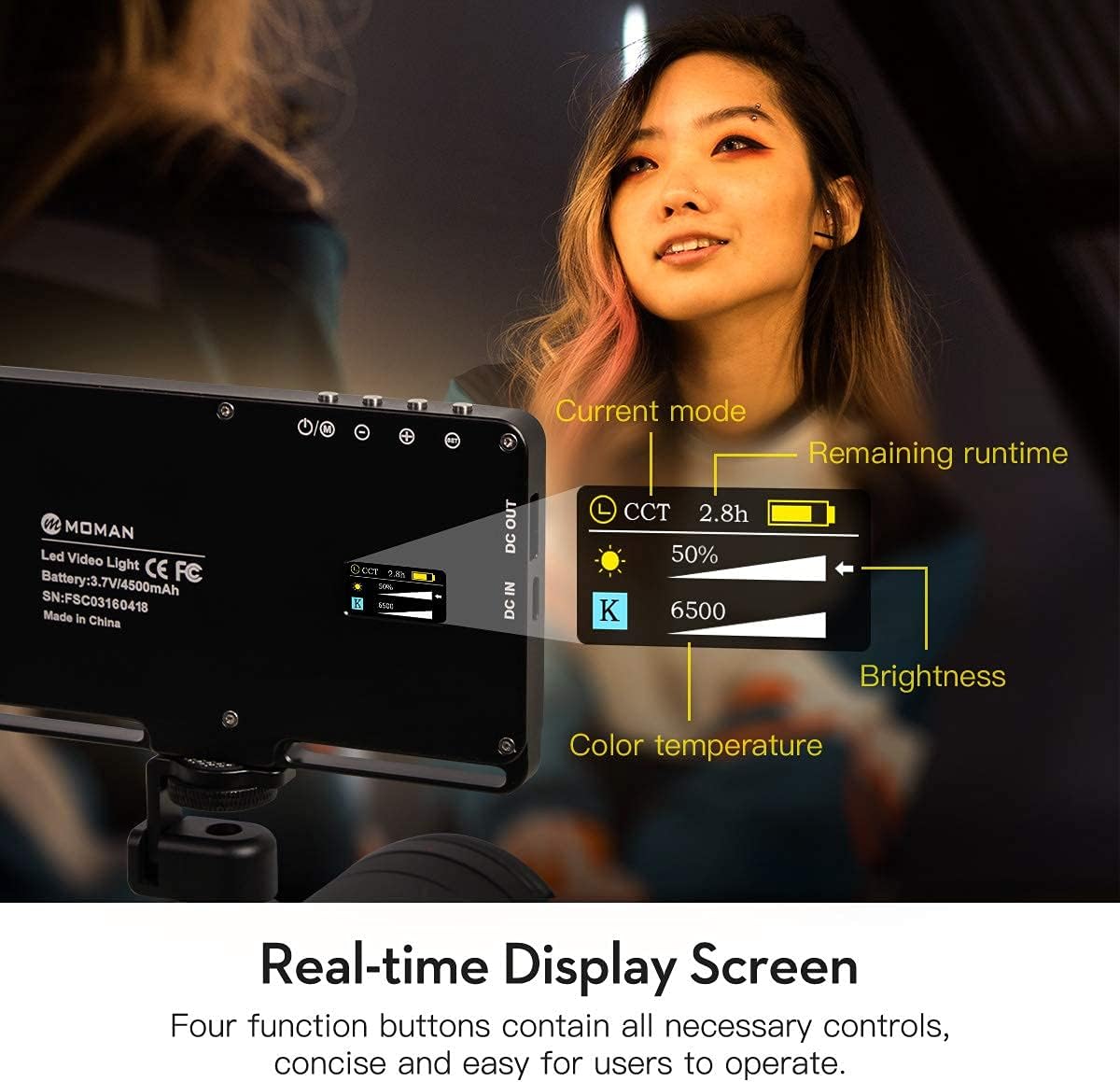
The device features an OLED screen for real-time display of settings and four function buttons for control.

This image highlights the OLED display screen of the MFL-06RC, which provides real-time information such as the current operating mode (e.g., CCT), remaining battery life, estimated runtime, brightness percentage, and color temperature (in Kelvin). The four control buttons are also visible, indicating user interaction points.
4.2. Power On/Off
Press and hold the power button (one of the four function buttons) for approximately 2 seconds to turn the light on or off.
4.3. Adjusting Brightness and Color Temperature (CCT Mode)
In CCT Mode, you can adjust the brightness from 0% to 100% and the color temperature from 3000K (warm) to 6500K (cool).
- Navigate to CCT Mode using the mode selection button.
- Use the adjustment buttons (usually marked with '+' and '-') to increase or decrease brightness.
- Use the adjustment buttons to change the color temperature.
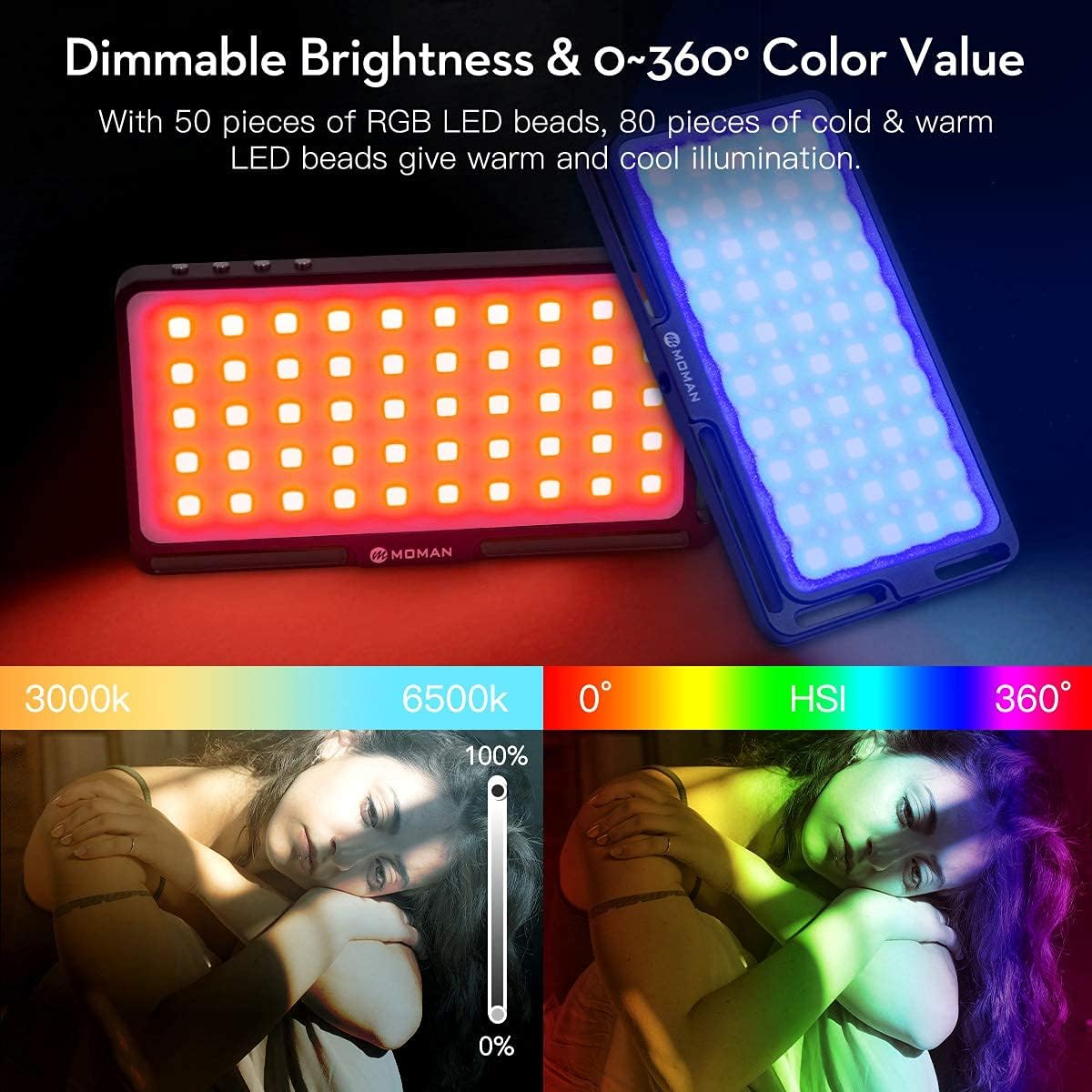
This image visually explains the light's dimming and color temperature adjustment capabilities. It shows a slider for brightness from 0% to 100% and a gradient for color temperature from 3000K to 6500K. Additionally, it displays a color wheel representing the 0-360° HSI (Hue, Saturation, Intensity) color value adjustment.
4.4. RGB Color Adjustment (HSI Mode)
In HSI Mode, you can adjust the hue (0-360°), saturation, and brightness to achieve a wide range of colors.
- Navigate to HSI Mode using the mode selection button.
- Use the adjustment buttons to select the desired hue (color) from 0-360°.
- Adjust saturation and brightness as needed using the corresponding buttons.
4.5. Special Lighting Modes (EFF Mode)
The MFL-06RC offers 6 inventive lighting modes for creative effects: Lighting, Photo, Fire, Music, Party, and Warning.
- Navigate to EFF Mode using the mode selection button.
- Use the adjustment buttons to cycle through and select the desired effect.
- Adjust parameters specific to each effect (e.g., intensity, speed) if available.

This image presents a visual guide to the six distinct lighting modes available on the MFL-06RC. It includes icons and brief descriptions for CCT (Color Correlated Temperature), HSI (Hue, Saturation, Intensity), EFF (Special Effects like Lightning, Photo, Fire, Music, Party, Warning), SET (Seven Colors), SOS, and CCT Overclock modes, along with their respective display screen interfaces.
4.6. Power Bank Function
The MFL-06RC can act as a power bank to charge other digital devices, such as smartphones, via its DC OUT port.
- Connect your external device to the MFL-06RC's DC OUT (USB) port using a compatible USB cable (not included).
- The light will provide a 5V-1A DC output to charge the connected device.

This image illustrates the MFL-06RC's capability to function as a power bank. It shows the video light connected to a smartphone via its DC OUT port, indicating that it can charge external devices with a 5V-1A output.
5. Maintenance
- Keep the device clean using a soft, dry cloth. Avoid abrasive materials or chemical cleaners.
- Avoid exposing the device to extreme temperatures, high humidity, or direct water contact.
- Store the MFL-06RC in a cool, dry place when not in use.
- Do not attempt to disassemble or repair the device yourself, as this will void the warranty.
6. Troubleshooting
6.1. Light Not Turning On
- Check battery level: Ensure the device is sufficiently charged. Connect it to a power source and allow it to charge for a period.
- Verify power button: Ensure the power button is pressed and held correctly for approximately 2 seconds.
6.2. Device Not Charging
- Cable connection: Ensure the Type-C charging cable is securely connected to both the light's DC IN port and the power source.
- Cable/Adapter functionality: Try using a different Type-C cable and a different USB power adapter to rule out faulty accessories.
6.3. Power Bank Function Not Working
- Port selection: Ensure the external device is connected to the DC OUT port, not the DC IN port.
- External device cable: Verify that the charging cable for the external device is functional and correctly connected.
- Battery level: The MFL-06RC must have sufficient battery charge to power external devices.
7. Specifications
| Feature | Detail |
|---|---|
| Model | MFL-06RC |
| Brand | Moman |
| Color Temperature | 3000K-6500K |
| Brightness Adjustment | 0%-100% |
| CRI | 96+ |
| RGB Color Value | 0-360° |
| Battery Capacity | 4500mAh (Built-in Lithium Ion) |
| Charging Port | Type-C (DC IN) |
| Power Bank Output | 5V-1A (DC OUT) |
| Dimensions (Thickness) | Approximately 1cm (0.39in) |
| Weight | Approximately 190g (0.41lb) |
| Connectivity Technology | USB |
| UPC | 761882888413 |
8. Warranty and Support
For detailed warranty information, technical support, or service inquiries, please refer to the official Moman website or contact Moman customer service directly.
You can also visit the Moman Store on Amazon for additional product information and support resources:
Related documentsMFL-06RC


Ask a question about this manual
Ask about setup, troubleshooting, compatibility, parts, safety, or missing instructions. Manuals+ will review the question and use this page’s manual context to help answer it.