1. Introduction
This manual provides instructions for the safe and effective use of your Newmowa NB-5L Replacement Battery and Portable USB Charger Kit. This kit is designed to provide reliable power for your compatible Canon camera, ensuring you capture all important moments.

Image: The Newmowa NB-5L Replacement Battery and USB Charger Kit, showing two batteries and the compact USB charger.
2. Package Contents
Please verify that all items are included in your package:
- 2 x Newmowa NB-5L Replacement Batteries (1000mAh, 3.7V)
- 1 x Newmowa USB Battery Charger
- 1 x Micro USB Cable
3. Compatible Camera Models
The Newmowa NB-5L batteries and charger are compatible with various Canon cameras that use the NB-5L battery. These include, but are not limited to:
- Canon PowerShot S100
- Canon PowerShot S110
- Canon PowerShot SD790IS
- Canon PowerShot SD850IS
- Canon PowerShot SD870IS
- Canon PowerShot SD890IS
- Canon PowerShot SD970IS
- Canon PowerShot SX200IS
- Canon PowerShot SX210IS
- Canon Digital IXUS 800 IS
- Canon Digital IXUS 850 IS

Image: An illustration showing a Canon IXUS 850 IS camera and two NB-5L batteries, indicating compatibility.
4. Setup: Battery Insertion
Follow these steps to correctly insert the battery into the charger:
- Hold the charger with the battery slot facing upwards.
- Align the battery's metal contacts with the charger's pins.
- Gently slide the battery into the slot until it clicks securely into place. Ensure it is fully seated.

Image: A four-panel illustration demonstrating how to insert the battery into the charger and connect the USB cable for charging.
5. Operating Instructions: Charging
5.1. Connecting the Charger
Once the battery is inserted, connect the charger to a power source using the provided Micro USB cable. The charger supports various USB power sources:
- USB Wall Charger
- Power Bank
- Laptop USB Port
- Car Charger
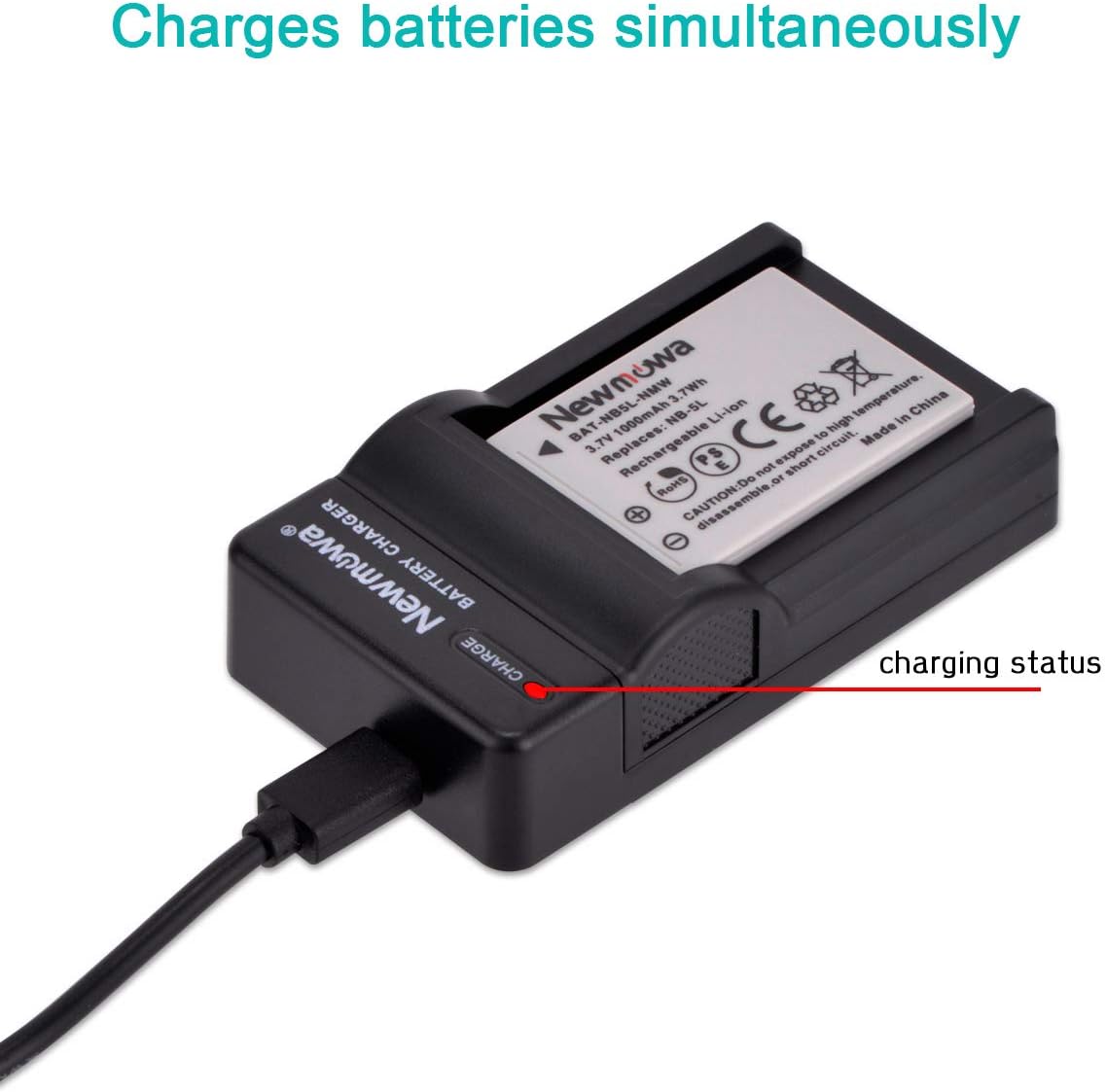
Image: Visual representation of various power sources for the USB charger, including a USB wall charger, power bank, laptop, and car charger.
5.2. Charging Status Indicator
The charger features an LED indicator to show the charging status:
- RED Light: Indicates that the battery is currently charging.
- GREEN Light: Indicates that the battery is fully charged.
The charger is designed to charge batteries simultaneously if both slots are occupied.

Image: The Newmowa battery charger with a battery inserted, highlighting the LED indicator for charging status.
6. Safety Features
The Newmowa NB-5L battery and charger kit is built with multiple circuit protection mechanisms to ensure safe operation:
- Over-Charging Protection: Prevents batteries from being overcharged, extending their lifespan.
- Short-Circuit Protection: Guards against damage from short circuits.
- High-Temperature Protection: Monitors and prevents overheating during charging.
- Current Protection: Regulates the charging current to safe levels.
- Discharge Protection: Protects batteries from excessive discharge.
- Battery PTC Protection: Provides additional thermal protection for the battery cell.

Image: The Newmowa charger accompanied by icons representing various safety features: Short Circuit Protection, Voltage Protection, Current Protection, Discharge Protection, and Battery PTC Protection.
7. Maintenance and Care
- Store batteries in a cool, dry place when not in use.
- Avoid exposing batteries or the charger to extreme temperatures, direct sunlight, or moisture.
- Do not disassemble, crush, or puncture the batteries or charger.
- Clean the charger and battery contacts with a dry, soft cloth if necessary.
- If a battery is not used for an extended period, charge it periodically to maintain its health.
8. Troubleshooting
- Battery not charging:
- Ensure the battery is correctly inserted into the charger with contacts aligned.
- Verify the USB cable is securely connected to both the charger and the power source.
- Try a different USB power source or cable to rule out issues with those components.
- Charger LED not lighting up:
- Check the power connection.
- Ensure the power source is active.
- Battery drains quickly:
- Battery capacity can decrease over time with repeated use.
- Ensure the camera settings are not excessively draining power (e.g., constant screen use, Wi-Fi).
9. Specifications
| Feature | Detail |
|---|---|
| Battery Model | NB-5L |
| Battery Type | Lithium Ion |
| Battery Voltage | 3.7V |
| Battery Capacity | 1000mAh |
| Charger Input | Micro USB |
| Product Dimensions | 2.36 x 1.18 x 0.79 inches (approximate for battery) |
| Item Weight | 4.2 ounces (total kit approximate) |
10. Warranty and Support
Newmowa products are designed for reliability and performance. For any questions, technical support, or warranty inquiries, please refer to the contact information provided with your purchase or visit the official Newmowa website. Please retain your proof of purchase for warranty claims.


