1. Introduction
This manual provides comprehensive instructions for the safe and effective use of your RDSJ L16M2PB1 laptop battery. Please read this manual carefully before installation and operation to ensure optimal performance and longevity of your battery.

Image 1.1: RDSJ L16M2PB1 Laptop Battery and its packaging, highlighting quality and warranty information.
2. Product Features
- Battery Type: Li-ion
- Voltage: 7.4V / 7.5V / 7.6V
- Capacity: 30Wh
- Designed for up to 500 recharge cycles.
- Equipped with multiple protection features for safety and reliability.

Image 2.1: Diagram illustrating the internal components of the battery, including the main chip, protection chip, resistance, and temperature sensing elements, which contribute to longer discharge time, lower power consumption, quick charging, and over 500 recycle times.
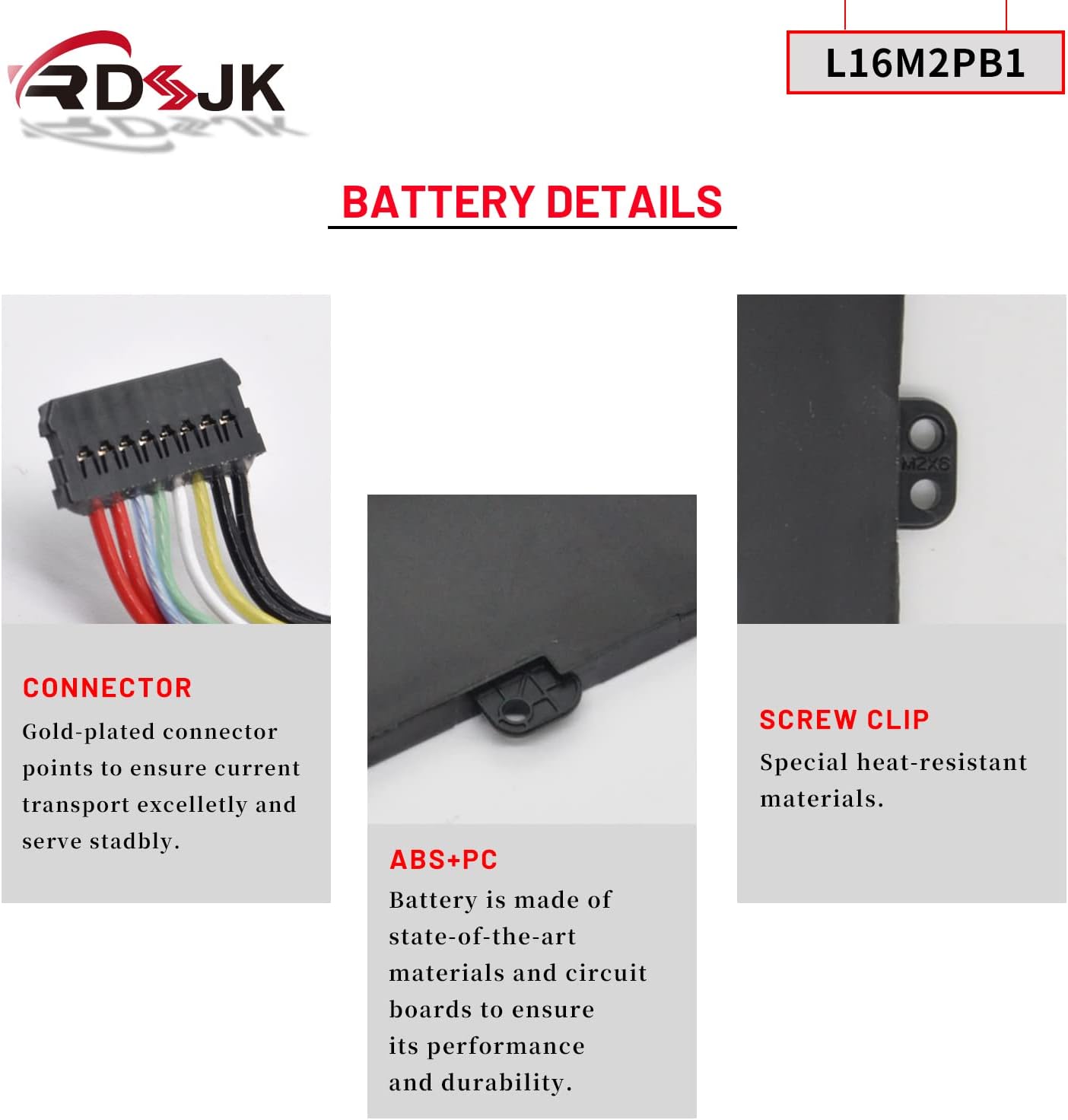
Image 2.2: Detailed view of the battery's gold-plated connector points for excellent current transmission, special heat-resistant screw clips, and the durable ABS+PC casing designed for performance and durability.
3. Compatibility
Compatible Laptop Models:
This battery is compatible with a wide range of Lenovo IdeaPad and Xiaoxin series laptops. Please verify your laptop model before purchase and installation.
- Lenovo Xiaoxin 5000 Series
- Lenovo IdeaPad 130-14IKB, 130-14AST, 130-15IKB, 130-15AST Series
- Lenovo IdeaPad 320-14AST, 320-14IAP, 320-14IKB, 320-14ISK Series
- Lenovo IdeaPad 320-15ABR, 320-15AST, 320-15IAP, 320-15IKB, 320-15ISK Series
- Lenovo IdeaPad 320-17ABR, 320-17AST, 320-17IKB, 320-17ISK Series
- Lenovo IdeaPad 330-14AST, 330-14IGM, 330-14IKB Series
- Lenovo IdeaPad 330-15AST, 330-15IGM, 330-15IKB Series
- Lenovo IdeaPad 330-17AST, 330-17IKB Series
- Lenovo IdeaPad 3-14ADA05, 3-14ARE05, 3-14IIL05, 3-14IML05, 3-14IGL05 Series
- Lenovo IdeaPad 3-15ARE05, 3-15IIL05, 3-15IML05 Series
- Lenovo IdeaPad 520-15IKB Series
- Lenovo IdeaPad S145-14IKB, S145-14API, S145-14AST, S145-14IGM, S145-14IIL, S145-14IWL Series
- Lenovo IdeaPad S145-15API, S145-15AST, S145-15IGM, S145-15IIL, S145-15IKB, S145-15IWL Series
- Lenovo B320-14IKB Series
- Lenovo V320-17IKB, V320-17ISK Series
- Lenovo V15-ADA, V15-IGL, V15-IIL, V15-IKB, V15-IWL, V145-15AST Series
Replaceable Part Numbers:
- L16L2PB1, L16L2PB2, L16L2PB3
- L16M2PB1, L16M2PB2, L16M2PB3
- L16S2PB1, L16S2PB2, L16S2PB3
- L16C2PB1, L16C2PB2, L16C2PB3
- 5B10M86149, 5B10M88058
- L17L2PF1, 5B10Q41213
- L17M2PB7, 5B10Q71253
- 2ICP6/54/90

Image 3.1: Visual reference for compatible Lenovo IdeaPad models and corresponding battery part numbers.
4. Installation Guide
Replacing a laptop battery typically involves opening the laptop casing. It is recommended to consult a professional or refer to specific laptop disassembly guides for your model if you are unsure. Ensure the laptop is powered off and disconnected from the power adapter before beginning.
4.1. How to Find Your Laptop Model
Accurately identifying your laptop model is crucial for proper battery replacement. Follow these steps:
- Press the Windows key + R simultaneously to open the Run dialog.
- Type msinfo32 and click OK.
- In the System Information window, locate System Model to find your laptop's specific model number.

Image 4.1: Visual guide demonstrating the steps to find your laptop's system model using the 'msinfo32' command in Windows.
4.2. General Installation Steps (Consult specific laptop guides for details)
- Power Off: Shut down your laptop completely and disconnect the AC adapter.
- Discharge: If possible, remove the old battery and press the power button for 10-15 seconds to discharge any residual power.
- Open Casing: Carefully open the laptop's bottom casing. This may require specific tools and techniques depending on your laptop model.
- Disconnect Old Battery: Locate the old battery and gently disconnect its cable from the motherboard.
- Remove Old Battery: Unscrew any retaining screws holding the old battery in place and remove it.
- Install New Battery: Place the new RDSJ L16M2PB1 battery into the compartment, ensuring it aligns correctly. Secure it with the screws.
- Connect New Battery: Carefully connect the new battery's cable to the motherboard connector.
- Close Casing: Reassemble the laptop casing, ensuring all screws are tightened appropriately.

Image 4.2: Top view of the RDSJ L16M2PB1 battery, showing its form factor and connector placement for installation reference.
5. Operating Your Battery
5.1. First Use and Calibration
For optimal performance and to calibrate the battery's charge indicator, follow these steps for the first few uses:
- Initial Discharge: Use your laptop on battery power until the battery level reaches approximately 5% (do not let it discharge to 0%).
- Full Charge: Connect the AC adapter and charge the battery completely to 95-100%.
- Repeat Cycle: Repeat this discharge to 5% and full charge cycle 3-4 times. This helps the battery management system accurately gauge the battery's capacity.
5.2. General Usage Tips
- Avoid frequently discharging the battery completely to 0%.
- If storing the laptop for an extended period, ensure the battery is charged to around 50-70%.
- The actual operating time will vary based on device usage and power requirements.
6. Maintenance and Care
Proper care can extend the lifespan of your laptop battery.
6.1. Battery Protection Features
Your RDSJ L16M2PB1 battery incorporates several protection mechanisms:
- Over-Temperature Protection: Prevents overheating.
- Over-Current Protection: Safeguards against excessive current flow.
- Over-Discharge Protection: Prevents the battery from discharging too deeply.
- Over-Voltage Protection: Protects against voltage spikes during charging.
- Over-Charge Protection: Prevents overcharging, which can damage the battery.

Image 6.1: Visual representation of the battery's integrated safety features, including protection against over-temperature, over-current, over-discharge, over-voltage, and over-charge.
6.2. General Care Tips
- Keep the battery and laptop in a cool, dry place, away from direct sunlight and extreme temperatures.
- Avoid physical damage to the battery.
- Do not expose the battery to water or other liquids.
- Store between 0°C-40°C (32°F-104°F).
7. Troubleshooting Common Issues
If you encounter issues with your new battery, consider the following:
- Battery Not Recognized: Ensure the battery connector is securely seated. Reinstalling the battery or updating laptop drivers may resolve this.
- Battery Not Charging: Verify the AC adapter is working correctly. Check the charging port for debris. Perform the initial discharge/charge cycles as described in Section 5.1.
- Short Battery Life: Review your laptop's power settings. Close unnecessary background applications. Ensure the battery has completed its initial calibration cycles.
- Incorrect Battery Percentage: This often resolves after completing the 3-4 full discharge/charge cycles for calibration.
If problems persist, please contact customer support for further assistance.
8. Product Specifications
| Specification | Detail |
|---|---|
| Brand | RDSJ |
| Model Number | L16M2PB1 |
| Battery Type | Lithium Ion (Li-ion) |
| Voltage | 7.4V / 7.5V / 7.6V |
| Capacity | 30Wh |
| Item Weight | 7.4 ounces |
| Package Dimensions | 9.17 x 5.59 x 1.26 inches |
| Manufacturer | RDSJ |

Image 8.1: Close-up of the battery's label, confirming model number L16M2PB1, Li-ion type, 7.5V voltage, and 30Wh/4000mAh capacity.
9. Warranty and Support
Your RDSJ L16M2PB1 laptop battery comes with a 1-Year Warranty from the date of purchase, covering manufacturing defects. Additionally, a 30-day exchange policy is available.
For technical assistance, warranty claims, or any product-related inquiries, please contact RDSJ customer service. Online customer service is available 7 days a week, 24 hours a day.
Please retain your proof of purchase for warranty validation.