
1. Introduction
The ORDRO LN-3 is a compact and powerful infrared (IR) illuminator designed to enhance the night vision capabilities of compatible cameras. It provides invisible infrared light, allowing cameras with night vision functionality to capture clear images and videos in low-light or complete darkness. This manual provides essential information for the safe and effective use of your LN-3 illuminator.
2. Safety Information
- Infrared Light: The light emitted by this device is infrared and largely invisible to the human eye. Do not stare directly into the IR LEDs for prolonged periods.
- Compatibility: This illuminator is designed for use with cameras that have built-in infrared night vision capabilities. It will not function as a visible light source for standard cameras.
- Water Resistance: Avoid exposing the device to water or high humidity.
- Temperature: Operate and store the device within the specified temperature ranges (Operating: 10~50 ℃, Storage: -30~65 ℃).
- Battery Safety: Do not attempt to disassemble or replace the built-in lithium battery. Use only the provided USB charging cable.
3. Package Contents
Please check the package for the following items:
- 1 x ORDRO LN-3 Infrared Night Vision Illuminator
- 1 x USB Charging Cable (Type-C)
- 1 x User Manual

Image: Package contents including the LN-3 illuminator, USB charging cable, and manual.
4. Product Overview
The ORDRO LN-3 features 20 infrared LED beads for uniform illumination and a compact design for portability and easy integration with camera setups.
4.1 Key Features
- 20 infrared light beads for adjustable, uniform brightness.
- Standard cold shoe interface for camera mounting.
- Additional cold shoe interface on top for accessory expansion.
- 1/4" screw hole for tripod or stand mounting.
- Built-in 2100mAh lithium battery, rechargeable via USB Type-C.
- Compact and lightweight design.
4.2 Components

Image: Front view of the LN-3 illuminator, highlighting the 20 IR lamp beads and the two-stage slide switch (All/Off/Half).
The device features a two-part sliding switch for power control and brightness adjustment (All/Off/Half). A green indicator light signifies charging or active operation.

Image: The LN-3 illuminator mounted on a camera, illustrating its cold shoe mount for attachment and an additional cold shoe on top for expanding accessories. The 1/4" screw hole at the bottom is also shown.
The illuminator is equipped with a standard cold shoe mount for easy attachment to most cameras. It also includes a 1/4" screw hole for mounting on tripods or other stands, and an additional cold shoe on top for attaching microphones or other accessories.
5. Setup
5.1 Charging the Battery
The LN-3 has a built-in 2100mAh lithium battery. Before first use, fully charge the device.
- Connect the provided USB Type-C charging cable to the charging port on the illuminator.
- Connect the other end of the USB cable to a standard USB power adapter (not included) or a computer's USB port.
- The green indicator light will illuminate during charging. It will turn off or change color (depending on model variation) when fully charged.
A full charge provides approximately 2.5 hours of continuous working time.

Image: The LN-3 illuminator with an icon representing its built-in 2100mAh lithium battery, emphasizing its USB Type-C charging capability.
5.2 Mounting on a Camera or Tripod
- Camera Mounting: Slide the cold shoe mount of the LN-3 into your camera's hot shoe or cold shoe slot until it clicks securely into place.
- Tripod Mounting: Screw the 1/4" thread at the bottom of the LN-3 onto a compatible tripod or light stand.
6. Operating Instructions
6.1 Powering On/Off and Adjusting Brightness
The LN-3 features a two-part sliding switch for power and brightness control:
- OFF: Slide the switch to the "OFF" position to turn off the illuminator.
- HALF: Slide the switch to the "HALF" position for reduced infrared light output. This setting is suitable for closer subjects or to conserve battery life.
- ALL: Slide the switch to the "ALL" position for maximum infrared light output. This setting provides the brightest illumination for distant subjects or very dark environments.
Ensure your camera's night vision mode is activated to properly utilize the infrared light.

Image: The LN-3 illuminator in use on a camera, demonstrating the improved visibility in low light when using the IR light compared to without it.
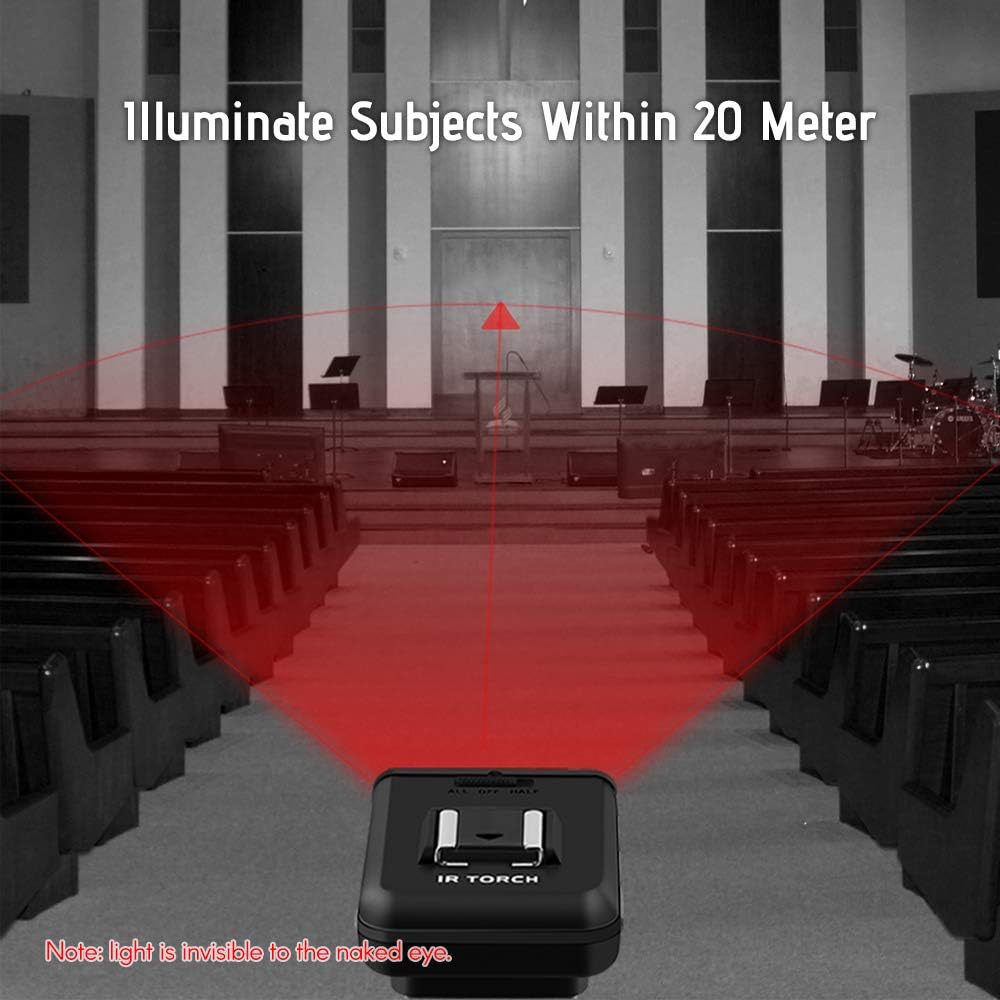
Image: A visual representation of the LN-3's illumination range, showing its capability to light up subjects within 20 meters. A crucial note indicates that this infrared light is not visible to the human eye.
7. Maintenance
- Cleaning: Use a soft, dry cloth to clean the exterior of the illuminator. Do not use liquid cleaners or solvents.
- Storage: When not in use, store the device in a cool, dry place away from direct sunlight and extreme temperatures.
- Battery Care: For long-term storage, charge the battery to approximately 50% every three months to maintain battery health.
8. Troubleshooting
- Illuminator does not turn on:
- Ensure the battery is charged. Connect the USB charging cable and check if the indicator light illuminates.
- Verify the power switch is set to "HALF" or "ALL" and not "OFF".
- Camera does not show improved night vision:
- Crucial: Confirm that your camera has a dedicated infrared night vision function. This illuminator emits infrared light, which is invisible to standard cameras and the human eye. It will not work as a visible light source.
- Ensure the illuminator is powered on and set to an appropriate brightness level ("HALF" or "ALL").
- Check the distance to your subject. While the illuminator can reach up to 20 meters, optimal performance is typically closer.
- Short battery life:
- Ensure the battery is fully charged before use.
- Using the "ALL" brightness setting will consume battery faster than "HALF".
- Battery performance can degrade over time with repeated charge cycles.
9. Specifications
| Feature | Specification |
|---|---|
| Infrared LED Wavelength | 850nm |
| Indicator Light | Green (charging/working) |
| Switch Type | Two-part sliding switch (All/Off/Half) |
| Battery Capacity | 2100mAh |
| Working Current | 1000mA |
| Continuous Working Time | More than 2 hours (approx. 2.5 hours) |
| Working Environment Temperature | 10~50 ℃ (50~122 ℉) |
| Working Environment Humidity | 40%~80% |
| Storage Temperature | -30~65 ℃ (-22~149 ℉) |
| Charging Port | USB Type-C |
| Weight | Approximately 80 grams (2.82 oz) |
| Dimensions (L x W x H) | Approximately 63x50x44mm (2.48x1.97x1.73 inches) |
| Model Number | PUN0184081729491UU |
10. Warranty and Support
ORDRO products are manufactured to high-quality standards. For specific warranty details, please refer to the documentation provided at the time of purchase or contact your retailer. Keep your proof of purchase for any warranty claims.
If you encounter any issues or have questions regarding your ORDRO LN-3 Infrared Night Vision Illuminator, please contact the seller or ORDRO customer support for assistance.