
Important Safety Instructions
Please read this manual carefully before using the appliance and keep it for future reference. Failure to follow these instructions may result in electric shock, fire, or serious injury.
- Ensure the power supply voltage matches the rating label on the appliance.
- Do not immerse the appliance, power cord, or plug in water or other liquids.
- Unplug the appliance from the power outlet before cleaning, maintenance, or when not in use.
- Keep the appliance out of reach of children and pets.
- Do not operate the appliance with a damaged cord or plug, or after it malfunctions or has been damaged in any manner.
- Place the appliance on a stable, flat, and dry surface.
- Do not block the air inlets or outlets. Maintain at least 20 cm clearance from walls and other objects.
- Only use clean tap water in the water tank. Do not add any chemicals or additives other than those recommended by the manufacturer.
- Do not move the appliance when the water tank is full.
- This appliance is for indoor use only.
Product Overview
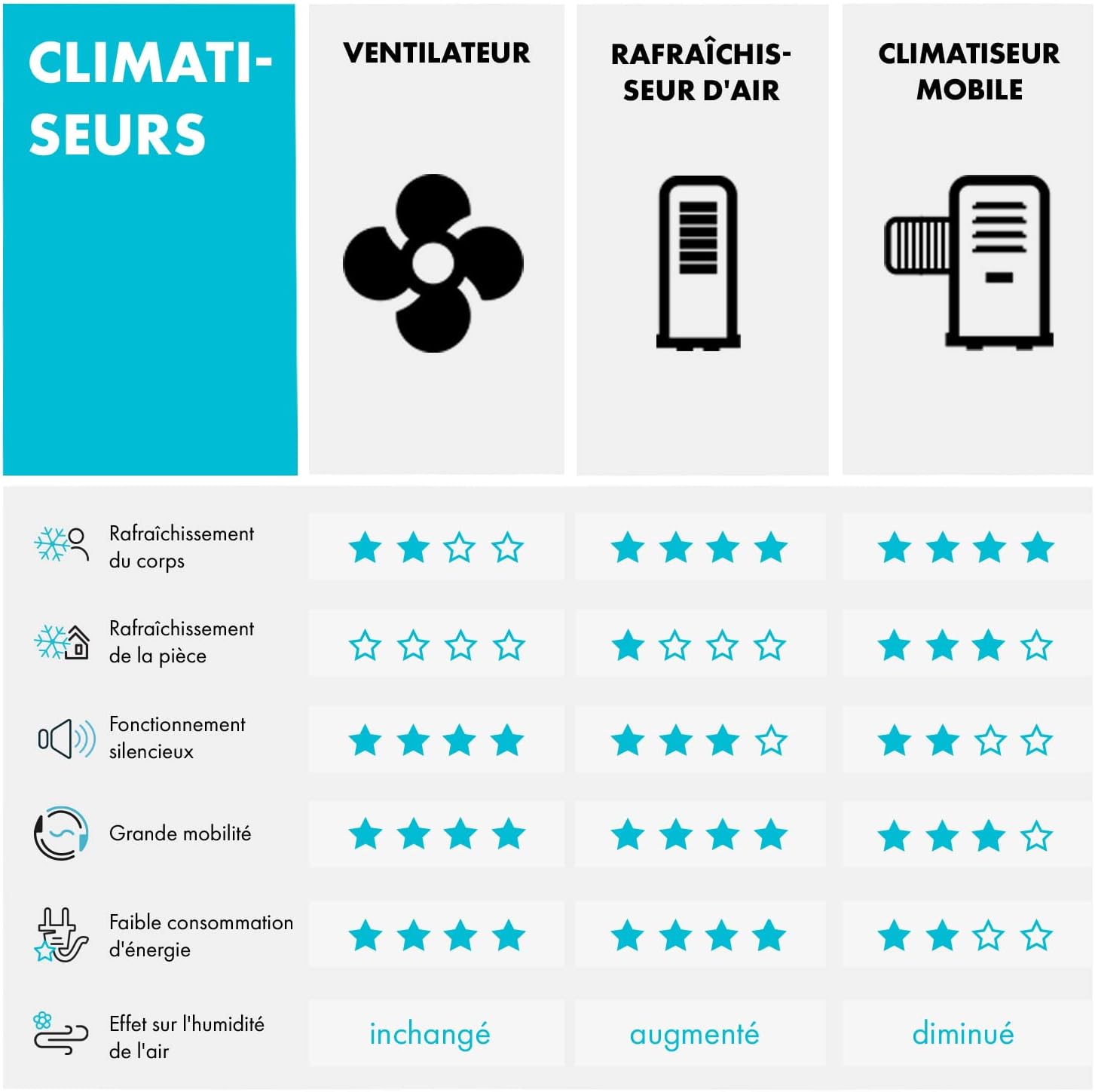
The Klarstein Skyscraper Ice is a versatile 5-in-1 evaporative air cooler designed to provide cooling, humidification, ventilation, and air ionization. It also features a night mode for quiet operation, making it suitable for various environments.

The Klarstein Skyscraper Ice provides body cooling and air purification.
Key Features
- 5-in-1 Functionality: Evaporative Cooling, Humidifier, Fan, Ionizer, Night Mode.
- Powerful Airflow: Up to 180 m³/h for effective cooling.
- Multiple Fan Speeds: 3 adjustable fan speeds (Low, Medium, High).
- Oscillation: 90° oscillation for wide area coverage.
- Large Water Tank: 6-liter capacity for extended operation.
- Timer Function: Programmable timer up to 7.5 hours.
- Remote Control: Convenient operation from a distance.
- Quiet Operation: Minimum noise level of 45 dB, ideal for night use.
- Energy Efficient: Low power consumption of 45W.

Overview of Klarstein Skyscraper Ice features, highlighting airflow, oscillation, and control options.
Setup
Unpacking
Carefully remove the appliance from its packaging. Check that all components are present and undamaged:
- 1 x Klarstein Skyscraper Ice Air Cooler
- 2 x Ice Packs
- 1 x Remote Control (battery included)
- 1 x User Manual
Placement
Position the air cooler on a stable, flat, and dry surface. Ensure there is adequate space around the unit for proper air circulation. Avoid placing it in direct sunlight or near heat sources.

The mobile air cooler is suitable for use in various rooms, including attics, offices, and bedrooms, without requiring an exhaust hose.
Filling the Water Tank
The water tank has a capacity of 6 liters. For optimal cooling performance, use cold water and the provided ice packs.
- Ensure the appliance is unplugged from the power outlet.
- Locate and open the water tank cover, usually at the bottom rear or side of the unit.
- Fill the tank with clean, cold tap water. Do not exceed the 'MAX' fill line indicated on the tank.
- For enhanced cooling, place the two included ice packs (after freezing them in a freezer) into the water tank.
- Securely close the water tank cover.
- Plug the appliance into a suitable power outlet.

Close-up view of the water tank and the two included ice packs, ready for use.
Operating Instructions
Control Panel and Remote Control
The Klarstein Skyscraper Ice can be operated using the intuitive control panel located on the top of the unit or with the included remote control.

Detailed view of the control panel and remote control, showing various function buttons.
Power On/Off
- Press the ON/OFF button on the control panel or remote control to turn the unit on or off.
Fan Speed Adjustment
- Press the SPEED button to cycle through the three fan speeds: Low, Medium, and High.
Operating Modes
- Press the MODE button to select from the following modes:
- Normal Mode: Provides a constant, steady airflow.
- Nature Mode: Simulates natural wind patterns by varying the fan speed intermittently.
- Night Mode: Operates at a lower, quieter speed to ensure undisturbed sleep. The fan speed will gradually decrease over time.

The air cooler in night mode, demonstrating its quiet operation at 45 dB for restful sleep.
Oscillation Function
- Press the SWING button to activate the 90° oscillation function, distributing cool air across a wider area. Press again to stop oscillation.
Humidification Function
- Press the HUMIDIFIER button to activate the evaporative cooling and humidification function. This will draw water from the tank to cool and humidify the air.
Ionizer Function
- Press the ION button to activate the ionizer, which releases negative ions to help purify the air.
Timer Function
- Press the TIMER button repeatedly to set the desired operating time, up to 7.5 hours. The unit will automatically turn off once the set time has elapsed.
Maintenance
Regular cleaning and maintenance ensure the longevity and efficient operation of your Klarstein Skyscraper Ice air cooler.
Cleaning the Water Tank
- Unplug the appliance before cleaning.
- Drain any remaining water from the tank.
- Clean the water tank regularly (at least once a week) with a soft cloth and mild detergent to prevent the buildup of mold, mildew, or mineral deposits.
- Rinse thoroughly with clean water and dry completely before refilling.
Cleaning the Air Filter
- Unplug the appliance.
- Carefully remove the air filter from the back of the unit.
- Wash the filter with clean water and a mild detergent. For heavy dust, a soft brush can be used.
- Rinse the filter thoroughly and allow it to air dry completely before reinserting it into the unit.
The removable air filter, shown before and after cleaning, for maintaining air quality.
Exterior Cleaning
- Wipe the exterior surfaces of the appliance with a soft, damp cloth. Do not use abrasive cleaners or solvents.
Storage
- If the appliance will not be used for an extended period, drain all water from the tank and clean the unit thoroughly.
- Store the appliance in a cool, dry place, preferably in its original packaging, away from direct sunlight and extreme temperatures.
Troubleshooting
If you encounter any issues with your Klarstein Skyscraper Ice, please refer to the following common problems and solutions:
| Problem | Possible Cause | Solution |
|---|---|---|
| Appliance does not turn on | No power supply; Power button not pressed; Remote control battery depleted. | Check power connection; Press power button; Replace remote control battery. |
| Weak or no airflow | Air filter clogged; Air inlets/outlets blocked; Fan speed set too low. | Clean air filter; Ensure clear path for air; Increase fan speed. |
| No cooling effect | Water tank empty; Humidification function not activated; Ice packs not used or frozen. | Fill water tank; Activate humidification; Use frozen ice packs. |
| Unusual noise | Appliance not on a flat surface; Obstruction in fan; Water pump issue. | Place on a flat surface; Check for obstructions (unplug first); Contact customer support if pump noise persists. |
| Unpleasant odor | Stagnant water in tank; Dirty filter. | Drain and clean water tank thoroughly; Clean air filter. |
Specifications
| Feature | Specification |
|---|---|
| Brand | KLARSTEIN |
| Model Name | Skyscraper Ice |
| Power Consumption | 45 Watts |
| Voltage | 220 Volts |
| Airflow Capacity | 180 m³/h |
| Water Tank Capacity | 6 Liters |
| Noise Level | 45 dB (min) / 55 dB (max) |
| Dimensions (D x W x H) | 28 cm x 28 cm x 95 cm |
| Weight | 6 Kilograms |
| Control Type | Remote Control, Manual |
| Special Features | 5-in-1 (Cooler, Humidifier, Fan, Ionizer, Night Mode), Easy to Install, Portable, 90° Oscillation |
| Material | Plastic |
Warranty and Support
For detailed warranty information, product registration, or technical support, please refer to the warranty card included with your purchase or visit the official Klarstein website. Our customer service team is available to assist you with any questions or concerns regarding your Skyscraper Ice air cooler.
Please retain your proof of purchase for any warranty claims.


