
VMAI HD-019
VMAI 38 Inch 2.1 Sound Bar User Manual
Model: HD-019
1. Introduction
Thank you for choosing the VMAI 38 Inch 2.1 Sound Bar. This sound bar is designed to enhance your home entertainment experience with powerful audio, featuring dual built-in subwoofers and versatile connectivity options. Please read this manual thoroughly before use to ensure proper operation and to maximize your enjoyment of the product.
2. Safety Information
- Do not expose this appliance to dripping or splashing liquids.
- Do not block any ventilation openings. Install in accordance with the manufacturer's instructions.
- Do not install near any heat sources such as radiators, heat registers, stoves, or other apparatus (including amplifiers) that produce heat.
- Protect the power cord from being walked on or pinched, particularly at plugs, convenience receptacles, and the point where they exit from the appliance.
- Only use attachments/accessories specified by the manufacturer.
- Unplug this appliance during lightning storms or when unused for long periods of time.
3. Package Contents
Please check that all items are included in your package:
- VMAI 38 Inch Sound Bar
- Remote control
- Premium 5 ft Optical cable
- 5 ft RCA cable
- Power Adapter
- Wall mounting brackets and screws
- User Manual
4. Product Overview
The VMAI Sound Bar HD-019 is engineered to deliver a powerful and clear audio experience. It features dual 25W built-in subwoofers and four speakers, providing 90W of total power for room-shaking bass and precise sound.

Figure 4.1: VMAI 38 Inch Sound Bar and included remote control.
The sound bar incorporates advanced DSP technology and Bluetooth 5.0 for stable and fast wireless transmission. It offers multiple input connections including HDMI ARC, Optical, AUX, and USB (for flash drives only).

Figure 4.2: Internal components of the VMAI Sound Bar, highlighting the 6 speakers and 90 watts of power for a superb sound experience.

Figure 4.3: Illustration of the sound bar's dual built-in subwoofers, designed to deliver deep bass.
5. Setup
5.1 Placement Options
The VMAI Sound Bar offers flexible placement options to suit your home theater setup:
- Desktop Placement: Position the sound bar directly in front of your TV on a flat surface, ensuring it does not obstruct the TV's remote sensor.
- Wall Mount: For an elegant, space-saving setup, the sound bar can be mounted on the wall using the included mounting brackets and template. Ensure the wall can support the weight of the sound bar.

Figure 5.1: The sound bar's mountable design allows for both wall mounting and desktop placement.
5.2 Connecting Your Sound Bar
The sound bar supports various connection methods to integrate with your devices:
- HDMI ARC: Connect an HDMI cable from the sound bar's HDMI ARC port to your TV's HDMI ARC port. This allows for audio return channel functionality, simplifying control.
- Optical Input: Use the included optical cable to connect the sound bar to your TV's optical audio output.
- AUX Input: Connect devices using the included RCA cable to the AUX input.
- USB Input: For playing audio from a USB flash drive.
- Bluetooth 5.0: Wirelessly connect your Bluetooth-enabled devices.

Figure 5.2: The sound bar supports HDMI (ARC), AUX, Optical, USB, and Bluetooth 5.0 connections.
5.3 Important Note for Optical Mode (PCM Setting)
When using the Optical input, it is crucial to adjust your TV's audio settings to PCM (Pulse Code Modulation). Failure to do so may result in no sound or distorted audio.
Steps to enable PCM (may vary by TV brand):
- Go to the 'Settings' menu on your TV.
- Navigate to 'Audio Format' or 'Sound Output' settings.
- Select 'PCM' as the digital audio output format.
- If using HDMI ARC, also check 'HDMI Audio Format' and set it to 'PCM'.
6. Operating Instructions
6.1 Powering On/Off
Press the Power/Mode button on the sound bar or the remote control to turn the unit on or off.
6.2 Input Selection
Press the Selection (M) button on the sound bar or the INPUT button on the remote control to cycle through available input sources (HDMI ARC, Optical, AUX, USB, Bluetooth).
6.3 Volume Control
Use the Volume + and Volume - buttons on the sound bar or remote control to adjust the volume level.
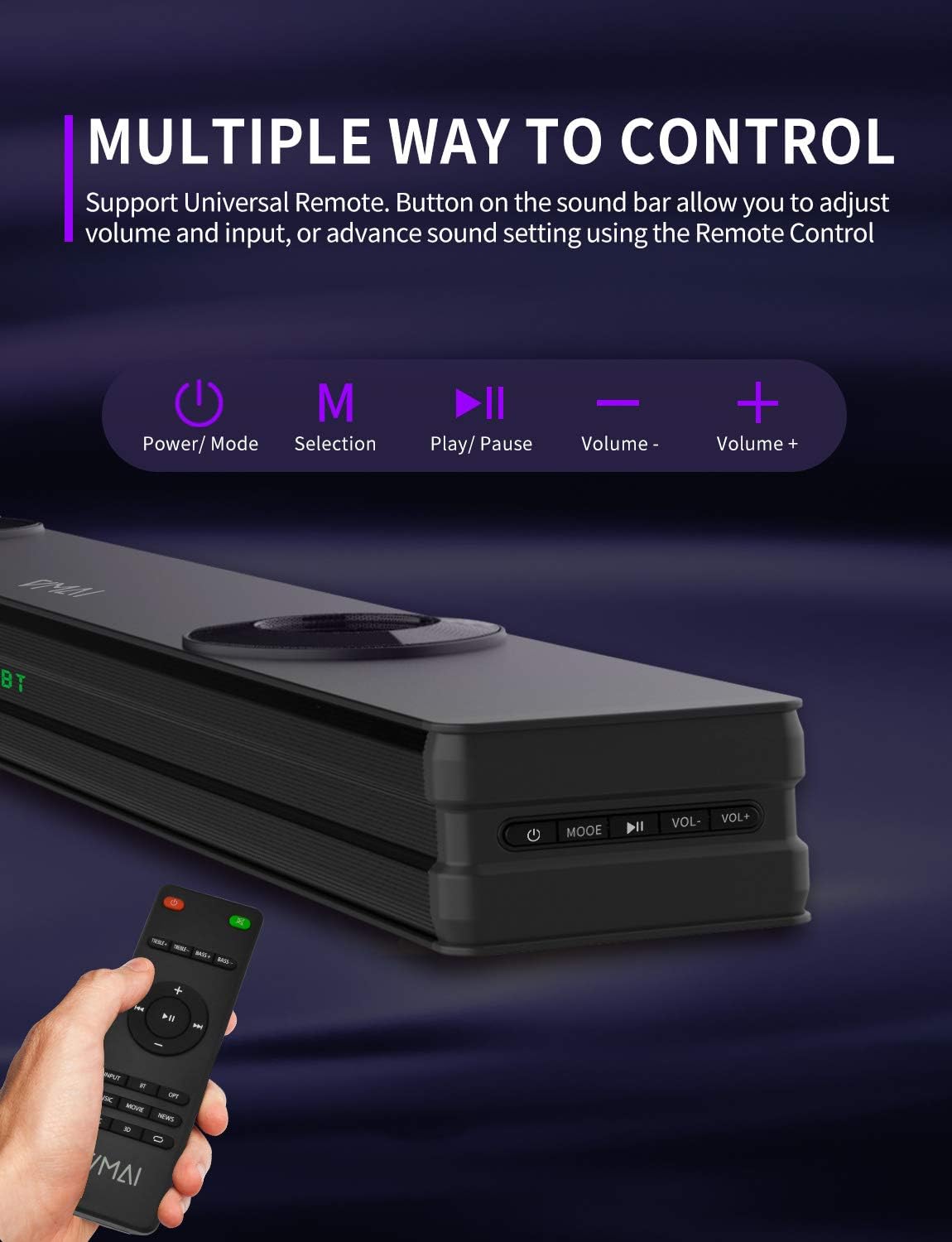
Figure 6.1: The sound bar can be controlled via its integrated buttons or the included remote control.
6.4 Equalizer Modes
The sound bar features 4 distinct sound modes to optimize your listening experience. Use the remote control to switch between them:
- Music Mode: Optimized for music playback, enhancing clarity and bass.
- Movies Mode: Provides a cinematic surround sound experience, ideal for films.
- News Mode: Enhances vocal clarity for news broadcasts and dialogue-heavy content.
- 3D Surround Sound Mode: Creates an immersive, three-dimensional audio field.
6.5 Bluetooth Pairing
To pair your Bluetooth device:
- Switch the sound bar to Bluetooth mode (indicated by 'BT' on the display).
- Enable Bluetooth on your device (smartphone, tablet, etc.).
- Search for 'VMAI Sound Bar' in your device's Bluetooth settings.
- Select it to pair. Once connected, the 'BT' indicator will stop flashing.
7. Maintenance
To ensure the longevity and optimal performance of your VMAI Sound Bar, follow these maintenance guidelines:
- Cleaning: Use a soft, dry cloth to clean the surface of the sound bar. Do not use liquid cleaners or aerosol sprays.
- Ventilation: Ensure the ventilation openings are not blocked to prevent overheating.
- Storage: If storing the sound bar for an extended period, unplug it from the power outlet and store it in a cool, dry place.
- Avoid Moisture: Keep the sound bar away from water and high humidity.
8. Troubleshooting
If you encounter issues with your VMAI Sound Bar, please refer to the following common problems and solutions:
| Problem | Possible Cause / Solution |
|---|---|
| No sound from the sound bar. |
|
| Distorted or poor sound quality. |
|
| Bluetooth connection issues. |
|
| Remote control not working. |
|
| Bass is weak or not noticeable. |
|
9. Specifications
| Feature | Specification |
|---|---|
| Model Name | HD-019 |
| Dimensions (D x W x H) | 4.3"D x 38"W x 2.5"H |
| Item Weight | 6 Pounds |
| Speaker Maximum Output Power | 90 Watts |
| Input Voltage | 240 Volts |
| Speaker Type | 3D, Soundbar, Subwoofer, Surround Sound |
| Connectivity Technology | Optical, HDMI (ARC), AUX, USB, Bluetooth |
| Bluetooth Version | 5.0 |
| Bluetooth Range | 15.24 Meters (50 Feet) |
| Audio Output Mode | Stereo, Surround |
| Material | Metal |
| Color | Matte Black |
10. Warranty and Support
VMAI offers a 12-month coverage for its products. Every VMAI sound bar undergoes a strict quality test process before shipment. For any issues or inquiries, please contact VMAI customer support. We are committed to resolving all your problems within 24 hours.
VMAI aims to provide high-quality audio products that deliver fantastic audio-visual enjoyment and an authentic interactive experience.
Ask a question about this manual
Ask about setup, troubleshooting, compatibility, parts, safety, or missing instructions. Manuals+ will review the question and use this page’s manual context to help answer it.