
JOOAN 10-Channel NVR & 8pcs 1296P Bullet Cameras
JOOAN 3MP Wireless Security Camera System User Manual
Model: 10-Channel NVR & 8pcs 1296P Bullet Cameras
1. Introduction
The JOOAN 3MP Wireless Security Camera System provides comprehensive surveillance for your home or business. This system includes a 10-channel Network Video Recorder (NVR) with a pre-installed 1TB hard drive and eight 1296P (3MP) bullet cameras. Designed for ease of use, the system features plug-and-play setup, IP67 weatherproof cameras, AI human motion detection, and remote viewing capabilities via mobile and PC applications.
Enjoy peace of mind with 24/7 reliable recording and advanced features that minimize false alarms and ensure clear, high-definition monitoring day and night.

Figure 1: JOOAN 3MP Wireless Security Camera System components.
2. Package Contents
Please check the package contents carefully upon opening to ensure all items are present and undamaged:
- 1 x 10-Channel Wireless NVR (with pre-installed 1TB HDD)
- 8 x 1296P (3MP) Wireless Bullet Cameras
- 8 x Power Adapters for Cameras (DC 12V-1A)
- 1 x Power Adapter for NVR (DC 12V-2A)
- 1 x USB Mouse
- 1 x User Manual
- 8 x Screw Bags for Camera Installation
- 1 x Security Sign
- 1 x Free Extension Antenna (to strengthen signal)

Figure 2: Visual representation of the JOOAN security camera system package contents.
3. System Components Overview
3.1 Wireless NVR (Network Video Recorder)
The NVR is the central hub of your security system. It records and stores video footage from all connected cameras. This 10-channel NVR supports up to 10 cameras and comes with a 1TB security-grade hard drive, expandable up to 6TB. It utilizes H.265+ video compression for efficient storage and smoother viewing.
- Channels: 10-channel support (8 cameras included, 2 expandable)
- Storage: Pre-installed 1TB HDD (supports 500GB-6TB)
- Video Compression: H.265+ (saves over 50% storage compared to H.264)
- Connectivity: HDMI, VGA, USB, WAN port for network connection.
Video 1: An overview of the JOOAN security camera system and its features.
3.2 3MP Wireless Bullet Cameras
The included bullet cameras capture high-definition video with 3-megapixel resolution, providing clear and detailed images. They are designed for both indoor and outdoor use with IP67 weatherproof rating and offer excellent night vision capabilities.
- Resolution: 3MP (2304x1296) for super HD images.
- Weatherproof: IP67 rated for outdoor durability against rain and dust.
- Night Vision: Up to 100ft (30m) with 4pcs Array Infrared LEDs and IR-CUT filter.
- Audio: Equipped with a microphone for one-way audio monitoring.
- Power: Cameras are powered by included power adapters, not battery operated.

Figure 3: Demonstrates the superior clarity of 3MP images compared to 2MP.
4. Setup Guide
The JOOAN Wireless Security Camera System is designed for a simple plug-and-play setup. Cameras are pre-paired with the NVR at the factory, so no complex configuration is needed for initial local viewing.
4.1 Initial System Connection
- Connect NVR to Power: Plug the NVR's power adapter into the NVR and then into a power outlet.
- Connect NVR to Display: Connect the NVR to a monitor or TV using an HDMI or VGA cable.
- Connect Cameras to Power: Plug each camera's power adapter into the camera and then into a power outlet.
- Wait for Auto-Connection: The cameras will automatically connect to the NVR. You should see live video feeds appear on your monitor within minutes.
- Connect USB Mouse: Plug the included USB mouse into the NVR's USB port for system navigation.
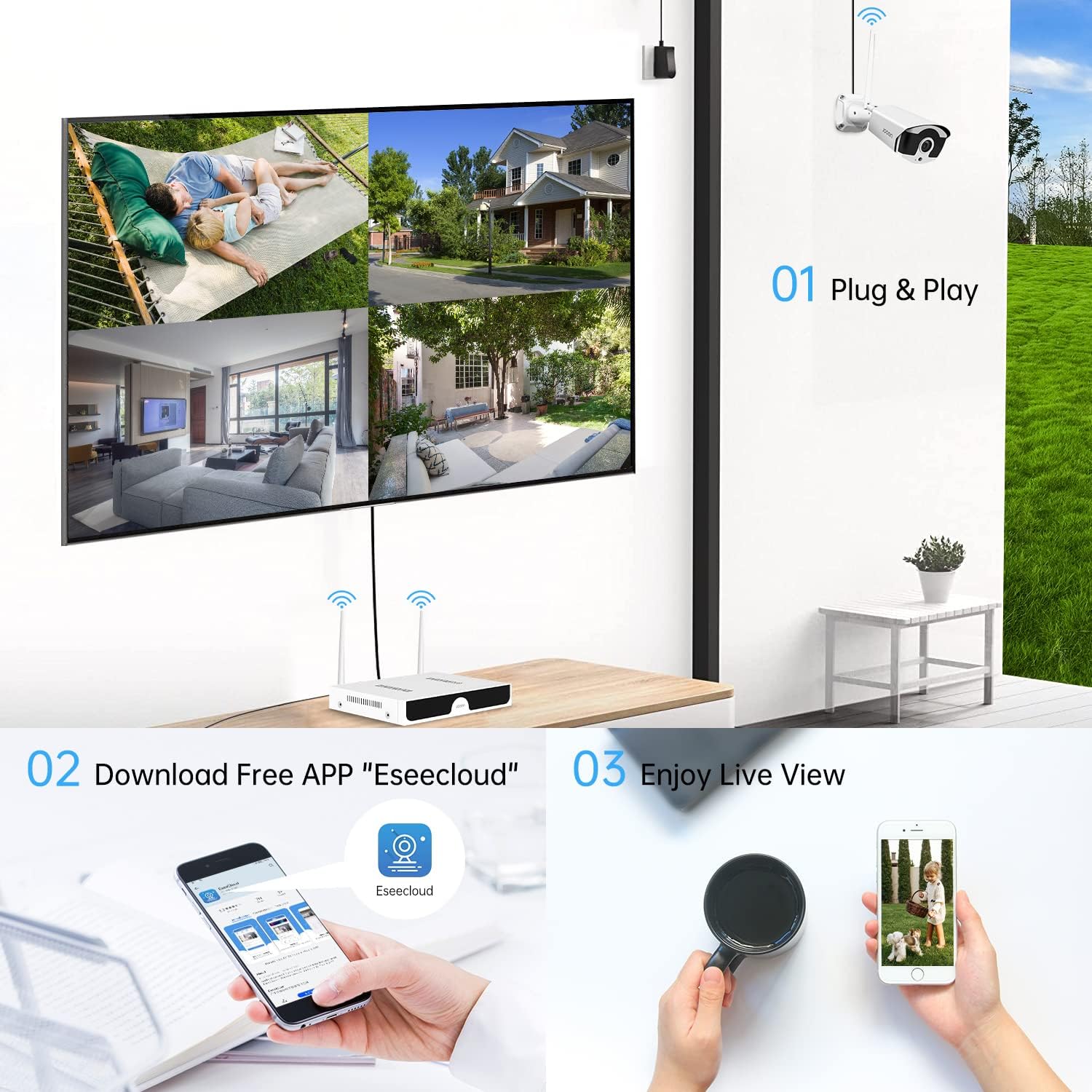
Figure 4: Visual guide for the initial plug-and-play setup of the system.
Video 2: Demonstrates how to get a local image view within one minute of setup.
4.2 Remote Viewing Setup (EseeCloud App)
To view your cameras remotely on your smartphone or PC, you need to connect the NVR to your router and use the EseeCloud application.
- Connect NVR to Router: Use an Ethernet cable to connect the NVR's WAN port to your internet router.
- Download EseeCloud App: Download the free "EseeCloud" app from your smartphone's app store (iOS or Android).
- Add Device: Open the app, register an account, and add your NVR by scanning the Cloud ID QR code displayed on your monitor (found in Network Setup).
- Live View: Once added, you can view live feeds and playback recordings from anywhere with an internet connection.

Figure 5: Steps to connect your NVR to the internet and set up remote viewing via the EseeCloud app.
5. Operation Guide
5.1 Live View and Playback
After initial setup, you can view live footage directly on your connected monitor. The 1TB hard drive allows for continuous 24/7 recording for over 30 days with 8 cameras. You can easily access recorded footage for playback.
- Local Playback: Use the USB mouse to navigate the NVR interface on your monitor to select specific dates and times for playback.
- Remote Playback: Access recorded videos through the EseeCloud app on your smartphone or PC from anywhere.

Figure 6: Demonstrates live viewing and playback options on both a monitor and mobile device.
5.2 AI Human Motion Detection & Alerts
The system features advanced AI human detection technology, which distinguishes human shapes from animals, objects, or environmental factors like leaves in the breeze. This significantly reduces false alarms.
- Customizable Zones: Set specific motion detection areas for each camera to focus on critical zones.
- Alerts: Receive instant notifications via NVR buzzer, email alerts, or push notifications to your EseeCloud app when human motion is detected.

Figure 7: Illustrates how AI human detection works and the types of alerts received.
5.3 One-Way Audio Function
Each camera is equipped with a microphone, allowing you to hear the sound from the monitoring scene while viewing live footage. This feature enhances surveillance by providing audio context to visual events.

Figure 8: Shows the audio recording capability of the cameras.
6. Advanced Features
6.1 Signal Cascade Technology
To address potential weak signal issues due to distance or obstacles, the system supports camera cascaded technology. You can set one IP camera closer to the NVR as a repeater to receive signals from cameras that are farther away. This ensures stable video transmission.
- Signal Boost: Improves signal strength for cameras installed at longer distances or across multiple floors.
- Free Extension Antenna: One extension antenna is included to further strengthen the signal for cameras with weak reception.

Figure 9: Diagram illustrating how signal cascade technology extends wireless coverage.
6.2 H.265+ Video Compression
This advanced video encoding standard effectively controls the video stream and reduces the video bit rate. Compared to H.264, H.265+ provides a smoother viewing experience and saves more than half of the hard drive space, allowing for longer recording periods.

Figure 10: Shows the storage efficiency of H.265+ compression.
7. Maintenance
Regular maintenance ensures optimal performance and longevity of your security system:
- Clean Lenses: Periodically clean camera lenses with a soft, damp cloth to remove dust and smudges that can affect image clarity.
- Check Connections: Ensure all power and network cables are securely connected to prevent interruptions.
- Software Updates: Check for firmware updates for the NVR and cameras via the EseeCloud app or JOOAN's official website to ensure the latest features and security patches.
- Hard Drive Health: Monitor the NVR's hard drive health through the system settings to prevent data loss.
- Power Supply: Ensure stable power supply to both NVR and cameras. Avoid using unapproved power adapters.
8. Troubleshooting
Here are solutions to common issues you might encounter:
| Problem | Possible Cause | Solution |
|---|---|---|
| No video display on monitor. | Loose cable connection, NVR not powered on, incorrect input source on monitor. | Check HDMI/VGA cable, ensure NVR is powered, select correct input source on monitor. |
| Cameras not connecting to NVR. | Camera not powered, out of wireless range, interference. | Ensure cameras are powered. Move cameras closer to NVR. Utilize signal cascade feature or extension antenna. |
| No remote viewing via app. | NVR not connected to internet, incorrect Cloud ID, app issues. | Ensure NVR is connected to router. Verify Cloud ID. Restart app or NVR. |
| Frequent false motion alarms. | Environmental factors (trees, animals), sensitive settings. | Enable AI Human Detection. Adjust motion detection sensitivity and customize detection zones. |
| Poor night vision quality. | Obstructions, dirty lens, insufficient IR light. | Clear any obstructions. Clean camera lens. Ensure IR LEDs are not blocked. |
9. Specifications
| Feature | Detail |
|---|---|
| Brand | JOOAN |
| Model | 3MP Wireless Security Camera System |
| NVR Channels | 10-Channel (8 cameras included, expandable to 10) |
| Camera Resolution | 3MP (1296P / 2304x1296) |
| Video Compression | H.265+ |
| Hard Drive | 1TB Security Grade HDD (Supports 500GB-6TB) |
| Night Vision Range | Up to 100ft (30m) with IR-CUT filter |
| Weatherproof Rating | IP67 |
| Audio | One-way audio (built-in microphone on cameras) |
| Motion Detection | AI Human Detection, customizable zones |
| Remote Access | EseeCloud App (iOS/Android), PC Client |
| Power Source | Powered by included adapters (not battery operated) |
| Item Weight | 12.38 pounds (System) |
10. Warranty and Support
JOOAN is committed to providing high-quality security solutions. For any product-related inquiries, technical assistance, or warranty claims, please refer to the contact information provided in your product packaging or visit the official JOOAN support website.
Always ensure you are using official JOOAN accessories and following the instructions in this manual to maintain your warranty validity.
Related documents10-Channel NVR & 8pcs 1296P Bullet Cameras


Ask a question about this manual
Ask about setup, troubleshooting, compatibility, parts, safety, or missing instructions. Manuals+ will review the question and use this page’s manual context to help answer it.