
KINGONE K9
KINGONE K9 Super Bass Portable Wireless Bluetooth NFC 2.1 Speaker User Manual
Model: K9
Introduction
This manual provides detailed instructions for the setup, operation, and maintenance of your KINGONE K9 Super Bass Portable Wireless Bluetooth NFC 2.1 Speaker. Please read this manual thoroughly before using the device to ensure proper functionality and longevity.
Product Overview
The KINGONE K9 is a portable wireless speaker designed for high-quality audio playback. It features Bluetooth and NFC connectivity, allowing for seamless pairing with various devices. Its compact design and robust sound make it ideal for both indoor and outdoor use.

Figure 1: Front view of the KINGONE K9 speaker, highlighting its green color and minimalist design.
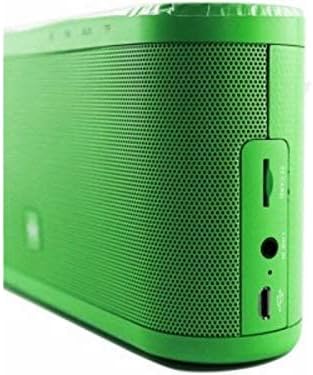
Figure 2: Side panel of the KINGONE K9 speaker, detailing the various input ports for versatile connectivity.
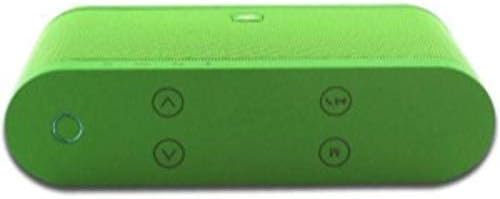
Figure 3: Top panel of the KINGONE K9 speaker, illustrating the intuitive button layout for easy control.
Package Contents
- KINGONE K9 Super Bass Portable Wireless Bluetooth NFC 2.1 Speaker
- Charging Cable (Micro USB)
- User Manual (this document)
- Protective Packaging

Figure 4: The KINGONE K9 speaker alongside its charging cable and elegant product packaging.
Setup
1. Charging the Speaker
Before first use, fully charge the speaker. Connect the provided Micro USB cable to the charging port on the side of the speaker (refer to Figure 2) and the other end to a USB power adapter (not included) or a computer's USB port. The charging indicator light will illuminate during charging and turn off when fully charged.
2. Powering On/Off
To power on the speaker, press and hold the power button located on the top panel (refer to Figure 3) until you hear an audible prompt. To power off, press and hold the same button again.
Operating Instructions
1. Bluetooth Pairing
- Ensure the speaker is powered on and in Bluetooth pairing mode (indicated by a flashing LED light).
- On your device (smartphone, tablet, laptop), enable Bluetooth and search for available devices.
- Select "KINGONE K9" from the list of found devices.
- Once paired, the LED indicator will become solid, and you will hear a confirmation tone.
2. NFC Pairing (Near Field Communication)
If your device supports NFC, simply tap your NFC-enabled device to the NFC area on the speaker (usually indicated by an NFC logo). The speaker will automatically pair with your device.
3. AUX Input Mode
Connect an audio device to the speaker's AUX input port (refer to Figure 2) using a 3.5mm audio cable (not included). The speaker will automatically switch to AUX mode.
4. Micro SD Card Playback
Insert a Micro SD card with audio files (MP3, WAV, etc.) into the Micro SD card slot on the side of the speaker (refer to Figure 2). The speaker will automatically detect the card and begin playing music.
5. Volume Control
Use the volume up (+) and volume down (-) buttons on the top panel (refer to Figure 3) to adjust the playback volume.
6. Track Navigation
Use the previous track (◀◀) and next track (▶▶) buttons on the top panel (refer to Figure 3) to skip between songs.
7. Mode Switching
Press the 'M' (Mode) button on the top panel to cycle through available modes: Bluetooth, AUX, Micro SD, and FM Radio (if supported by your model).
Note: The product specifications mention "Controller type: Remote Control". However, no remote control is typically included or depicted with this model. All primary functions are controlled via the speaker's top panel buttons.
Maintenance
- Cleaning: Use a soft, dry cloth to clean the speaker's surface. Do not use abrasive cleaners or solvents.
- Storage: Store the speaker in a cool, dry place away from direct sunlight and extreme temperatures.
- Battery Care: To prolong battery life, avoid fully discharging the battery frequently. Charge the speaker regularly, even if not in use for extended periods.
- Water Resistance: This speaker is not water-resistant. Avoid exposure to liquids.
Troubleshooting
| Problem | Possible Cause | Solution |
|---|---|---|
| Speaker does not power on. | Low battery. | Charge the speaker fully. |
| Cannot pair via Bluetooth. | Speaker not in pairing mode; device Bluetooth off; too far from speaker. | Ensure speaker is in pairing mode. Turn on device Bluetooth. Move device closer to speaker (within 10 meters). |
| No sound. | Volume too low; incorrect mode selected; audio cable not connected properly. | Increase speaker and device volume. Switch to correct input mode (Bluetooth, AUX, SD). Reconnect audio cable. |
| Sound distortion. | Volume too high; weak signal. | Reduce volume. Move speaker closer to the audio source. |
Specifications
- Model Number: K9
- Brand: KINGONE
- Connectivity Technology: Wireless, Bluetooth, NFC
- Speaker Type: Bluetooth Speakers
- Compatible Devices: Multi (Laptop, Tablet, Smartphone)
- Port Type: Micro USB (Charging), AUX (3.5mm), Micro SD Card Slot
- Nominal Output: 10 - 20 Watt (Max 20 Watts)
- Audio Output Mode: Stereo
- Mounting Type: Tabletop
- Dimensions: 21 x 12.3 x 9 cm
- Product Weight: 1 kg
- Special Features: Portable
- External Product ID (EAN-13): 6959003400116
Warranty and Support
Please refer to the product packaging or the retailer's website for specific warranty information. For technical support or inquiries, please contact KINGONE customer service through their official channels. No specific warranty period or support contact details are provided in this manual.
Ask a question about this manual
Ask about setup, troubleshooting, compatibility, parts, safety, or missing instructions. Manuals+ will review the question and use this page’s manual context to help answer it.