
1. Introduction
Thank you for choosing the KINGONE K5 Bluetooth Speaker. This manual provides essential information for setting up, operating, and maintaining your speaker. Please read it carefully to ensure proper use and to maximize your listening experience.
2. Safety Information
- Do not expose the speaker to extreme temperatures, direct sunlight, or high humidity.
- Avoid dropping or subjecting the speaker to strong impacts.
- Do not disassemble or attempt to repair the speaker yourself. Contact qualified service personnel.
- Keep the speaker away from water and other liquids.
- Use only the specified charging cable and power adapter.
3. Package Contents
Please check that all items are present in your package:
- KINGONE K5 Bluetooth Speaker
- Micro-USB Charging Cable
- Audio Cable (AUX)
- User Manual
4. Product Overview
Familiarize yourself with the speaker's components and controls.

Image 1: Front view of the KINGONE K5 Bluetooth Speaker, showcasing its perforated grille and the KINGONE logo.
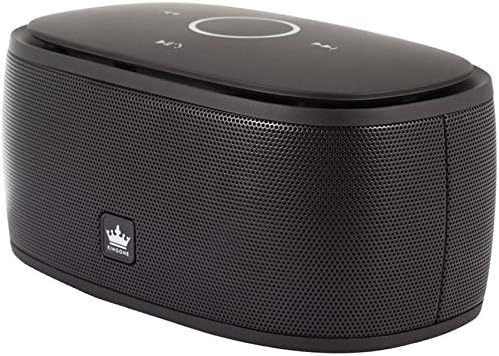
Image 2: Angled view of the speaker, highlighting the touch-sensitive control panel on the top surface with playback and mode buttons.
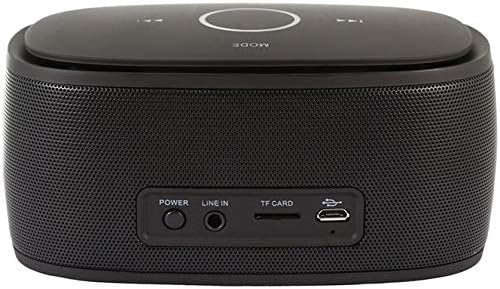
Image 3: Rear view of the speaker, displaying the power button, Line In (AUX) port, TF card slot, and Micro-USB charging port.
Control Panel (Top)
- Touch Wheel: For volume adjustment. Swirl clockwise to increase volume, anti-clockwise to decrease.
- Play/Pause Button: Controls media playback.
- Previous/Next Track Buttons: Navigates through tracks.
- Mode Button: Switches between input modes (Bluetooth, TF Card, AUX). Long press to toggle automatic call answering.
- Call Answer Button: Located at the center of the touch wheel, used to answer incoming calls.
Rear Panel
- Power Button: Turns the speaker on or off.
- LINE IN (AUX) Port: For wired audio connection.
- TF Card Slot: For playing music directly from a TF (MicroSD) card.
- Micro-USB Charging Port: For charging the speaker's internal battery.
5. Setup
5.1 Charging the Speaker
- Connect the Micro-USB charging cable to the speaker's Micro-USB port.
- Connect the other end of the cable to a USB power source (e.g., computer USB port, USB wall adapter).
- The charging indicator light will illuminate. Once fully charged, the light may change color or turn off.
- A full charge provides up to 8 hours of music playback.
5.2 Power On/Off
- To Power On: Press and hold the Power button on the rear panel until you hear a power-on sound or voice prompt.
- To Power Off: Press and hold the Power button again until you hear a power-off sound or voice prompt.
6. Operating Instructions
6.1 Bluetooth Pairing
- Ensure the speaker is powered on and in Bluetooth mode (indicated by a voice prompt or LED).
- On your smartphone, tablet, or computer, enable Bluetooth and search for available devices.
- Select "KINGONE K5" from the list of devices.
- Once paired, you will hear a confirmation voice prompt. The speaker is now ready to play audio from your device.
- The effective Bluetooth range is approximately 10 meters (33 feet).
6.2 Audio Playback
- Bluetooth: After successful pairing, play audio from your connected device. Use the Play/Pause and track navigation buttons on the speaker or your device.
- TF Card: Insert a TF (MicroSD) card with audio files into the TF card slot. The speaker will automatically switch to TF card mode and begin playback.
- AUX (Line In): Connect an audio device using the provided 3.5mm audio cable to the LINE IN port. Press the Mode button to switch to AUX mode if it doesn't switch automatically.
- APP Functionality: An optional app can be installed on Apple/Android systems, offering features like Clock, FM radio, and music control.
6.3 Volume Control
Adjust the volume by swirling your finger around the touch wheel on the top panel:
- Clockwise: Increase volume.
- Anti-clockwise: Decrease volume.
6.4 Hands-free Calling
The KINGONE K5 speaker features a built-in microphone for hands-free calls.
- Answering Calls: When an incoming call is received, touch the Call Answer button (center of the touch wheel) to answer.
- Ending Calls: Touch the Call Answer button again to end the call.
- Automatic Answering: To enable or disable automatic answering of incoming calls, long press the MODE key. The speaker will provide a voice prompt to indicate the status.
6.5 Voice Prompts
The speaker provides voice prompts to indicate its status, available in both English and Chinese languages.
7. Maintenance
- Clean the speaker with a soft, dry cloth. Do not use abrasive cleaners or solvents.
- Store the speaker in a cool, dry place when not in use.
- Avoid blocking the speaker grille to ensure optimal sound quality.
8. Troubleshooting
| Problem | Possible Cause | Solution |
|---|---|---|
| Speaker does not power on. | Battery is depleted. | Charge the speaker using the Micro-USB cable. |
| Cannot pair via Bluetooth. | Bluetooth is not enabled on your device or speaker is not in pairing mode. | Ensure Bluetooth is active on both devices. Restart both devices and try pairing again. Ensure no other device is currently connected to the speaker. |
| No sound during playback. | Volume is too low or muted. Incorrect input mode. | Increase volume on both the speaker and the connected device. Check that the correct input mode (Bluetooth, TF, AUX) is selected. |
| Poor sound quality. | Device is out of Bluetooth range. Interference. | Move the connected device closer to the speaker. Avoid obstacles between the speaker and the device. |
9. Specifications
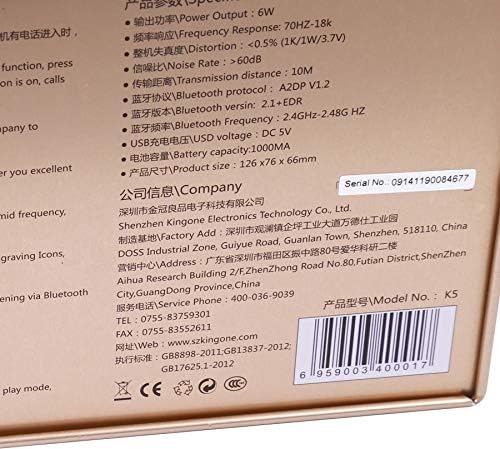
Image 4: Detailed specifications printed on the product packaging.
| Feature | Specification |
|---|---|
| Model Number | K5 |
| Bluetooth Version | V2.0 EDR A2D (compatible with V2.1+EDR) |
| Bluetooth Protocol | A2DP V1.2 |
| Bluetooth Frequency | 2.4GHZ-2.48G HZ |
| Transmission Distance | Up to 10 meters |
| Power Output | 6W |
| Frequency Response | 70Hz-18KHz |
| Distortion | <0.5% (1K/1W/3.7V) |
| Signal-to-Noise Ratio (S/N) | >60dB |
| Amplifiers | 2pcs NdFeB magnet Dia(40mm) |
| Vibrating Diaphragm | 50x90mm |
| Battery Capacity | 1000mAh |
| Playback Time | Up to 8 hours |
| USB Charge Voltage | DC 5V |
| Product Dimensions | 126 x 76 x 66 mm |
| Connectivity Technology | Bluetooth, Wired (AUX) |
| Audio Output Mode | Stereo |
| Speaker Type | Multimedia |
| Special Features | Bluetooth, Portable, Hands-free with MIC, TF Card Support, Touch Control |
| Compatible Devices | Laptop, Smartphone, Tablet |
10. Warranty and Support
For warranty information, please refer to the documentation provided at the time of purchase or contact your retailer. For technical support or inquiries, you may contact the manufacturer:
- Manufacturer: Shenzhen Kingone Electronics Technology Co., Ltd.
- Service Phone: 400-036-9039
- Telephone: 0755-83759301
- Fax: 0755-83552611
- Website: www.szkingone.com