Introduction
The Sonoff S26 Smart WiFi Socket is an intelligent plug designed to bring smart automation to your home. It allows you to remotely control connected devices via the eWeLink app, set schedules, and integrate with voice assistants like Amazon Alexa and Google Home. This manual provides detailed instructions for setting up, operating, and maintaining your Sonoff S26 Smart WiFi Socket.

Figure 1: Front view of the Sonoff S26 Smart WiFi Socket, showing the power button and the Brazilian standard outlet.
Safety Information
- Ensure the socket is used within its specified voltage (220 Volts) and load limits (Max. load: 2200W/10A).
- Do not disassemble or modify the device.
- Keep the device away from water, moisture, and high temperatures.
- For indoor use only.
- Unplug the device from the power outlet before cleaning.
Package Contents
- 1 x Sonoff S26 Smart WiFi Socket
- 1 x User Manual (this document)
Setup Guide
1. Physical Installation
- Plug the Sonoff S26 Smart WiFi Socket into a standard Brazilian wall outlet.
- Plug the appliance you wish to control into the Sonoff S26 socket.
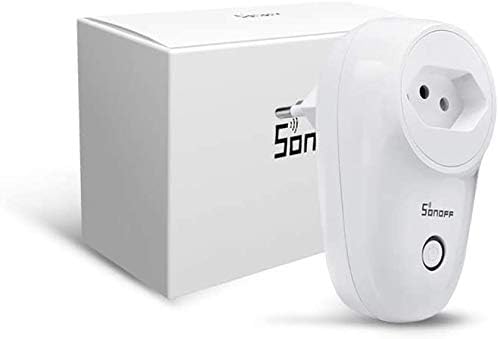
Figure 2: Sonoff S26 Smart WiFi Socket alongside its packaging, illustrating the compact design.
2. App Installation
Download the eWeLink app from the App Store (iOS) or Google Play Store (Android). Alternatively, scan the QR code usually found on the product packaging or quick start guide.
- Search for "eWeLink" in your app store.
- Install the app and register a new account if you don't have one.
3. Device Pairing (Wi-Fi Connection)
- Ensure your Sonoff S26 is plugged in and the indicator light is blinking rapidly (Quick Pairing Mode). If not, press and hold the manual control button for 5-7 seconds until it blinks rapidly.
- Open the eWeLink app, tap the "+" icon at the bottom center, and select "Quick Pairing".
- Confirm the indicator light is blinking rapidly and tap "Next".
- Enter your Wi-Fi network name (SSID) and password. Ensure your Wi-Fi is 2.4GHz.
- The app will search for and connect to the device. Once connected, you can rename your device.
Operating Instructions
1. Basic On/Off Control
- Manual Control: Press the physical button on the Sonoff S26 to manually turn the connected appliance on or off.
- App Control: Open the eWeLink app, select your Sonoff S26 device, and tap the power icon to toggle its status. The app will display the real-time status of the device.
2. Scheduling and Timers
The eWeLink app allows you to set various timers for automated control:
- Schedule Timer: Set specific times for the device to turn on or off daily or on selected days of the week.
- Countdown Timer: Set a countdown for the device to turn on or off after a specified duration.
- Loop Timer: Program the device to cycle on and off repeatedly for set intervals.
3. Scene Creation
Create "Scenes" in the eWeLink app to automate actions based on conditions or to control multiple devices simultaneously:
- Smart Scene: Trigger actions based on environmental conditions (e.g., temperature, humidity) or other device statuses.
- One-Tap Scene: Create a shortcut to turn on/off a group of devices with a single tap.
4. Voice Control Integration
The Sonoff S26 is compatible with popular voice assistants:
- Amazon Alexa: Link your eWeLink account in the Alexa app. Once linked, you can say commands like, "Alexa, turn on [device name]."
- Google Home: Link your eWeLink account in the Google Home app. Use commands such as, "Hey Google, turn off [device name]."
- IFTTT: Integrate with IFTTT (If This Then That) for advanced automation recipes.
Maintenance
- Cleaning: Use a soft, dry cloth to clean the surface of the device. Do not use liquid cleaners or aerosols.
- Storage: Store the device in a cool, dry place when not in use.
- Firmware Updates: Periodically check the eWeLink app for available firmware updates to ensure optimal performance and security.
Troubleshooting
| Problem | Possible Cause | Solution |
|---|---|---|
| Device fails to connect to Wi-Fi. | Incorrect Wi-Fi password, 5GHz Wi-Fi network, device too far from router. |
|
| Device is offline in the app. | Power outage, Wi-Fi disconnected, device malfunction. |
|
| Voice control not working. | Incorrect device name, eWeLink account not linked, voice assistant issues. |
|
Specifications
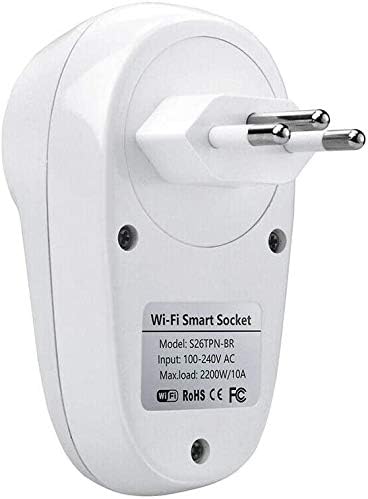
Figure 3: Rear view of the Sonoff S26 Smart WiFi Socket, displaying the model number (S26TPN-BR) and electrical input/load details.
| Feature | Detail |
|---|---|
| Model | S26 (Part Number: 0301XNWG30V) |
| Brand | SONOFF |
| Input Voltage | 100-240V AC (Bivolt) |
| Max. Load | 2200W / 10A |
| Wi-Fi Standard | IEEE 802.11 b/g/n 2.4GHz |
| Material | PC V0 |
| Dimensions | 6 x 5 x 9 cm (Length x Width x Height) |
| Weight | 120 g |
| Color | White |
| Compatibility | Amazon Alexa, Google Home, IFTTT |
Warranty and Support
Limited Warranty: SONOFF products typically come with a limited warranty covering manufacturing defects. Please refer to the warranty card included with your product or visit the official SONOFF website for specific warranty terms and conditions.
Customer Support: For technical assistance, troubleshooting, or product inquiries, please contact SONOFF customer support through their official website or the eWeLink app. You can also visit the SONOFF Store on Amazon for more information.


