
NKF RC311S 06-531W52-TY02X
RC311S Universal Remote Control User Manual
Model: RC311S 06-531W52-TY02X | Brand: NKF
Introduction
This user manual provides comprehensive instructions for the NKF RC311S 06-531W52-TY02X Universal Remote Control. Designed for ease of use, this remote offers seamless control over various TCL and Pioneer TV models without the need for complex programming. Please read this manual carefully to ensure proper operation and longevity of your remote control.

Front and back view of the RC311S universal remote control, showcasing its ergonomic design.
Product Overview
The RC311S remote control features a user-friendly layout with dedicated buttons for common functions, ensuring intuitive navigation and control of your television.
Remote Control Layout and Functions

Detailed diagram of the RC311S remote control, labeling each button with its primary function, including power, number keys, volume, channel, Netflix, YouTube, and navigation buttons.
- Power Button (●): Turns the TV on or off.
- TV/SOURCE: Selects input source (HDMI, AV, etc.).
- Number Keys (0-9): Direct channel selection.
- YouTube Button: Direct access to the YouTube application.
- VOL +/-: Adjusts volume up or down.
- CH +/-: Changes channels up or down.
- Mute Button: Mutes or unmutes the TV sound.
- Netflix Button: Direct access to the Netflix application.
- Navigation Pad (Up, Down, Left, Right, OK): Navigates menus and confirms selections.
- Back Button: Returns to the previous screen or menu.
- EXIT: Exits the current menu or application.
- INFO: Displays information about the current program or input.
- USB: Accesses USB media.
- Menu Button: Opens the TV's main menu.
- SLEEP: Sets a sleep timer.
- GUIDE: Opens the electronic program guide.
- FAV: Accesses favorite channels.
- CH.LIST: Displays the channel list.
- PICTURE: Adjusts picture settings.
- SOUND: Adjusts sound settings.
- CC: Toggles closed captions.
- Playback Controls (Rewind, Play/Pause, Fast Forward, Stop): Controls media playback.
- MTS: Multi-channel Television Sound.
Setup
Battery Installation
The RC311S remote control requires two (2) AAA 1.5V alkaline batteries (not included) for operation. Follow these steps to install the batteries:
- Locate the battery compartment cover on the back of the remote control.
- Press down on the tab and slide the cover downwards to open the compartment.
- Insert two AAA batteries, ensuring the positive (+) and negative (-) terminals align correctly with the markings inside the compartment.
- Slide the battery compartment cover back into place until it clicks securely.
Once batteries are installed, the remote is ready for use. No programming or pairing is required for most compatible models.

Rear view of the RC311S remote control, showing the battery compartment.
Operating Instructions
Basic Operation
To operate your TV with the RC311S remote control, simply point the remote directly at the TV's infrared sensor. Ensure there are no obstructions between the remote and the TV.
- Power On/Off: Press the Power button once.
- Channel Surfing: Use the CH +/- buttons to change channels sequentially, or use the Number Keys for direct channel input.
- Volume Adjustment: Use the VOL +/- buttons to increase or decrease the volume.
- Smart TV Access: Press the Netflix or YouTube buttons for quick access to these streaming services.
- Menu Navigation: Use the Navigation Pad (Up, Down, Left, Right) and OK button to navigate through TV menus and settings.

A hand holding the RC311S remote control, pointing it towards a television displaying a smart TV interface, demonstrating its intuitive use for accessing content and applications.
Operating Distance
The effective operating distance for the RC311S remote control is up to 10 meters (33 feet). Optimal performance is achieved when the remote is pointed directly at the TV's IR receiver without any physical obstructions.

An illustration showing the RC311S remote control being used to operate a television from a distance, highlighting its effective range of up to 10 meters (33 feet).
Compatible TV Models
The RC311S remote control is compatible with a wide range of TCL and Pioneer TV models. A partial list of compatible models includes:
- TCL TV Models: 40D1600, 49D1620, LT-32KB45, 32A6000, RLED-L32A600, 32D1202, G-L32S12, 32D1200, TOKTCLED32SM-N, 32D1200, 32WIFI H-40, LED3250SMR, 32D1240, LED-32SSTV, 32D1241, 32MV1800S, 32D1291, MS32-T100, JA32HD218S, 32SHD, 32D1360, MGS3202X, 32D1510, DO-1607740, MGS3202X, 32D1510, LED3233SMR, 32D1530, L32D1530S, TVJ LED S32 D1530, QE170003, 32D1570, HK32G1680, TOKTCLED32S, TOKTCLED32S, TOKTCLED32S H-35, 32GA1600, 32D1600, 32GA1600 SMART, 32D1600, LED32HDTS, LEDM-322NIP, DO-1612754, TVJ LED S32 D1600, DO-1614601, 32D1620, RLED-L32D1620SMT, RLED-L32D1620SMT, IMP32SMT, JA32SHD500, LED32DTV2-SMT, 32D1700, 32F1800, RQE180236, ES-TL3204, G-L40S12, 40D1200, 40D1240, 40D1520, MGS4002X, 40D1510, 40D1520, LED4033SMR, 40D1520, TVJ LED S40 D1500, RQE170005, HK40G1680, 40D1570, 40D1570, TOKTCLED40S, 40D1600, 40GA1600, 40D1600, 40 ST FHD 17LCT, 40D1600, LEDM-401NIP, 40D1600, 40D1600, MD-401600, DO-1609596, RLED-L40D1620SMT, TN40D1620S, RLED-L40D1620SMT, 43A6000, RLED-L43A600, LT-43KB65, 43A6000, HYN-43FHD, 43D1202, RLED-L43D1200SMT, 43D1202, 43D1202, G-L43S12, 43D1200, RLED-L43D1200SMT, 43D1202, TVTOKTCLED43SM-N, LED-43SSTV, 43D1241, SSM431291, 43D1291, LEDM-43SM, JA43FHD218S, 43SFHD, 43D1360, NLED-43SMTLT, 43D1370, 43D1510, L43D1520, TVJ LED S43 D1520, RQE170006, 43D1570, TOKTCLED43S, H-43, 43GA1600 SMART, 43D1600, HKP43SMI, LEDM-432NIP, DO-1615906, DO-1614608, 49FHDS2, 43D1620, SSM501200F, 50D1200F, HKSM557000, 55A7000, G-L55S12, RLED-L43D1620SMT, JA43SGFHD501, NLED-43SMTLT, NLED-43SMTLT, 43D1700, ES-TL4304, 43F1810, MGS4802X, 48D1510, MGS4802X, 48D1520, L48D1520, L48D1520S, TOKTCLED48S, 48D1570, MGS4902X, 49D1300, 49GA1600, 49D1600, 49GA1600 SMART, HKP49SMI, 49D1600, LEDM-491NIP, DO-1609672, LEDM-491NIP, LEDM-491NIP, TVJ LED S49 D1600, DO-1612253, DO-1615258, DO-1615297, DO-1615984, DO-1615939, RLED-L49D1620SMT.
- Pioneer TV Models: PLE-32S1HD, PLE-65D1800, PLE-32S08HD, PLE-40S08FHD, PLE-43D1202UD, PLE-43S09UHD, PLE-50S08UHD, PLE-32S08HD, PLE-50D1200F.
This remote is designed to work out of the box with these models without any complex setup procedures.
Maintenance
Proper maintenance will extend the life of your remote control:
- Cleaning: Use a soft, dry cloth to clean the remote's surface. Do not use liquid cleaners or abrasive materials.
- Battery Care: If the remote will not be used for an extended period, remove the batteries to prevent leakage and corrosion.
- Storage: Store the remote in a cool, dry place away from direct sunlight and extreme temperatures.
- Avoid Drops: Protect the remote from physical impact, as drops can damage internal components.
Troubleshooting
If you experience issues with your RC311S remote control, please refer to the following common troubleshooting steps:
| Problem | Possible Cause | Solution |
|---|---|---|
| Remote not responding. | Dead or incorrectly installed batteries. | Replace batteries with new AAA 1.5V alkaline batteries, ensuring correct polarity (+/-). |
| Remote has short range or intermittent response. | Low batteries; obstruction between remote and TV; remote not pointed correctly. | Replace batteries. Ensure a clear line of sight to the TV's IR sensor. Point the remote directly at the TV. |
| Certain buttons do not work. | Dirt or debris under buttons; internal malfunction. | Clean the remote surface. If the issue persists, the remote may require replacement. |
| Remote does not control my TV. | TV model is not compatible. | Verify your TV model is listed in the "Compatible TV Models" section of this manual. |
Specifications
| Feature | Detail |
|---|---|
| Model Number | RC311S 06-531W52-TY02X |
| Brand | NKF |
| Product Dimensions | 9.84 x 2.06 x 0.98 inches |
| Item Weight | 3.84 ounces |
| Batteries Required | 2 x AAA (not included) |
| Special Feature | No Programming Required |
| Color | Black |
| Max Supported Devices | 1 (Television) |
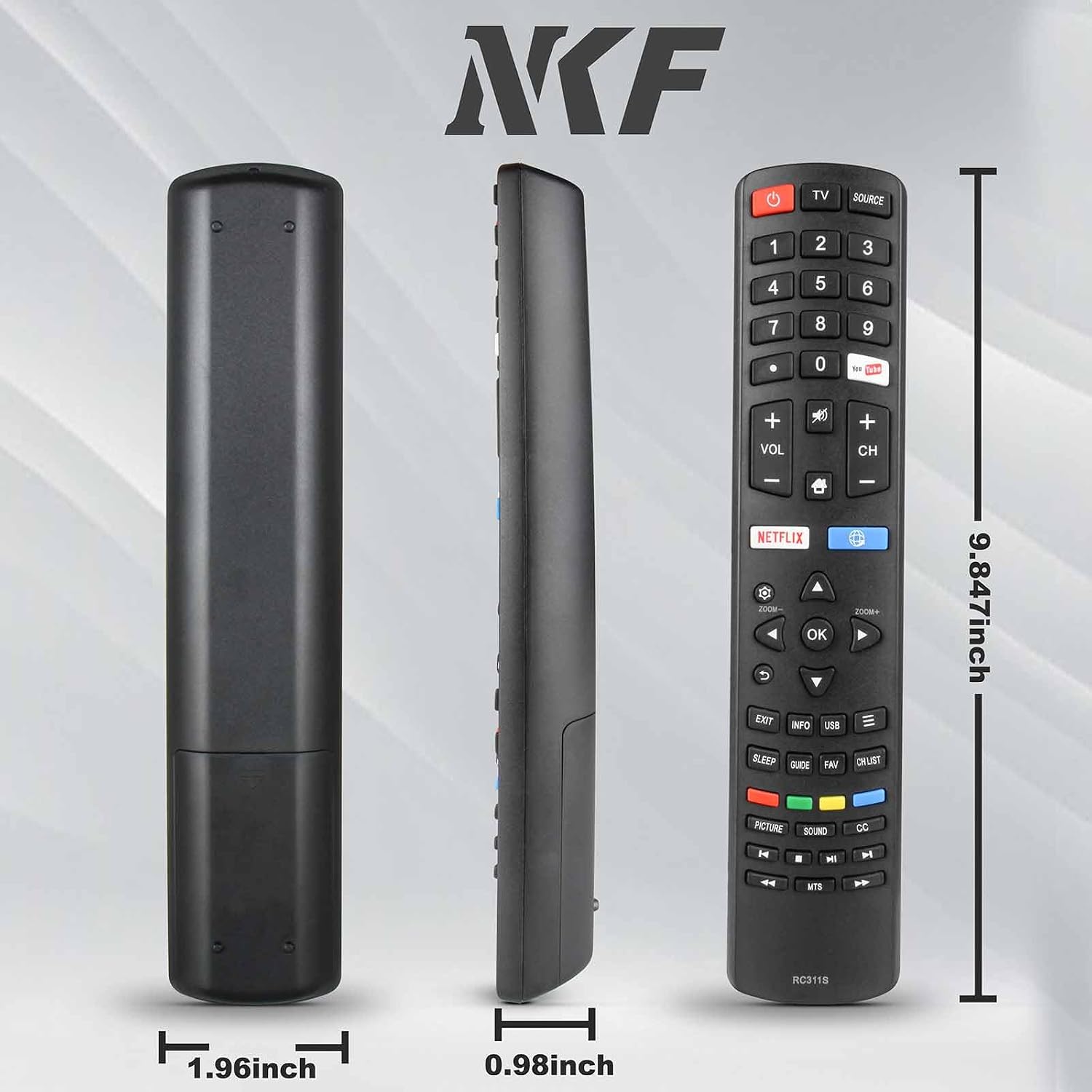
Side and front views of the RC311S remote control with measurements indicating its length (9.84 inches), width (1.96 inches), and thickness (0.98 inches).
Warranty and Support
This product is designed for reliable performance. While a specific warranty period is not detailed in the product information, NKF strives to provide quality products. For any support inquiries, technical assistance, or questions regarding compatibility, please refer to the seller or the NKF brand store on Amazon.
Visit the official NKF Store for more information: NKF Store on Amazon
Ask a question about this manual
Ask about setup, troubleshooting, compatibility, parts, safety, or missing instructions. Manuals+ will review the question and use this page’s manual context to help answer it.