
1. Product Overview
The Rocelco 19" Portable Laptop Riser, Model R PDRW, is a compact and height-adjustable desk converter designed for versatility and portability. It allows users to easily transition between sitting and standing positions, promoting ergonomic working habits in various environments.
Key Features:
- Lightweight Design: Weighs less than 7 pounds, making it highly portable for travel and relocation.
- Included Carrying Pouch: A protective pouch is provided for convenient transport and storage.
- Ultra-Thin Fold: Folds down to less than 1 inch in height for minimal storage space.
- Adjustable Height: Offers 8 different height settings, raising up to 15 inches above the work surface.
- Compact Work Surface: Features a 10" x 19" surface, suitable for most laptops and a mouse.
- Ergonomic Benefits: Facilitates standing while working, contributing to improved posture and reduced sedentary time.

Image: The Rocelco 19" Portable Laptop Riser in white, shown with a laptop and a notebook on its surface. A blue carry bag is visible in the background, held by a hand, illustrating the product's portability.
2. Setup Instructions
The Rocelco 19" Portable Laptop Riser requires no assembly. It is designed for immediate use directly out of the box.
- Unpacking: Carefully remove the riser from its packaging.
- Placement: Place the folded riser on a stable, flat surface such as a desk or table.
- Unfolding: Gently lift the top surface of the riser. The scissor-lift mechanism will extend. Ensure both sides of the mechanism are fully extended and locked into place at the desired height.
- Positioning: Place your laptop and/or mouse on the riser's work surface.

Image: A side view of the Rocelco 19" Portable Laptop Riser, demonstrating its slim profile when folded, measuring only 0.9 inches in thickness.

Image: The Rocelco 19" Portable Laptop Riser shown folded flat, positioned next to its blue carrying bag on a wooden surface, highlighting its compact storage and portability.
3. Operating Instructions
The Rocelco PDRW is designed for easy and quick height adjustments.
- Adjusting Height: To raise the riser, gently lift the top platform. The internal mechanism will extend, allowing you to select one of the 8 preset height levels.
- Lowering the Riser: To lower, press the release lever (typically located on one side or underneath the platform) and gently push the platform down until it reaches the desired lower height or folds completely flat.
- Stability Check: Before placing your devices, ensure the riser is stable and locked into its chosen height position.
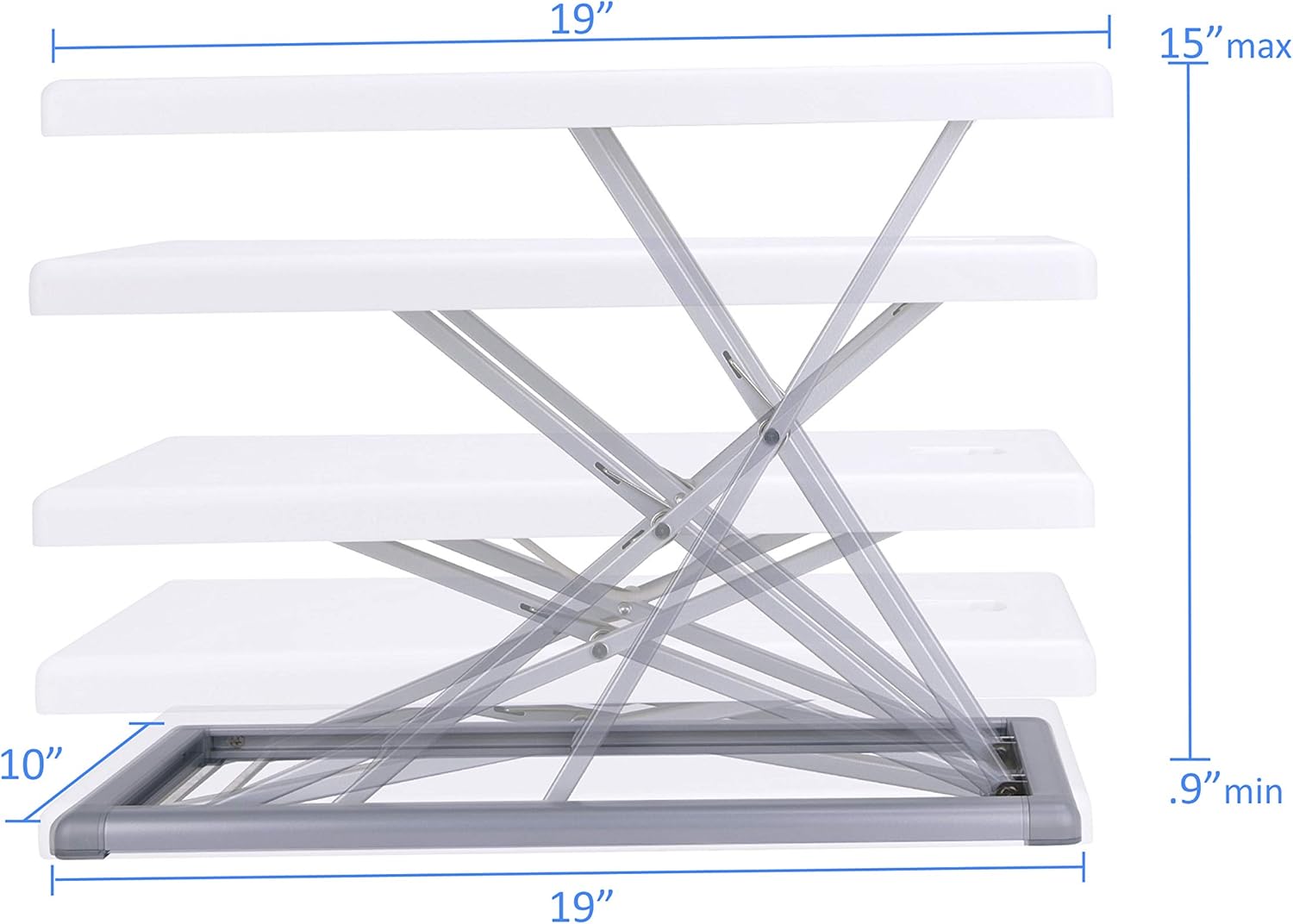
Image: A diagram detailing the dimensions of the Rocelco 19" Portable Laptop Riser, highlighting its 19" width, 10" depth, and its adjustable height range from a minimum of 0.9" when folded to a maximum of 15" when fully extended.
Video: This instructional video demonstrates the features and operation of the Rocelco Portable Desk Riser (PDR), including its compact design, 10" x 19" work surface, lightweight nature (under 7 pounds), and adjustable height from 1" to 15" with multiple stopping points. It also shows the included carrying pouch.
4. Maintenance
To ensure the longevity and optimal performance of your Rocelco Portable Laptop Riser, follow these simple maintenance guidelines:
- Cleaning: Wipe the surfaces with a soft, damp cloth. Avoid abrasive cleaners or solvents that may damage the laminated finish or plastic components.
- Inspection: Periodically check the scissor-lift mechanism and all moving parts for any signs of wear or damage. Ensure all connections are secure.
- Storage: When not in use, fold the riser flat and store it in its protective carrying pouch to prevent scratches and dust accumulation.
- Weight Limit: Do not exceed the recommended weight capacity of the riser to prevent damage to the mechanism.
5. Troubleshooting
If you encounter any issues with your Rocelco Portable Laptop Riser, refer to the following common troubleshooting tips:
- Riser is difficult to adjust: Ensure no objects are obstructing the scissor-lift mechanism. Apply gentle, even pressure when lifting or lowering. If the mechanism feels stiff, check for any debris.
- Riser feels unstable: Verify that the riser is placed on a flat, stable surface. Ensure the scissor-lift mechanism is fully extended and locked into one of the preset height positions. Avoid placing excessive weight on one side.
- Riser does not fold completely flat: Check for any obstructions within the folding mechanism. Ensure the release lever is fully engaged when attempting to fold.
If these steps do not resolve the issue, please contact Rocelco customer support for further assistance.
6. Specifications
| Feature | Detail |
|---|---|
| Model Number | R PDRW |
| Product Dimensions (L x W x H) | 10 x 19 x 1 inches (folded) |
| Work Surface Dimensions | 10 x 19 inches |
| Adjustable Height Range | Up to 15 inches (8 preset levels) |
| Item Weight | 5 pounds |
| Material Type | Alloy Steel, Plastic |
| Finish Type | Laminated |
| Color | White |
| Assembly Required | No |
| What's in the Box | Portable Desk Riser |
7. Warranty and Support
For information regarding product warranty, please refer to the warranty card included with your purchase or visit the official Rocelco website. Rocelco is committed to customer satisfaction and product quality.
Customer Support:
If you have any questions, require technical assistance, or need to report an issue, please contact Rocelco customer support through the following channels:
- Manufacturer: Rocelco, Inc.
- Website: Visit the Rocelco Store on Amazon for product information and support links.
- Contact Information: Refer to your product packaging or the official Rocelco website for the most current contact details (phone, email, or support portal).


