
HENEX HC-3208S
HENEX HC-3208S Barcode Scanner User Manual
Model: HC-3208S
1. Introduction
The HENEX HC-3208S is a versatile 2D wired handheld barcode scanner designed for efficient and accurate data capture. It supports both 1D and 2D barcodes, including QR codes, and is capable of scanning codes directly from screens. Featuring both manual and automatic induction scanning modes, this device offers strong compatibility and ease of use for various applications.

Figure 1.1: HENEX HC-3208S Barcode Scanner with its adjustable stand.
2. Features
- Dual Scanning Modes: Supports both manual trigger scanning and automatic induction scanning. The automatic mode activates when a barcode is presented to the scanner while it's placed on its stand, eliminating the need to press a button.
- Plug & Play Connectivity: Requires no software or driver installation. Simply connect the USB cable to your computer to begin operation.
- High Compatibility: Fully compatible with major operating systems including WINDOWS, Linux, and MAC. Works seamlessly with common software applications like Word, Excel, and Novell.
- Screen Scanning Capability: Designed to read barcodes from various surfaces, including labels, paper, mobile phone screens, and computer displays. It can also read dirty or incomplete codes.
- Strong Decode Capability: Utilizes advanced decoding algorithms to read a wide range of 1D and 2D codes, including:
- 2D Codes: QR Code, Data Matrix, PDF417, Aztec, Maxicode, etc.
- 1D Codes: UPC / EAN / JAN, UPC-A & UPC-E, EAN-8 & EAN-13, JAN-8 & JAN-13, ISBN / ISSN, Code 39 (with full ASCII), Codabar (NW7), Code 128 & EAN 128, Code 93, Interleaved 2 of 5 (ITF), Addendum 2 of 5, IATA Code, MSI / Plessy, China Postal Code, Code 32 (Italian Pharmacode), RSS 14, RSS Limited, RSS Expanded.
- Ergonomic Design: Comfortable to hold and operate, reducing fatigue during extended use.

Figure 2.1: The scanner supports various 1D and 2D barcode types, including those on screens.
3. Package Contents
Please verify that all items are present in the package:
- HENEX HC-3208S Barcode Scanner
- Adjustable Barcode Stand
- USB Connection Cable (1.8 meters)

Figure 3.1: Included components: scanner, stand, and USB cable.
4. Setup
- Connect the USB Cable: Insert the USB connector of the scanner's cable into an available USB port on your computer (Laptop, Desktop, etc.).
- System Recognition: The operating system (Windows, Linux, Mac) will automatically detect and install the necessary drivers. No manual driver installation is required.
- Place on Stand (Optional): For automatic induction scanning, place the scanner securely onto its adjustable stand. Ensure the scanner is positioned correctly for optimal scanning angles.
- Ready for Use: Once connected, the scanner is ready to begin scanning barcodes.

Figure 4.1: The scanner features simple plug-and-play USB connectivity.
5. Operating Instructions
5.1. Manual Scanning Mode
Hold the scanner in your hand. Point the scanning window towards the barcode you wish to read. Press the trigger button located on the handle. The scanner will emit a blue LED light and a buzzer sound upon successful scan.
5.2. Automatic Induction Scanning Mode
Place the scanner on its adjustable stand. Ensure the scanner is configured for automatic induction mode (refer to the product's quick setup guide for specific barcode configurations if needed). When a barcode is presented within the scanner's field of view, the scanning light will automatically activate and read the barcode without requiring a trigger press.
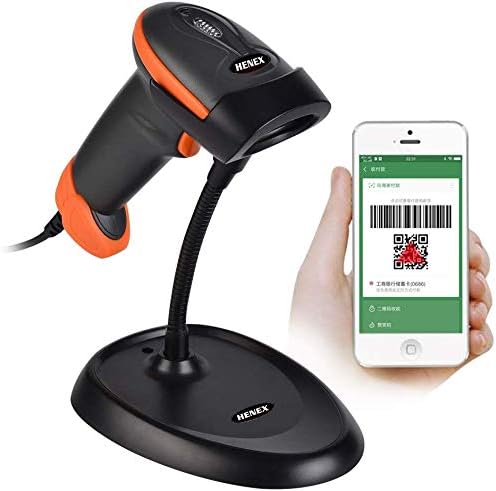
Figure 5.1: The scanner can read barcodes from screens, ideal for mobile payments or digital tickets.
5.3. Scanning Tips
- Ensure the barcode is flat and not excessively wrinkled or damaged.
- Adjust the distance between the scanner and the barcode for optimal reading (typically 40-250mm depending on barcode type and size).
- For screen scanning, ensure the screen brightness is adequate and avoid glare.
- Caution: Do not point the scanner's laser beam directly into eyes.
6. Maintenance
To ensure the longevity and optimal performance of your HENEX HC-3208S barcode scanner, follow these maintenance guidelines:
- Cleaning: Use a soft, dry cloth to clean the scanner's exterior. For the scanning window, use a lint-free cloth lightly dampened with a mild, non-abrasive cleaner. Avoid harsh chemicals or abrasive materials.
- Storage: Store the scanner in a cool, dry place away from direct sunlight and extreme temperatures.
- Handling: While the scanner has an anti-fall height of 5 meters, avoid unnecessary drops or impacts to prevent damage.
- Cable Care: Do not bend or crimp the USB cable excessively. Always grasp the plug, not the cable, when disconnecting.
7. Troubleshooting
If you encounter issues with your barcode scanner, please refer to the following common troubleshooting steps:
- Scanner Not Responding:
- Ensure the USB cable is securely connected to both the scanner and the computer.
- Try connecting the scanner to a different USB port on your computer.
- Restart your computer.
- Unable to Read Barcodes:
- Verify that the barcode is clean, clear, and not excessively damaged or smudged.
- Adjust the distance and angle between the scanner and the barcode.
- Ensure sufficient lighting for the barcode.
- Check if the scanner is in the correct mode (manual or auto-induction) for your use case.
- For screen scanning, increase the screen brightness and minimize glare.
- No Beep or LED Indication on Scan:
- This indicates an unsuccessful scan. Refer to "Unable to Read Barcodes" steps.
- Ensure the scanner's internal settings for sound and LED are not disabled (refer to advanced configuration barcodes if available in a separate guide).
- Data Not Transmitting to Computer:
- Ensure your cursor is active in a text field or application where you expect the scanned data to appear.
- Verify the scanner is recognized by your operating system (check Device Manager on Windows, System Information on Mac).
8. Specifications
| Parameter | Value |
|---|---|
| Product Dimensions | 173mm * 67mm * 94mm (6.81 x 2.64 x 3.7 inches) |
| Item Weight | 290 g (10.2 ounces) |
| Model Number | HC-3208S |
| Image (pixels) | 1280 pixels (H) * 800 pixels (V) |
| Light Source | Aiming: 617 nm LED; Illumination: 6500K LED |
| Scanning Distance | 40-200mm @ UPC / EAN 13mil PCS = 90%; 20-250mm @ QR 20mil PCS = 100% |
| Scanning Angle | 65° elevation / 30° / 55° |
| Field of View | 34° horizontal, 28° vertical |
| Reading Accuracy | ≥ 5mil |
| Printing Contrast | ≥25% |
| Indication Method | Blue LED light, Buzzer |
| Cable Length | 1.8 meters |
| Anti-fall Height | 5 meters |
| Compatible Devices | Laptop, Desktop, Smartphone |
| Power Source | Corded Electric (via USB) |
| Connectivity Technology | USB Cable |
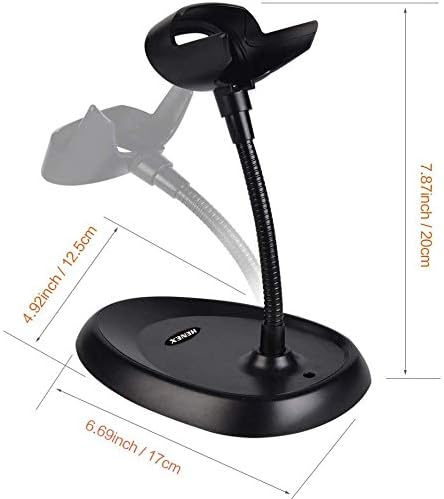
Figure 8.1: Dimensions of the scanner stand.
9. Warranty and Support
For warranty information, technical support, or service inquiries regarding your HENEX HC-3208S Barcode Scanner, please contact the manufacturer or your point of purchase. Keep your purchase receipt as proof of purchase for warranty claims.
Related documentsHC-3208S


Ask a question about this manual
Ask about setup, troubleshooting, compatibility, parts, safety, or missing instructions. Manuals+ will review the question and use this page’s manual context to help answer it.