1. Introduction
The AVHzY USB Meter UM25C Series, specifically the C5(16bit) model, is a versatile and advanced USB tester designed for precise measurement and analysis of USB power delivery. This device is engineered to provide detailed insights into charger cables, power banks, and various USB-powered devices, supporting modern charging protocols like PD3.1.
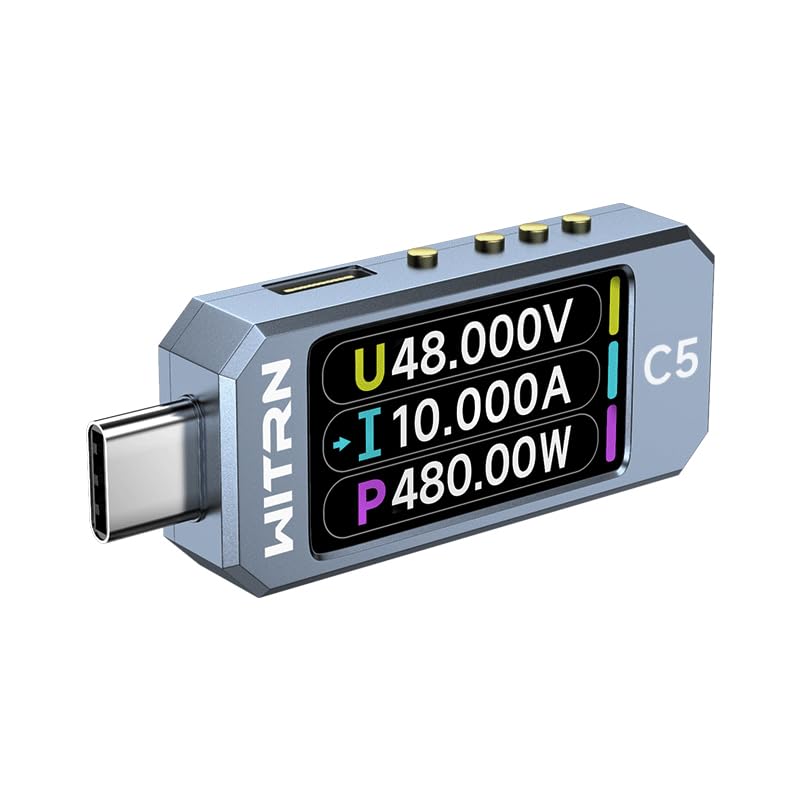
Figure 1.1: The AVHzY USB Meter UM25C C5(16bit) device, showcasing its compact design and integrated USB-C connector.
2. Key Features
- Advanced Power Delivery Support: Supports PD3.1 with capabilities for 28V, 36V, and 48V EPR AVS deception, and up to 11A high current.
- Spectrum Analysis: Features a spectrum analysis function to track and analyze multiple targets simultaneously.
- Built-in Capacity Calculation: Includes a function for calculating capacity, useful for evaluating power banks.
- High-Performance Processor: Equipped with an ARM M4F 240MHz high-speed 32-bit processor with FPU hardware acceleration unit for rapid data processing.
- Vibrant IPS LCD Screen: Features a 1.47-inch color IPS LCD screen with a resolution of 320x172 pixels, offering a wide viewing angle for clear data display.
- 3-Axis Gravity Sensor: Enhances user experience by allowing screen orientation adjustments.
- High-Precision ADC Chip: Utilizes a 16-bit independent ADC chip (C5 model) and a 2Mhz high-speed on-chip ADC for accurate measurements.
- Versatile Connectivity: Includes 24P USB-C male/female socket pass-through for broad compatibility.
- Durable Memory: Incorporates ferroelectric FRAM with a 10 billion flash life for reliable data storage.
- Real-time Data Display: Capable of simultaneously locking and displaying 3 frequency data points and ripple values.
- PC Software Integration: Allows connection to PC software for saving reading curve data and creating personalized themes.

Figure 2.1: The device's display showing support for various fast charge protocols, including PD3.1 EPR 48V.

Figure 2.2: Illustration of the high-speed M4F 240MHz 32-bit CPU and the device's capability to handle 10A+ current.

Figure 2.3: The device features a custom theme option and is constructed with durable CNC aluminum alloy and toughened glass.
3. Safety Information
Please read and understand all safety instructions before using the AVHzY USB Meter. Failure to follow these instructions may result in electric shock, fire, or serious injury.
- Do not expose the device to moisture or extreme temperatures.
- Do not attempt to disassemble or modify the device. This will void the warranty and could lead to damage or injury.
- Use only with compatible USB power sources and devices. Exceeding specified voltage and current limits can damage the meter and connected equipment.
- Keep out of reach of children.
- If the device shows signs of damage or malfunction, discontinue use immediately.
- Be aware that external load resistors, if used, can generate significant heat. Exercise caution and ensure proper ventilation.
4. Setup
The AVHzY USB Meter is designed for plug-and-play operation. Follow these steps to begin using your device:
- Connect to Power Source: Insert the male USB-C connector of the AVHzY USB Meter into a USB power source (e.g., wall charger, power bank, computer USB port). The device screen should power on.
- Connect Device Under Test: Plug the USB cable of the device you wish to test (e.g., smartphone, tablet, USB load) into the female USB-C port on the AVHzY USB Meter.
- Observe Readings: The screen will immediately display real-time voltage (V), current (A), and power (W) readings.
For advanced functions and PC software connectivity, refer to the Operating Instructions section.
5. Operating Instructions
The AVHzY USB Meter offers various modes and functions accessible via its physical buttons and PC software.
5.1 On-Device Operation
The device features multiple buttons (typically located on the side or top) that control its functions. These buttons often have different actions based on short presses versus long presses. Refer to the on-screen prompts for specific button functions in each mode.
- Main Display: Shows real-time Voltage (V), Current (A), and Power (W).
- Mode Switching: Short press buttons to cycle through different display modes (e.g., detailed voltage/current, capacity/energy accumulation, temperature, protocol detection).
- Data Reset: Long press a designated button to reset accumulated data (e.g., mAh, mWh).
- Screen Rotation: The 3-axis gravity sensor allows for automatic screen rotation. Manual rotation might also be available via button press.
- Protocol Detection: Access the protocol detection screen to identify the fast charging protocols supported by the connected charger.
5.2 PC Software Connectivity
The AVHzY USB Meter can connect to a PC for enhanced data logging, analysis, and customization.
- Software Download: Obtain the official PC software from the AVHzY website or provided resources.
- Connection: Connect the USB Meter to your PC using a compatible USB cable. The software should detect the device.
- Data Logging: The software allows you to save real-time voltage, current, and power curves, providing a detailed history of charging cycles.
- Theme Customization: Use the software to create and upload personalized themes to your USB Meter's display.

Figure 5.1: The PC software interface, displaying real-time Vbus, Current, and Watt curves for detailed analysis.
6. Maintenance
Proper maintenance ensures the longevity and accuracy of your AVHzY USB Meter.
- Cleaning: Use a soft, dry cloth to clean the device. Do not use abrasive cleaners or solvents.
- Storage: Store the device in a cool, dry place away from direct sunlight and extreme temperatures.
- Handling: Avoid dropping the device or subjecting it to strong impacts. While durable, excessive force can cause damage.
7. Troubleshooting
If you encounter issues with your AVHzY USB Meter, refer to the following common problems and solutions:
| Problem | Possible Cause / Solution |
|---|---|
| Device does not power on / No display. |
|
| "Not supported USB device" message or no charging. |
|
| Inaccurate readings. |
|
| Included load resistor gets very hot. |
|
8. Specifications
| Attribute | Value |
|---|---|
| Model | C5(16bit) |
| Brand | AVHzY |
| Min. Operating Voltage | 3.3 Volts |
| Item Weight | 0.01 Ounces |
| Power Source | Battery Powered (likely internal, charged via USB) |
| Package Dimensions | 3.7 x 2.6 x 0.94 inches |
| Date First Available | November 28, 2022 |
9. Warranty and Support
For warranty information, technical support, or service inquiries, please contact AVHzY customer support through their official website or the retailer from whom you purchased the product.
Manufacturer: AVHzY
Website: Visit the AVHzY Store on Amazon (for general brand information)