
Giecy G300BLACK
Giecy Portable Voice Amplifier G300BLACK User Manual
Model: G300BLACK | Brand: Giecy
1. Introduction
Thank you for choosing the Giecy G300BLACK Portable Voice Amplifier. This device is designed to amplify your voice clearly and powerfully, making it ideal for teachers, tour guides, trainers, presenters, and anyone needing to project their voice to a large audience. With its 30W output and long-lasting 2800mAh rechargeable battery, it ensures your message is heard without strain.
This manual provides detailed instructions on how to set up, operate, and maintain your voice amplifier to ensure optimal performance and longevity.
2. Package Contents
Please check the package to ensure all items are present:
- Giecy G300BLACK Voice Amplifier Unit
- Wired Headset Microphone
- USB Charging Cable
- Power Adapter (Charger)
- Adjustable Waist/Shoulder Strap
- User Manual (this document)
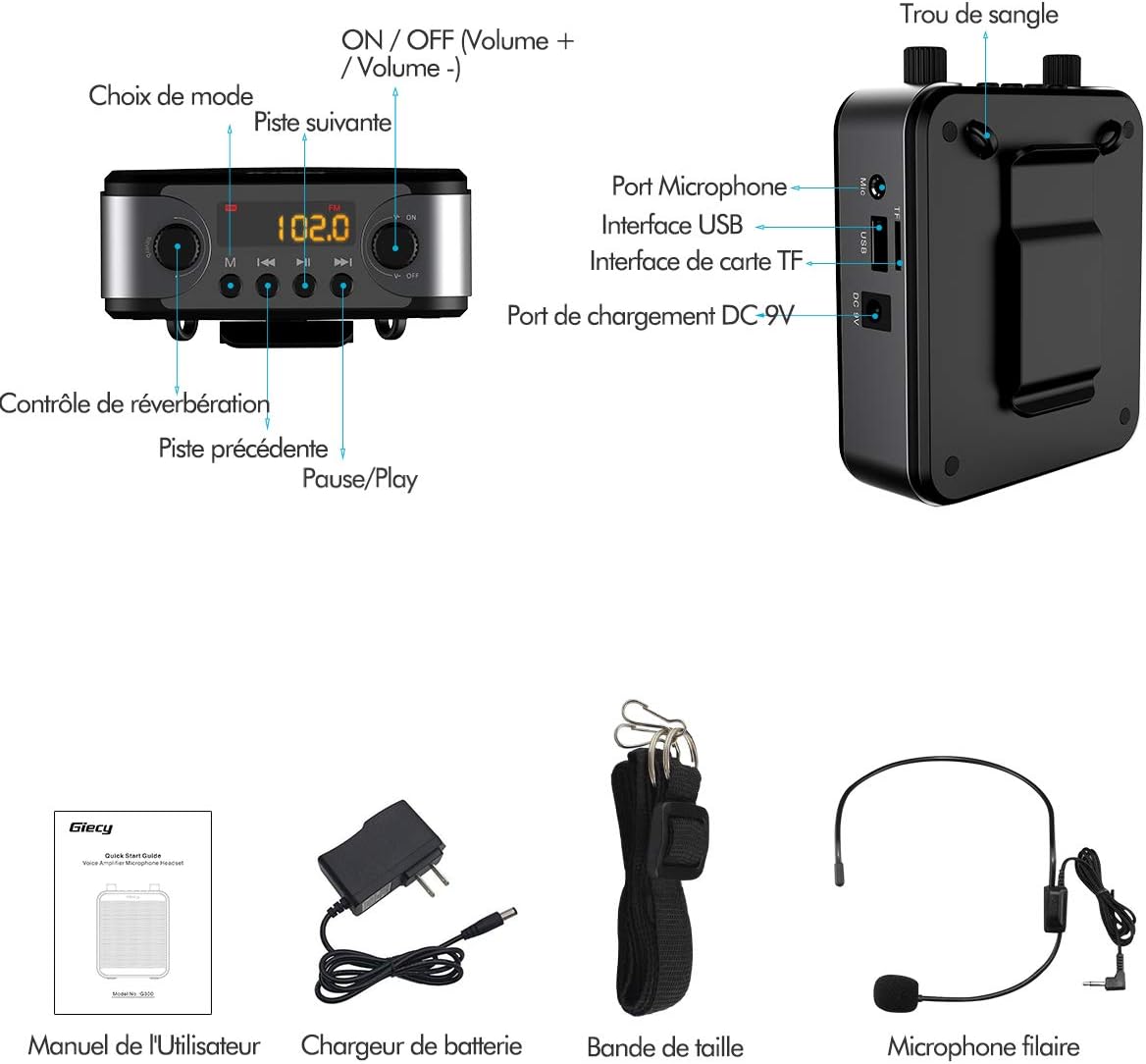
Image: Contents of the Giecy G300BLACK package, showing the amplifier unit, headset microphone, charging cable, power adapter, and strap.
3. Product Overview
Familiarize yourself with the various parts and controls of your Giecy G300BLACK voice amplifier.

Image: Detailed view of the Giecy G300BLACK amplifier, highlighting the microphone port, USB interface, TF card interface, DC 9V charging port, ON/OFF/Volume knob, mode selection, and strap hole.
- ON/OFF / Volume + / Volume - Knob: Rotate to power on/off and adjust volume.
- Mode Selection Button: Press to cycle through modes (MIC, Bluetooth, USB, TF Card, FM Radio).
- Reverb Control Knob: Adjusts the reverb effect for the microphone.
- Previous Track Button: Skips to the previous audio track in music mode.
- Play/Pause Button: Plays or pauses audio playback.
- Next Track Button: Skips to the next audio track in music mode.
- Microphone Port (MIC): Connect the wired headset microphone here.
- USB Interface: For connecting USB flash drives for audio playback.
- TF Card Interface: For inserting TF (MicroSD) cards for audio playback.
- DC 9V Charging Port: Connect the power adapter for charging.
- Strap Hole: For attaching the adjustable waist/shoulder strap.
4. Setup
4.1 Initial Charging
Before first use, fully charge the voice amplifier. The device has a built-in 7.4V 2800mAh rechargeable lithium battery.
- Connect the power adapter to the DC 9V charging port on the amplifier.
- Plug the power adapter into a standard wall outlet.
- The charging indicator light will illuminate.
- A full charge typically takes 3-5 hours. The indicator light will change or turn off when charging is complete.

Image: Illustration showing the Giecy G300BLACK amplifier next to a large battery icon indicating 2800mAh capacity, with text detailing working times for Bluetooth (7-10 hours) and Microphone (14-17 hours), and a charge time of 3-5 hours.
4.2 Connecting the Headset Microphone
- Insert the 3.5mm plug of the wired headset microphone firmly into the "MIC" port on the amplifier.
- Position the headset microphone comfortably on your head, ensuring the microphone capsule is close to your mouth (approximately 1-2 cm) for optimal voice pickup.
4.3 Attaching the Strap
- Attach the clips of the adjustable strap to the strap holes on the amplifier.
- Adjust the strap length to comfortably wear the amplifier around your waist or over your shoulder.
5. Operating Instructions
5.1 Power On/Off and Volume Control
- To power on, rotate the ON/OFF / Volume knob clockwise until you hear a click and the display illuminates.
- Continue rotating clockwise to increase the volume.
- Rotate counter-clockwise to decrease the volume.
- To power off, rotate the knob counter-clockwise until you hear a click and the display turns off.
5.2 Microphone Mode (Voice Amplification)
- Ensure the headset microphone is connected.
- Power on the amplifier. It should automatically enter Microphone mode. If not, press the "Mode" button until "MIC" or a similar indicator appears on the display.
- Speak into the microphone. Adjust the volume knob to your desired amplification level.
- Adjust the "Reverb" knob to add or remove echo effect as desired.
- To prevent feedback (howling), avoid pointing the microphone directly at the amplifier speaker and maintain a reasonable distance between the microphone and the speaker.

Image: A speaker using the Giecy G300BLACK voice amplifier with a headset microphone in a large lecture hall setting, demonstrating its 30W output and ability to cover a wide area (up to 40,000 sq ft).
5.3 Bluetooth Mode
The Giecy G300BLACK can function as a Bluetooth speaker.
- Power on the amplifier. Press the "Mode" button until "BLUE" or a Bluetooth icon appears on the display, indicating it's in pairing mode.
- On your mobile device (smartphone, tablet, laptop), enable Bluetooth and search for available devices.
- Select "Giecy G300BLACK" (or similar name) from the list to pair.
- Once paired, you can play audio from your device through the amplifier.
- Use the amplifier's volume knob and your device's volume controls to adjust the sound level.
- The "Previous Track", "Play/Pause", and "Next Track" buttons on the amplifier can control playback.

Image: A person sitting outdoors, looking at their smartphone, with the Giecy G300BLACK amplifier visible nearby, illustrating its use as a Bluetooth speaker.
5.4 USB Drive / TF Card Playback
The amplifier supports audio playback from USB flash drives and TF (MicroSD) cards.
- Insert a USB flash drive into the "USB" port or a TF card into the "TF" slot.
- The amplifier should automatically switch to the corresponding mode and begin playing audio files. If not, press the "Mode" button to select the correct input.
- Use the "Previous Track", "Play/Pause", and "Next Track" buttons to control playback.
- The amplifier supports common audio formats.

Image: Close-up of the side of the Giecy G300BLACK amplifier, clearly showing the USB and TF card slots, with a USB drive and a TF card depicted next to them, indicating their use for direct audio playback.
5.5 FM Radio Mode
- Power on the amplifier. Press the "Mode" button until "FM" appears on the display.
- To auto-scan and save FM stations, press and hold the "Play/Pause" button. The amplifier will scan and store available stations.
- Use the "Previous Track" and "Next Track" buttons to navigate between saved FM stations.
6. Maintenance and Care
- Cleaning: Wipe the amplifier with a soft, dry cloth. Do not use abrasive cleaners or solvents.
- Storage: Store the device in a cool, dry place away from direct sunlight and extreme temperatures.
- Battery Care: To prolong battery life, avoid fully discharging the battery frequently. Charge the device regularly, even if not in use, at least once every 3 months.
- Water Resistance: The amplifier is not waterproof. Avoid exposure to water or high humidity.
- Handling: Handle the device with care. Avoid dropping or subjecting it to strong impacts.
7. Troubleshooting
| Problem | Possible Cause | Solution |
|---|---|---|
| No sound from amplifier. |
|
|
| Feedback (howling) sound. |
|
|
| Bluetooth pairing failed. |
|
|
| USB/TF card not playing. |
|
|
8. Specifications
| Feature | Detail |
|---|---|
| Model | G300BLACK |
| Output Power | 30W |
| Battery Capacity | 7.4V 2800mAh Lithium-Polymer |
| Working Time (MIC Mode) | 14-17 hours |
| Working Time (Music Mode) | 7-10 hours |
| Charging Time | 3-5 hours |
| Connectivity | Bluetooth, USB, TF Card |
| Audio Input | USB |
| Frequency Response | 13 KHz |
| Dimensions (Package) | 18 x 15.6 x 6.1 cm |
| Weight (Item) | 550 g |
| UPC | 767311322206 |
9. Warranty and Support
Giecy products are designed for reliability and performance. For warranty information or technical support, please refer to the contact details provided with your purchase or visit the official Giecy website. Please retain your proof of purchase for warranty claims.
For common issues, please refer to the Troubleshooting section of this manual.
Related documentsG300BLACK


Ask a question about this manual
Ask about setup, troubleshooting, compatibility, parts, safety, or missing instructions. Manuals+ will review the question and use this page’s manual context to help answer it.