
1. Introduction and Overview
The EMART Softbox Photography Lighting Kit is designed to provide professional-grade continuous lighting for various applications, including studio photography, video recording, live streaming, portrait shooting, and podcasting. This kit features upgraded softboxes and energy-efficient LED bulbs to ensure optimal illumination and ease of use.

Figure 1.1: Complete EMART Softbox Photography Lighting Kit.

Figure 1.2: Versatile applications of the lighting kit, including portrait photography, studio lighting, live streaming, and product shooting.
2. Package Contents
Please verify that all items listed below are included in your package:
- 2 x 20"x28" Softbox
- 2 x Light Stand
- 2 x 40W LED Bulbs (6500K)
- 4 x Velcro Cable Ties
- 2 x Soft Cloth
- 1 x Carry Bag

Figure 2.1: Visual representation of all included components.
3. Setup Instructions
Follow these steps to assemble your EMART Softbox Photography Lighting Kit:
- Unpack Components: Carefully remove all items from the carry bag.
- Set Up Light Stands: Extend the legs of the light stands to create a stable base. Adjust the height to your desired level using the quick-adjustment single action lock. Ensure the 3-leg stage is fully spread for maximum stability.

Figure 3.1: Light stand features, including height adjustment and sturdy 3-leg stage.
- Attach Softboxes: Mount the 20"x28" softboxes onto the top of the light stands. The softboxes feature an upgraded base for a more secure and hidden attachment.
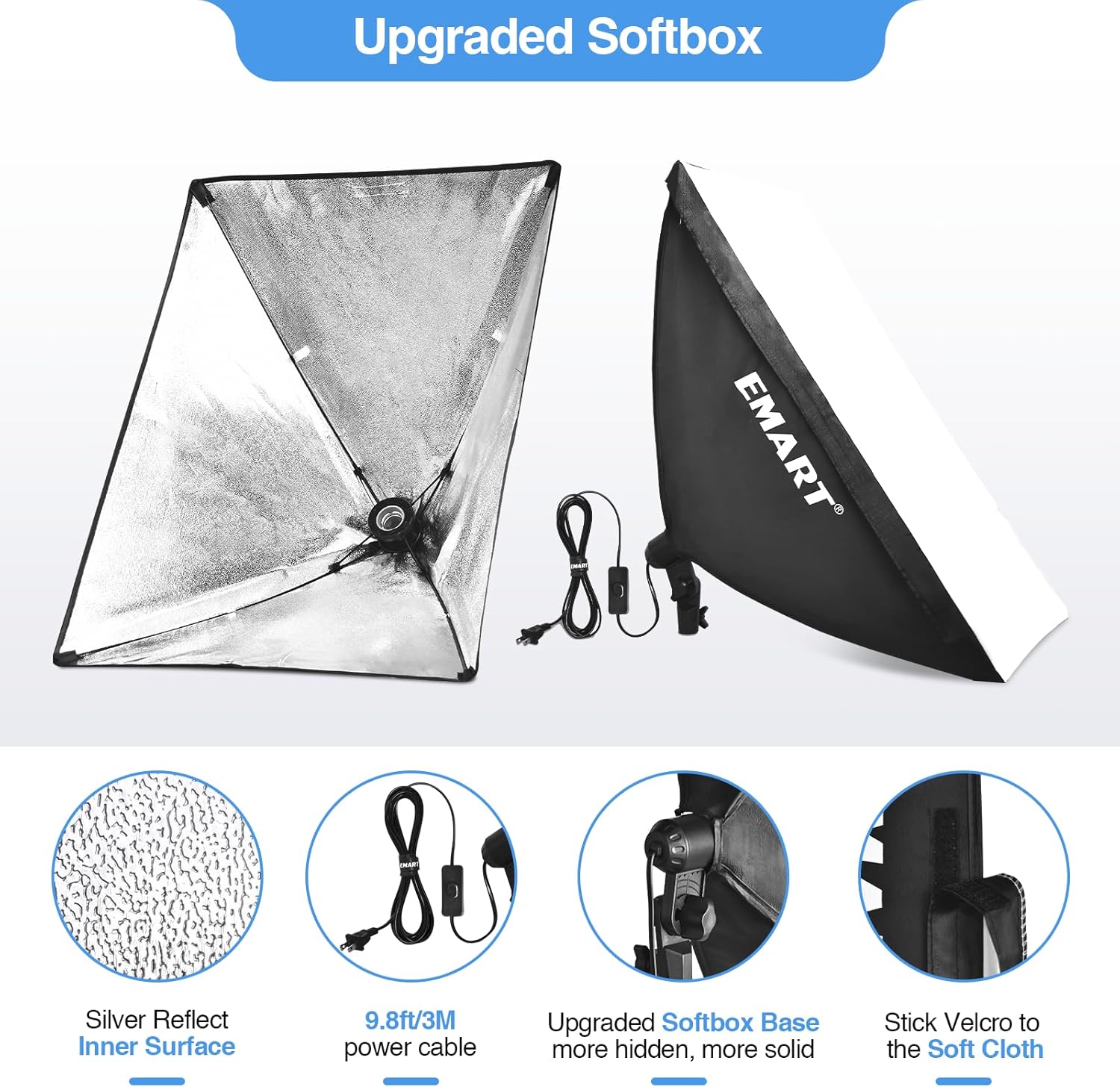
Figure 3.2: Details of the upgraded softbox design.
- Install LED Bulbs: Screw the 40W 6500K LED bulbs into the E26/E27 sockets inside the softboxes.

Figure 3.3: Key features of the 40W LED light bulb.
- Attach Soft Cloth (Optional): For softer, more diffused light, attach the included soft cloth to the front of the softbox using the Velcro fasteners.
- Manage Cables: Use the provided Velcro cable ties to securely fasten power and connecting cables to the light stands. This helps keep your workspace tidy and prevents tripping hazards.

Figure 3.4: Using Velcro cable ties for cable management.
- Connect to Power: Plug the power cables into a suitable electrical outlet.
4. Operating Instructions
Once assembled, operating your EMART Softbox Lighting Kit is straightforward:
- Power On/Off: Use the inline switch on the power cable to turn the lights on or off.
- Adjust Angle: The softbox features a 210° rotatable head. Loosen the adjustment knob, position the softbox to your desired angle for optimal lighting, and then tighten the knob to secure it.
Figure 4.1: Adjusting the softbox angle for precise lighting.
- Adjust Height: Modify the height of the light stands as needed for different shooting scenarios. Ensure the stand remains stable after adjustment.
- Light Quality: The 40W 6500K LED bulbs provide bright, daylight-balanced light, ideal for accurate color rendition in photography and video. The silver reflective inner lining of the softbox maximizes light output and minimizes shadows.
5. Maintenance
Proper maintenance ensures the longevity and optimal performance of your lighting kit:
- Cleaning: Regularly wipe down the exterior of the softboxes and light stands with a soft, dry cloth to remove dust and debris. Avoid using abrasive cleaners or solvents.
- Bulb Replacement: While the LED bulbs have a long lifespan, if a bulb needs replacement, ensure the power is disconnected and the bulb has cooled down. Replace with an E26/E27 base 40W 6500K LED bulb or equivalent.
- Storage: When not in use, disassemble the kit and store it in the provided Oxford cloth portable tote bag to protect components from damage and dust.
- Cable Care: Avoid sharp bends or kinks in the power cables. Always use the Velcro ties for neat storage and transport.
6. Troubleshooting
If you encounter any issues with your lighting kit, refer to the following common problems and solutions:
| Problem | Possible Cause | Solution |
|---|---|---|
| Light does not turn on. | No power, loose bulb, faulty switch, or damaged bulb. | Check power outlet. Ensure bulb is screwed in tightly. Verify the inline switch is in the "ON" position. Replace bulb if necessary. |
| Light flickers or is intermittent. | Loose electrical connection in the cable or socket. | Ensure all cable connections are secure. If flickering persists, contact customer support. |
| Light stand is unstable or tips easily. | Legs not fully extended, uneven surface, or insufficient weight. | Fully extend the light stand legs. Place on a flat, stable surface. Utilize sandbags (not included in this kit, but recommended for added stability) on the stand legs if needed. |
| Light output is not soft enough. | Soft cloth not attached or improperly positioned. | Ensure the soft cloth is securely attached to the front of the softbox. |
7. Specifications
| Feature | Detail |
|---|---|
| Softbox Dimensions | 20" x 28" (50cm x 70cm) |
| Light Bulb Type | LED |
| Light Bulb Wattage | 40W (equivalent to 400W incandescent) |
| Color Temperature | 6500K (Daylight) |
| CRI | >90 |
| Light Stand Height | 26.4" to 84.2" (67cm to 214cm) |
| Softbox Head Rotation | 210° |
| Power Cable Length | 9.8 ft (3M) |
| Item Weight | 9.39 pounds |
| Model Number | EM-SBK5070 |
8. Warranty and Support
EMART is committed to providing high-quality products and customer satisfaction. For any questions or concerns regarding your EMART Softbox Photography Lighting Kit, please contact our customer support team. We aim to reply within 24 hours.
For additional information, you may refer to the official User Manual PDF available online: EMART User Manual (PDF)

