
Introduction
The Ringke Phone Lanyard is a versatile accessory designed to keep your smartphone or other portable devices secure and easily accessible. Featuring a durable nylon strap and a convenient one-touch buckle, it can be worn as a neck, wrist, or crossbody strap, offering hands-free convenience for various activities.
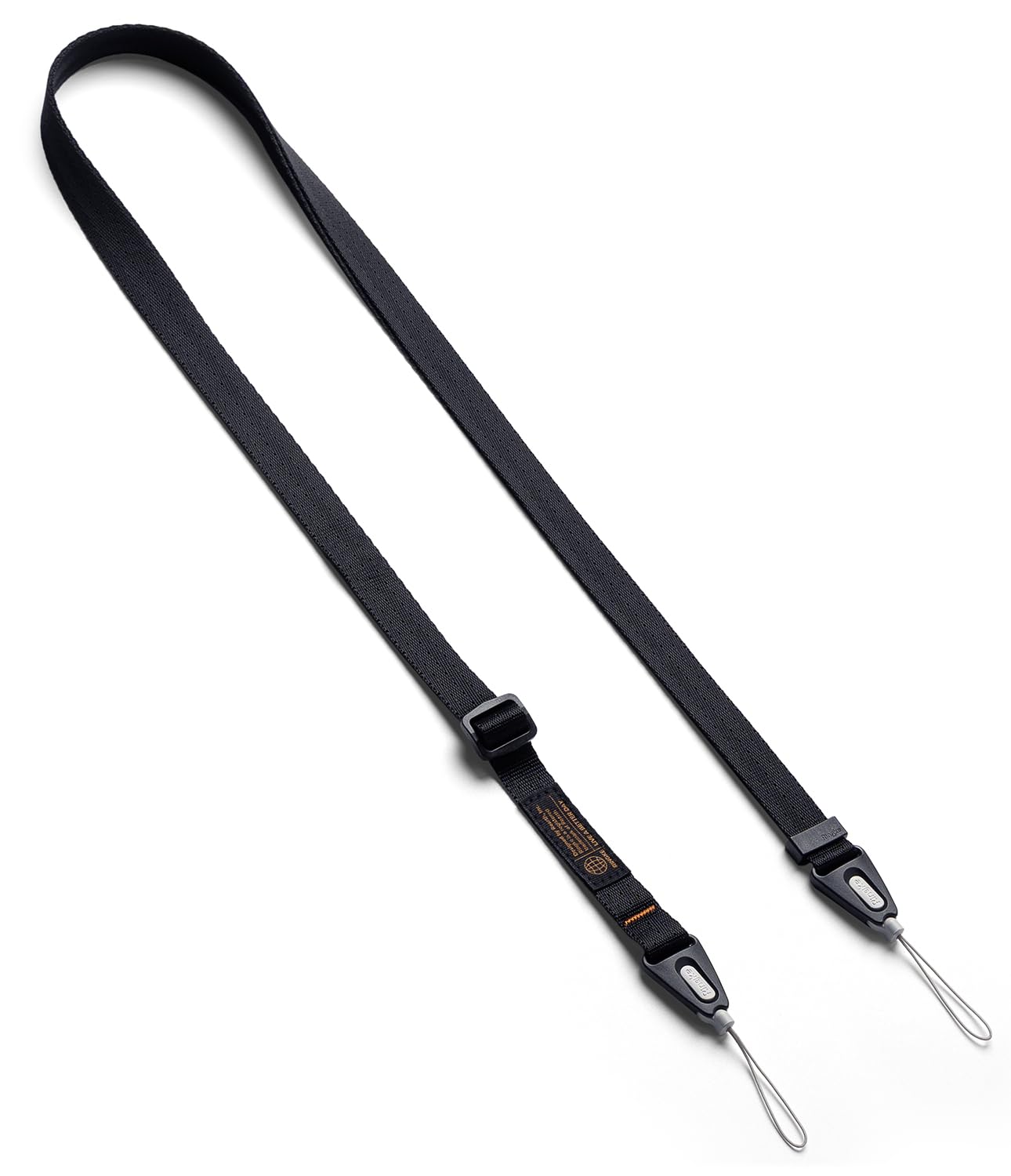
Figure 1: Ringke Phone Lanyard (Black)
This image displays the black Ringke Phone Lanyard, highlighting its adjustable strap and the one-touch buckle mechanism.
Setup Instructions
Follow these steps to properly attach the Ringke Phone Lanyard to your device's case.
- Prepare your phone case: Ensure your phone case has a dedicated lanyard hole or a compatible attachment point. Ringke cases with QuikCatch lanyard holes are ideal.
- Attach the end strap: Locate the thin loop at the end of the lanyard's buckle base. Thread this loop through the lanyard hole on your phone case.
- Secure the loop: Once the loop is threaded through, pass the buckle base through the loop itself and pull gently to secure it. This creates a strong attachment point.
Figure 2: Attaching the Lanyard to a Phone Case
This image shows a close-up of the lanyard's thin loop being threaded through a phone case's lanyard hole and secured by passing the buckle through the loop.

Figure 3: Single Strap Hole Compatibility
This image illustrates how the duo-loop shoulder strap can be used with phone cases that feature a single lanyard hole, demonstrating the threading technique.
Operating Instructions
The Ringke Phone Lanyard offers flexibility in how you carry your device.
Adjusting the Length
The strap length is adjustable from 92cm to 143cm (approximately 36.22 to 56.30 inches) to suit your preference and wearing style.
- To lengthen: Hold the strap firmly and pull the adjuster away from the buckle.
- To shorten: Pull the strap through the adjuster towards the buckle.

Figure 4: Adjusting Strap Length
This image shows hands manipulating the strap adjuster to modify the lanyard's length for a customized fit.
Using the One-Touch Buckle
The one-touch buckle allows for quick attachment and detachment of your device from the main strap.
- To attach: Align the buckle base (attached to your phone case) with the main strap's buckle and press firmly until it clicks into place.
- To detach: Press the release button on the buckle and pull the buckle base away from the main strap.

Figure 5: One-Touch Buckle Mechanism
This image provides a detailed view of the Ringke buckle, illustrating its components: the end strap, the durable buckle base, and the main Ringke strap.
Wearing Styles
The adjustable length and quick-release buckle enable various wearing options:
- Neck Lanyard: Wear around your neck for easy access.
- Crossbody Strap: Wear across your body for enhanced security and comfort.
- Wrist Strap: Shorten the strap to wear it around your wrist.

Figure 6: Hands-Free Usage
This image shows an individual utilizing the Ringke Phone Lanyard in a crossbody fashion, securing their smartphone for hands-free convenience while traveling.
Maintenance
To ensure the longevity and proper function of your Ringke Phone Lanyard, follow these maintenance guidelines:
- Cleaning: Wipe the nylon strap with a damp cloth and mild soap if necessary. Avoid harsh chemicals or abrasive cleaners. Allow to air dry completely.
- Storage: Store the lanyard in a clean, dry place away from direct sunlight when not in use.
- Inspection: Periodically inspect the strap, buckle, and attachment points for any signs of wear, fraying, or damage.
Troubleshooting
If you encounter any issues with your Ringke Phone Lanyard, consider the following:
- Lanyard detaches unexpectedly: Ensure the one-touch buckle is fully engaged and clicked into place. Avoid applying excessive force or spinning the attached device, as this may cause the buckle to release or the strap to wear prematurely.
- Strap feels uncomfortable: Adjust the length of the strap to find a comfortable fit for your body and chosen wearing style. The strap is designed to be wide enough to distribute weight comfortably.
- Difficulty attaching to case: Verify that your phone case has a compatible lanyard hole. If the hole is too small, do not force the attachment, as this could damage the case or the lanyard.
Specifications
| Brand | Ringke |
| Model Number | RK-SHD-STRP-BLK |
| Material Type | Nylon |
| Item Weight | 30 g |
| Item Dimensions | 35 x 0.7 x 0.21 inches (88.9 x 1.78 x 0.53 cm) |
| Adjustable Length | 92 cm to 143 cm (36.22 to 56.30 inches) |
| Fastener Type | Lobster Clasp (for buckle system) |
| Compatible Devices | Universal (with compatible phone case) |
Warranty and Support
For warranty information or product support, please contact Ringke customer service through their official website or the retailer where the product was purchased. Keep your proof of purchase for any warranty claims.
Website: www.ringkestore.com