
Aqualung Kalm Plus
AQUALUNG Kalm Plus Dive Computer User Manual
Model: Kalm Plus (WT/GN/GN)
Brand: Aqualung
Introduction
The Aqualung Kalm Plus dive computer is a solar-powered, 'Made in Japan' device equipped with Bluetooth Smart technology. This advanced dive computer offers excellent running costs due to its solar charging capability, eliminating the need for frequent battery replacements. It allows for wireless transfer of log data to a dedicated smartphone application, enabling easy review of dive details such as date, entry/exit times, maximum depth, average depth, and deepest water temperature. The app also facilitates convenient adjustment of most Kalm Plus unit settings directly from your smartphone. Additionally, the Kalm Plus features a unique 'Anniversary Function' that displays a special message upon reaching a specific number of logged dives, enhancing the diving experience.
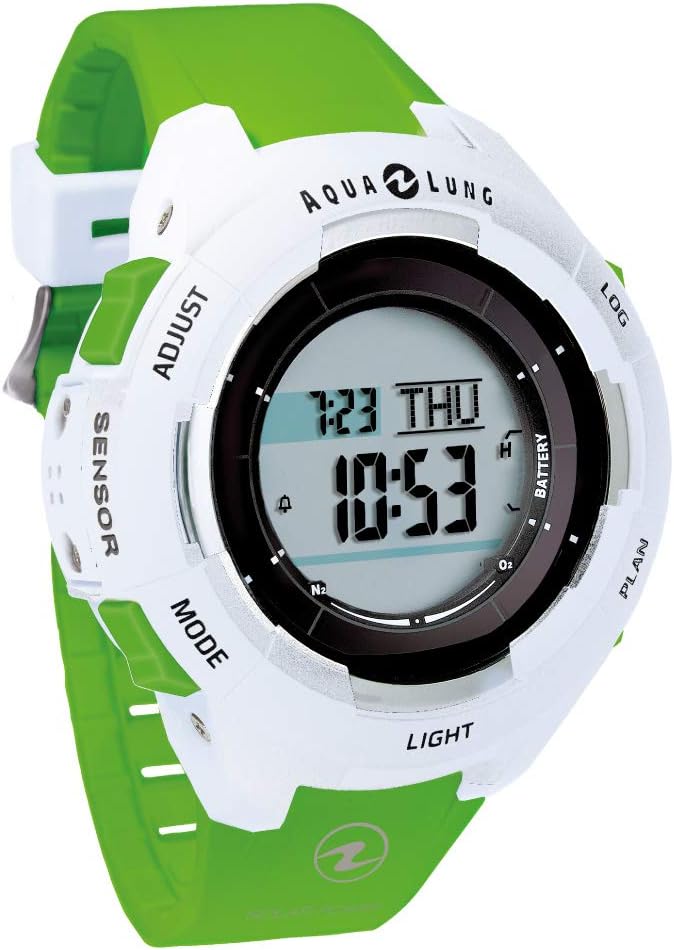
Image: Front view of the AQUALUNG Kalm Plus Dive Computer. The watch-style computer features a white casing with a vibrant green strap. The digital display shows time, date, and dive-related indicators. Buttons for 'ADJUST', 'SENSOR', 'MODE', 'LIGHT', 'PLAN', 'LOG', and 'BATTERY' are visible around the bezel.
Setup
Before your first dive, ensure the Kalm Plus is properly set up. This includes initial charging, time synchronization, and configuring essential dive parameters.
- Initial Solar Charge: Place the dive computer in direct sunlight or under strong artificial light for several hours to ensure a full charge. The solar panel is located on the watch face.
- Time and Date Setting:
- Press the MODE button to navigate to the time setting mode.
- Use the ADJUST button to change values and the LIGHT button to confirm and move to the next setting.
- Set the current time, date, and year.
- Unit Settings: Configure units for depth (meters/feet) and temperature (Celsius/Fahrenheit) according to your preference. This can typically be done in the settings menu accessible via the MODE button.
- Download Dedicated App: Download the "Diver LOG" app from your smartphone's app store. This app is essential for wireless data transfer and advanced settings configuration.
- Pair with Smartphone: Follow the instructions in the "Diver LOG" app to pair your Kalm Plus dive computer via Bluetooth. Ensure Bluetooth is enabled on both devices.
Operating
The Kalm Plus dive computer is designed for intuitive operation during and after your dives.
Dive Mode
- Automatic Activation: The computer automatically switches to dive mode when submerged to a certain depth (typically 1.2 meters / 4 feet).
- During Dive: The main display will show critical information such as current depth, dive time, and no-decompression limit. Use the MODE or LIGHT buttons to cycle through additional information like maximum depth, water temperature, and average depth.
- Ascent Rate Indicator: Pay attention to the ascent rate indicator to ensure safe ascent speeds.
- Safety Stop: The computer will prompt for a safety stop at 5 meters (15 feet) for 3 minutes.
Surface Mode
- Automatic Deactivation: The computer automatically returns to surface mode when out of water for a specified period.
- Surface Interval: Displays the surface interval time, which is crucial for planning repetitive dives.
- No-Fly Time: Shows the recommended no-fly time to ensure safe travel after diving.
Log Mode and Data Transfer
- Accessing Logs: Press the LOG button to enter log mode and review past dive data directly on the computer.
- Wireless Data Transfer: Open the "Diver LOG" app on your paired smartphone. The app will automatically synchronize with the Kalm Plus to transfer dive logs wirelessly via Bluetooth.
- Log Data Details: The app allows you to view detailed information for each dive, including date, entry/exit times, maximum depth, average depth, deepest water temperature, and allows for manual input of location information, images, and other notes.
Anniversary Function
- The Kalm Plus features a unique 'Anniversary Function'. When you reach a specific number of logged dives, a special message will be displayed on the computer's screen, celebrating your diving milestones.

Image: Detailed view of the AQUALUNG Kalm Plus features and specifications. This image highlights the unique 'Anniversary Function', the log button for quick mode transition, clear scroll display of information, large display of important underwater data, high-brightness LED illumination, and the inclusion of a watch guard. It also details the "Diver LOG" app's capabilities for wireless data transfer and smartphone control via Bluetooth Smart, along with product dimensions and weight.
Maintenance
Proper maintenance ensures the longevity and reliability of your Kalm Plus dive computer.
- Rinsing: After each dive, thoroughly rinse the dive computer with fresh water to remove salt, sand, and other debris. Operate the buttons while rinsing to flush out any trapped particles.
- Drying: Dry the computer completely with a soft cloth before storage. Avoid direct sunlight for prolonged drying.
- Storage: Store the Kalm Plus in a cool, dry place away from direct sunlight and extreme temperatures.
- Solar Charging: Periodically expose the computer to light to maintain its charge, even when not in use. This prevents the internal battery from fully discharging.
- Inspection: Regularly inspect the strap and casing for any signs of wear or damage.
Troubleshooting
Here are solutions to common issues you might encounter with your Kalm Plus dive computer.
| Problem | Possible Cause | Solution |
|---|---|---|
| Display is dim or blank. | Insufficient solar charge. | Expose the computer to strong light (sunlight or artificial) for several hours to fully charge. |
| Cannot pair with smartphone via Bluetooth. | Bluetooth not enabled, app not running, or computer not in pairing mode. | Ensure Bluetooth is on for both devices. Open the "Diver LOG" app. Follow app instructions to initiate pairing. Restart both devices if necessary. |
| Incorrect depth or temperature readings. | Sensor obstruction or unit setting error. | Rinse the computer thoroughly to clear any debris from the sensor. Check unit settings (meters/feet, Celsius/Fahrenheit) in the menu. |
| Buttons are stiff or unresponsive. | Salt or debris accumulation. | Rinse the computer thoroughly with fresh water, pressing the buttons repeatedly during rinsing to dislodge any foreign material. |
Specifications
| Feature | Detail |
|---|---|
| Brand Name | Aqualung |
| Model | Kalm Plus |
| ASIN | B0856WX84X |
| Battery Usage | No (Solar Powered) |
| Dimensions | 58.9 x 52.4 mm |
| Thickness | Approx. 14.3 mm |
| Weight | 75 g |
| Connectivity | Bluetooth Smart |
| Origin | Made in Japan |
| Date First Available on Amazon.co.jp | February 18, 2019 |
Warranty and Support
For detailed warranty information and technical support, please refer to the official Aqualung website or contact their customer service directly. Keep your proof of purchase for warranty claims.
Official Aqualung Website: www.aqualung.com
Related documentsKalm Plus


Ask a question about this manual
Ask about setup, troubleshooting, compatibility, parts, safety, or missing instructions. Manuals+ will review the question and use this page’s manual context to help answer it.