
1. Introduction
Welcome to the user manual for your Nokia 216 Dual SIM mobile phone. This guide provides essential information to help you set up, operate, and maintain your device. The Nokia 216 (RM-1187) is a classic feature phone designed for reliable communication, featuring dual SIM capability, a 2.4-inch display, and a VGA camera.
Please read this manual carefully to ensure proper use and to get the most out of your phone.
2. Package Contents
Ensure all items are present in your product package:
- Nokia 216 Dual SIM Mobile Phone (RM-1187)
- Battery
- Power Adapter
- USB Cable
3. Device Overview
Familiarize yourself with the key components of your Nokia 216 phone.
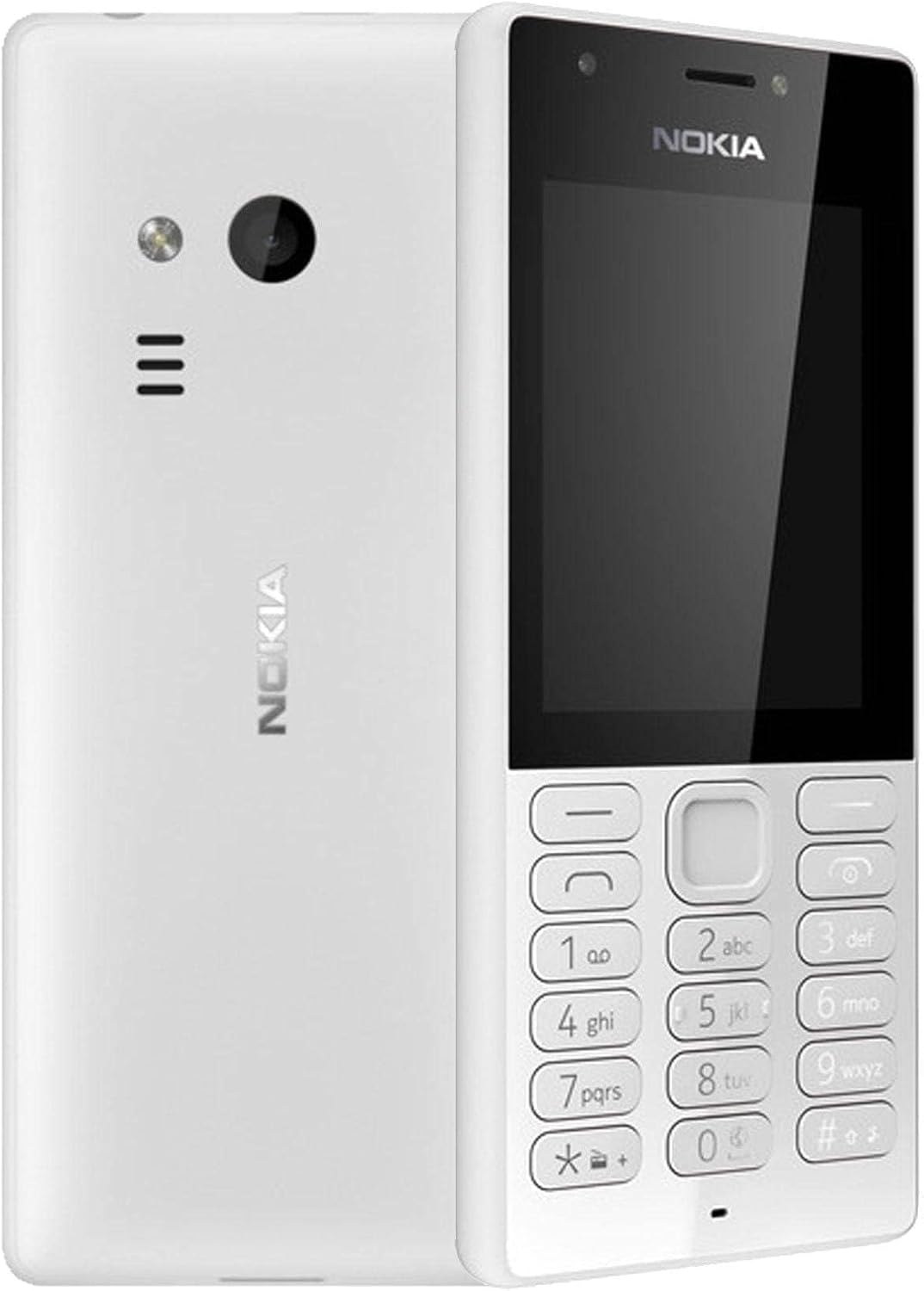
Figure 3.1: Front and back view of the Nokia 216 Dual SIM mobile phone. The front shows the display, earpiece, and numeric keypad. The back features the rear camera, LED flash, and loudspeaker grille.

Figure 3.2: Front view of the Nokia 216 Dual SIM mobile phone. This image highlights the 2.4-inch display, the navigation keys, and the alphanumeric keypad for dialing and text input.

Figure 3.3: Back view of the Nokia 216 Dual SIM mobile phone. This view shows the rear VGA camera lens, the LED flash, and the Nokia branding.
Key Components:
- Display: 2.4-inch QVGA screen.
- Keypad: Alphanumeric keypad for dialing and text entry, with navigation keys.
- Rear Camera: VGA camera with LED flash.
- Loudspeaker: For audio playback and hands-free calls.
- Microphone: For voice input during calls and recordings.
- 3.5mm Audio Jack: For headphones or external speakers.
- Charging Port: Micro-USB port for charging and data transfer.
4. Setup
4.1. Insert SIM Card(s)
- Turn off the phone and disconnect any charger.
- Carefully remove the back cover by prying it open from the notch.
- If the battery is in, lift it out.
- Insert the SIM card(s) into the designated slot(s) with the gold contacts facing down. For dual SIM models, ensure both SIMs are correctly seated.
- If applicable, insert a microSD card into its slot for additional storage.
- Replace the battery.
- Align the back cover and press it firmly until it clicks into place.
4.2. Charge the Battery
- Connect the power adapter to a wall outlet.
- Plug the micro-USB end of the cable into the phone's charging port.
- The battery indicator on the screen will show the charging status.
- Once fully charged, disconnect the charger from the phone and then from the wall outlet.
5. Operating Instructions
5.1. Power On/Off
- To Power On: Press and hold the power key (usually the red 'End Call' key) until the phone vibrates and the Nokia logo appears.
- To Power Off: Press and hold the power key until the 'Power off' option appears on the screen, then select it.
5.2. Making Calls
- From the home screen, enter the phone number using the numeric keypad.
- Press the green 'Call' key to initiate the call.
- To end a call, press the red 'End Call' key.
5.3. Sending Text Messages (SMS)
- Go to Menu > Messages > Create message.
- Type your message using the keypad.
- Enter the recipient's phone number or select from contacts.
- Select Send.
5.4. Using the Camera
- Go to Menu > Camera.
- Frame your shot using the display.
- Press the center navigation key to take a photo.
6. Maintenance and Care
To ensure the longevity and optimal performance of your Nokia 216, follow these care guidelines:
- Keep the device dry: Moisture can damage electronic circuits.
- Use original accessories: Only use batteries, chargers, and accessories approved by Nokia.
- Clean gently: Use a soft, clean, dry cloth to clean the surface of the device.
- Avoid extreme temperatures: Do not expose your device to very high or low temperatures.
- Handle with care: Avoid dropping or subjecting the device to strong impacts.
7. Troubleshooting
If you encounter issues with your Nokia 216, try these common troubleshooting steps:
| Problem | Solution |
|---|---|
| Phone does not turn on | Ensure the battery is charged. Connect the charger and try again. Check if the battery is properly inserted. |
| No network signal | Check if the SIM card is correctly inserted. Move to an area with better network coverage. Restart the phone. |
| Battery not charging | Ensure the charger is properly connected to both the phone and the power outlet. Try a different power outlet or charger. Check for any damage to the charging port. |
| Cannot make or receive calls | Check network signal. Ensure your SIM card is active and has sufficient credit/plan. Verify that call barring is not enabled. |
8. Specifications
| Feature | Detail |
|---|---|
| Brand | Nokia |
| Model Name | RM-1187 |
| Operating System | Symbian 9.1 (Series 30) |
| Screen Size | 2.4 inches |
| Screen Resolution | 240 x 320 pixels |
| Refresh Rate | 90 Hz |
| Installed RAM Size | 256 MB |
| Memory Storage Capacity | 3.9 GB (Internal, likely for system/apps, expandable via microSD) |
| CPU Model | A10 |
| Cellular Technology | 2G |
| Wireless Communication Technologies | Cellular |
| Connectivity Technologies | USB, Bluetooth, Wi-Fi |
| GPS | A-GPS |
| Primary Device User Interface | Buttons, Numeric Keypad, Microphone |
| Other Camera Features | Rear Camera (VGA) |
| Audio Jack | 3.5 mm |
| Form Factor | Classic |
| Color | Grey |
| Talk Time | Up to 18 hours |
| Item Weight | 339 grams |
| Package Dimensions | 13.4 x 12.6 x 3.6 cm |
| What's in the Box | Power adapter, USB cable |
9. Warranty and Support
For warranty information, please refer to the warranty card included in your product package or visit the official Nokia website. If you require further assistance or technical support, please contact Nokia customer service through their official channels.
Keep your purchase receipt as proof of purchase for warranty claims.


