
1. Introduction
This manual provides comprehensive instructions for the installation, operation, and maintenance of the THEBEN LUNA 121 top3 RC EL twilight switch with an integrated light sensor. Please read this manual carefully before installation and use to ensure safe and efficient operation of the device.
2. Safety Instructions
- Installation and maintenance should only be performed by a qualified electrician.
- Disconnect power before performing any work on the device or its connections.
- Observe all local and national electrical safety regulations.
- Do not expose the device to moisture, extreme temperatures, or corrosive environments.
- Ensure proper grounding where required.
3. Product Overview
The THEBEN LUNA 121 top3 RC EL is a flush-mounted twilight switch designed for automatic control of lighting based on ambient light levels. It features a digital display for easy configuration and an external light sensor for accurate light detection. The device is suitable for various applications requiring light-dependent switching.
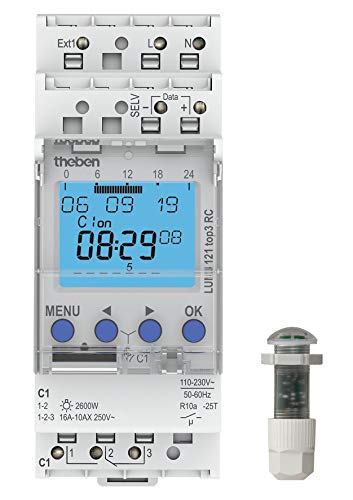
Figure 1: THEBEN LUNA 121 top3 RC EL Twilight Switch and its external light sensor. The main unit features a digital display showing time and date, along with control buttons (MENU, arrow keys, OK). Electrical terminals for power (L, N), output (C1), and data/external connections (Ext1, SELV, Data) are visible. The external sensor is a compact, cylindrical unit designed for outdoor light detection.
4. Specifications
| Feature | Value |
|---|---|
| Product Dimensions (L x W x H) | 19 x 33 x 13 cm |
| Weight | 120 grams |
| Manufacturer | THEBEN |
| Model Number | 1210230 |
| Operating Mode | ON-OFF |
| Current Rating | 16 A |
| Operating Voltage | 250 Volts |
| Brand | Theben |
| Material | Polycarbonate |
| Control Method | Application (App) |
| Number of Units | 1 |
5. Setup and Installation
5.1 Mounting the Device
The THEBEN LUNA 121 top3 RC EL is designed for flush-mounted installation. Ensure adequate space and ventilation within the electrical enclosure. Secure the device firmly according to standard electrical installation practices.
5.2 Electrical Connections
- Power Supply (L, N): Connect the live (L) and neutral (N) wires to the corresponding terminals on the device. The operating voltage is 250 Volts, 50-60Hz.
- Output (C1): Connect the load (e.g., lighting circuit) to the C1 output terminals. The device supports a current rating of 16 A. Refer to the wiring diagram on the device for specific connections (e.g., 1-2 for 2600W, 1-2-3 for 16A-10AX 250V~).
- External Light Sensor: Connect the external light sensor to the designated terminals (often labeled 'Data' or similar, as seen in the product image). Ensure the sensor is mounted in a location that accurately reflects ambient light conditions, away from direct artificial light sources.
- External Input (Ext1): If applicable, connect any external control signals to the Ext1 terminal.
- SELV: Connect Safety Extra-Low Voltage components if required by your specific setup.
Always consult the detailed wiring diagram printed on the device and any accompanying technical documentation for precise connection instructions.
6. Operating Instructions
6.1 Initial Power-Up
Once installed and powered, the device's digital display will illuminate. The initial setup may require setting the current time and date.
6.2 Basic Operation
The THEBEN LUNA 121 top3 RC EL operates automatically, switching connected loads (e.g., lights) ON when the ambient light level falls below a set threshold (dusk) and OFF when it rises above another threshold (dawn). The external light sensor continuously monitors the light conditions.
6.3 Configuration via Display and Buttons
Use the "MENU" button to access the device's settings. Navigate through the menu options using the arrow keys (up/down/left/right, as indicated by the symbols on the device) and confirm selections with the "OK" button. Typical settings include:
- Setting current time and date.
- Adjusting the ON/OFF switching thresholds (lux levels).
- Configuring switching delays to prevent flickering due to momentary light changes.
- Programming specific time schedules or overrides.
6.4 Application Control
The device supports control via an application. Refer to the manufacturer's website or product documentation for details on downloading and connecting to the compatible application for advanced configuration and remote control functionalities.
7. Maintenance
- Cleaning: Periodically clean the device and especially the external light sensor with a soft, dry cloth. Do not use abrasive cleaners or solvents.
- Connection Check: Annually, or as needed, inspect electrical connections for tightness and signs of wear. Ensure power is disconnected before inspection.
- Sensor Placement: Ensure the external light sensor remains unobstructed and clean for accurate light detection.
8. Troubleshooting
| Problem | Possible Cause | Solution |
|---|---|---|
| Device not powering on. | No power supply; incorrect wiring. | Check circuit breaker. Verify L and N connections. |
| Lights not switching ON/OFF automatically. | Incorrect light threshold settings; faulty sensor; sensor obstructed. | Adjust lux settings in menu. Check sensor for damage or obstructions. Ensure sensor is correctly connected. |
| Lights flickering or switching erratically. | Insufficient switching delay; sensor exposed to momentary light changes. | Increase switching delay setting. Relocate sensor if it's affected by car headlights or other transient light sources. |
| Display not working or showing errors. | Internal fault; power issue. | Cycle power to the device. If problem persists, contact technical support. |
If troubleshooting steps do not resolve the issue, contact qualified technical support. Do not attempt to repair the device yourself.
9. Warranty and Support
Specific warranty information for the THEBEN LUNA 121 top3 RC EL is not available in this document. For warranty details, technical support, or service inquiries, please refer to the original purchase documentation or contact THEBEN customer service directly through their official website or authorized distributors.


