
Rev-A-Shelf 5WB2-1222CR-1
Rev-A-Shelf 5WB2-1222CR-1 Two-Tier Pullout Cabinet Organizer Instruction Manual
Model: 5WB2-1222CR-1 | Brand: Rev-A-Shelf
Introduction
This manual provides detailed instructions for the installation, operation, and maintenance of your Rev-A-Shelf 5WB2-1222CR-1 Two-Tier Pullout Cabinet Organizer. This system is designed to enhance storage and accessibility within base kitchen cabinets, featuring two durable steel wire baskets with full-extension slides.

Image: The Rev-A-Shelf Two-Tier Cabinet Organizer, model 5WB2-1222CR-1, shown installed in a cabinet with cookware.
Safety Information
- Always measure your cabinet opening before installation to ensure a proper fit.
- Do not overload the baskets beyond the weight capacity of the slides (100 lbs per basket).
- For safer operation, consider adding the optional door mount kit (5WB-DMKIT), sold separately.
- Keep small children and pets away from the unit during installation and operation to prevent injury.
Setup and Installation
The Rev-A-Shelf Two-Tier Pullout Cabinet Organizer comes fully assembled and requires a simple 4-screw installation. Before beginning, ensure you have the necessary tools: an electric drill and a #2 Phillips bit.
Step 1: Measure Your Cabinet Opening
Accurate measurements are crucial for a proper fit. Consider your cabinet type (face frame or frameless) and any obstructions like hinges or plumbing.
- Width (W): Measure the opening width, accounting for any protruding hinges.
- Height (H): Measure the total height from the top edge to the bottom.
- Depth (D): Measure from the back wall to the front edge where the door sits.
Minimum Opening Dimensions for Model 5WB2-1222CR-1:
- Face Frame Cabinet: 11.5"W x 22.25"D x 19.5"H
- Frameless Cabinet: 11.75"W x 22.25"D x 19.5"H

Image: Illustration distinguishing between frameless and face frame cabinet types, highlighting key features like full-width opening, hinges, and frame restrictions.

Image: Visual guide on measuring minimum cabinet opening, including considerations for protruding and non-protruding hinges.

Image: Step-by-step visual for measuring cabinet width (W), height (H), and depth (D) to ensure product compatibility.
Video: How to Measure Your Cabinet Opening
Video: An official Rev-A-Shelf guide demonstrating the correct method for measuring cabinet openings to ensure a perfect fit for pullout organizers.
Step 2: Installation Process (4-Screw Method)
The organizer comes pre-assembled. Follow these steps for quick installation:
- Position the Frame: Gather the included hardware. Place the organizer frame inside your cabinet at the desired location. Ensure to account for space needed for hinges and the cabinet door to close properly.
- Secure the Slides: Attach the slide mechanism to the face frame of the cabinet, positioning it 1/4 inch back from the cabinet opening. If installing in a frameless cabinet, attach it directly to the sidewall.
- Attach Support Brackets: Secure the support brackets to the cabinet base using the provided wood screws.
- Insert Baskets: Use the remaining screws to mount the rear of the frame to the cabinet floor. Verify that the baskets extend smoothly and that your cabinet door closes fully. Make any necessary adjustments.

Image: Overview of the easy 9-screw installation process, highlighting tools needed (electric drill, #2 Phillips bit) and a quick DIY estimate of 20 minutes.

Image: Step 1 of installation, showing how to attach the slides to the support brackets and position the frame within the cabinet.
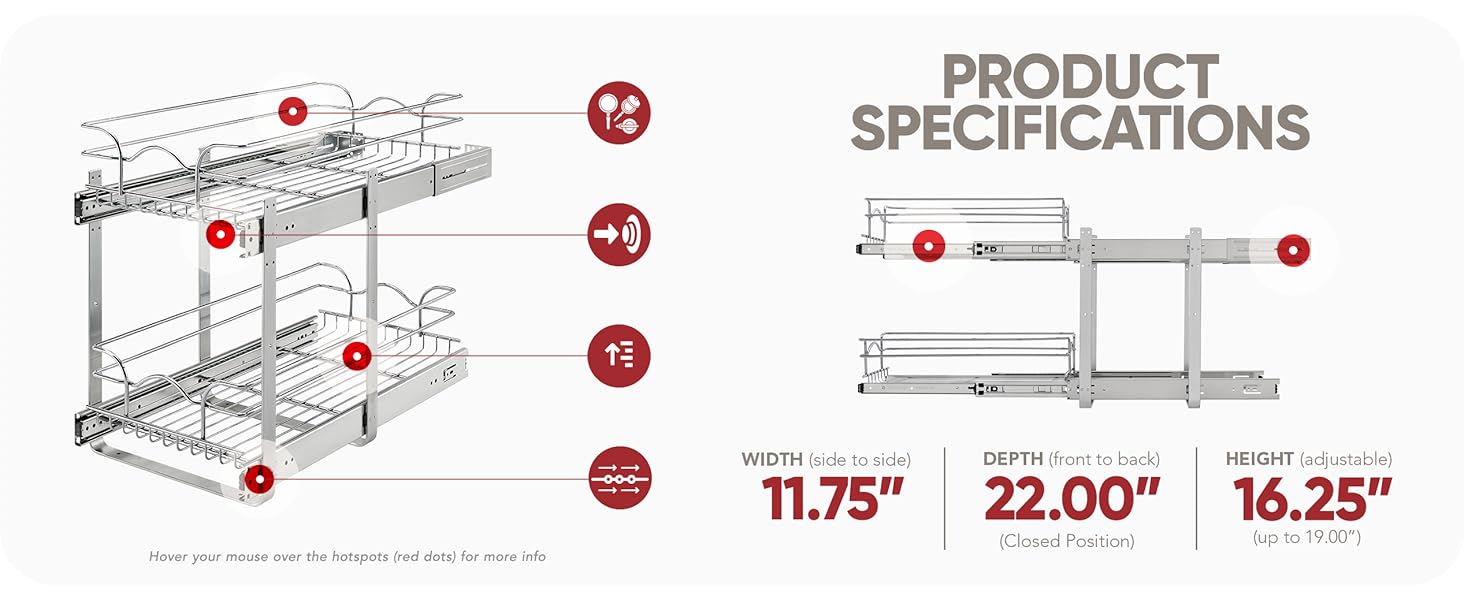
Image: Step 2 of installation, illustrating how to secure the frame to the cabinet base using an electric drill.

Image: Step 3 of installation, showing the final step of inserting the baskets into the secured frame and ensuring smooth operation.
Operating Instructions
The Rev-A-Shelf Two-Tier Pullout Cabinet Organizer is designed for ease of use, providing full access to your stored items.
- Pulling Out: Gently pull the front of either basket to slide it out of the cabinet. The full-extension ball-bearing slides ensure smooth and complete access to items at the back.
- Pushing In: Push the basket back into the cabinet until it is fully recessed. Ensure no items obstruct the movement or prevent the cabinet door from closing.
- Loading: Distribute weight evenly across the baskets. Avoid placing excessively heavy items on one side. The maximum weight capacity per basket is 100 lbs.
- Adjustable Dividers: Utilize the adjustable dividers within the baskets to organize items of various sizes, such as pots, pans, lids, and small appliances, preventing them from shifting during movement.
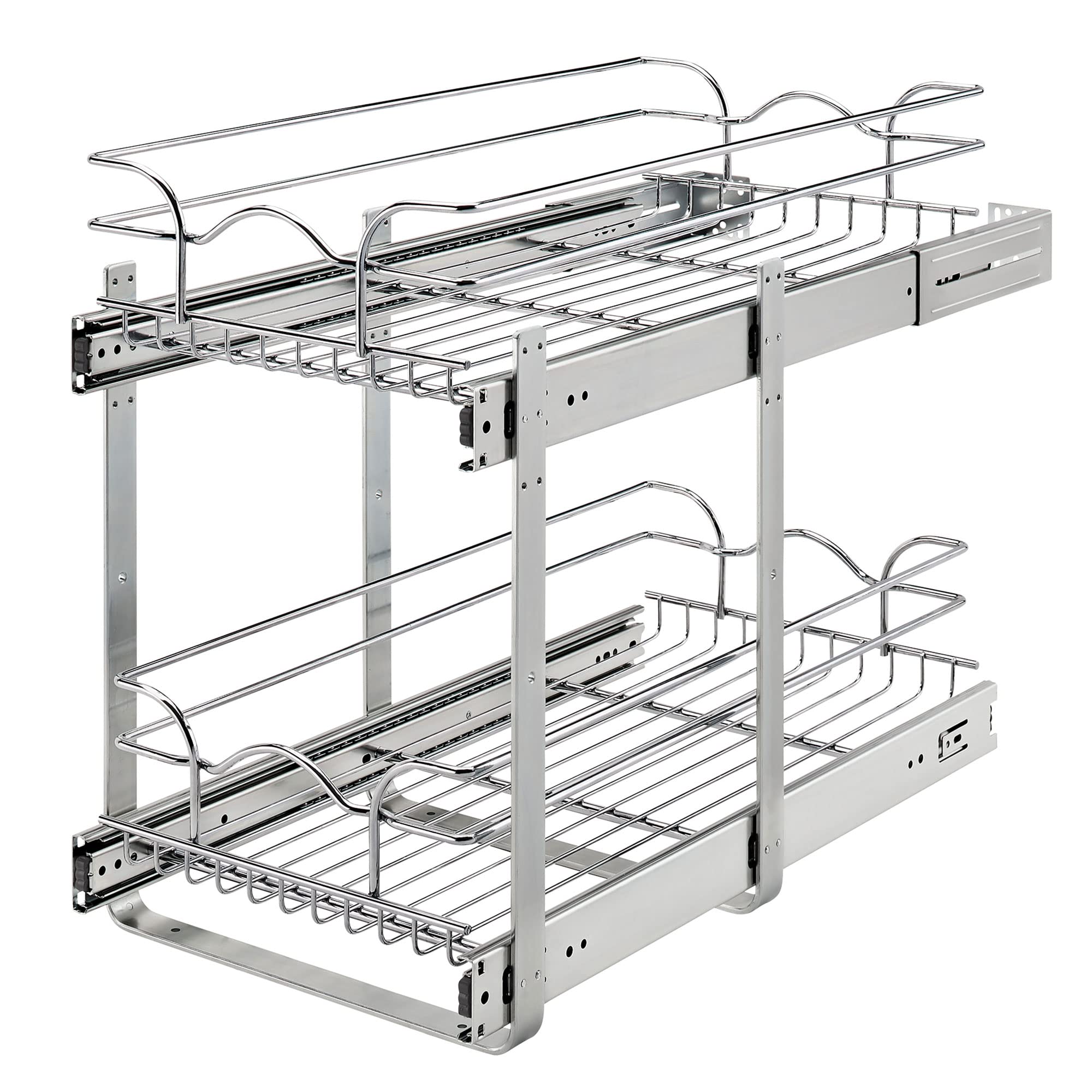
Image: The Rev-A-Shelf Two-Tier Pullout Organizer fully extended from a cabinet, showcasing organized pots and pans.

Image: A visual representation of smart cabinet storage, demonstrating how the pullout organizer neatly stores pots, pans, and lids, maximizing cabinet space.
Video: Rev-A-Shelf 5WB2 Series Two Tier Pull Out Basket Organizers Overview
Video: An official video showcasing the features and functionality of the Rev-A-Shelf 5WB2 Series Two-Tier Pullout Basket Organizers.
Maintenance
Regular maintenance ensures the longevity and smooth operation of your Rev-A-Shelf pullout organizer.
- Cleaning: Wipe down the chrome-plated steel wire baskets and frame with a soft, damp cloth. For stubborn grime, use a mild household cleaner and dry thoroughly. Avoid abrasive cleaners or scouring pads, which can damage the finish.
- Slide Lubrication: The ball-bearing slides are pre-lubricated. If movement becomes stiff over time, apply a small amount of silicone-based lubricant to the slide mechanisms. Do not use oil-based lubricants, as they can attract dust and debris.
- Hardware Check: Periodically check all screws and mounting hardware to ensure they remain tight. Retighten if necessary to maintain stability.
- Weight Distribution: Always ensure items are distributed evenly within the baskets to prevent strain on the slides and frame.
Troubleshooting
| Problem | Possible Cause | Solution |
|---|---|---|
| Organizer does not slide smoothly. |
|
|
| Cabinet door does not close completely. |
|
|
| Baskets feel wobbly or unstable. |
|
|
Specifications
| Model Number | 5WB2-1222CR-1 |
| Product Dimensions (W x D x H) | 11.75" x 22" x 19" |
| Minimum Opening Width (Face Frame) | 11.5" |
| Minimum Opening Width (Frameless) | 11.75" |
| Minimum Opening Depth | 22.25" |
| Minimum Opening Height | 19.5" |
| Material | Alloy Steel |
| Finish Type | Chrome |
| Number of Tiers | Two |
| Mounting Type | Cabinet-integrated (Pull Out) |
| Weight Capacity | 100 lbs per basket |
| Included Components | (1) top basket, (1) bottom basket, (2) u-shape supports, (2) rear mounting brackets and hardware |

Image: Diagram illustrating the closed and full-extension depths, basket height, and overall dimensions for cookware compatibility.

Image: Detailed dimensional drawing of the organizer, showing width (11.75"), closed depth (22"), and adjustable frame height (16.25" to 19").
Warranty Information
This Rev-A-Shelf product is covered by a Limited Lifetime Warranty. For specific details regarding coverage, terms, and conditions, please refer to the official Rev-A-Shelf website or contact customer support.
Customer Support
For further assistance, technical support, or to inquire about replacement parts, please contact Rev-A-Shelf customer service:
- Website: Visit the official Rev-A-Shelf website for product information and support resources.
- Contact: Refer to the "Contact Us" section on the Rev-A-Shelf website for phone numbers or email support options.
Related documents5WB2-1222CR-1


Ask a question about this manual
Ask about setup, troubleshooting, compatibility, parts, safety, or missing instructions. Manuals+ will review the question and use this page’s manual context to help answer it.