
1. Introduction
The 70mai Tire Pressure Monitoring System (TPMS) Lite is designed to provide real-time monitoring of your vehicle's tire pressure and temperature. This system enhances driving safety by alerting you to potential tire issues such as rapid leaks, high pressure, or high temperature. It features external sensors, a solar-powered display unit, and mobile app connectivity for convenient monitoring.
2. Product Overview
2.1 Package Contents
- 70mai TPMS Lite Display Unit x 1
- External Tire Pressure Sensors x 4
- USB Charging Cable x 1
- User Manual x 1
2.2 Component Identification
Familiarize yourself with the main components of the 70mai TPMS Lite system.

Figure 2.1: 70mai TPMS Lite system components including the main display, external sensors, and mobile app interface.

Figure 2.2: The 70mai TPMS Lite display unit, featuring a clear screen for real-time data and an integrated solar panel for charging.

Figure 2.3: Detailed view of an external sensor's internal structure, highlighting its precision components.
3. Setup and Installation
3.1 Charging the Display Unit
Before first use, fully charge the display unit using the provided USB cable. The unit also supports solar charging, which can maintain battery levels during daylight hours.
- Connect the USB charging cable to the display unit's USB port.
- Connect the other end to a 5V USB power adapter (not included) or a car USB port.
- Allow the unit to charge until the battery indicator shows full.
3.2 Installing External Sensors
The 70mai TPMS Lite uses external sensors that are easy to install on your tire valve stems.
- Unscrew the original valve cap from each tire valve stem.
- Screw on the corresponding external sensor (e.g., "FL" for Front Left, "FR" for Front Right, etc.) onto each valve stem. Ensure a tight fit to prevent air leakage.
- The sensors are designed for all-weather environments.
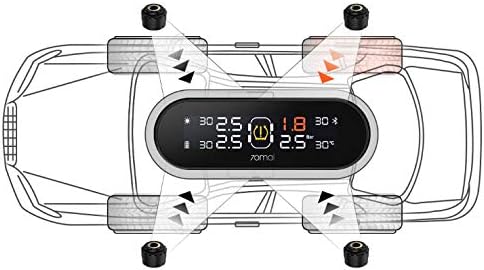
Figure 3.1: Sensor installation diagram, illustrating the correct placement of each sensor on the respective tire valve.
3.3 Pairing with Mobile App (Optional)
For an integrated view and additional features, connect your device to the 70mai mobile app via Bluetooth.
- Download the "70mai" app from your smartphone's app store.
- Open the app and follow the on-screen instructions to add your 70mai TPMS Lite device.
- The app may prompt you to scan a QR code on the sensor itself for pairing.

Figure 3.2: The 70mai mobile application interface, providing a comprehensive overview of tire status.

Figure 3.3: The 70mai app's sensor binding screen, used for initial setup and re-pairing of sensors.
4. Operating Instructions
4.1 Power On/Off
The device automatically wakes when the vehicle moves and automatically sleeps when fully parked to conserve battery.
4.2 Display Information
The display unit shows real-time pressure and temperature data for all four tires.

Figure 4.1: The display unit showing real-time tire pressure and temperature readings.
4.3 Alarm Modes
The 70mai TPMS Lite is equipped with multiple alarm functions to alert you to critical tire conditions:
- Fast/Slow Leak Alarm: Alerts when a rapid or gradual air leak is detected.
- High Pressure/Temperature Alarm: Notifies if tire pressure or temperature exceeds safe limits.
- Sensor Fault Alarm: Indicates a malfunction with one of the sensors.
- Sensor Battery Low Power Alarm: Warns when a sensor's battery is low.
To dismiss an alarm, simply press any button on the display unit.
5. Maintenance
5.1 Charging the Display Unit
The display unit can be charged via its integrated solar panel or through the USB port. Ensure the solar panel is exposed to sunlight for optimal charging. For faster charging or in low-light conditions, use the USB cable.
5.2 Sensor Battery Replacement
The external sensors have a battery life of up to 2 years. When a sensor battery low power alarm is triggered, the battery needs to be replaced.
- Carefully unscrew the sensor from the tire valve stem.
- Refer to Figure 2.3 for guidance on disassembling the sensor to access the battery compartment.
- Replace the old battery with a new, compatible battery (e.g., CR1632 coin cell, check sensor specifications for exact type).
- Reassemble the sensor and re-install it on the tire valve stem, ensuring it is tightly secured.
6. Troubleshooting
6.1 No Sensor Data Displayed
- Check Sensor Installation: Ensure sensors are tightly screwed onto the valve stems. A loose connection can prevent data transmission.
- Re-pair Sensors: If a specific sensor is not transmitting, try re-pairing it using the 70mai mobile app and the QR code on the sensor.
- Sensor Battery: Check if the sensor battery is low or depleted. Replace if necessary.
- Vehicle Movement: The system activates when the vehicle is in motion. Drive for a short period to see if data appears.
6.2 Inaccurate Readings
- Verify Tire Pressure: Use a reliable manual tire gauge to cross-check the pressure readings.
- Sensor Placement: Ensure each sensor is on its designated tire (e.g., Front Left sensor on Front Left tire).
- Environmental Factors: Tire pressure and temperature can fluctuate with ambient temperature changes.
6.3 Display Unit Not Powering On/Charging
- USB Charging: Ensure the USB cable is properly connected and the power source is active.
- Solar Charging: Place the display unit in direct sunlight to allow the solar panel to charge the internal battery.
- Battery Depletion: If the unit has been stored for a long time, it may require extended charging.
7. Specifications
| Feature | Specification |
|---|---|
| Model Number | Y0011BU |
| Manufacturer | 70mai |
| Item Weight | 381 g |
| Package Dimensions | 14.73 x 10.92 x 5.84 cm |
| Display Unit Charging | Solar & USB Charging |
| Sensor Type | External Sensors (4 included) |
| Sensor Battery Life | Up to 2 years |
| Connectivity | Bluetooth (for mobile app) |
| Alarm Modes | Fast/Slow Leak, High Pressure/Temperature, Sensor Fault, Sensor Battery Low |
8. Warranty and Support
70mai offers a 12-month 100% free manufacturer assurance for the TPMS Lite. For any questions or concerns, please contact 70mai customer support. Lifetime support is provided.
For further assistance, please visit the official 70mai website or contact their customer service channels.


