
1. Introduction
Thank you for purchasing the Lenco SPR-100BK Splash-Proof Bluetooth Speaker. This portable speaker delivers powerful sound with strong bass and features FM radio, USB, SD card playback, and integrated light effects. Designed for durability, it is splash-proof, making it suitable for various environments. This manual provides essential information for safe and optimal use of your device.
2. Important Safety Instructions
- Do not expose the device to extreme temperatures, direct sunlight, or high humidity.
- Ensure the charging port cover is securely closed when near water to maintain splash-proof integrity.
- Do not disassemble or modify the device. Refer all servicing to qualified personnel.
- Use only the specified charging cable.
- Keep the device away from strong magnetic fields.
- Avoid dropping or subjecting the device to strong impacts.
3. Product Overview
Familiarize yourself with the components of your Lenco SPR-100BK speaker.
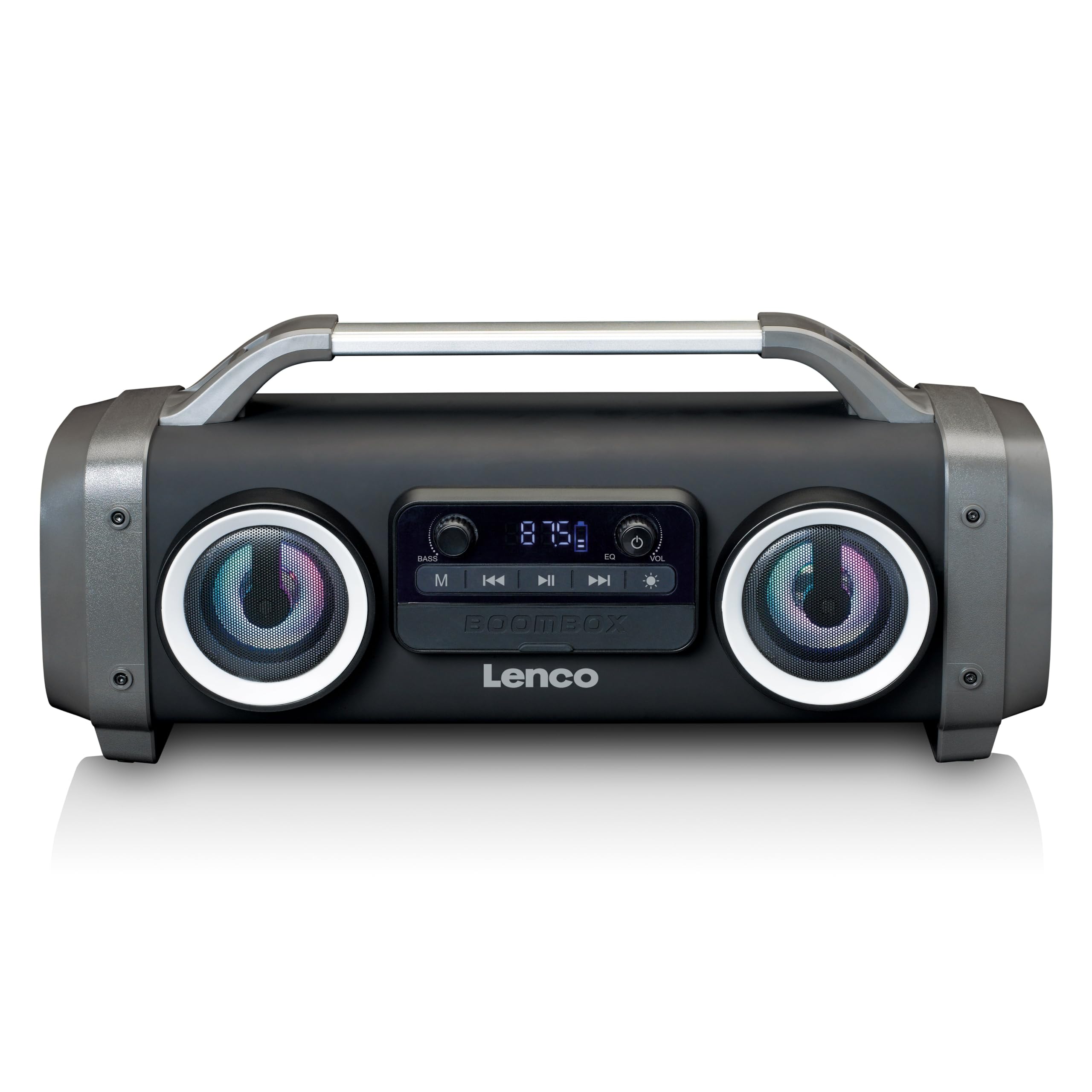
Figure 1: Front view of the Lenco SPR-100BK speaker, showing the main speaker grille, control panel, and integrated light effects.
3.1 Controls and Ports
- Power Button: Turns the speaker on or off.
- Mode Button: Switches between Bluetooth, FM Radio, USB, SD, and AUX modes.
- Play/Pause Button: Plays or pauses audio.
- Volume Control Knob: Adjusts the master volume.
- Bass Boost Knob: Adjusts the bass level.
- Light Effect Button: Cycles through or turns off light effects.
- USB Port: For USB flash drive playback.
- SD Card Slot: For SD card playback.
- AUX Input (3.5mm): For connecting external audio devices.
- Charging Port (Mini USB): For charging the internal battery.
4. Setup
4.1 Unpacking
Carefully remove the speaker and all accessories from the packaging. Ensure the following items are present:
- Lenco SPR-100BK Bluetooth Speaker
- USB Charging Cable
- 3.5mm Audio Cable (AUX cable)
- User Manual
4.2 Charging the Battery
- Locate the Mini USB charging port on the speaker.
- Connect the supplied USB charging cable to the speaker's charging port.
- Connect the other end of the USB cable to a compatible USB power adapter (5V/1A, not included) or a computer's USB port.
- The charging indicator light will illuminate, typically red, during charging. It will turn off or change color (e.g., blue) when fully charged.
- A full charge takes approximately 4-5 hours and provides up to 15 hours of playback (without light effects).
4.3 Initial Power On
Press and hold the Power Button for a few seconds until the speaker powers on and you hear an audible prompt or see the display light up.
5. Operation
5.1 Power On/Off
- To power on: Press and hold the Power Button.
- To power off: Press and hold the Power Button again.
5.2 Bluetooth Connection
- Turn on the speaker. It will automatically enter Bluetooth pairing mode, indicated by a flashing LED.
- Enable Bluetooth on your mobile device (smartphone, tablet, etc.).
- Search for available Bluetooth devices and select "SPR-100BK" from the list.
- Once paired, the speaker will emit a confirmation sound, and the LED will stop flashing.
- True Wireless Stereo (TWS) Mode: If you have two SPR-100BK speakers, you can pair them for stereo sound.
- Ensure both speakers are powered on and in Bluetooth mode.
- On one speaker (the master), press and hold the Mode Button until you hear a TWS pairing prompt.
- The two speakers will automatically connect. Once connected, pair your device to the master speaker as described above.
5.3 FM Radio
- Press the Mode Button repeatedly until you select FM Radio mode.
- To auto-scan and save stations: Press and hold the Play/Pause Button. The speaker will scan for available FM stations and save them automatically.
- To switch between saved stations: Use the Previous/Next Track Buttons (if available, otherwise it will cycle through automatically).
- Note: For better FM reception, ensure the included 3.5mm audio cable is plugged into the AUX input, as it acts as an external antenna.
5.4 USB/SD Card Playback
- Insert a USB flash drive or an SD card (with supported audio files) into the respective port/slot.
- The speaker will automatically switch to USB or SD mode and begin playback. If not, press the Mode Button to select the correct source.
- Use the Play/Pause Button and Previous/Next Track Buttons to control playback.
5.5 AUX Input
- Connect one end of the supplied 3.5mm audio cable to the AUX input on the speaker.
- Connect the other end to the headphone jack or audio output of your external device.
- Press the Mode Button to select AUX mode.
- Control playback and volume from your external device.
5.6 Light Effects
Press the Light Effect Button to cycle through different light modes or to turn the lights off. The speaker features 12 color light effects.
5.7 Sound Adjustment
- Volume: Rotate the Volume Control Knob to increase or decrease the overall sound level.
- Bass: Rotate the Bass Boost Knob to adjust the intensity of the bass.
6. Maintenance
6.1 Cleaning
Wipe the speaker with a soft, dry cloth. Do not use abrasive cleaners, waxes, or solvents. For stubborn dirt, a slightly damp cloth can be used, ensuring all port covers are sealed.
6.2 Battery Care
- To prolong battery life, fully charge the speaker before first use.
- Avoid completely draining the battery frequently.
- If storing the speaker for an extended period, charge it to about 50% every few months.
6.3 Storage
Store the speaker in a cool, dry place, away from direct sunlight and extreme temperatures.
7. Troubleshooting
| Problem | Possible Cause | Solution |
|---|---|---|
| Speaker does not power on. | Battery is depleted. | Charge the speaker using the supplied USB cable. |
| No sound. | Volume is too low; incorrect mode selected; device not connected. | Increase volume; press Mode button to select correct source; ensure Bluetooth device is paired or AUX cable is connected. |
| Bluetooth pairing fails. | Speaker not in pairing mode; device too far; interference. | Ensure speaker is in Bluetooth pairing mode (flashing LED); move device closer; turn off other Bluetooth devices. |
| Poor FM radio reception. | No external antenna; weak signal. | Plug in the 3.5mm AUX cable to act as an antenna; try moving the speaker to a different location. |
| USB/SD playback not working. | Unsupported file format; card/drive not inserted correctly; corrupted files. | Ensure files are in a supported format (e.g., MP3); reinsert the USB drive/SD card; try a different drive/card. |
8. Specifications
| Model Number | SPR-100BK |
| Brand | Lenco |
| Power Output | 25 Watts RMS |
| Connectivity | Bluetooth, USB, SD Card, 3.5mm AUX Input |
| Battery Type | Lithium-ion (4400 mAh) |
| Playback Time | Up to 15 hours (reduced with light effects) |
| Charging Input | 5V/1A (Mini USB) |
| Special Features | Splash-proof design, Integrated light effects, FM Radio, TWS function |
| Dimensions (L x W x H) | 60 x 60 x 85 cm |
| Weight | 2 Kilograms |
Note: Specifications are subject to change without prior notice.
9. Warranty and Support
9.1 Warranty Information
This Lenco product is covered by a warranty for a period of 2 years on parts from the date of purchase. This warranty covers manufacturing defects and workmanship under normal use. It does not cover damage caused by misuse, accidents, unauthorized modifications, or normal wear and tear.
9.2 Software Updates
Software updates for this product are guaranteed until April 13, 2030.
9.3 Customer Support
For technical assistance, warranty claims, or product inquiries, please contact Lenco customer support through their official website or the retailer where the product was purchased. Please have your model number (SPR-100BK) and proof of purchase ready.
Official Lenco Website: www.lenco.com


