
JBL SUBBP12AM
JBL SUBBP12AM User Manual
12" Amplified Subwoofer with Sub Level Control
Product Overview
The JBL SUBBP12AM is a powerful 12-inch amplified subwoofer designed to deliver deep, impactful bass for your car audio system. It features a built-in amplifier, a patented Slipstream port for distortion-free bass, and comes with a remote control for convenient adjustments.

Image: Angled view of the JBL SUBBP12AM amplified subwoofer, showcasing its black enclosure and the JBL logo.
What's in the Box
- One SUBBP12AM powered Subwoofer/enclosure
- Owner's manual
- Remote control

Image: The included remote control unit with its adjustment knob and the connecting cable.
Key Features
- Powered polypropylene subwoofer with built-in amplifier (150W RMS / 450W Peak)
- 12" (305mm) woofer
- Frequency response: 35 - 120Hz
- Patented Slipstream port design for distortion-free bass and reduced port noise
- Durable polypropylene woofer cone
- Includes remote control for convenient sub level adjustments
Setup and Installation
Proper installation is crucial for optimal performance and safety. It is recommended to have this unit installed by a qualified professional.
Placement
Position the subwoofer securely in your vehicle's trunk or cargo area. Ensure it is stable and will not shift during driving. Allow adequate space around the unit for proper ventilation.
Wiring Connections
Connect the power, ground, and remote turn-on wires to your vehicle's electrical system according to the wiring diagram provided in the full owner's manual. Connect the audio input from your head unit or amplifier to the subwoofer's input terminals.
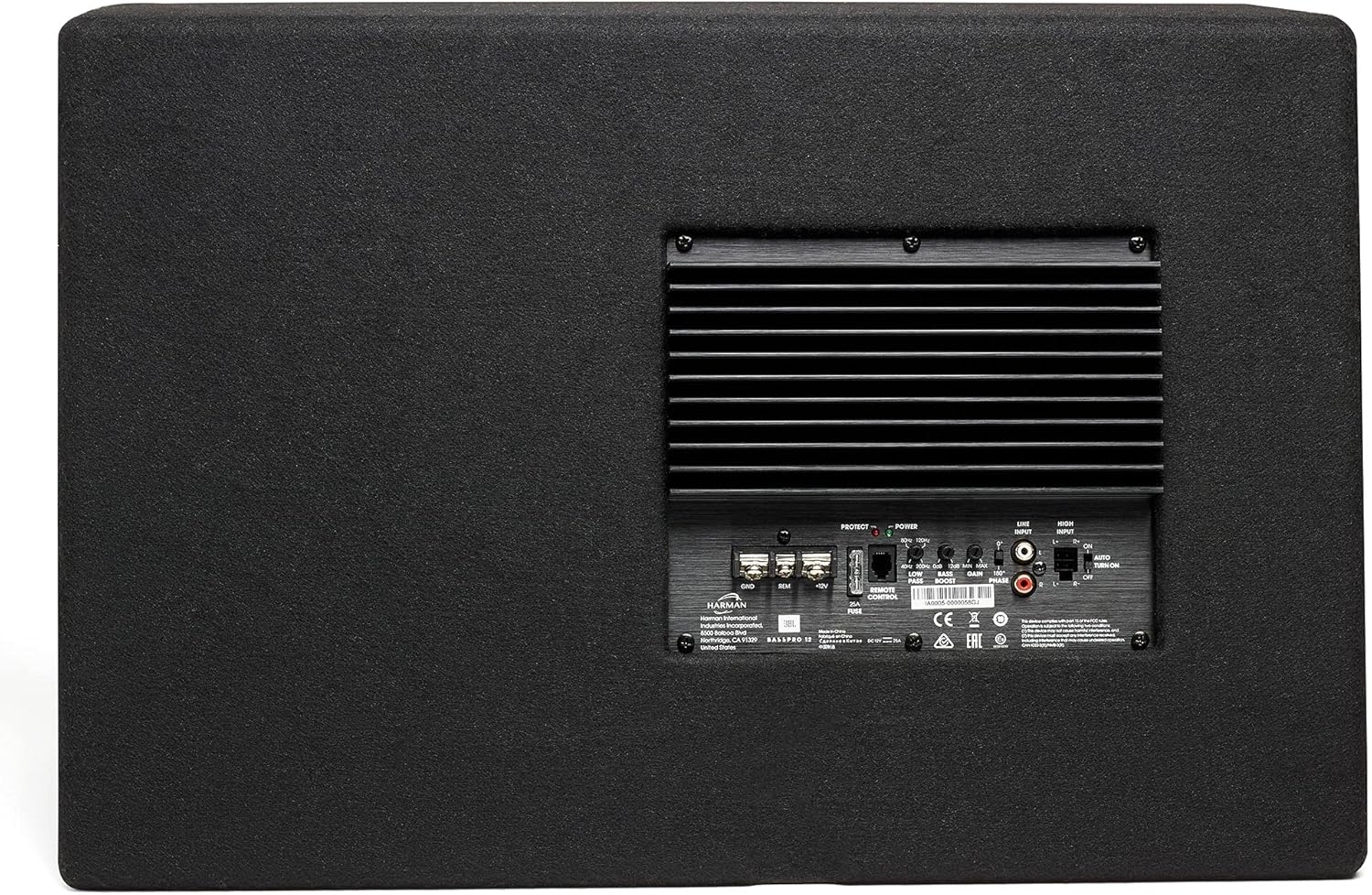
Image: Rear panel of the subwoofer, displaying the various input and control connections for power, audio, and remote.
Remote Level Control Installation
Mount the included remote level control in an accessible location near the driver's seat. Connect the remote control cable to the designated port on the subwoofer's rear panel.
Operating Instructions
Power On/Off
The subwoofer will automatically power on when it receives a remote turn-on signal from your head unit and power is supplied. It will power off when the signal is removed.
Adjusting Bass Level
Use the remote level control to adjust the subwoofer's output level from minimum to maximum, allowing you to fine-tune the bass intensity to your preference while driving.
Optimizing Performance
For optimal sound, ensure your head unit's subwoofer output level and crossover settings are properly configured. The SUBBP12AM's Slipstream port is designed to minimize turbulence and deliver clean, deep bass even at high output levels.
Maintenance
To ensure the longevity and performance of your JBL SUBBP12AM, follow these simple maintenance guidelines:
- Cleaning: Use a soft, dry cloth to wipe down the enclosure. Avoid using abrasive cleaners or solvents, as they may damage the finish.
- Ventilation: Ensure that the subwoofer's vents are not obstructed to prevent overheating.
- Connections: Periodically check all wiring connections to ensure they are secure and free from corrosion.
Troubleshooting
If you experience issues with your JBL SUBBP12AM, refer to the following common troubleshooting steps. For more detailed information, consult the full owner's manual or contact customer support.
- No Power: Check all power and ground connections. Ensure the remote turn-on wire is receiving a signal from your head unit. Verify the vehicle's fuse for the subwoofer circuit.
- No Sound: Confirm that the audio input cables are securely connected. Check the head unit's settings to ensure the subwoofer output is enabled and the volume is up. Adjust the remote level control.
- Distorted Sound: Reduce the input gain on the subwoofer or the output level from your head unit. Check for loose connections or damaged wiring. Ensure the enclosure is not vibrating excessively against other surfaces.
- Overheating: Ensure adequate ventilation around the subwoofer. Check for proper impedance matching if external components are used.
Specifications
| Feature | Detail |
|---|---|
| Model Name | SUBBP12AM |
| Speaker Type | Subwoofer |
| Woofer Diameter | 12 Inches (305mm) |
| Speaker Maximum Output Power | 450 Watts Peak / 150 Watts RMS |
| Frequency Response | 35 Hz - 120 Hz |
| Connectivity Technology | Wired |
| Control Method | Remote Control |
| Product Dimensions | 13"D x 24.13"W x 11.25"H |
| Item Weight | 34.2 pounds (15.56 Kilograms) |
| Color | Black |
| Power Source | Corded Electric |
| Mounting Type | Floor Standing |
| Recommended Uses For Product | Car |
| UPC | 050036368308 |
Warranty and Support
Warranty Information
This JBL SUBBP12AM subwoofer comes with a Limited Warranty. Please refer to the complete warranty statement included with your product or visit the official JBL website for detailed terms and conditions regarding coverage, duration, and claims procedures.
Customer Support
For technical assistance, troubleshooting beyond this manual, or warranty inquiries, please contact JBL customer support. Contact information can typically be found on the official JBL website or in the full owner's manual.
Related documentsSUBBP12AM


Ask a question about this manual
Ask about setup, troubleshooting, compatibility, parts, safety, or missing instructions. Manuals+ will review the question and use this page’s manual context to help answer it.