
Motocaddy M5-GPS-DHC
Motocaddy M5 GPS DHC Electric Golf Caddy User Manual
Model: M5-GPS-DHC | Brand: Motocaddy
Introduction
Welcome to the user manual for your Motocaddy M5 GPS DHC Electric Golf Caddy. This manual provides essential information for setting up, operating, maintaining, and troubleshooting your electric golf caddy. Please read this manual thoroughly to ensure optimal performance and longevity of your product.

Figure 1: The Motocaddy M5 GPS DHC Electric Golf Caddy.
Product Overview and Key Features
The Motocaddy M5 GPS DHC is an advanced electric golf caddy designed to enhance your golfing experience with integrated GPS, smart connectivity, and automatic downhill control. Key features include:
- Touchscreen GPS: Features a 3.5" LCD Touchscreen GPS with 40,000 pre-loaded courses for accurate shot measurement, real-time updates, advanced analytics tracking, and dynamic green view.
- Smart Connectivity: On-board Bluetooth allows connection to your smartphone for calls, texts, emails, Facebook notifications, and other app alerts. Built-in WiFi enables lightning-fast course and system updates.
- Downhill Control (DHC): A Dual Motor System with DHC technology ensures the caddy maintains a constant speed when going downhill, providing stability on varied terrain.
- Fully Adjustable & Compact: Simple-to-fold, 2-step system collapses the cart into a compact size for easy storage and transportation. The thick, ergonomic handle adjusts to fit your height.
- Included Accessories: Comes with a cell phone device cradle, drink holder, umbrella holder, scorecard holder, USB charging cable, and a long-lasting battery and charger.

Figure 2: Detailed view of the M5 GPS DHC touchscreen display highlighting its interactive features.

Figure 3: Included accessories for the M5 GPS DHC, demonstrating their attachment points.
Setup
- Unfolding the Caddy:
The M5 GPS DHC features a simple 2-step folding system. To unfold, release the main latch and extend the frame until it locks into place. Ensure all locking mechanisms are securely engaged before use.

Figure 4: The M5 GPS DHC in its folded configuration.
- Battery Installation and Charging:
Locate the battery compartment. Insert the included Lithium Ion battery, ensuring it clicks securely into place. Connect the charger to the battery and a power outlet. Charge the battery fully before first use. A full charge typically takes several hours. The battery is designed to be lightweight and waterproof with an IP66 rating.
- Handle Adjustment:
Adjust the ergonomic handle to your preferred height for comfortable operation. Loosen the adjustment knob, set the handle to the desired position, and tighten the knob firmly.
- Attaching Accessories:
Utilize the accessory station to attach the cell phone device cradle, drink holder, umbrella holder, and scorecard holder as needed. Ensure they are securely fastened to prevent dislodgement during use.
Operating Instructions
This section details the primary functions and operations of your Motocaddy M5 GPS DHC.
3.1 GPS Functions and Touchscreen Navigation
The 3.5" LCD touchscreen provides comprehensive GPS data and control. It is glove-friendly and ultra-responsive in all weather conditions.
- Course Selection: The caddy comes with 40,000 pre-loaded courses. Select your desired course from the menu.
- Distances: View accurate front, middle, and back distances to the green.
- Dynamic Green View: Adjust the flag position on the green by dragging and dropping it on the screen for precise yardage to the pin.
- Hazard Planning: Access detailed information on course hazards to plan your shots effectively.
- Shot Measurement: Track the distance of your shots automatically or manually.
- Score Tracking: Keep score directly on the device for up to four players.
- Clock & Round Timer: Monitor your pace of play with the integrated clock and round timer.

Figure 5: Overview of GPS and display features.
3.2 Smart Connectivity (Bluetooth & WiFi)
Connect your M5 GPS DHC to your smartphone via Bluetooth and to a WiFi network for enhanced functionality.
- Smartphone Notifications: Receive alerts for incoming calls, text messages, emails, and app notifications directly on the caddy's screen. (Requires compatible smartphone and Motocaddy app).
- Course & Firmware Updates: Use the built-in WiFi to download the latest course maps and firmware updates quickly and easily, ensuring your caddy is always up-to-date.
3.3 Automatic Downhill Control (DHC)
The DHC system automatically regulates the caddy's speed when descending slopes, preventing it from running away and providing a smooth, controlled descent. This feature is always active when the caddy is in motion on a decline.
3.4 Adjustable Distance Control (ADC)
The ADC feature allows you to send the caddy ahead for a pre-set distance (e.g., 15, 30, 45, 60 yards) before it automatically stops. This is useful for sending the caddy to the next tee box or a specific point on the fairway.
3.5 USB Charging Port
A convenient USB charging port is located on the caddy's handle, allowing you to charge your smartphone or other USB-powered devices during your round.
3.6 Product Video Overview
Watch the official product video for a visual guide to the M5 GPS DHC's features and operation:
Video 1: M5GPS DHC Electric Caddy Overview. This video demonstrates the key features including the touchscreen GPS, smart connectivity, shot measurement, and compact folding design.
Maintenance
Regular maintenance ensures the longevity and optimal performance of your Motocaddy M5 GPS DHC.
- Cleaning: Wipe down the caddy with a damp cloth after each use to remove dirt and debris. Avoid using abrasive cleaners.
- Battery Care: Always fully charge the battery after each round, even if it was a short one. Store the battery in a cool, dry place when not in use. For long-term storage, ensure the battery is charged to approximately 50% and recharged every 1-2 months.
- Water & Dust Protection: The caddy has an IP66 water and dust rating, meaning it is protected against powerful water jets and dust ingress. However, avoid submerging the unit.
- Wheel Maintenance: Periodically check the wheels for debris and ensure they spin freely. Clean any grass or dirt from the wheel axles.
- Storage: When folded, store the caddy in a dry, protected area. Its compact design (approximately 25.5 inches high x 18.5 inches wide) allows for easy storage.
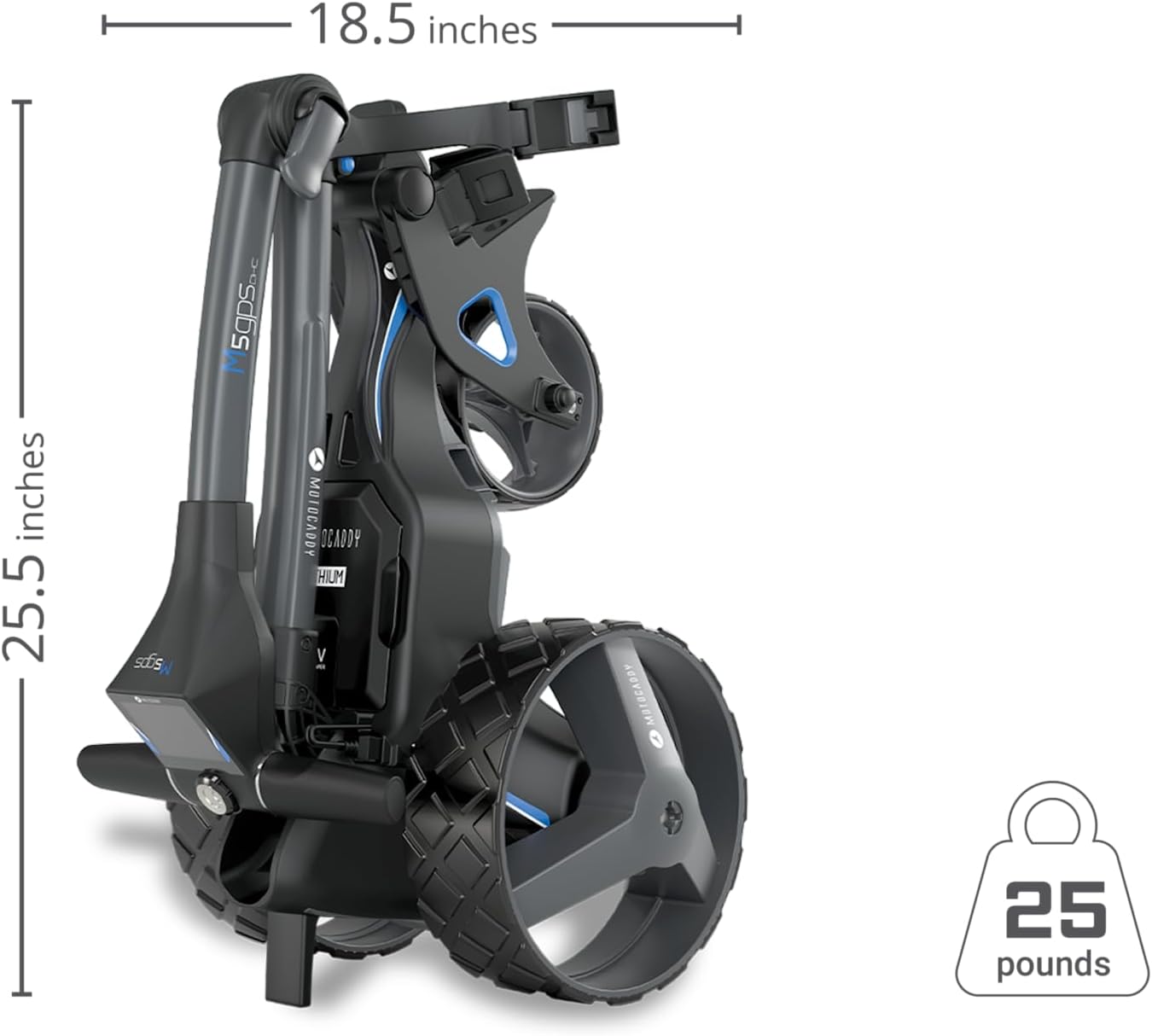
Figure 6: Compact folded dimensions for storage.
Troubleshooting
If you encounter issues with your Motocaddy M5 GPS DHC, refer to the common problems and solutions below:
| Problem | Possible Cause | Solution |
|---|---|---|
| Caddy does not power on. | Battery not connected or discharged. | Ensure battery is fully inserted and charged. Check charger connection. |
| GPS not acquiring signal. | Poor satellite reception; outdated course data. | Move to an open area. Ensure WiFi is connected for course updates. |
| Bluetooth connectivity issues. | Smartphone not paired; Bluetooth off. | Ensure Bluetooth is enabled on your phone and the caddy. Re-pair devices if necessary. |
| Caddy not moving smoothly on slopes. | DHC system malfunction. | Ensure wheels are clean and free of debris. If issue persists, contact support. |
| Screen unresponsive. | Temporary software glitch. | Restart the caddy. Ensure screen is clean and dry. |
For issues not covered here, or for further assistance, please contact Motocaddy customer support.
Specifications
Detailed specifications for the Motocaddy M5 GPS DHC Electric Golf Caddy:
| Feature | Detail |
|---|---|
| Model Number | M5-GPS-DHC |
| Item Weight | 39.9 pounds |
| Display Size | 3.5 Inches LCD Touchscreen |
| Display Resolution | 480 x 272 |
| Battery Type | 1 Lithium Ion (included) |
| Connectivity | Bluetooth, WiFi, USB |
| GPS Features | 40,000 pre-loaded courses, Shot Measurement, Dynamic Green View, Hazard Planning |
| Control Features | Automatic Downhill Control (DHC), Adjustable Distance Control (ADC) |
| Folding Mechanism | Simple 2-step compact folding |
| Included Components | 1 x Golf Cart, Battery, Charger, Cell Phone Cradle, Drink Holder, Umbrella Holder, Scorecard Holder, USB Charging Cable |
| Water & Dust Rating | IP66 |
Warranty and Support
For detailed warranty information, please refer to the warranty card included with your product or visit the official Motocaddy website. For technical support, spare parts, or service inquiries, please contact Motocaddy customer service directly. Contact details can typically be found on the manufacturer's website or in the product packaging.
Related documentsM5-GPS-DHC


Ask a question about this manual
Ask about setup, troubleshooting, compatibility, parts, safety, or missing instructions. Manuals+ will review the question and use this page’s manual context to help answer it.