
Introduction
This manual provides comprehensive instructions for the setup, operation, and maintenance of your LINKCOOL 42-inch Portable Adjustable Cell Phone Tripod Stand. Please read this manual thoroughly before using the product to ensure proper functionality and safety.
What's in the Box
Verify that all components are present upon unpacking:
- 42-inch Phone Tripod Stand
- Phone Holder Mount
- Bluetooth Wireless Remote Control
- GoPro Adapter
- Carry Bag
- Instruction Manual (this document)
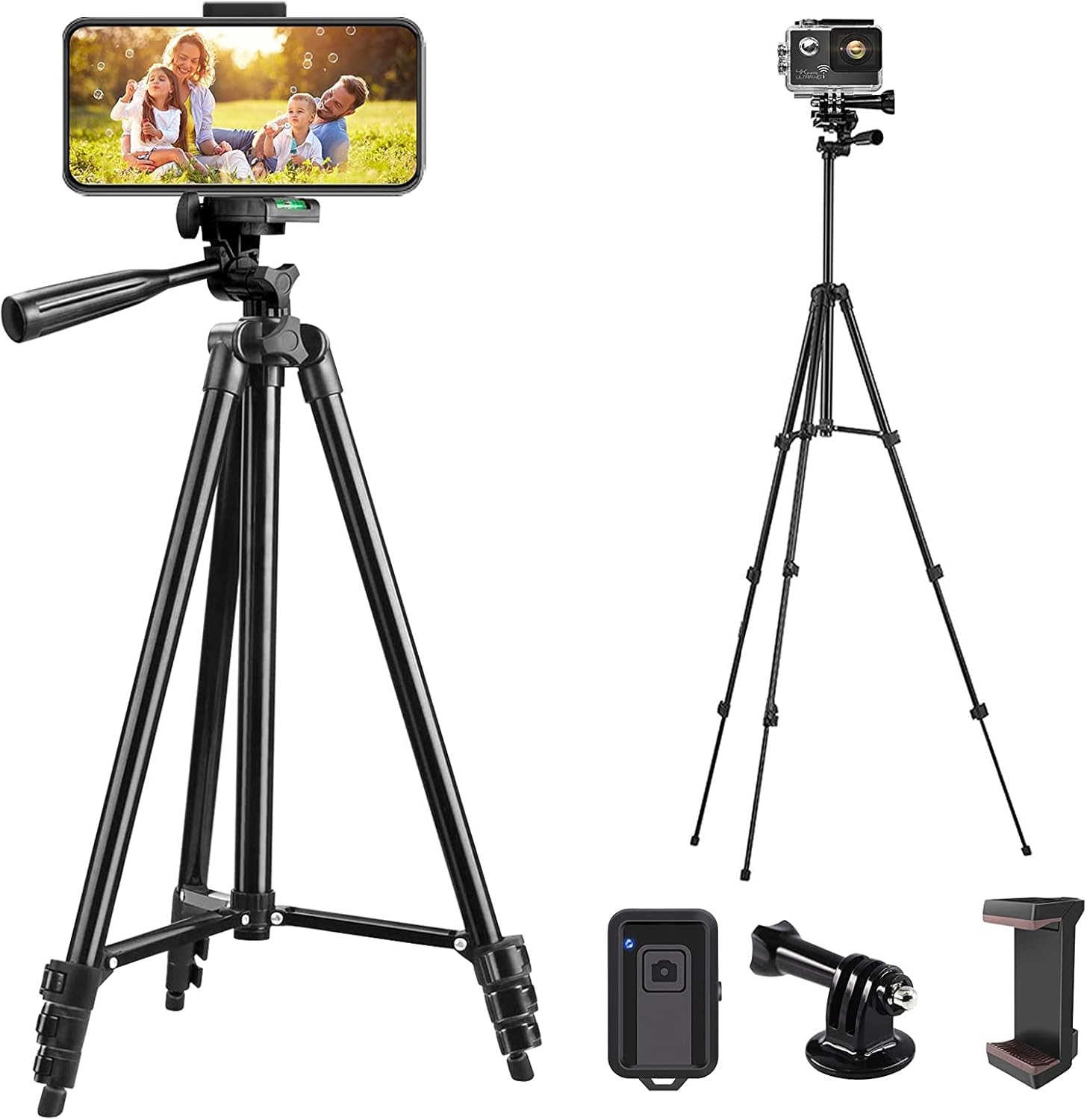
Image: The LINKCOOL 42-inch Phone Tripod Stand, including the main tripod unit, a phone holder, a wireless remote control, and a GoPro adapter.
Video: An overview of the LINKCOOL 42-inch Portable Adjustable Phone Tripod, demonstrating its components, adjustable height, angle capabilities, and remote control pairing. Duration: 0:43.
Setup
1. Tripod Assembly and Height Adjustment
- Unfold the tripod legs by gently pulling them outwards until they are fully extended and stable.
- To adjust the height, locate the quick-release flip-locks on each leg section. Open the locks, extend the leg sections to the desired height, and then securely close the flip-locks.
- The center column can also be extended for additional height. Loosen the knob at the base of the center column, raise it, and then tighten the knob to secure.

Image: The tripod demonstrating its adjustable height capabilities, ranging from 13 inches (34.5cm) to 42 inches (106cm).
2. Attaching the Phone Mount or Camera
- For Phone Mount: Screw the phone holder mount onto the tripod's 1/4-inch universal screw. Ensure it is tightened securely. The phone mount can extend to accommodate phones between 5.8cm and 9cm (approximately 2.3 to 3.54 inches) in width.
- For Camera/GoPro: If using a camera, attach it directly to the 1/4-inch universal screw. For a GoPro, use the provided GoPro adapter to secure it to the tripod.

Image: Illustration detailing the cell phone clip size (7.1cm to 10.5cm) and demonstrating the universal compatibility of the tripod with various devices.
Video: Demonstrates the assembly of the tripod, including attaching the phone mount and adjusting angles. Duration: 0:57.
3. Bluetooth Remote Control Pairing
- Ensure the remote control has a working battery (1 Lithium Metal battery included).
- Turn on the remote control by sliding the ON/OFF switch. A blue LED light will flash, indicating it's in pairing mode.
- On your smartphone, go to Bluetooth settings and enable Bluetooth.
- Look for "AB Shutter3" in the list of available devices and select it to pair. The blue LED on the remote will turn off once successfully paired.
- Open your phone's camera app. You can now use the remote control to trigger the shutter.
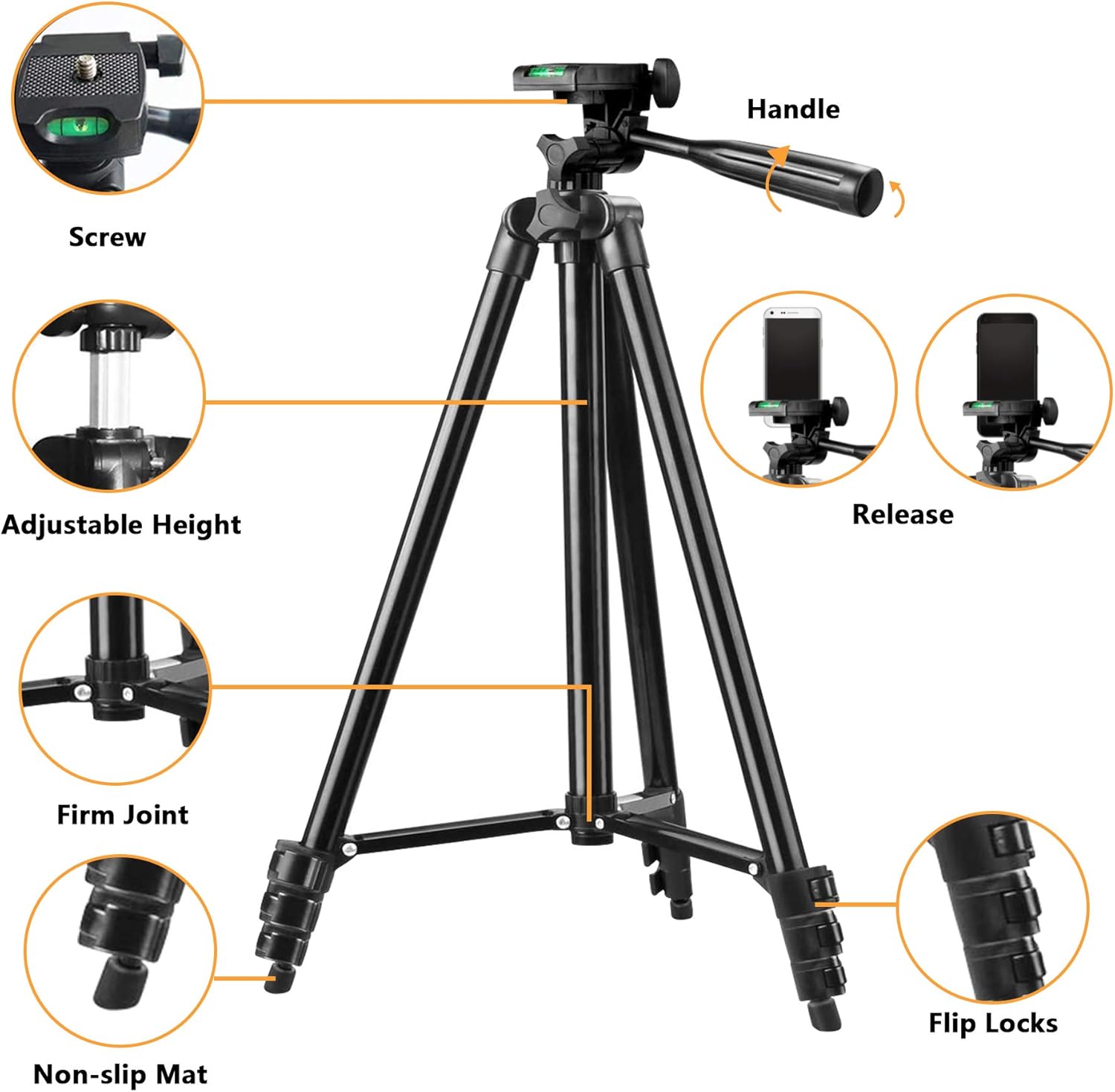
Image: Visual guide for pairing the Bluetooth remote control, showing the ON/OFF switch, LED indicator, and the pairing process on a smartphone's Bluetooth settings.
Operating Instructions
1. Adjusting Angles and Orientation
The tripod head features a 3-way pan and tilt mechanism, allowing for versatile positioning:
- Pan (Horizontal Rotation): Loosen the main knob below the camera platform to rotate the head 360 degrees horizontally for panoramic shots. Tighten to secure.
- Tilt (Vertical Adjustment): Use the pan handle to adjust the vertical angle (up to 90 degrees forward and 180 degrees backward). Tighten the handle's locking mechanism to secure the desired tilt.
- Portrait/Landscape Mode: The phone mount can be rotated to switch between portrait and landscape orientations.

Image: Visual representation of the tripod's multi-angle rotation capabilities, including 90-degree tilt, 180-degree tilt, and 360-degree panoramic rotation.
2. Using the Wireless Remote Control
Once paired, the remote control allows you to capture photos or start/stop video recording from a distance of up to 30 feet. Simply press the button on the remote to activate the shutter or recording function on your connected smartphone.

Image: Examples of the tripod being used in outdoor environments, showcasing its utility for capturing moments with family and nature.
Maintenance
- Cleaning: Wipe the tripod with a soft, dry cloth after each use to remove dust and dirt. For stubborn grime, a slightly damp cloth can be used, followed by immediate drying. Avoid harsh chemicals or abrasive cleaners.
- Storage: Store the tripod in its carry bag in a cool, dry place away from direct sunlight and extreme temperatures.
- Inspection: Periodically check all screws, knobs, and flip-locks to ensure they are secure. Tighten any loose components.
- Battery: If the remote control will not be used for an extended period, consider removing the battery to prevent leakage.
Troubleshooting
| Problem | Possible Cause | Solution |
|---|---|---|
| Tripod is unstable. | Leg locks are not fully secured; uneven surface. | Ensure all flip-locks are tightly closed. Adjust leg lengths to compensate for uneven ground. |
| Remote control not pairing. | Remote is off; battery low; Bluetooth not enabled on phone; already paired to another device. | Turn on remote. Replace battery if needed. Enable Bluetooth on phone. Forget other Bluetooth devices and re-pair. |
| Phone not fitting in mount. | Phone width exceeds mount's capacity. | Check phone dimensions against mount specifications (5.8-9cm). Remove bulky phone cases if necessary. |
Specifications
| Feature | Detail |
|---|---|
| Model Name | LK-42B |
| Brand | LINKCOOL |
| Material | Aluminum |
| Maximum Height | 106 Centimeters (42 inches) |
| Minimum Height | 33 Centimeters (13 inches) |
| Item Weight | 420 Grams (14.8 ounces) |
| Weight Limit | 4.4 Pounds |
| Tripod Head Type | Panoramic-heads (3-way pan and tilt) |
| Phone Mount Compatibility | Cell phones within 5.8-9cm (2.3-3.54 inches) width |
| Remote Control Battery | 1 Lithium Metal battery (included) |
| Remote Control Range | Up to 30 feet |
Safety Information
- Do not exceed the maximum weight limit of 4.4 pounds to prevent tipping or damage.
- Ensure all locks and knobs are securely tightened before leaving the tripod unattended with a device attached.
- Avoid using the tripod in strong winds or on unstable surfaces, as this may cause it to fall.
- Keep the product away from children to prevent accidents.
- Do not attempt to disassemble or modify the tripod, as this may void any potential warranty and cause damage.
