
1. Introduction
This manual provides instructions for the proper use and maintenance of your Yenkee YHC 101SR USB 2.0 Hub and Card Reader. Please read this guide thoroughly before using the device to ensure optimal performance and longevity. The YHC 101SR is a versatile adapter that combines a 3-port USB 2.0 hub with a multi-format card reader, designed to expand your computer's connectivity.
2. Package Contents
- Yenkee YHC 101SR USB 2.0 Hub and Card Reader
- User Manual (this document)
3. Key Features
- Plug & Play: No driver installation required for most operating systems.
- 3 USB 2.0 Ports: Expand your PC's connectivity for external devices.
- Multi-Format Card Reader: Supports SD, SDXC, SDHC, and Micro SD cards.
- Automatic Card Recognition: Simplifies data transfer from memory cards.
- Compact Design: Portable and easy to carry.
- High-Speed Data Transfer: Up to 480 Mbps via USB 2.0.
4. Setup Instructions
The Yenkee YHC 101SR is designed for simple Plug & Play operation. Follow these steps to set up your device:
- Connect to Computer: Locate an available USB port on your computer. Insert the USB connector of the YHC 101SR into this port.
- Driver Installation (Automatic): Your operating system (Windows, macOS, Linux) will automatically detect the device and install the necessary drivers. This process usually takes a few seconds.
- Ready for Use: Once the installation is complete, the device is ready to use. You can now connect USB devices or insert memory cards.
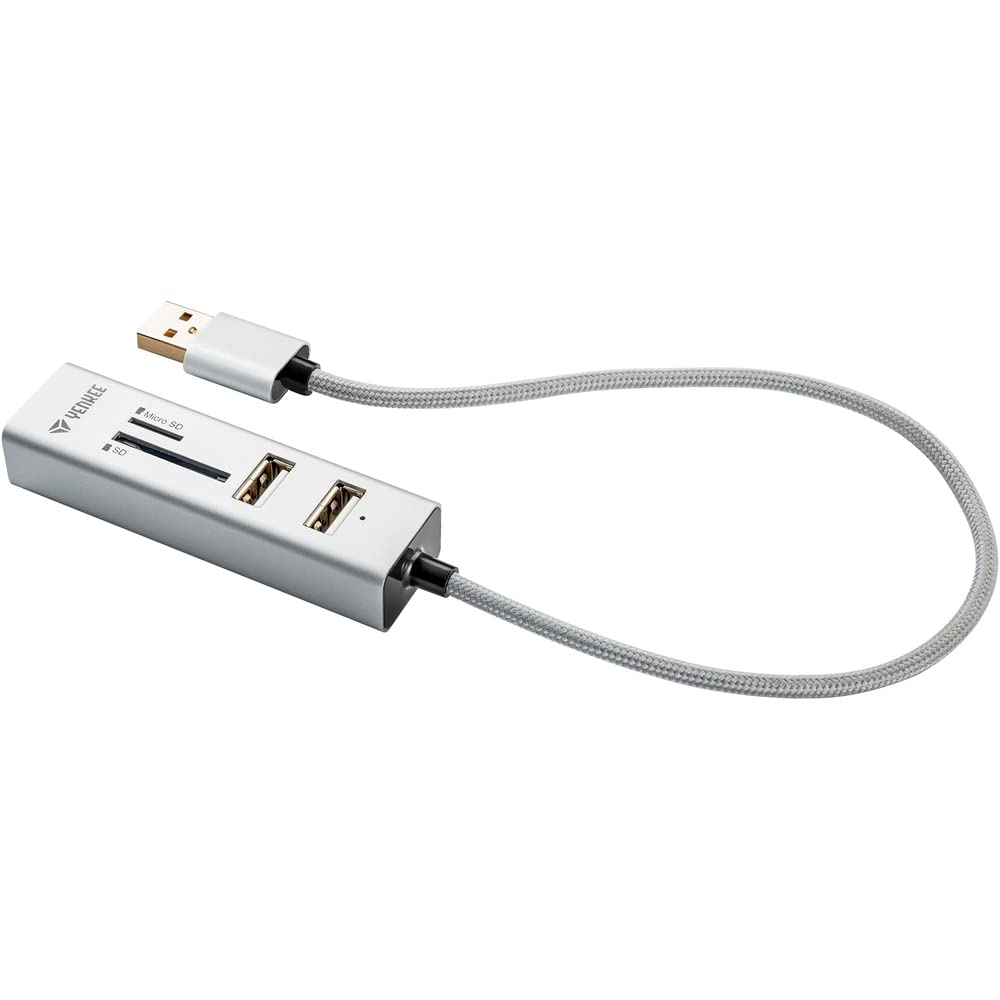
Image 1: The Yenkee YHC 101SR USB 2.0 Hub and Card Reader. This image shows the compact design of the device with its integrated USB cable, ready to be connected to a computer.
5. Operating Instructions
5.1 Using the USB Hub
The YHC 101SR provides three additional USB 2.0 ports for connecting various peripherals.
- Connect USB Devices: Plug your USB devices (e.g., mouse, keyboard, flash drive, external hard drive) into any of the three available USB ports on the hub.
- Device Recognition: Your computer will recognize the connected devices automatically.
- Power Considerations: For high-power consumption devices (e.g., some external hard drives), ensure your computer's USB port can provide sufficient power. If issues arise, try connecting the high-power device directly to a computer port or use a powered USB hub (if available).
5.2 Using the Card Reader
The integrated card reader supports common memory card formats.
- Identify Card Slot: The device has two slots: one for standard SD cards and another for Micro SD cards.
- Insert Memory Card: Gently insert your SD, SDXC, SDHC, or Micro SD card into the corresponding slot until it clicks into place. Ensure the card is inserted in the correct orientation.
- Access Data: Your computer will detect the memory card as a removable drive. You can then access, transfer, or manage files using your computer's file explorer.
- Eject Safely: Before removing the memory card, always safely eject it from your operating system to prevent data corruption.
6. Maintenance and Care
- Cleaning: Use a soft, dry cloth to clean the device. Do not use liquid cleaners or solvents.
- Storage: Store the device in a cool, dry place away from direct sunlight and extreme temperatures.
- Handling: Avoid dropping the device or subjecting it to strong impacts.
- Moisture: Keep the device away from water and high humidity.
7. Troubleshooting
| Problem | Possible Cause | Solution |
|---|---|---|
| Device not recognized by computer. | Loose connection, faulty USB port, operating system issue. |
|
| USB device connected to hub is not working. | Insufficient power, faulty USB device, driver issue for the connected device. |
|
| Memory card not detected. | Incorrect insertion, unsupported card format, faulty card. |
|
8. Specifications
| Model Number | YHC 101SR |
| Brand | Yenkee |
| USB Standard | USB 2.0 |
| Number of USB Ports | 3 |
| Card Reader Slots | SD slot, Micro SD slot |
| Supported Card Formats | SD, SDXC, SDHC, Micro SD |
| Data Transfer Rate | Up to 480 Mbps |
| Output Power | DC 5V / 500mA |
| Cable Length | 30 cm |
| Dimensions (L x W x H) | 84 x 24 x 16 mm |
| Weight | 39 Grams |
| System Requirements | USB port, Windows Vista/7/8/10, Linux 2.4 or higher, Mac OS X |
| Compatible Devices | Keyboards, Monitors (as per manufacturer's data) |
9. Warranty and Support
Yenkee products are designed for reliability and performance. For information regarding warranty terms, technical support, or service, please refer to the official Yenkee website or contact your local retailer. Keep your purchase receipt as proof of purchase for warranty claims.
Note: Specific warranty details may vary by region and retailer.
