
1. Introduction
Thank you for purchasing the Media Tech MT-3333 3-in-1 Home Theater System. This manual provides essential information for the safe and efficient operation of your new audio system. Please read it thoroughly before use and retain it for future reference.
Package Contents:
- 1 x Media Tech MT-3333 Subwoofer Unit
- 3 x Satellite Speakers
- 1 x Remote Control
- 1 x Audio/Video Cable
- 1 x User Manual
- 1 x Optical Cable

Figure 1.1: Front view of the Media Tech MT-3333 Home Theater System, showing the central subwoofer unit and two tall satellite speakers, along with a smaller center speaker.
2. Safety Instructions
To ensure safe operation and prevent damage, please observe the following safety precautions:
- Power Source: Connect the system only to a power outlet with the specified voltage (AC220-240V 50Hz).
- Ventilation: Ensure adequate ventilation around the subwoofer and speakers. Do not block any ventilation openings.
- Water and Moisture: Do not expose the system to rain, moisture, or dripping/splashing liquids. Do not place objects filled with liquids, such as vases, on the apparatus.
- Heat Sources: Keep the system away from heat sources such as radiators, heat registers, stoves, or other apparatus (including amplifiers) that produce heat.
- Placement: Place the system on a stable, flat surface. Avoid placing it in direct sunlight or in areas with excessive dust or vibrations.
- Cleaning: Unplug the system from the power outlet before cleaning. Use a dry cloth only.
- Servicing: Do not attempt to service this product yourself. Refer all servicing to qualified service personnel.
- Children: Keep packaging materials and small parts out of reach of children.
3. Setup
Follow these steps to set up your home theater system:
3.1 Unpacking
- Carefully remove all components from the packaging.
- Check that all items listed in the "Package Contents" section are present.
- Retain the packaging for future transport or storage.
3.2 Speaker Connections
Connect the satellite speakers to the corresponding output ports on the rear of the subwoofer unit. Ensure correct polarity (positive to positive, negative to negative) for optimal sound quality.
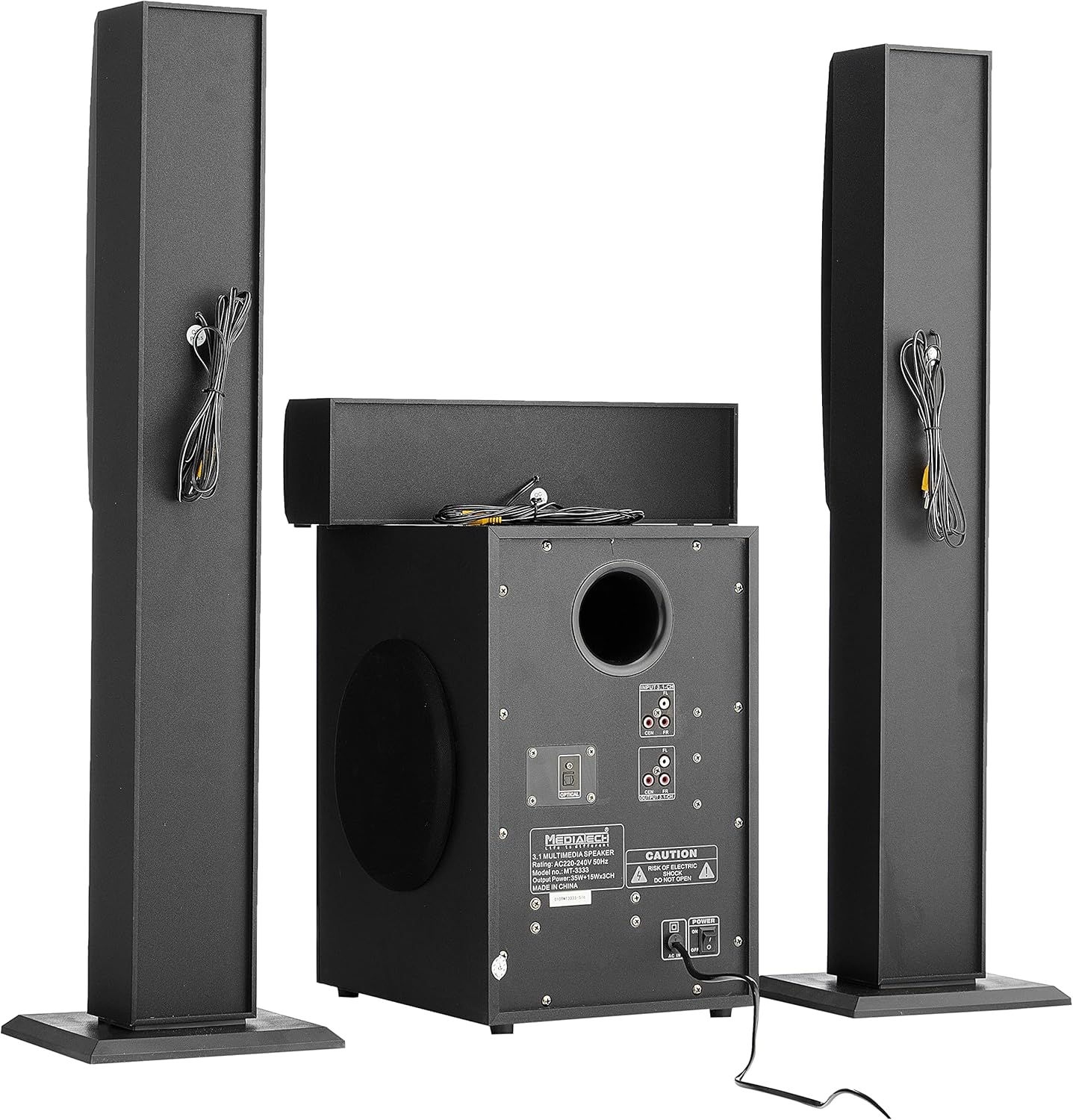
Figure 3.1: Rear view of the system, illustrating the subwoofer and satellite speakers connected via cables.
3.3 Audio Source Connections
The MT-3333 offers multiple input options. Choose the appropriate connection for your audio source:
- Optical Input: For high-quality digital audio from TVs, game consoles, or Blu-ray players. Connect an optical cable from your source to the OPTICAL port on the subwoofer.
- AUX (MP3) Input: For connecting devices with a 3.5mm audio output (e.g., smartphones, tablets, laptops). Use the provided audio cable to connect to the MP3/AUX port.
- USB Input: Insert a USB flash drive containing audio files into the USB port.
- SD Card Input: Insert an SD memory card containing audio files into the SD card slot.
- Bluetooth: For wireless audio streaming from Bluetooth-enabled devices. (Refer to Section 4.3 for pairing instructions).

Figure 3.2: Detailed view of the subwoofer's rear panel, highlighting the various input and output connections, including the Optical port and 3.1-channel audio inputs/outputs.
3.4 Power Connection
- Ensure all audio connections are secure.
- Connect the power cord to the AC IN port on the rear of the subwoofer.
- Plug the two-pin power plug into a suitable wall outlet.
4. Operating Instructions
4.1 Powering On/Off
Locate the power switch on the rear panel of the subwoofer. Flip it to the "ON" position to power on the system. Flip it to "OFF" to power off. You can also use the power button on the remote control or the front panel of the subwoofer.
4.2 Input Selection
Press the "MODE" button on the remote control or the front panel to cycle through available input sources: Bluetooth, USB, SD, AUX, and Optical.
4.3 Bluetooth Pairing
- Switch the system to Bluetooth mode using the "MODE" button. The display will indicate "BT".
- Enable Bluetooth on your mobile device or computer.
- Search for available devices and select "MT-3333" from the list.
- Once paired, you can stream audio wirelessly to the system.
4.4 Volume, Bass, and Treble Control
- Volume: Use the "VOL+" and "VOL-" buttons on the remote or the main volume knob on the subwoofer to adjust the overall volume.
- Bass: Use the "BASS+" and "BASS-" buttons on the remote to adjust the bass level.
- Treble: Use the "TRE+" and "TRE-" buttons on the remote to adjust the treble level.
4.5 Remote Control Functions
The remote control provides full functionality for your MT-3333 system:

Figure 4.1: The remote control for the Media Tech MT-3333, showing buttons for power, input selection (USB, SD, BT, AUX, OPTICAL), volume, bass, treble, equalizer presets (EQ1-EQ4), and media playback controls.
- Power Button (Red): Turns the system on or off.
- Input Selection (USB, SD, BT, AUX, DIS, LED): Selects the desired audio source. 'DIS' might refer to display or another input. 'LED' controls lighting.
- Volume Control (VOL+, VOL-): Adjusts the master volume.
- Bass Control (BASS+, BASS-): Adjusts the bass output.
- Treble Control (TRE+, TRE-): Adjusts the treble output.
- EQ (EQ1-EQ4): Selects preset equalizer modes.
- Media Playback Controls (Play/Pause, Next, Previous, Repeat): For USB/SD card playback.
- Mute: Silences the audio output.
- Numeric Keypad (0-9): For direct track selection on USB/SD.
- Lighting Control (LED): Activates or adjusts any integrated lighting features.
5. Maintenance
Proper maintenance ensures the longevity and optimal performance of your home theater system.
5.1 Cleaning
- Always unplug the system from the power outlet before cleaning.
- Use a soft, dry cloth to wipe the surfaces of the subwoofer and speakers.
- Do not use liquid cleaners, aerosols, or abrasive cleaning agents, as they may damage the finish or internal components.
- Use a soft brush or compressed air to gently clean dust from speaker grilles and ventilation openings.
5.2 Storage
If you plan to store the system for an extended period:
- Disconnect all cables and power cords.
- Store the system in a cool, dry place, away from direct sunlight and extreme temperatures.
- If possible, use the original packaging to protect the components from dust and physical damage.
6. Troubleshooting
If you encounter any issues with your Media Tech MT-3333, refer to the following table for common problems and solutions.
| Problem | Possible Cause | Solution |
|---|---|---|
| No power | Power cord not connected; Power switch off; Wall outlet faulty | Ensure power cord is securely plugged in; Turn power switch ON; Test wall outlet with another device. |
| No sound | Incorrect input selected; Volume too low; Speaker cables loose; Mute function active | Press MODE to select correct input; Increase volume; Check speaker connections; Press MUTE on remote. |
| Poor sound quality | Loose connections; Source audio quality low; Incorrect EQ setting | Check all cable connections; Try a different audio source; Adjust BASS/TREBLE or EQ settings. |
| Remote control not working | Batteries depleted; Obstruction between remote and system; Remote not pointed correctly | Replace remote control batteries; Remove any obstructions; Point remote directly at the subwoofer's sensor. |
| Bluetooth pairing failure | System not in BT mode; Device too far; Interference | Ensure system is in BT mode; Move device closer; Turn off other Bluetooth devices nearby. |
If the problem persists after trying these solutions, please contact customer support.
7. Specifications
| Feature | Specification |
|---|---|
| Model Number | MT-3333 |
| Output Power | Subwoofer: 35W, Satellite Speakers: 3 x 15W (Total 80W) |
| Speaker Unit Size | Subwoofer: 6.5 inches, Satellite Speakers: 3 x 3 inches |
| Material | Wood and ABS Plastic |
| Inputs | USB, AUX (MP3), SD Card, Bluetooth, Optical |
| Power Supply | AC220-240V 50Hz |
| Approx. Shipping Dimensions | 76 x 26 x 21 cm |
| Approx. Shipping Weight | 3.1 kg |
8. Warranty and Support
Media Tech products are designed for reliability and performance. This product comes with a standard manufacturer's warranty against defects in materials and workmanship under normal use.
For warranty claims, technical support, or service inquiries, please refer to the contact information provided on your purchase receipt or visit the official Media Tech website.
Please note: The warranty may not cover damage caused by improper installation, accident, misuse, abuse, negligence, or unauthorized modification.

