
1. Introduction
This manual provides detailed instructions for the installation, operation, and maintenance of your Jensen AWM965 AM/FM|CD|DVD|MP3/USB Wallmount Stereo. The AWM965 is a 12-volt multimedia system featuring an AM/FM electronic tuner (US/Euro), a CD and DVD player, and a front USB input for playback of MP3/WMA files from compatible flash drives. This unit is designed for durability in mobile environments.
IMPORTANT: Before operating, ensure the Transport/Shipping Screw has been removed from the rear of the unit. This screw protects the DVD player during shipping but must be removed for proper DVD functionality.
2. Setup and Installation
2.1. Unpacking and Inspection
Carefully remove the unit from its packaging. Verify that all components listed in the packing list are present. Inspect the unit for any signs of damage incurred during transit. If any items are missing or damaged, contact your dealer immediately.

Image: The Jensen AWM965 unit, remote control with battery, 20-pin power/A-B speaker mating pigtail, and auxiliary audio/video cable. This image also shows the recommended cutout dimensions for installation.
2.2. Selecting the Mounting Location
Choose a mounting location that avoids:
- Proximity to heat-radiating appliances such as electric heaters.
- Areas adjacent to other equipment that radiates heat.
- Poorly-ventilated or dusty places.
- Moist or humid locations.
2.3. Preparing the Opening
Use the provided mounting hole diagram to measure and cut an opening in the desired mounting surface. Secure the unit using four M3x20mm screws. Ensure the area behind the mounting location is clear of wires, fuel, vacuum, or brake lines.
2.4. Wiring the Radio
Route the power, speaker, and antenna cables through the hole. Connect them to the unit as outlined in the wiring diagram. After ensuring correct connections, perform a test operation.
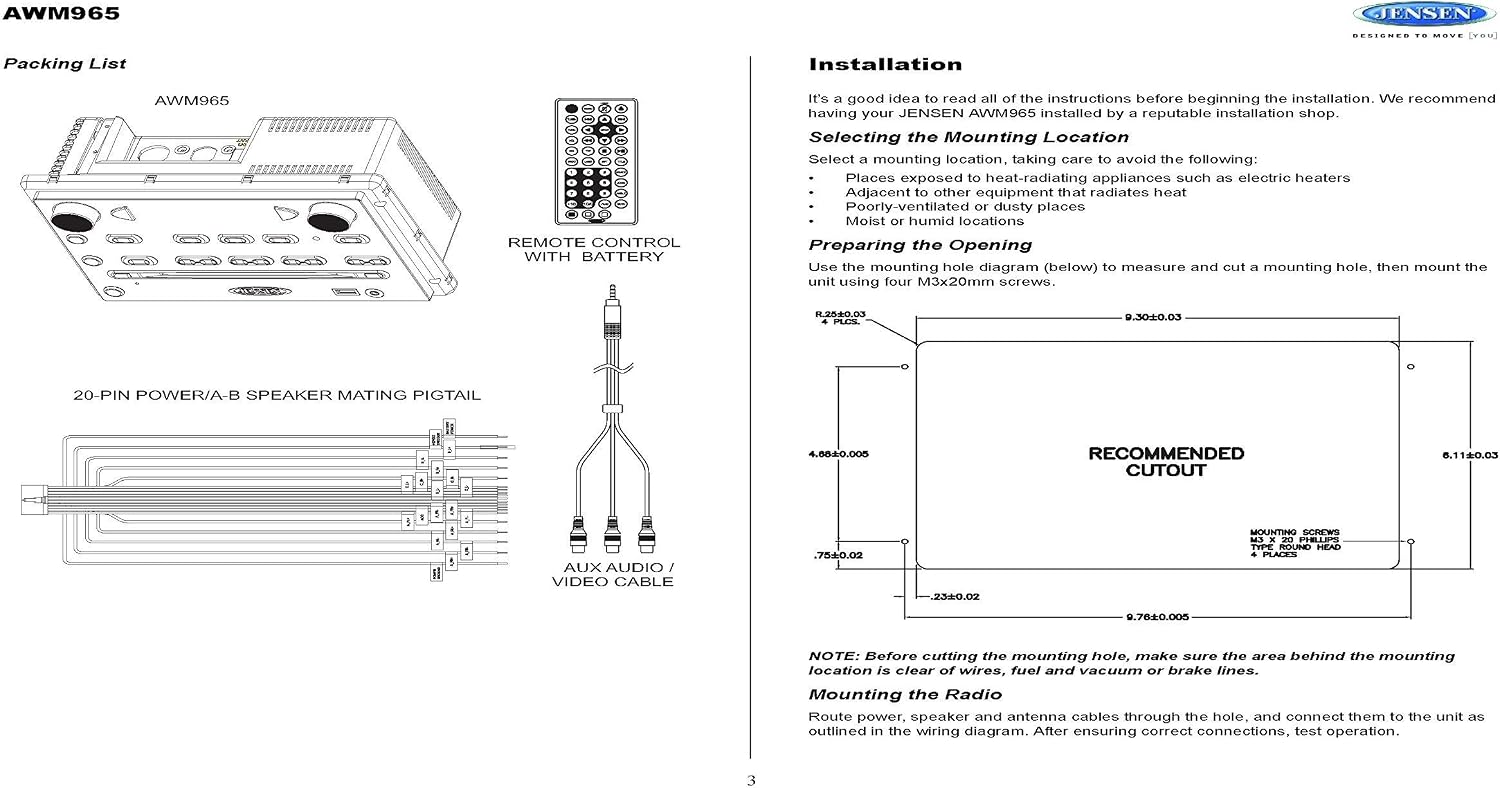
Image: Detailed wiring diagram for the Jensen AWM965, showing connections for power, speakers, and auxiliary inputs. Includes a 10 AMP fuse and pin descriptions for the wiring harness.
The wiring diagram depicts all the wiring connections required for proper operation of the unit. Refer to the diagram for specific pin assignments and color codes for the 20-pin power/speaker harness.
3. Operating Instructions
The Jensen AWM965 offers various functions accessible via the front panel controls and the included remote control.

Image: Front panel of the Jensen AWM965 showing the display, control buttons for power, volume, tuning, source selection, and disc slot.

Image: The remote control for the Jensen AWM965, displaying buttons for power, menu, volume, tuning, playback controls, source selection, and numerical input.
3.1. Basic Controls
- Power Button (P): Press to turn the unit on or off.
- Volume (VOL): Rotate the knob or use the remote's VOL +/- buttons to adjust the audio level.
- Source (SRC): Press to cycle through available audio/video sources (AM/FM, CD, DVD, USB, AUX).
- Mute: Press to temporarily silence the audio output. Press again to restore.
- Loudness (LOUD): Activates or deactivates the loudness compensation for enhanced bass and treble at low volumes.
- Menu: Accesses the system menu for various settings.
- Enter: Confirms selections in the menu or during playback.
3.2. AM/FM Tuner Operation
- Band Selection: Press the SRC button until AM or FM is selected.
- Tuning: Use the TUNE +/- buttons to manually tune to a station. Press and hold TUNE +/- for automatic seek tuning.
- Preset Stations: The unit supports 30 programmable stations (18 FM, 12 AM). To store a station, tune to the desired frequency, then press and hold a preset button (1-6) until the display confirms storage.
- Auto Store: Automatically scans and stores the strongest stations to presets.
- US/European Frequency Spacing: Selectable via the system menu.
3.3. CD/DVD Player Operation
- Disc Insertion: Gently insert a CD or DVD into the disc slot with the label side facing up. The unit will automatically load the disc.
- Playback Controls: Use the Play/Pause (;), Stop (=), Skip Forward/Backward (: / 9) buttons for disc navigation.
- Repeat (RPT): Repeats the current track/chapter or entire disc.
- Program (PROG): Allows for programmed playback of tracks/chapters.
- Title/Menu: Accesses the DVD title or disc menu.
- Zoom/Angle/Audio/GoTo: Specific DVD playback functions available via the remote control.
3.4. USB Playback
Insert a USB flash drive into the front USB input. The unit supports MP3, WMA, and JPEG formats. Use the playback controls to navigate files and folders. The USB port also supports charging of iPod and other USB-based devices.
3.5. Auxiliary Audio/Video Input
Connect external audio/video devices to the front 3.5mm line-level input. Select the AUX source to listen to or view content from the connected device.
3.6. Clock and Timer Functions
The unit features a clock with a sleep timer and an alarm clock. These functions can be set and adjusted through the system menu.
3.7. LCD Dimmer
The LCD display brightness can be adjusted via the dimmer setting in the system menu for optimal viewing conditions.
4. Maintenance
4.1. Cleaning the Unit
To clean the unit, use a soft, dry cloth. For stubborn stains, dampen the cloth lightly with water. Never use harsh chemicals, abrasive cleaners, or solvents, as these can damage the finish or internal components.
4.2. Disc Care
Handle discs by their edges. Keep discs clean and free of scratches. Store discs in their cases when not in use to prevent damage.
5. Troubleshooting
If you experience issues with your Jensen AWM965, refer to the following common problems and solutions:
- No Power: Check the 10 AMP fuse in the wiring harness. Ensure all power connections are secure. Verify the vehicle's 12-volt power supply is active.
- No Sound: Check speaker connections for proper polarity and secure attachment. Ensure the Mute function is not active. Verify the volume level is not set to minimum.
- DVD Player Not Working / Disc Error: Ensure the Transport/Shipping Screw has been removed from the rear of the unit. Try a different disc to rule out a faulty disc. Clean the disc if necessary.
- USB Device Not Recognized: Ensure the USB device is formatted correctly (FAT32 recommended). Try a different USB device. Ensure the files are in supported formats (MP3, WMA, JPEG).
- Remote Control Not Responding: Check and replace the remote control battery if necessary. Ensure there are no obstructions between the remote and the unit's IR receiver.
- Poor Radio Reception: Check the antenna connection. Ensure the antenna is fully extended or properly installed. Move to an area with better signal strength if in a remote location.
If the problem persists after attempting these solutions, contact customer support or a qualified service technician.
6. Specifications
The following table details the technical specifications of the Jensen AWM965 Wallmount Stereo:

Image: A page from the manual detailing general, FM tuner, AM tuner, amplifier, and DVD specifications for the Jensen AWM965.
| Category | Specification |
|---|---|
| Model Number | AWM965 |
| Power System | 12 V DC (3-wire) |
| Operating Voltage Range | 10 V to 16 V |
| Current Draw @ 12V (Idle) | 7 mA |
| Current Draw @ 12V (Nominal) | 3.5 A |
| Current Draw @ 12V (Maximum) | 10 A |
| Operating Temperature Range | 14°F to 140°F (-10°C to 60°C) |
| Storage Temperature Range | -22°F to 158°F (-30°C to 70°C) |
| Maximum Relative Humidity | 85% |
| Overall Dimensions (W x H x D) | 10 7/16" x 7" x 5" (26.59 cm x 17.78 cm x 12.7 cm) |
| Product Weight | 5.5 lbs (2.54 kg) |
| FM Tuner Sensitivity | 2 µV |
| AM Tuner Sensitivity | 15 µV |
| CD Frequency Response | 20 Hz to 20 KHz |
| CD Signal to Noise Ratio | 79 dB |
| CD Skip Threshold | 1.6 G |
| Compatible Disc Formats | CD, CD-R, CD-RW, MP3, DVD, DVD+/- RW |
| Maximum Output Power | 8 x 6 Watts Total (6 Watts per channel, 8 channels) |
| Total Harmonic Distortion | 1% |
| Connectivity Technology | Auxiliary, USB |
| Controller Type | Remote |
| Compatible Devices | MP3 Players, Smartphone |
| Connector Type | 3.5mm Jack |
| Audio Output Mode | Stereo |
| Surround Sound Channel Configuration | 5.1 (for compatible external systems) |
| Wireless Technology | IR (for remote control) |
| Supported Formats | MP3 Audio, WMA, JPEG |
| Manufacturer | ASA Electronics |
| UPC | 714752388193 |
Specifications are subject to change without notice.
7. Warranty and Support
7.1. Warranty Information
The Jensen AWM965 Wallmount Stereo comes with a 90-day limited warranty. Please retain your proof of purchase for warranty claims. This warranty covers manufacturing defects under normal use. It does not cover damage resulting from improper installation, accident, misuse, abuse, neglect, or unauthorized modification.
7.2. Customer Support
For technical assistance, troubleshooting beyond this manual, or warranty inquiries, please contact ASA Electronics, the manufacturer of Jensen products. Refer to their official website or product packaging for the most current contact information.


