
Select Sound BTH023
Select Sound Wireless In-Ear Headphones User Manual
Model: BTH023
Introduction
Thank you for choosing Select Sound Wireless In-Ear Headphones, Model BTH023. These headphones are designed to provide a premium audio experience with advanced wireless connectivity, hands-free calling, and a comfortable, ergonomic design suitable for various activities. Please read this manual carefully before using your headphones to ensure proper operation and to maximize their lifespan.
Package Contents
- Select Sound Wireless In-Ear Headphones (BTH023)
- Charging Case
- USB Charging Cable
- User Manual
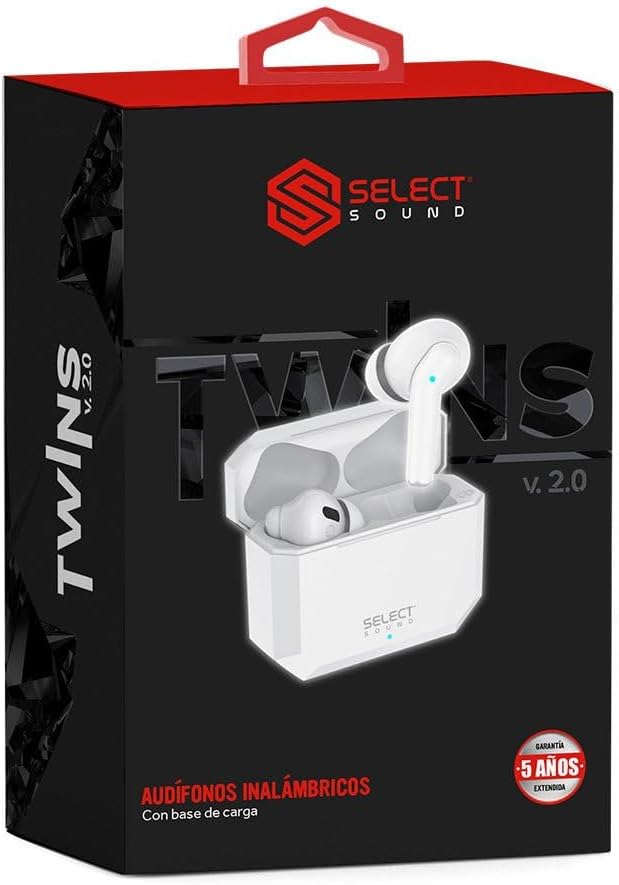
Image: The retail packaging for the Select Sound BTH023 headphones, showing the headphones and charging case inside.
Product Overview
Familiarize yourself with the components of your Select Sound BTH023 headphones.

Image: A pair of white Select Sound BTH023 wireless in-ear headphones, with one earbud partially removed from its open charging case, showing the charging contacts and indicator light.
- Earbuds: Left and Right in-ear headphones with integrated microphones.
- Charging Case: Portable case for charging and storing the earbuds.
- LED Indicator: On earbuds and charging case, indicating power, charging status, and pairing mode.
- Control Area: For playback, call management, and voice assistant activation.
Setup and First Use
1. Charging the Headphones
Before first use, fully charge the headphones and the charging case.
- Place both earbuds into the charging case.
- Connect the charging case to a USB power source using the provided USB cable.
- The LED indicator on the charging case will show charging status. It will typically turn solid or off when fully charged.
- The earbuds' LED indicators will also show their charging status while inside the case.
Note: The average battery life is approximately 4 hours on a full charge. The charging case provides multiple additional charges.
2. Pairing with a Bluetooth Device
The headphones use Bluetooth technology for wireless connection with compatible devices up to 10 meters away.
- Ensure the headphones are charged.
- Open the charging case. The earbuds will automatically enter pairing mode.
- On your device (smartphone, tablet, laptop), go to the Bluetooth settings.
- Turn on Bluetooth and search for available devices.
- Select "BTH023" or "Select Sound BTH023" from the list of found devices.
- Once connected, the earbuds' LED indicators will change, usually turning off or blinking slowly.

Image: A top-down view of the white Select Sound BTH023 wireless in-ear headphones and their closed charging case, illustrating their compact design.
Note: Once paired, the headphones will automatically connect to the last paired device when removed from the case, provided Bluetooth is enabled on the device.
Operating Instructions
Music Playback
- Play/Pause: Tap the control area on either earbud once.
- Next Track: Double-tap the right earbud.
- Previous Track: Double-tap the left earbud.
- Volume Up: Triple-tap the right earbud.
- Volume Down: Triple-tap the left earbud.
Call Management
- Answer/End Call: Tap the control area on either earbud once.
- Reject Call: Press and hold the control area on either earbud for 2 seconds.
Voice Assistant
- Activate Voice Assistant (Siri, Google Assistant, etc.): Press and hold the control area on either earbud for 3 seconds.
Maintenance and Care
- Cleaning: Use a soft, dry cloth to clean the earbuds and charging case. Do not use harsh chemicals or abrasive materials.
- Storage: When not in use, store the headphones in their charging case to protect them and keep them charged.
- Water Resistance: The headphones are water-resistant. Avoid submerging them in water or exposing them to excessive moisture for prolonged periods. Dry them thoroughly if they get wet.
- Battery Life: To preserve battery life, charge the headphones regularly, even if not used frequently. Avoid extreme temperatures.
Troubleshooting
| Problem | Possible Solution |
|---|---|
| Headphones not turning on. | Ensure the earbuds and charging case are fully charged. Place earbuds in the case and close/open the lid. |
| Cannot pair with device. |
|
| No sound or low volume. |
|
| Microphone not working during calls. |
|
Specifications
| Feature | Detail |
|---|---|
| Model Name | BTH023 |
| Connectivity Technology | Bluetooth |
| Wireless Range | Up to 10 meters |
| Ear Placement | In-Ear |
| Noise Control | Acoustic Isolation |
| Water Resistance Level | Water Resistant |
| Frequency Range | 20 Hz - 20,000 Hz |
| Impedance | 10 Ohm |
| Average Battery Life | 4 Hours (earbuds) |
| Battery Cell Composition | Lithium |
| Compatible Devices | Cell phones, Tablets, Desktop computers, Laptops |
| Color | White |
| Manufacturer | Green Whealthy Limited Co., Ltd |
Warranty and Support
Select Sound products are designed for durability and performance. This product may come with a manufacturer's warranty. For specific warranty details and to register your product, please refer to the information provided by the seller, "Select Sound", or visit their official support channels. Some reviews indicate a 5-year warranty may be available upon registration with the seller.
For technical support, troubleshooting assistance, or warranty claims, please contact Select Sound customer service through the platform where you purchased the product or via their official website.
Related documentsBTH023


Ask a question about this manual
Ask about setup, troubleshooting, compatibility, parts, safety, or missing instructions. Manuals+ will review the question and use this page’s manual context to help answer it.