1. Introduction and Intended Use
The Arkray Assure Prism Multi Blood Glucose Test Strips are designed for use with the Assure Prism Multi Blood Glucose Monitoring System. These strips are intended for in vitro diagnostic use (for external use only) by healthcare professionals and people with diabetes at home as an aid in monitoring the effectiveness of diabetes control.
The system measures glucose in fresh capillary whole blood samples obtained from the fingertip, forearm, palm, thigh, or calf. It is not intended for the diagnosis of or screening for diabetes, nor for use on neonates.
2. Important Safety Information
- For Single Use Only: Each test strip is designed for a single blood glucose test. Do not reuse test strips.
- Compatibility: Use only with the Assure Prism Multi Blood Glucose Meter. Using other test strips may lead to inaccurate results.
- Keep Out of Reach of Children: Test strips and lancets can be choking hazards.
- Consult Your Healthcare Professional: Always discuss your test results with your doctor or diabetes educator. Do not make any medical decisions without consulting a healthcare professional.
- Avoid Extreme Temperatures: Store test strips within the recommended temperature range.
3. Product Components
Each package of Assure Prism Multi Blood Glucose Test Strips contains:
- Vial(s) of 50 Assure Prism Multi Blood Glucose Test Strips.
- Instruction leaflet.
Note: The Assure Prism Multi Blood Glucose Meter, lancing device, and lancets are sold separately and are required for testing.

Image: A box containing 50 Assure Prism Multi Blood Glucose Test Strips.

Image: A detailed view of a single Assure Prism Multi Blood Glucose Test Strip, showing the sample application area.
4. Setup and Preparation
- Gather Supplies: Ensure you have your Assure Prism Multi Blood Glucose Meter, a test strip, a lancing device, and a new lancet.
- Wash Hands: Wash your hands thoroughly with warm, soapy water and dry them completely. This helps prevent infection and ensures an accurate sample.
- Prepare Lancing Device: Load a new lancet into your lancing device according to its instructions.
- Remove Test Strip: Take one test strip from the vial. Immediately close the vial cap tightly to protect the remaining strips from moisture.

Image: The Assure Prism Multi meter with a test strip inserted, alongside a box of test strips, illustrating the no-coding feature.
5. Operating Instructions: Performing a Blood Glucose Test
- Insert Test Strip: With the meter turned off, insert the test strip into the test strip port of the Assure Prism Multi meter. The meter will automatically turn on and display a test strip symbol.
- Obtain Blood Sample: Use the lancing device to prick your fingertip (or an alternative site, see Section 6) to obtain a blood drop. Gently squeeze the area to form a round drop of blood.
- Apply Blood Sample: Touch the tip of the test strip to the blood drop. The strip will automatically draw the blood into the sample window. Do not apply blood to the top of the strip. Hold the strip to the blood drop until the meter beeps or the display changes. A minimum of 0.5 microliters (0.5 µL) of blood is required.
- Read Results: The meter will count down, and your blood glucose result will appear on the display in approximately 5 seconds.
- Record and Dispose: Record your result if necessary. Remove the used test strip from the meter and dispose of it and the used lancet properly in a sharps container or according to local regulations.
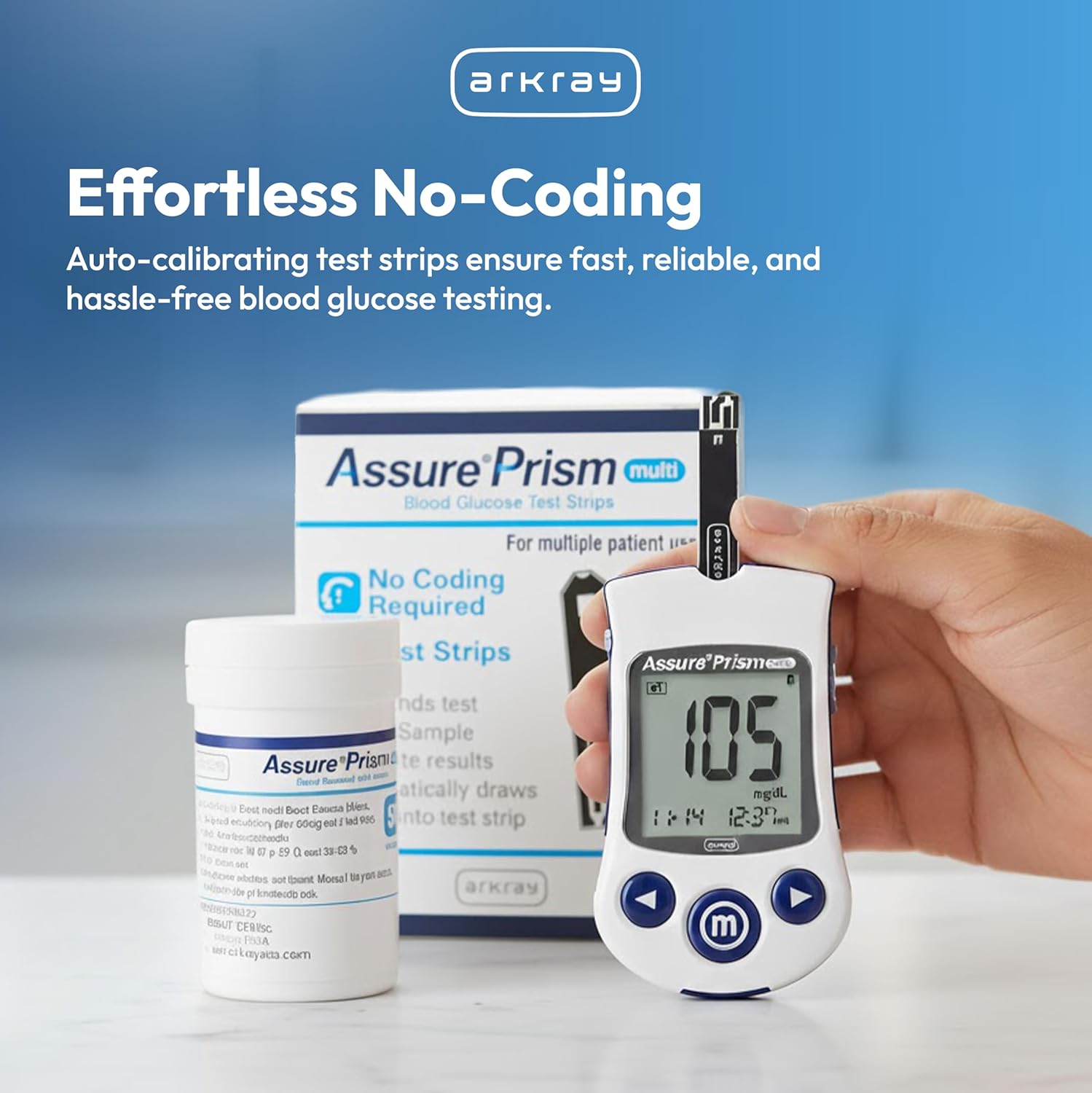
Image: The Assure Prism Multi meter with a test strip inserted, showing a numerical blood glucose reading on its display.

Image: A hand holding the Assure Prism Multi meter with a test strip inserted, demonstrating the readiness for blood sample application.
6. Alternative Site Testing (AST)
The Assure Prism Multi Blood Glucose Test Strips allow for testing from the fingertip, forearm, palm, thigh, or calf. Alternative site testing should only be performed during steady-state glucose conditions (e.g., not immediately after a meal, exercise, or during illness).
- Consult Your Doctor: Always consult your healthcare professional before performing AST to determine if it is appropriate for you.
- Differences in Results: Blood glucose levels from alternative sites may differ from fingertip results, especially when glucose levels are changing rapidly.
- Procedure: Follow the same steps as fingertip testing, ensuring a sufficient blood sample is obtained from the chosen alternative site.

Image: A visual representation of the Assure Prism Multi test strips and meter, emphasizing the flexibility of alternative site testing.
7. Care and Storage
- Store in Original Vial: Always store test strips in their original vial with the cap tightly closed. Do not transfer strips to another container.
- Temperature and Humidity: Store test strips at room temperature, between 34-86°F (1-30°C) and 20-80% relative humidity. Avoid direct sunlight and heat.
- Do Not Refrigerate: Refrigeration is not recommended.
- Expiration Date: Check the expiration date printed on the vial. Do not use expired test strips. Once the vial is opened, use the strips within the period specified in the meter's user manual (typically 90 days or 6 months, refer to your meter manual for exact details).
8. Troubleshooting
If you encounter issues during testing, consider the following:
- Error Messages: Refer to your Assure Prism Multi Blood Glucose Meter user manual for specific error codes and their solutions.
- Insufficient Blood Sample: If the meter does not start counting down after applying blood, you may not have applied enough blood. Do not add more blood to a used strip; discard it and retest with a new strip.
- Expired or Damaged Strips: Ensure your test strips are not expired and the vial cap has been kept tightly closed.
- Inaccurate Results: If results seem inconsistent with your symptoms or you suspect an inaccurate reading, perform a control solution test (if available) or contact your healthcare professional.
9. Specifications
| Feature | Detail |
|---|---|
| Sample Size | 0.5 µL (microliter) |
| Test Time | 5 seconds |
| Compatibility | Assure Prism Multi Blood Glucose Monitoring System |
| Coding | No Coding Required |
| Sample Type | Fresh capillary whole blood |
| Testing Sites | Fingertip, forearm, palm, thigh, calf |
| Storage Temperature | 34-86°F (1-30°C) |
| Humidity Range | 20-80% relative humidity |
| Quantity | 50 Test Strips per vial |
10. Warranty and Support
For warranty information, technical support, or to report any issues with your Assure Prism Multi Blood Glucose Test Strips, please contact Arkray customer service directly. Refer to the contact information provided in your Assure Prism Multi Blood Glucose Meter user manual or visit the official Arkray website.
Manufacturer: Arkray