
1. Introduction
This manual provides detailed instructions for the installation, operation, and maintenance of your Audiopipe APMN-2000 Class D Monoblock Subwoofer Amplifier. Please read this manual thoroughly before use to ensure proper function and safety. Retain this manual for future reference.
Important Safety Note: It is recommended to ground the amplifier to the frame of the vehicle. Always ensure proper wiring and electrical system capacity to prevent damage to the amplifier or vehicle.
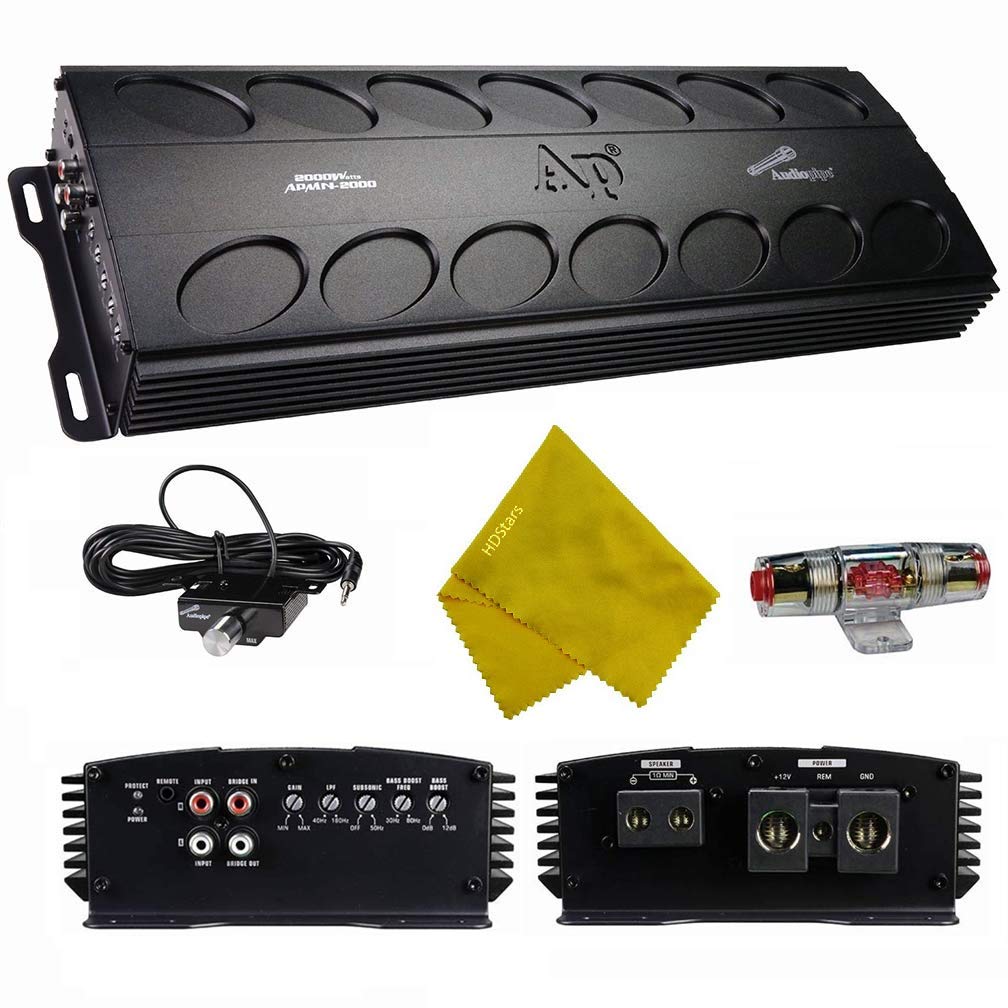
Figure 1.1: Front view of the Audiopipe APMN-2000 Monoblock Subwoofer Amplifier.
2. Setup and Installation
Proper installation is crucial for optimal performance and longevity of your amplifier. If you are unsure about any steps, consult a professional installer.
2.1 Power and Ground Connections
- Power Wire: Use 0-gauge power wire for the main power connection to ensure adequate current delivery. Connect this wire directly to the positive terminal of your vehicle's battery, incorporating an appropriate fuse (150A AFC fuse included) within 18 inches of the battery.
- Ground Wire: Use 0-gauge ground wire. Connect one end to a clean, unpainted metal surface on the vehicle's chassis (frame) and the other end to the amplifier's GND terminal. Ensure a solid, low-resistance connection.
- Remote Turn-On Wire: Connect a remote turn-on wire from your head unit's remote output to the amplifier's REM terminal. This wire signals the amplifier to turn on and off with your audio system.
- Electrical System: For optimal performance, especially when operating at 1 ohm, an upgraded electrical system (e.g., a second battery or high-output alternator) may be necessary to prevent voltage drops and potential overheating.
2.2 Audio Input and Output Connections
- RCA Input: Connect RCA cables from your head unit's subwoofer or full-range output to the amplifier's INPUT RCA jacks.
- Speaker Output: Connect your subwoofer(s) to the amplifier's SPEAKER terminals. Ensure correct polarity (+ to + and - to -) and verify the total impedance of your subwoofer setup matches the amplifier's stable operating impedance (1 ohm minimum).

Figure 2.1: View of the amplifier's input and output connections, including RCA inputs, speaker terminals, and control knobs.
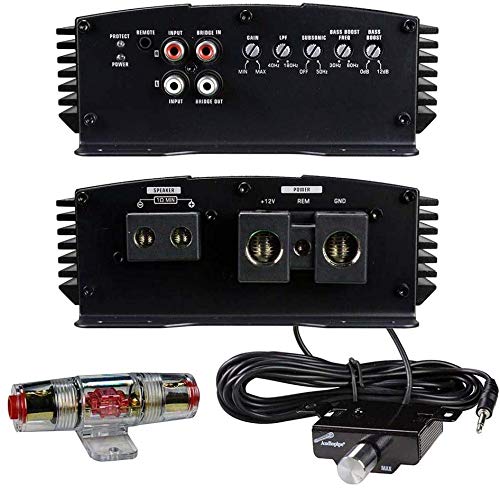
Figure 2.2: Included 150A AFC fuse and the remote bass knob for convenient bass level control.
3. Operating Instructions
Once installed, adjust the amplifier settings for optimal audio performance.
3.1 Control Panel Adjustments
- GAIN: Adjusts the input sensitivity of the amplifier to match the output voltage of your head unit. Start with the gain at minimum and slowly increase until desired volume is reached without distortion.
- LPF (Low Pass Filter): Controls the upper frequency limit for the subwoofer. Adjustable from 40Hz to 180Hz. Set this to filter out higher frequencies that subwoofers are not designed to reproduce.
- SUBSONIC FILTER: Filters out extremely low frequencies below the audible range, which can cause damage to subwoofers and waste amplifier power. Adjustable from 5Hz to 50Hz.
- BASS BOOST: Provides an adjustable bass enhancement at a specific frequency. Adjustable from 0dB to 18dB. Use sparingly to avoid distortion.
3.2 Remote Bass Knob
The included remote bass knob allows for convenient adjustment of the subwoofer output level from the driver's seat. Connect it to the amplifier's REMOTE port.
4. Maintenance
Regular maintenance ensures the longevity and consistent performance of your amplifier.
- Ventilation: Ensure the amplifier is installed in a location with adequate airflow. Avoid covering the heat sinks.
- Cooling: When operating at high power levels or low impedances (e.g., 1 ohm), the amplifier may generate significant heat. If excessive heat is observed, consider installing an external cooling fan to prevent thermal shutdown and ensure stable operation.
- Connections: Periodically check all power, ground, and speaker connections to ensure they are secure and free from corrosion. Loose connections can lead to power loss or damage.
- Cleaning: Keep the amplifier clean and free of dust and debris. Use a soft, dry cloth for cleaning. Do not use liquid cleaners.
5. Troubleshooting
If you experience issues with your amplifier, refer to the following common problems and solutions before seeking professional service.
| Problem | Possible Cause | Solution |
|---|---|---|
| Amplifier does not turn on | No power, poor ground, remote wire disconnected, blown fuse. | Check power, ground, and remote connections. Verify fuse integrity and replace if necessary. |
| Amplifier goes into protection mode (red LED) | Overheating, short circuit in speaker wiring, impedance too low, low voltage. | Ensure proper ventilation and consider external cooling. Check speaker wiring for shorts. Verify speaker impedance is 1 ohm or higher. Check vehicle's electrical system for stable voltage. |
| Distorted or weak sound output | Gain set too high/low, incorrect LPF/Subsonic settings, poor RCA connection, damaged speaker. | Adjust gain appropriately. Verify LPF and Subsonic filter settings. Check RCA cables. Inspect speakers for damage. |
| No bass from subwoofer | Incorrect LPF setting, phase issue, no signal. | Adjust LPF to allow bass frequencies. Check subwoofer wiring phase. Verify RCA signal from head unit. |
6. Specifications
Technical specifications for the Audiopipe APMN-2000 Monoblock Subwoofer Amplifier.
| Feature | Specification |
|---|---|
| Model | APMN2000 |
| Type | Class D Monoblock Subwoofer Amplifier |
| RMS Power (4 ohms) | 770 watts x 1 channel |
| RMS Power (2 ohms) | 1300 watts x 1 channel |
| RMS Power (1 ohm) | 1944 watts x 1 channel |
| Frequency Response | 30-180Hz |
| LPF (Low Pass Filter) | 40-180Hz |
| Subsonic Filter | 5-50Hz |
| Fuses | 1 x 150A AFC fuse (included) |
| Number of Channels | 1 |
| Mounting Type | Surface Mount |
| UPC | 638370183476 |
| ASIN | B084ZYBSB5 |
7. Warranty and Support
For detailed warranty information, technical assistance, or to inquire about service, please visit the official Audiopipe website or contact your authorized Audiopipe dealer. Please retain your purchase receipt as proof of purchase for any warranty claims.
Official Audiopipe Website: Audiopipe Store


