
Introduction
This manual provides essential information for the safe and efficient operation, installation, and maintenance of your Cooler Depot Refrigerated Bakery Display Cooler Case, Model CW-571 / CD-1800. Please read these instructions thoroughly before installation and use to ensure proper function and longevity of the unit.
Safety Information
Always follow basic safety precautions when using electrical appliances to reduce the risk of fire, electric shock, and injury to persons. Keep this manual for future reference.
- Ensure the unit is properly grounded.
- Do not operate the unit with a damaged power cord or plug.
- Do not use extension cords with this appliance.
- Keep ventilation openings clear of obstructions.
- Only qualified personnel should perform repairs.
Setup and Installation
Unpacking
Carefully remove the unit from its packaging. Inspect for any shipping damage. Retain the original packaging for potential returns or future transport. The unit is shipped on a pallet; keep the pallet for return purposes if necessary.
Placement
Place the display cooler on a firm, level surface. Ensure adequate clearance around the unit for proper ventilation, especially at the rear and sides where the compressor and condenser are located. Avoid direct sunlight or proximity to heat-generating appliances.
The unit is designed for freestanding installation.
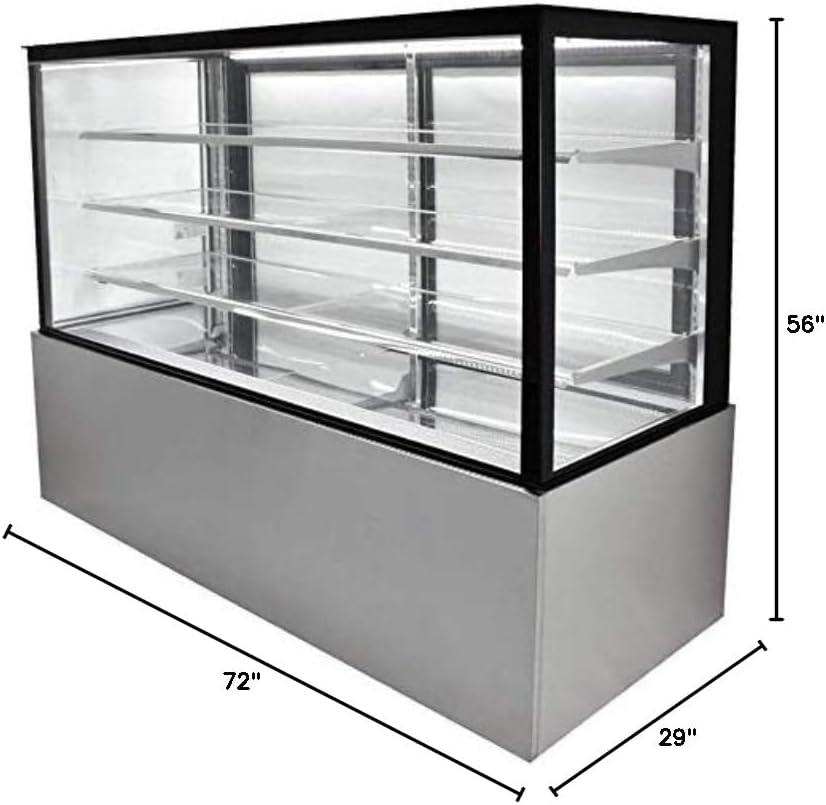
Image: Overall dimensions of the refrigerated bakery display cooler case. The unit measures 72 inches in length, 29 inches in depth, and 56 inches in height.
Initial Cleaning
Before first use, clean the interior and exterior surfaces with a mild detergent and warm water. Rinse thoroughly and dry completely.
Power Connection
Connect the unit to a dedicated 110V electrical outlet. Allow the unit to stand upright for at least 2-4 hours before plugging it in to allow the refrigerant to settle.
Operating Instructions
Powering On/Off
Locate the power switch, typically on the control panel. Flip the switch to the 'ON' position to start the cooling process. To turn off, flip the switch to 'OFF'.
Temperature Control
The unit maintains a steady low temperature range of 36°F to 48°F (2°C to 8°C). Use the digital control panel to adjust the desired temperature within this range. Refer to the control panel image for button identification.

Image: Close-up of the digital control panel for temperature adjustment and the bright LED lighting strip inside the display case.
Shelf Adjustment
The display case features 3 chrome-plated wire interior shelves. These shelves are adjustable to accommodate various product heights. To adjust, carefully lift and reposition the shelves on the support brackets.
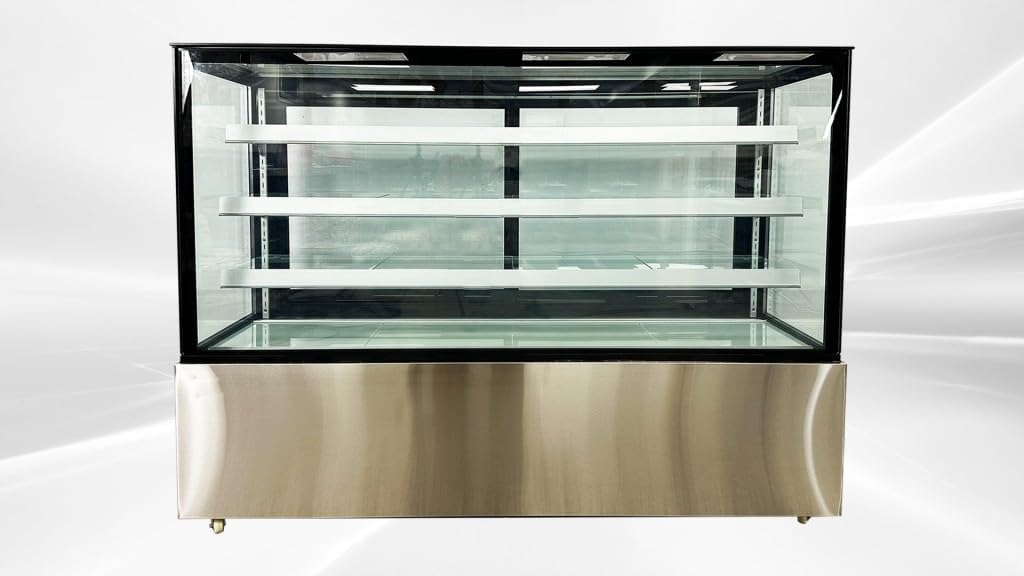
Image: Interior view of the display cooler showcasing the three adjustable chrome-plated wire shelves.
Condensation Reduction
A specialized air outlet design circulates air against the curved glass front to minimize condensation build-up, ensuring clear visibility of displayed items.
Loading Products
Arrange products on the shelves, ensuring not to block air vents or overload shelves. The rear glass access doors provide convenient loading and access.
Video: Demonstration of the Cooler Depot Refrigerated Bakery Case Upright CW-571, showing its features and operation.
Video: Overview of the Bakery Cooler Case CD-1800, highlighting its design and functionality.
Maintenance
Regular Cleaning
- Interior: Regularly wipe down interior surfaces and shelves with a mild, food-safe cleaner. Ensure all surfaces are dry before reloading products.
- Exterior: Clean the exterior stainless steel and glass surfaces with a soft cloth and appropriate cleaner. For glass, use a non-abrasive glass cleaner to maintain clarity.
- Door Seals: Inspect door gaskets regularly for cracks or tears. Clean them with warm, soapy water to ensure a tight seal.
Condenser Coil Cleaning
The condenser coils should be cleaned periodically (e.g., every 3-6 months) to ensure efficient operation. Unplug the unit before cleaning. Use a brush or vacuum cleaner to remove dust and debris from the coils located at the rear or bottom of the unit. Blocked coils can reduce cooling efficiency and increase energy consumption.
Defrost System
This unit features an automatic defrost system. No manual defrosting is typically required. If excessive ice buildup occurs, contact customer support.
Troubleshooting
Before contacting service, please check the following common issues:
| Problem | Possible Cause | Solution |
|---|---|---|
| Unit does not cool | Power cord unplugged; circuit breaker tripped; power switch off. | Check power connection; reset breaker; turn power switch on. |
| Insufficient cooling | Dirty condenser coils; blocked air vents; door not sealing properly; ambient temperature too high. | Clean condenser coils; ensure vents are clear; check door seals; relocate unit if ambient temperature is excessive. |
| Excessive condensation | High humidity; frequent door openings; door seal issues. | Ensure proper ventilation; minimize door openings; check and clean door seals. |
| Unusual noise | Unit not level; loose components; fan obstruction. | Ensure unit is level; inspect for loose parts; check fan for obstructions. |
If problems persist after performing these checks, please contact customer support.
Specifications
| Feature | Detail |
|---|---|
| Model Number | CW-571 / CD-1800 |
| Overall Dimensions (L x D x H) | 72" x 29" x 56" (182.88 cm x 73.66 cm x 142.24 cm) |
| Capacity | 23 cubic feet |
| Voltage | 110V |
| Refrigerant | R290 |
| Temperature Range | 36°F ~ 48°F (2°C ~ 8°C) |
| Number of Doors | 2 (rear access) |
| Number of Shelves | 3 (chrome-plated wire, adjustable) |
| Defrost System | Automatic |
| Installation Type | Freestanding |
| Certifications | NSF, UL, ETL |
Warranty Information
Cooler Depot provides the following warranty for this product:
- All-Parts Warranty: 3 Years
- Compressor Warranty: 6 Years
- Labor Warranty: 1 Year
For functional failures within 1 month of the item's delivered date, a full refund may be applied for. Please ensure the original pallet is retained, as returns cannot be processed without the product being bound to the pallet and wrapped.
Purchases made through Amazon ensure the safety and processing of your warranty claims.
Customer Support
For technical assistance, warranty claims, or any questions regarding your Cooler Depot Refrigerated Bakery Display Cooler Case, please contact Cooler Depot USA.
You can visit the official Cooler Depot USA store for more information: Cooler Depot USA Store
