
1. Introduction
This manual provides detailed instructions for the safe and efficient operation of your Retevis RB17 FRS Walkie Talkie. Please read this manual thoroughly before using the device to ensure proper functionality and to prevent damage.
2. Safety Information
Your Retevis RB17 Walkie Talkie is designed for reliable communication. Adhere to the following safety guidelines:
- FCC Compliance: This device complies with FCC Part 95 rules. The FCC ID for this walkie talkie is 2ASNSRB17.
- Battery Safety: Use only the specified Lithium Ion batteries. Do not expose batteries to fire or extreme temperatures.
- Antenna Care: Do not operate the radio with a damaged antenna. If a damaged antenna comes into contact with skin, a minor burn may result.
- Interference: Turn off the radio in areas where it is required, such as hospitals or aircraft.
- Water Resistance: The device is water repellent, not waterproof. Avoid submerging the radio in water.

3. Package Contents
Upon opening your Retevis RB17 Walkie Talkie package, verify that all items listed below are present:
- Retevis RB17 Walkie Talkie Units (2 Pack)
- 4400mAh Lithium Ion Batteries (2)
- USB Charging Cable (2-in-1)
- Power Adapter
- Belt Clips (2)
- Hand Straps (2)
- User Manual

4. Product Overview
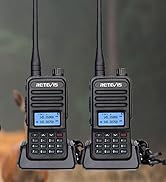
The Retevis RB17 is a durable and portable FRS two-way radio designed for clear, long-range communication. It features a robust build and an enhanced antenna for reliable performance.

Key Features:
- High Capacity Battery: Equipped with a 4400mAh Lithium Ion battery for extended use.
- Durable Construction: Thickened PC plastic structure and hard shell for fall and pressure resistance.
- Clear Audio: Strong audio output and squelch function for clear sound quality.
- Enhanced Antenna: Optimized circuit and enhanced gain antenna for stronger signal reception and transmission.
- USB-C Charging: Convenient and fast charging via USB-C.
- VOX Function: Voice-activated transmission for hands-free operation.
- Local Alarm: Emergency alert function for safety.


5. Setup
5.1. Battery Installation
The Retevis RB17 uses a 4400mAh Lithium Ion battery. To install the battery:
- Ensure the radio is powered off.
- Align the battery with the battery compartment on the back of the radio.
- Press the battery firmly into place until it clicks securely.

5.2. Charging the Battery
Before first use, fully charge the battery. The RB17 features convenient USB-C charging.
- Connect the 2-in-1 USB charging cable to the USB-C port on the radio.
- Connect the other end of the USB cable to the provided power adapter, then plug the adapter into a wall outlet.
- The charging indicator light will show red while charging.
- Once fully charged, the indicator light will turn green.

6. Operating Instructions
6.1. Power On/Off
- To Power On: Rotate the Power/Volume knob clockwise until you hear a click and the radio announces the current channel.
- To Power Off: Rotate the Power/Volume knob counter-clockwise until you hear a click.
6.2. Adjusting Volume
Rotate the Power/Volume knob clockwise to increase volume and counter-clockwise to decrease volume.
6.3. Channel Selection
The RB17 has 16 channels. To select a channel:
- Rotate the Channel Selector knob to choose your desired channel.
- The radio will audibly announce the selected channel number.
- Ensure all radios in your group are set to the same channel for communication.
6.4. Transmitting and Receiving
- To transmit, press and hold the Push-to-Talk (PTT) button on the side of the radio. Speak clearly into the microphone.
- Release the PTT button to receive messages.
6.5. VOX (Voice-Activated Transmission)
The VOX function allows for hands-free operation. When activated, the radio will transmit automatically when it detects your voice.
Refer to the full user manual for instructions on how to activate and adjust VOX sensitivity.
6.6. Local Alarm Function
In emergency situations, you can activate the local alarm to alert companions.

The alarm is typically activated by a dedicated orange button on the radio. Pressing this button will sound an alarm through your radio and potentially transmit it to other radios on the same channel.
6.7. Compatibility
The Retevis RB17 is compatible with other Retevis models such as RT22, RT21, RT68, and H-777S on the same channels and CTCSS/DCS codes.

7. Maintenance
7.1. Cleaning
- Wipe the radio's surface with a soft, damp cloth.
- Do not use harsh chemicals or abrasive cleaners.
- Ensure the charging port is free of dust and debris.
7.2. Battery Care and Storage
- Charge the battery fully before long periods of storage.
- Store the radio and battery in a cool, dry place away from direct sunlight and extreme temperatures.
- Avoid overcharging or completely draining the battery frequently to prolong its lifespan.
8. Troubleshooting
If you encounter issues with your Retevis RB17, refer to the following common problems and solutions:
| Problem | Possible Cause | Solution |
|---|---|---|
| Radio does not power on | Battery is low or not installed correctly | Charge the battery fully. Reinstall the battery, ensuring it clicks into place. |
| No sound or low volume | Volume is too low; Squelch setting too high | Increase the volume using the Power/Volume knob. Check squelch settings (if adjustable via programming). |
| Cannot communicate with other radios | Radios are on different channels or privacy codes (CTCSS/DCS) | Ensure all radios are set to the same channel and have matching CTCSS/DCS codes. |
| Poor range or intermittent signal | Obstructions (buildings, terrain); Low battery | Move to an open area. Ensure battery is fully charged. |
9. Specifications
Detailed technical specifications for the Retevis RB17 FRS Walkie Talkie:
- Model Number: FA9191A-C9034A (RB17)
- Brand: Retevis
- Item Weight: 1.45 pounds
- Product Dimensions: 1.49 x 2.2 x 8.85 inches
- Batteries: 2 Lithium Ion batteries required (included)
- Battery Capacity: 4400mAh
- Number of Channels: 16
- Frequency Range: 462.5500-462.7250 MHz (FRS)
- Voltage: 3.7 Volts
- Water Resistance Level: Water Repellent
- Color: Black
- Manufacturer: Retevis
- FCC ID: 2ASNSRB17
10. Warranty and Support
10.1. Warranty Information
Retevis provides the following warranty for the RB17 Walkie Talkie:
- Radio Body: 2-year warranty
- Accessories: 1-year warranty
- Returns: 30-day no-reason return policy.
Beyond the warranty period, maintenance services are still offered, with buyers responsible for associated costs.
10.2. Customer Support
For any questions, issues, or warranty claims, please contact Retevis customer support through Amazon. Responses are typically provided within 12 hours.


