
1. Introduction
This manual provides essential information for the safe and effective operation, maintenance, and troubleshooting of your Truper SINCO-10X2 10-inch Telescopic Miter Saw. Please read and understand all instructions before using the tool. Keep this manual for future reference.
2. Safety Information
Always follow basic safety precautions to reduce the risk of fire, electric shock, and personal injury. Failure to follow these instructions may result in serious injury.
- Wear Eye Protection: Always wear safety goggles or safety glasses with side shields.
- Wear Hearing Protection: Use ear protection during operation.
- Keep Work Area Clean: Cluttered areas invite accidents.
- Avoid Dangerous Environment: Do not use power tools in damp or wet locations, or expose them to rain.
- Keep Children Away: All visitors should be kept a safe distance from the work area.
- Secure Workpiece: Always clamp or secure the workpiece firmly before cutting.
- Use Correct Blade: Ensure the blade is appropriate for the material being cut and is sharp.
- Disconnect Power: Always disconnect the saw from the power source before making adjustments, changing accessories, or performing maintenance.
3. Product Overview
The Truper SINCO-10X2 is a 10-inch telescopic miter saw designed for precise cuts in various materials, primarily wood. Its features include:
- Increased cutting capacity, 20% lighter design.
- More comfortable trigger with safety lock to prevent accidental starts.
- Laser guide for improved cut line visibility.
- Blade with alternating flat teeth.
- Telescopic arm for extended cutting capacity.
Component Identification
Refer to the image below for a visual guide to the main components of your miter saw.
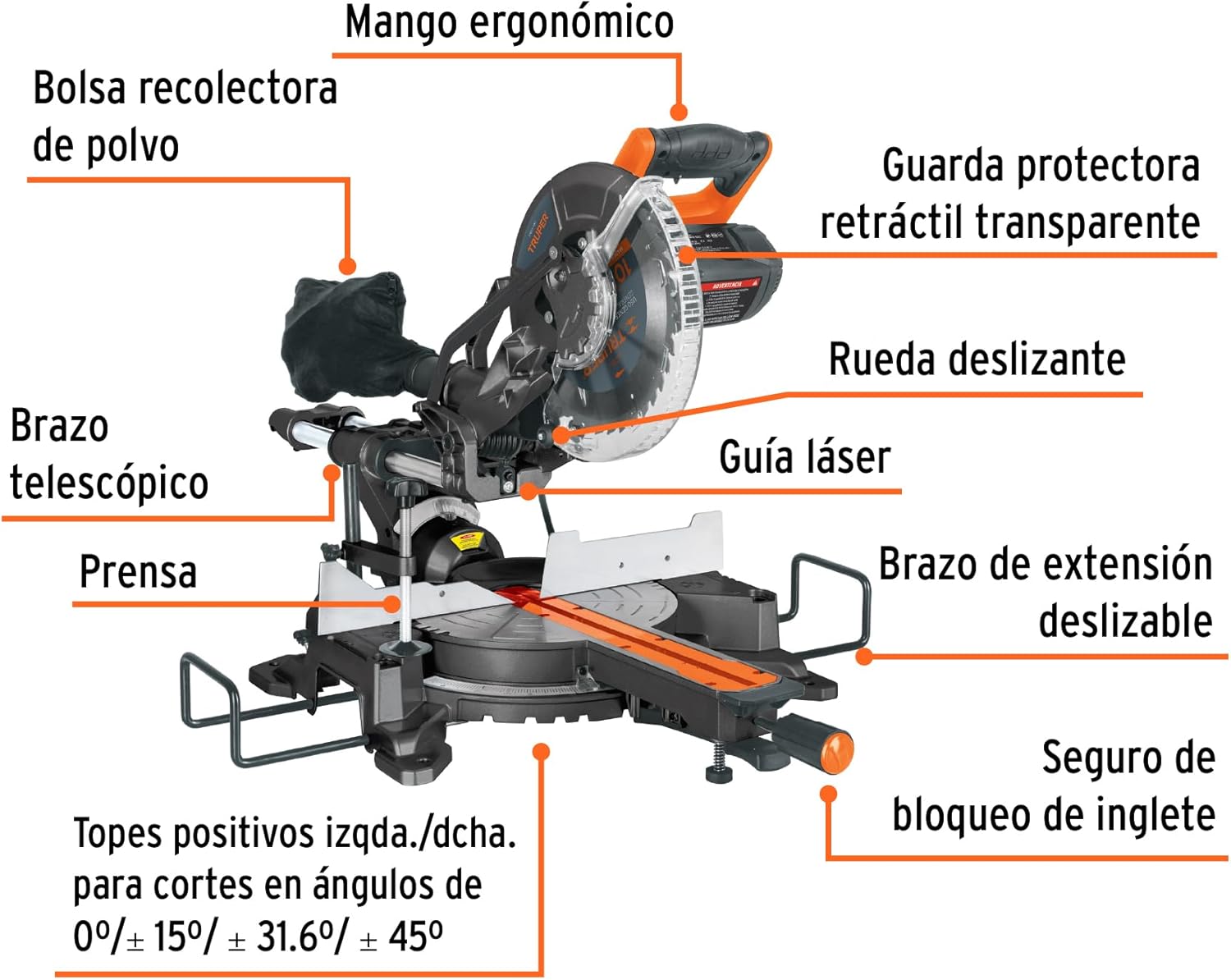
Product Dimensions
Understanding the dimensions of your miter saw is crucial for proper placement and storage.

Cutting Capabilities
The saw supports various cutting angles and types, including bevel and miter cuts.
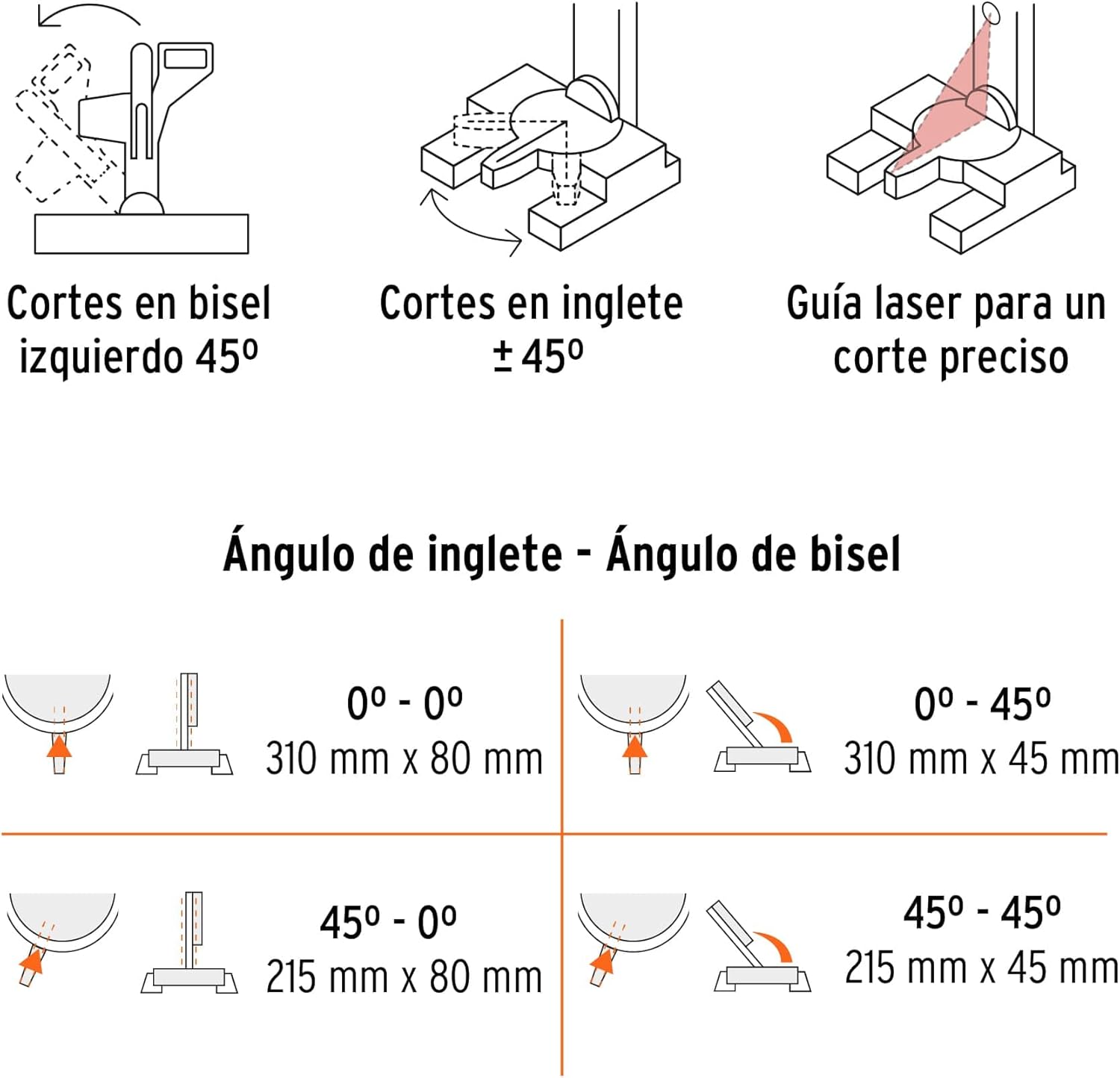
Blade Types
Different blade tooth configurations are suitable for specific materials.
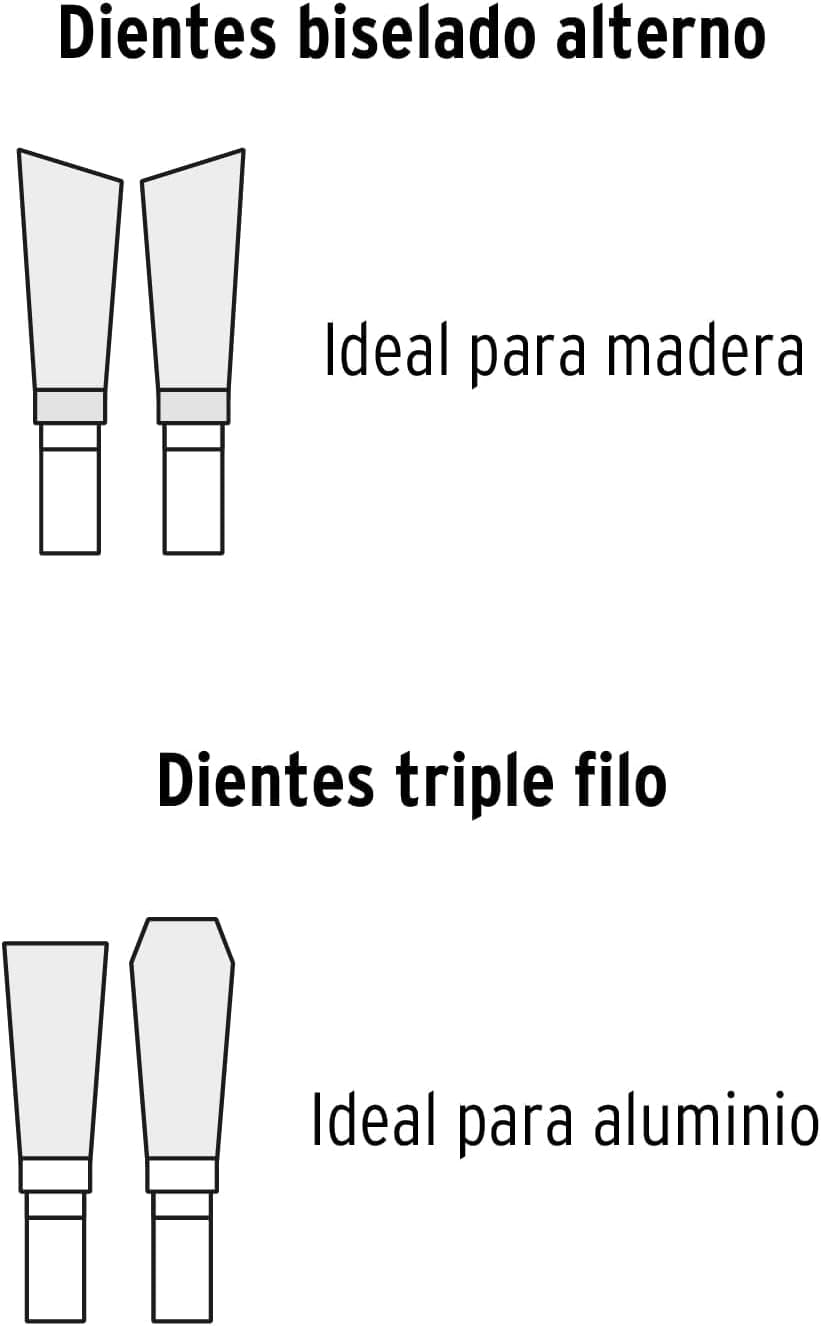

4. Setup
Before operating the miter saw, ensure it is properly assembled and secured.
- Unpacking: Carefully remove all components from the packaging. Inspect for any damage.
- Mounting: Securely mount the miter saw to a stable workbench or a compatible miter saw stand using appropriate bolts and fasteners.
- Blade Installation: Ensure the power cord is unplugged. Follow the instructions in the manual for safely installing the 10-inch blade. The blade should be clean and sharp.
- Dust Bag Attachment: Attach the dust collection bag to the designated port to manage sawdust during operation.
- Adjustments: Verify that all guards are in place and functioning correctly. Check the miter and bevel angle settings to ensure they are at 0 degrees for initial setup.
5. Operation
Operating your Truper SINCO-10X2 miter saw requires attention to detail and adherence to safety guidelines.
Basic Cutting Procedure
- Prepare Workpiece: Place the workpiece firmly against the fence and table. Use the clamp to secure it.
- Set Angle: Adjust the miter and/or bevel angle as required for your cut. The saw offers a range of miter cuts from 47° left to 52° right, and bevel cuts up to 45° left.
- Activate Laser Guide: Turn on the laser guide to project a precise cut line onto your workpiece. Align the blade with your mark.
- Start Saw: Depress the trigger, ensuring the safety lock is disengaged. Allow the blade to reach full speed before beginning the cut.
- Perform Cut: Slowly lower the blade through the workpiece. For telescopic cuts, pull the saw head forward, lower the blade, and push it back through the material.
- Release Trigger: Once the cut is complete, release the trigger and allow the blade to stop completely before raising the saw head.
Video Demonstration
Watch this video for a closer look at the saw's features and operation.
Video 5.1: Close-up demonstration of the Truper SINCO-10X2 miter saw's features and functionality.
6. Maintenance
Regular maintenance ensures the longevity and safe operation of your miter saw.
- Cleaning: After each use, disconnect the power and clean the saw. Remove sawdust and debris from the motor vents, blade guard, and table using a brush or compressed air.
- Blade Care: Regularly inspect the blade for sharpness and damage. Replace dull or damaged blades immediately. Ensure the blade is clean and free of resin buildup.
- Lubrication: Periodically lubricate moving parts as indicated in the detailed product manual (not provided here, but generally applies to sliding mechanisms).
- Cord Inspection: Check the power cord for any cuts, fraying, or damage. Replace if necessary.
- Fasteners: Ensure all nuts, bolts, and screws are tight.
7. Troubleshooting
This section addresses common issues you might encounter with your miter saw.
| Problem | Possible Cause | Solution |
|---|---|---|
| Saw does not start | No power supply; Safety lock engaged; Faulty switch | Check power connection; Disengage safety lock; Contact service center |
| Blade binds in workpiece | Dull blade; Incorrect cutting technique; Workpiece not secured | Replace/sharpen blade; Adjust cutting speed; Secure workpiece firmly |
| Inaccurate cuts | Blade wobble; Fence/table misalignment; Loose components | Check blade installation; Calibrate fence/table; Tighten all fasteners |
| Excessive vibration | Loose blade; Damaged blade; Unstable mounting | Tighten blade; Replace blade; Secure saw to workbench |
8. Specifications
Key technical specifications for the Truper SINCO-10X2 10-inch Telescopic Miter Saw.
| Specification | Value |
|---|---|
| Model Number | SINCO-10X2 |
| Brand | TRUPER |
| Voltage | 127 Volts |
| Wattage | 1900 Watts |
| Speed | 5000 RPM |
| Blade Length | 10 Inches |
| Number of Teeth | 40 |
| Blade Material | High-speed steel |
| Recommended Surface | Wood |
| Product Weight | 21.04 Kilograms |
| Product Dimensions (L x W x H) | 56L x 8W x 46H cm |
| Power Source | Corded Electric |
| Special Feature | Lightweight |
| Handle Material | Metal |
9. Warranty and Support
For warranty information, technical support, or service inquiries, please refer to the documentation included with your product or contact Truper customer service. Keep your purchase receipt as proof of purchase.


