
Introduction
This manual provides essential information for the safe and efficient use of your Pretul BAT-12P 12V Lithium-Ion Battery. This battery is specifically designed for use with Pretul TALI-12P, TALI-12PK, and TALI-12PK2 cordless drills. It features a 2 Ah capacity, an LED indicator for battery level, and a triple protection system against overheating, overcharging, and over-discharging. Please read these instructions carefully before first use and keep them for future reference.

Figure 1: Compatible Pretul cordless drills (TALI-12P, TALI-12PK, TALI-12PK2). The BAT-12P battery is designed for these models.
Safety Instructions
- Always use the battery with compatible Pretul tools and chargers.
- Do not expose the battery to water, moisture, or extreme temperatures.
- Avoid dropping or subjecting the battery to strong impacts.
- Do not attempt to disassemble, open, or service the battery pack.
- Keep the battery away from children and pets.
- Dispose of batteries responsibly according to local regulations.
Setup
1. Initial Charging
Before first use, fully charge the battery. Use only the Pretul charger compatible with 12V Lithium-Ion batteries (e.g., CAR-12P, not included).
- Connect the charger to a power outlet.
- Slide the BAT-12P battery onto the charger until it clicks into place.
- Allow the battery to charge until the charger's indicator light signals a full charge (refer to your charger's manual for specific indicator behavior).
- Once charged, disconnect the battery from the charger.
2. Installing the Battery
To install the BAT-12P battery into a compatible Pretul cordless drill (TALI-12P, TALI-12PK, TALI-12PK2):
- Align the battery with the base of the drill handle.
- Slide the battery firmly into the tool until it locks securely into place with an audible click.
- Ensure the battery is fully seated before operating the tool.
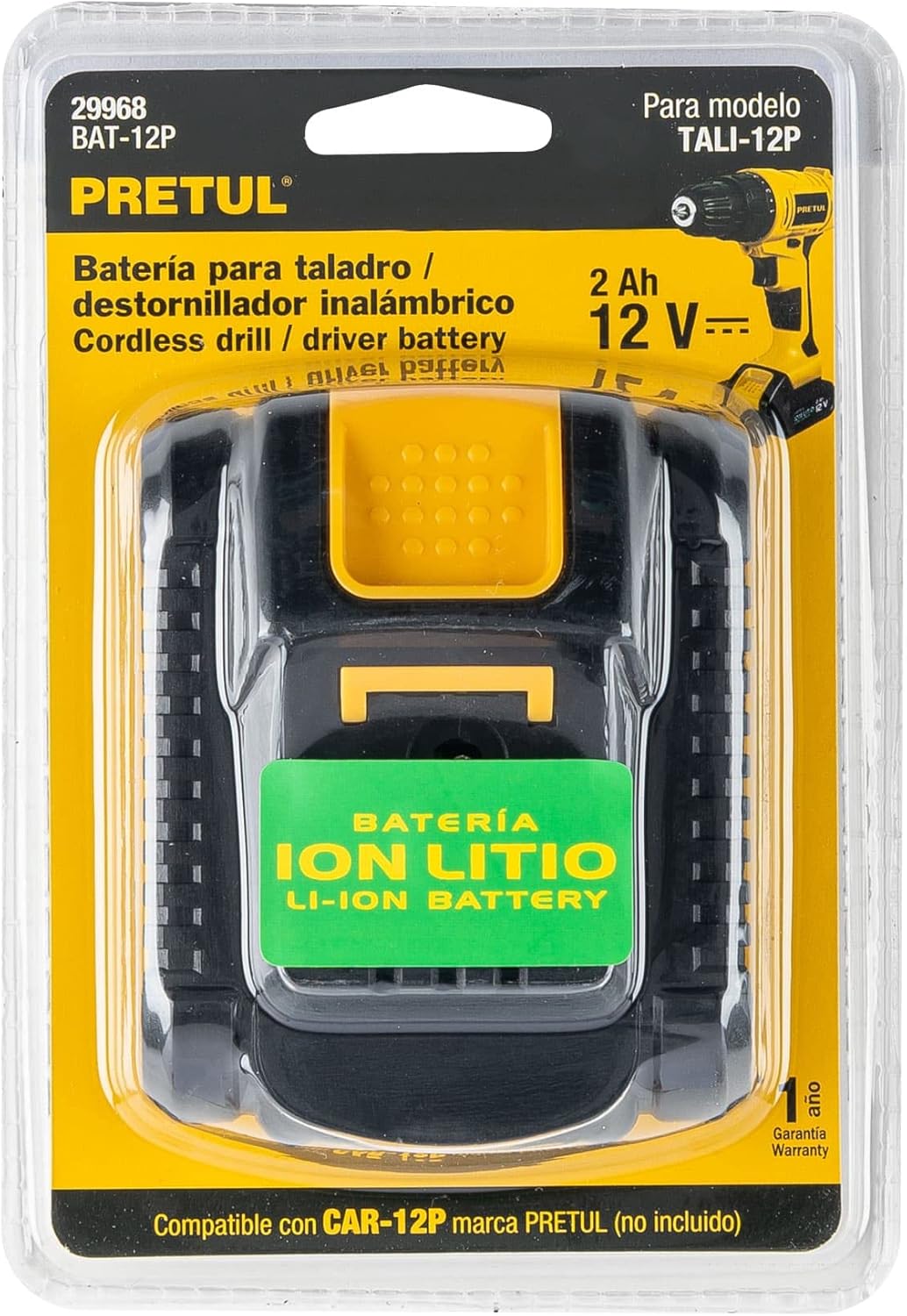
Figure 2: Pretul BAT-12P 12V Lithium-Ion Battery. This image shows the battery's design, including the release mechanism.
Operating
Battery Level Indicator
The BAT-12P battery is equipped with an LED indicator to display the current charge level. Press the indicator button on the battery to check the status.
- Three LEDs: Full charge.
- Two LEDs: Medium charge.
- One LED: Low charge, recharge soon.
- Flashing LED: Very low charge or potential issue.
Triple Protection System
The battery incorporates a triple protection system to ensure longevity and safety:
- Overheating Protection: Prevents damage from excessive heat during use or charging.
- Overcharge Protection: Stops charging once the battery reaches full capacity, preventing damage.
- Over-discharge Protection: Shuts off power before the battery is completely drained, protecting cell integrity.
Maintenance
- Cleaning: Keep battery contacts clean and free of dust or debris. Use a dry cloth to wipe the battery exterior. Do not use liquids or solvents.
- Storage: Store the battery in a cool, dry place, away from direct sunlight and extreme temperatures. For long-term storage, it is recommended to store the battery with a partial charge (around 50%).
- Charging Cycle: Avoid completely draining the battery before recharging. Regular partial charges are generally better for Lithium-Ion battery life than full discharge cycles.
Troubleshooting
| Problem | Possible Cause | Solution |
|---|---|---|
| Battery not charging. | Charger not plugged in; faulty charger; battery too hot/cold; damaged battery. | Ensure charger is properly connected. Check charger for damage. Allow battery to reach room temperature. If problem persists, battery may be faulty. |
| Tool not operating with battery. | Battery not fully inserted; battery discharged; tool malfunction. | Ensure battery is securely clicked into place. Check battery charge level and recharge if necessary. Test with another charged battery if available. |
| Battery LED indicator not working. | Battery fully discharged; internal fault. | Attempt to charge the battery. If it still doesn't work after charging, the indicator or battery may be faulty. |
If you encounter issues not listed here or if solutions do not resolve the problem, please contact Pretul customer support.
Specifications
| Feature | Detail |
|---|---|
| Model Number | BAT-12P |
| Voltage | 12V |
| Battery Capacity | 2 Ah (Amp Hours) |
| Battery Cell Type | Lithium-Ion |
| Material | Metal |
| Color | Black |
| Special Features | Rechargeable, Portable, LED Level Indicator, Triple Protection System (Overheating, Overcharge, Over-discharge) |
| Dimensions (L x W x H) | 5.38 x 18.7 x 15 cm (2.12 x 7.36 x 5.91 inches) |
| Weight | 250 g (0.55 lbs) |
| Manufacturer | Truper SA de CV |
Warranty and Support
The Pretul BAT-12P battery comes with a 1-year warranty against manufacturing defects. This warranty covers defects in materials and workmanship under normal use. It does not cover damage caused by misuse, abuse, unauthorized repairs, or normal wear and tear.
For warranty claims, technical support, or further assistance, please contact Pretul customer service. Refer to the product packaging or the official Pretul website for the most current contact information.
Manufacturer: Truper SA de CV


