
Introduction
This manual provides instructions for the safe and effective use of your Kircuit AC/AC Adapter. This adapter is designed to provide power to compatible Skil iXO series drill/screwdrivers, allowing for operation or battery charging from standard electrical outlets.
Safety Information
- Always ensure the adapter is compatible with your device's power requirements before use.
- Do not expose the adapter to water, moisture, or extreme temperatures.
- Avoid dropping or subjecting the adapter to severe impact.
- Do not attempt to open or modify the adapter. There are no user-serviceable parts inside.
- Unplug the adapter from the power outlet when not in use or during electrical storms.
- Keep out of reach of children.
Setup
- Unpack the Adapter: Carefully remove the Kircuit AC/AC Adapter from its packaging. Inspect for any visible damage.
- Connect to Power Outlet: Plug the adapter's two-prong plug into a standard AC 110V 50Hz electrical wall outlet.
- Connect to Device: Connect the barrel connector end of the adapter's cord to the appropriate power input port on your compatible Skil iXO series drill/screwdriver. Ensure a secure connection.
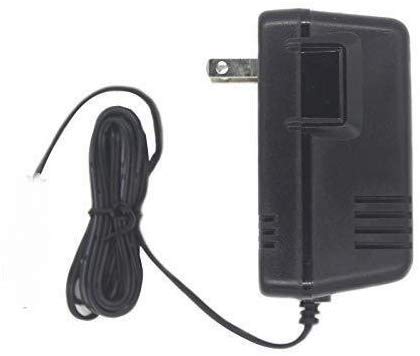
Image: A black Kircuit AC/AC adapter unit with a standard two-prong US electrical plug. A black power cord extends from the adapter, coiled, ending in a small white connector.
Operating Instructions
Once the adapter is properly connected to both the power outlet and your Skil iXO series drill/screwdriver, it will begin to supply power. The adapter allows you to operate your tool directly from the electrical outlet or charge its internal battery, depending on your tool's design. Refer to your Skil tool's manual for specific charging indicators and operational details.
Maintenance
- Cleaning: Disconnect the adapter from all power sources before cleaning. Use a soft, dry cloth to wipe the exterior. Do not use liquid cleaners or solvents.
- Storage: Store the adapter in a cool, dry place away from direct sunlight and extreme temperatures. Avoid tightly coiling the cord to prevent damage.
Troubleshooting
- Device not powering on/charging:
- Ensure the adapter is securely plugged into a functional wall outlet.
- Verify the barrel connector is firmly inserted into your Skil tool's power port.
- Check for any visible damage to the adapter or its cord. If damaged, discontinue use.
- Test the wall outlet with another device to confirm it is supplying power.
- Adapter feels warm: It is normal for the adapter to become slightly warm during operation. If it becomes excessively hot, disconnect it immediately and contact support.
Specifications
| Brand | Kircuit |
| Input Voltage | AC 110V 50Hz |
| Output Type | AC Output |
| Wattage | 45 watts |
| Connector Type | Barrel Connector |
| Compatible Devices | Skil 2346, F012234600, iXO2, iX02, 2346-01, 2352-01, 2352-02, IXO3, F012234602, IX03, iXO 3.6V/4V Max Power Portable Cordless Lithium-Ion Drill Screwdrivers |
Warranty Information
Specific warranty details for this Kircuit AC/AC Adapter may vary. Please refer to the product packaging or the manufacturer's official website for the most current warranty terms and conditions.
Support
For technical assistance or further inquiries regarding your Kircuit AC/AC Adapter, please contact the manufacturer or your retailer. Keep your purchase receipt and product information handy when seeking support.