
Tek Styz B084YWT2R6
PRO Stylus + Pen User Manual
Model: B084YWT2R6
Introduction
This manual provides comprehensive instructions for the Tek Styz PRO Stylus + Pen, a high-precision 2-in-1 writing instrument designed for use with capacitive (touch) and resistive (pressure-only) screens, specifically compatible with the Asus Transformer Book Trio. It also functions as a standard black ink pen.
Package Contents
- 3 x Tek Styz PRO Stylus + Pen (Silver)
Setup
The Tek Styz PRO Stylus + Pen is designed for immediate use upon unboxing. No assembly or battery installation is required.
- Unpack: Carefully remove the stylus pens from their packaging.
- Inspect: Verify that all three pens are present and free from any visible damage.
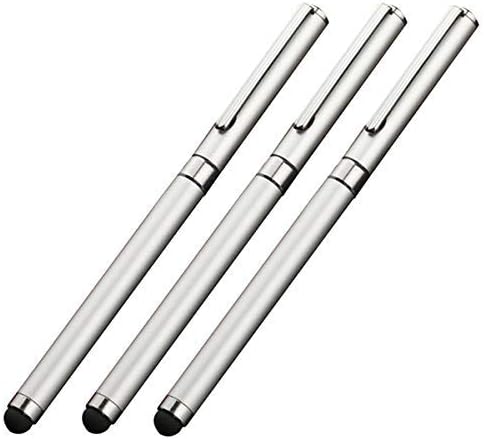
Image: Three silver Tek Styz PRO Stylus + Pens, as received in the package.
Operating Instructions
The Tek Styz PRO Stylus + Pen is a versatile 2-in-1 tool, combining a high-sensitivity stylus for touchscreens with a traditional ballpoint pen for writing on paper.
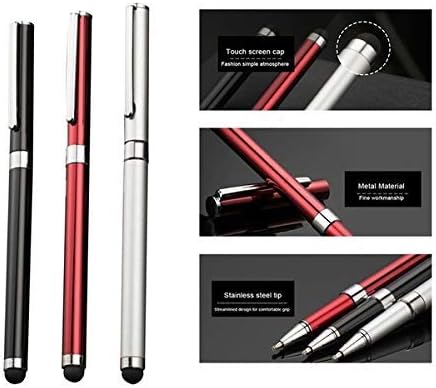
Image: A close-up view highlighting both the soft, conductive stylus tip and the fine ballpoint pen tip of the device.
Using the Stylus Function
The stylus tip is located at one end of the pen and is designed for precise interaction with capacitive and resistive touchscreens.
- Identify Stylus Tip: The stylus tip is a soft, rounded, conductive dome.
- Touchscreen Interaction: Gently touch the stylus tip to your device's screen (e.g., Asus Transformer Book Trio) to navigate menus, select items, draw, or write. The high sensitivity ensures accurate input without applying excessive pressure.
- Compatibility: This stylus is compatible with both capacitive (most common modern touchscreens) and resistive (older, pressure-sensitive screens) technologies.
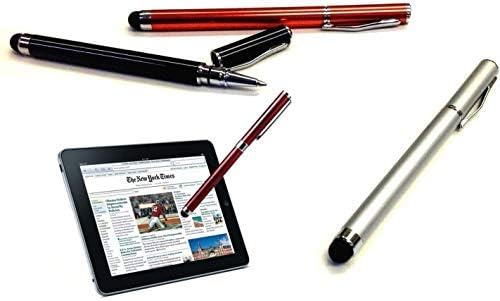
Image: The Tek Styz PRO Stylus + Pen shown in use with a tablet device, demonstrating its touchscreen functionality.
Using the Ballpoint Pen Function
The opposite end of the device functions as a standard black ink ballpoint pen for traditional writing tasks.
- Access Pen Tip: Remove the protective cap from the end opposite the stylus tip to reveal the ballpoint pen.
- Writing: Use the pen for traditional writing on paper. The pen is pre-filled with black ink.
- Replace Cap: Always replace the cap securely after use. This prevents the ink from drying out and protects the pen tip from damage.

Image: A hand demonstrating the use of the ballpoint pen function for writing on a notebook, highlighting its traditional writing capability.
Maintenance
Proper care will extend the life and performance of your Tek Styz PRO Stylus + Pen.
- Cleaning the Stylus Tip: If the stylus tip becomes dirty or less responsive, gently wipe it with a soft, lint-free cloth. Do not use abrasive cleaners or harsh chemicals.
- Protecting the Pen Tip: Always replace the cap on the ballpoint pen end when not in use to prevent ink drying and tip damage.
- Storage: Store the pens in a cool, dry place away from direct sunlight and extreme temperatures.
- Ink Refill: The ink cartridge is not designed for user replacement. When the ink runs out, the pen portion will no longer function.
Troubleshooting
| Problem | Possible Cause | Solution |
|---|---|---|
| Stylus not responding on touchscreen. | Dirty stylus tip; screen protector interference; device screen issue. | Clean the stylus tip with a soft cloth. Ensure your device screen is clean. Test on another compatible device if possible. |
| Ballpoint pen not writing. | Ink has dried out; ink cartridge is empty. | Ensure the cap was replaced after last use. If the ink is depleted, the pen cannot be refilled. |
| Stylus tip appears damaged. | Physical damage from dropping or misuse. | Avoid dropping the pen. If the tip is severely damaged, the stylus functionality may be compromised. |
Specifications
- Model: B084YWT2R6
- Brand: Tek Styz
- Manufacturer: Tek Styz
- Functionality: 2-in-1 Stylus (Capacitive/Resistive) and Ballpoint Pen
- Ink Color: Black
- Compatibility: Asus Transformer Book Trio and other compatible capacitive/resistive touchscreens
- UPC: 746558841626
- First Available: April 6, 2022
Warranty and Support
For warranty information or technical support, please contact Tek Styz directly through their official channels. Refer to your purchase documentation for specific warranty terms and conditions.
Manufacturer: Tek Styz
Seller: Veri Suni
For further assistance, you may visit the Tek Styz Store on Amazon.
Related documentsB084YWT2R6


Ask a question about this manual
Ask about setup, troubleshooting, compatibility, parts, safety, or missing instructions. Manuals+ will review the question and use this page’s manual context to help answer it.