
Pifco P50001
Pifco P50001 Tower Fan Instruction Manual
Model: P50001
Introduction
Thank you for purchasing the Pifco P50001 Tower Fan. This manual provides important information regarding the safe operation, installation, maintenance, and troubleshooting of your new fan. Please read this manual thoroughly before use and retain it for future reference.

Image: Front view of the Pifco P50001 Tower Fan, showcasing its compact white design.
Important Safety Instructions
Always follow basic safety precautions when using electrical appliances to reduce the risk of fire, electric shock, and injury to persons.
- Read all instructions before using this fan.
- Ensure the power supply matches the voltage specified on the fan's rating label.
- Do not operate any fan with a damaged cord or plug.
- Do not run cord under carpeting. Do not cover cord with throw rugs, runners, or similar coverings. Arrange cord away from traffic area and where it will not be tripped over.
- To disconnect the fan, turn controls to the OFF position, then remove the plug from the outlet.
- Do not insert fingers or foreign objects into any ventilation or exhaust opening.
- This fan is designed for indoor use only.
- The fan features a tip-over switch which automatically turns the unit off if it is tilted or knocked over, providing an added safety measure.

Image: Close-up view of the fan's base, highlighting the anti-slip rubber feet and the safety tip-over switch.
Product Overview
The Pifco P50001 Tower Fan is a compact and portable cooling solution designed for personal spaces like desks or bedside tables. It features a simple control dial for speed and oscillation settings.
Components:
- Main Fan Unit
- Control Dial (Top)
- Air Outlet Grille (Front)
- Power Cord
- Anti-slip Rubber Feet (Base)
- Tip-over Safety Switch (Base)
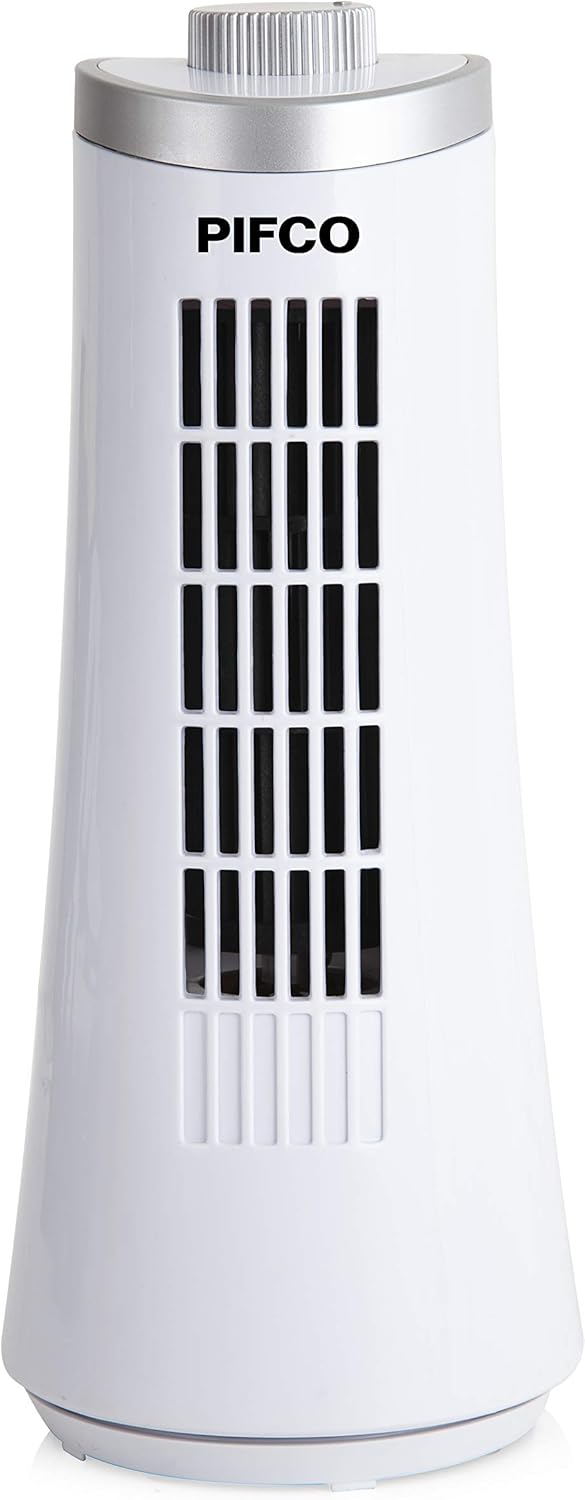
Image: Front view of the Pifco P50001 Tower Fan, showing the air outlet grille and overall design.
Setup
The Pifco P50001 Tower Fan is designed for easy setup and requires minimal assembly.
- Unpack the fan carefully from its packaging.
- Place the fan on a firm, level surface. Ensure the surface is stable and can support the fan's weight.
- Position the fan away from curtains, drapes, or any objects that could obstruct the airflow or be drawn into the fan.
- Plug the power cord into a standard electrical outlet (230V).

Image: The Pifco P50001 Tower Fan placed on a side table, demonstrating its compact size and power cord connection.
Operating Instructions
The fan is operated using the control dial located on the top of the unit.
- Power On/Off: Rotate the control dial clockwise from the "OFF" position to turn the fan on. Rotate counter-clockwise to the "OFF" position to turn the fan off.
- Speed Settings:
- Rotate the dial to "LOW" for a gentle airflow.
- Rotate the dial to "HIGH" for a stronger airflow.
- Automatic Oscillation:
- To activate oscillation at low speed, rotate the dial to "LOW SWING".
- To activate oscillation at high speed, rotate the dial to "HIGH SWING".
- The fan will automatically rotate from side to side, distributing air across a wider area.

Image: Detailed view of the fan's top control dial, showing the various settings for speed and oscillation.

Image: A hand demonstrating the operation of the fan's side button, which controls the oscillation function.
Maintenance
Regular cleaning will help maintain the efficiency and appearance of your fan.
- Always unplug the fan from the power outlet before cleaning.
- Use a soft, damp cloth to wipe the exterior surfaces of the fan. Do not use abrasive cleaners or solvents.
- Do not immerse the fan in water or allow water to drip into the motor housing.
- For dust accumulation on the air intake/outlet grilles, use a vacuum cleaner with a brush attachment to gently remove dust.
- Store the fan in a cool, dry place when not in use, preferably in its original packaging.
Troubleshooting
If you experience issues with your Pifco P50001 Tower Fan, please refer to the following common problems and solutions:
| Problem | Possible Cause | Solution |
|---|---|---|
| Fan does not turn on. | Not plugged in; Power outlet not working; Tip-over switch activated. | Ensure fan is securely plugged in. Test outlet with another device. Ensure fan is upright and on a stable surface. |
| Weak airflow. | Fan speed set too low; Air intake/outlet blocked. | Increase fan speed using the control dial. Check for and remove any obstructions from grilles. |
| Fan is making unusual noise. | Fan not on a level surface; Foreign object inside. | Place fan on a flat, stable surface. Unplug and carefully inspect for any foreign objects. Do not attempt to disassemble. |
| Oscillation not working. | Dial not set to "SWING" mode. | Ensure the control dial is set to either "LOW SWING" or "HIGH SWING". |
Specifications
| Feature | Detail |
|---|---|
| Brand | Pifco |
| Model Number | P50001 |
| Color | White |
| Electric Fan Design | Floor Fan (Compact Tower) |
| Room Type | Office, Home, Desk |
| Special Features | 1.7 Meter Cable, Safety Tip Over Switch, Automatic Oscillation, 2 Speed Settings |
| Recommended Uses | Air Circulation |
| Wattage | 15 watts |
| Voltage | 230 Volts |
| Blade Material | Plastic |
| Item Weight | 2.82 pounds |
| Package Dimensions | 12.76 x 5.79 x 5.35 inches |
Warranty and Support
Pifco products are manufactured to the highest standards. For information regarding warranty coverage, technical support, or spare parts, please refer to the warranty card included with your purchase or visit the official Pifco website.
Please retain your proof of purchase for any warranty claims.
Ask a question about this manual
Ask about setup, troubleshooting, compatibility, parts, safety, or missing instructions. Manuals+ will review the question and use this page’s manual context to help answer it.