
TechniSat DIGITRADIO 371 CD BT
TechniSat DIGITRADIO 371 CD BT User Manual
Stereo Digital Radio with CD Player, Bluetooth, and USB
1. Introduction
Thank you for choosing the TechniSat DIGITRADIO 371 CD BT. This versatile stereo digital radio system offers a wide range of audio entertainment options, including DAB+ digital radio, FM radio, a CD player, Bluetooth audio streaming, and USB playback. This manual provides detailed instructions to help you set up, operate, and maintain your device for optimal performance.
2. Important Safety Instructions
- Read all instructions carefully before operating the device.
- Keep this manual for future reference.
- Do not expose the device to rain or moisture to prevent fire or electric shock.
- Ensure proper ventilation. Do not block any ventilation openings.
- Place the device on a stable, flat surface.
- Only use attachments/accessories specified by the manufacturer.
- Unplug the device during lightning storms or when unused for long periods.
- Refer all servicing to qualified service personnel.
- The device may only be operated within the specified environmental conditions.
3. Package Contents
Please check that all items are present in the package:
- TechniSat DIGITRADIO 371 CD BT unit
- Remote control
- User manual (this document)
- 2 AAA batteries (for remote control)
4. Product Overview
4.1 Front Panel

The front panel features a clear color display, control buttons for mode selection, information, menu navigation, and preset access. Two rotary knobs are provided for volume control and tuning/entering selections.
4.2 Rear Panel
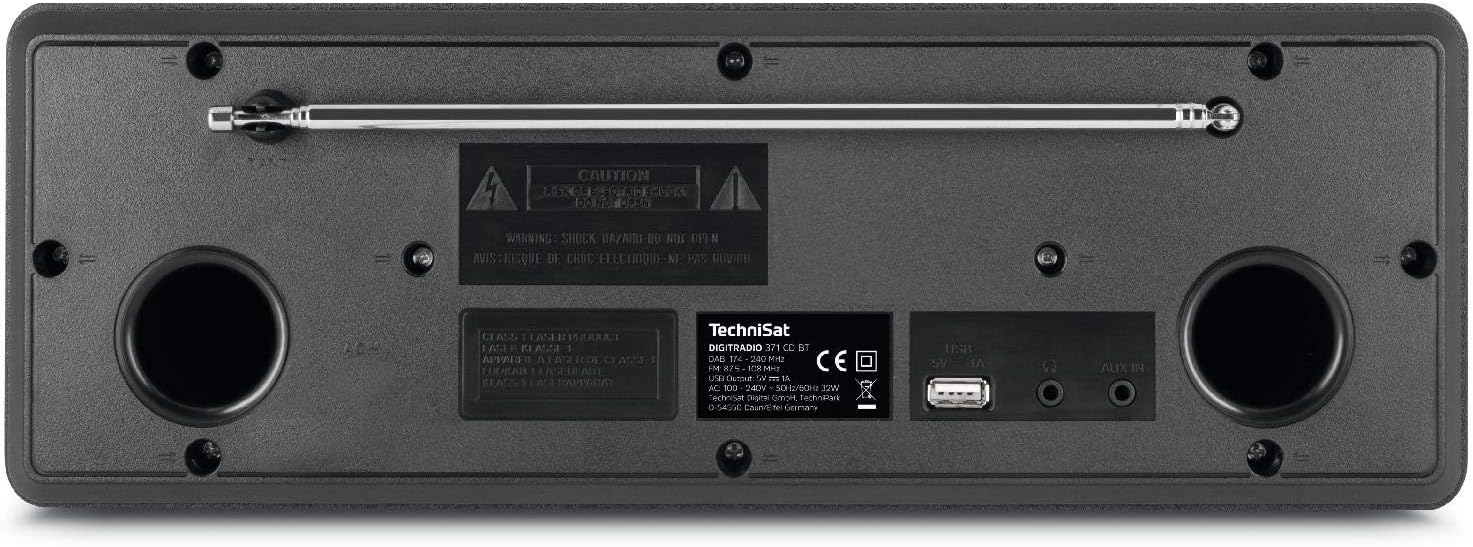
The rear panel includes the telescopic antenna for radio reception, a USB port for MP3 playback and device charging, and a 3.5mm AUX input for connecting external audio sources.
4.3 Remote Control

The included remote control provides convenient access to all functions of the DIGITRADIO 371 CD BT, including power, mode selection, volume, tuning, and preset management.
5. Setup
5.1 Power Connection
- Ensure the device is placed on a stable surface.
- Connect the power cable to the AC inlet on the rear of the unit.
- Plug the other end of the power cable into a standard wall outlet (230V).
5.2 Antenna Adjustment
For optimal DAB+ and FM radio reception, fully extend the telescopic antenna located on the rear of the unit. Adjust its position and angle to achieve the best signal quality.
5.3 Initial Power On and Scan
- Press the Power button on the front panel or remote control to turn on the device.
- Upon first use, the radio will typically initiate an automatic scan for DAB+ stations. This process may take a few minutes.
- Once the scan is complete, the first available DAB+ station will begin playing.
6. Operating Instructions
6.1 Mode Selection
Press the MODE button on the front panel or remote control to cycle through available modes: DAB+, FM, CD, Bluetooth, and AUX.
6.2 DAB+ Radio
- Select DAB+ mode using the MODE button.
- If an automatic scan has not been performed or you wish to rescan, navigate to the menu and select 'Full Scan'.
- Use the TUNING/ENTER knob or the navigation buttons on the remote to browse available stations. Press ENTER to select a station.
- To save a station as a preset, press and hold the PRESET button, then select a preset number (1-20) and confirm.
6.3 FM Radio
- Select FM mode using the MODE button.
- To automatically scan for stations, press the SCAN button on the remote or navigate through the menu.
- To manually tune, rotate the TUNING/ENTER knob.
- To save a station as a preset, press and hold the PRESET button, then select a preset number (1-20) and confirm.
6.4 CD Player
- Select CD mode using the MODE button.
- Gently insert an audio CD or MP3 CD into the CD slot. The device will automatically load and begin playback.
- Use the playback control buttons (Play/Pause, Skip Forward/Backward) on the front panel or remote control.
6.5 Bluetooth Audio Streaming
- Select Bluetooth mode using the MODE button. The display will show 'Pairing'.
- On your Bluetooth-enabled device (e.g., smartphone, tablet), search for available Bluetooth devices and select 'DIGITRADIO 371 CD BT'.
- Once paired, you can stream audio from your device to the DIGITRADIO 371 CD BT.
6.6 USB Playback and Charging
- Insert a USB flash drive containing MP3 files into the USB port on the rear panel.
- Select USB mode (if available, otherwise it may automatically switch).
- Use the navigation and playback controls to browse and play MP3 files.
- The USB port also provides a charging function for compatible devices like smartphones.
6.7 AUX Input
- Connect an external audio device (e.g., MP3 player) to the 3.5mm AUX IN jack on the rear panel using an appropriate audio cable (not included).
- Select AUX mode using the MODE button.
- Audio from the external device will now play through the DIGITRADIO 371 CD BT speakers. Control playback from the external device.
6.8 Alarm Clock and Sleep Timer
- Alarm Clock: Access the alarm settings via the MENU button. Follow the on-screen prompts to set alarm time, source (buzzer, radio), and volume.
- Sleep Timer: Access the sleep timer settings via the MENU button. Set a duration after which the radio will automatically turn off.
7. Maintenance
7.1 Cleaning
- Always unplug the device from the power outlet before cleaning.
- Use a soft, dry cloth to wipe the exterior surfaces.
- Do not use abrasive cleaners, waxes, or solvents as they may damage the finish.
- For the display, use a soft, lint-free cloth.
7.2 CD Player Care
- Handle CDs by their edges to avoid fingerprints.
- Clean CDs with a soft, lint-free cloth, wiping from the center outwards.
- Do not use scratched or damaged CDs, as they may harm the player mechanism.
8. Troubleshooting
| Problem | Possible Cause | Solution |
|---|---|---|
| No power | Power cable not connected; Power outlet not active | Check power cable connection; Try a different outlet |
| Poor radio reception | Antenna not extended; Weak signal area | Fully extend and adjust antenna; Try repositioning the unit |
| CD not playing | CD inserted incorrectly; CD is dirty or scratched | Reinsert CD correctly; Clean or replace CD |
| Bluetooth not connecting | Device not in pairing mode; Bluetooth disabled on external device | Ensure radio is in Bluetooth mode; Enable Bluetooth on your device and search again |
| No sound from AUX | Cable not connected; Incorrect mode selected | Check AUX cable connection; Select AUX mode |
9. Specifications
- Model Number:
- DIGITRADIO 371 CD BT (0000/2948)
- Dimensions (W x H x D):
- 34.5 x 12.3 x 21 cm
- Weight:
- 2.7 Kilograms
- Power Source:
- Wired, internal power supply
- Voltage:
- 230 Volts
- Wattage:
- 10 watts (speaker output)
- Speaker Count:
- 2 (Stereo)
- Radio Tuner:
- DAB+, FM
- Connectivity:
- Bluetooth (reception), USB (MP3 playback, charging), 3.5mm AUX In, 3.5mm Headphone Jack
- Display:
- 2.4 inch color display (dimmable)
- CD Player:
- Plays Audio CDs, MP3 CDs, CD-R, CD-RW
- Features:
- Alarm clock, Sleep timer, Station memory (20x DAB+/20x FM), EQ Predefined
- OSD Languages:
- English, German, French, Italian
10. Warranty and Support
For warranty information, please refer to the warranty card included with your product or contact your local TechniSat dealer or customer support. If you encounter any issues not covered in the troubleshooting section, please visit the official TechniSat website or contact their customer service for assistance.
Related documentsDIGITRADIO 371 CD BT


Ask a question about this manual
Ask about setup, troubleshooting, compatibility, parts, safety, or missing instructions. Manuals+ will review the question and use this page’s manual context to help answer it.