
1. Important Safety Information
Please read this instruction manual carefully before using the appliance and keep it for future reference. Failure to follow these instructions may result in electric shock, fire, or serious injury.
- Always ensure the appliance is placed on a stable, heat-resistant surface, away from walls and other appliances to allow adequate air circulation.
- Do not immerse the appliance, cord, or plug in water or any other liquid.
- Keep children and pets away from the appliance during operation. The surface can become very hot.
- Do not operate the appliance if the power cord or plug is damaged, or if the appliance malfunctions or has been damaged in any way. Contact customer support for assistance.
- Unplug the appliance from the power outlet when not in use and before cleaning. Allow it to cool completely before handling.
- Do not block any air vents.
- Use only accessories supplied or recommended by the manufacturer.
- This appliance is for household use only. Do not use outdoors.
- Exercise extreme caution when removing hot oil or other hot liquids.
2. Product Overview
The Klarstein AeroVital Cube Chef is a versatile hot air fryer designed for frying, baking, grilling, and roasting with minimal oil. It features DuoHeating Technology for even cooking and a spacious 14-liter interior.
2.1 Components
- Main Unit with Digital Touch Screen Control Panel
- Transparent Front Door
- Internal Lighting
- Air Vents (rear and sides)
2.2 Included Accessories
The appliance comes with a 5-piece accessory set to enhance your cooking experience:
- Drip Tray: Collects excess oil and food particles.
- Grill Grate: For grilling and placing dishes.
- Grill Basket: Ideal for fries, vegetables, and smaller items.
- Rotisserie Skewer (Spindle): For roasting whole chickens or larger cuts of meat.
- Rotisserie Skewer Lever: For safe insertion and removal of the hot rotisserie skewer.
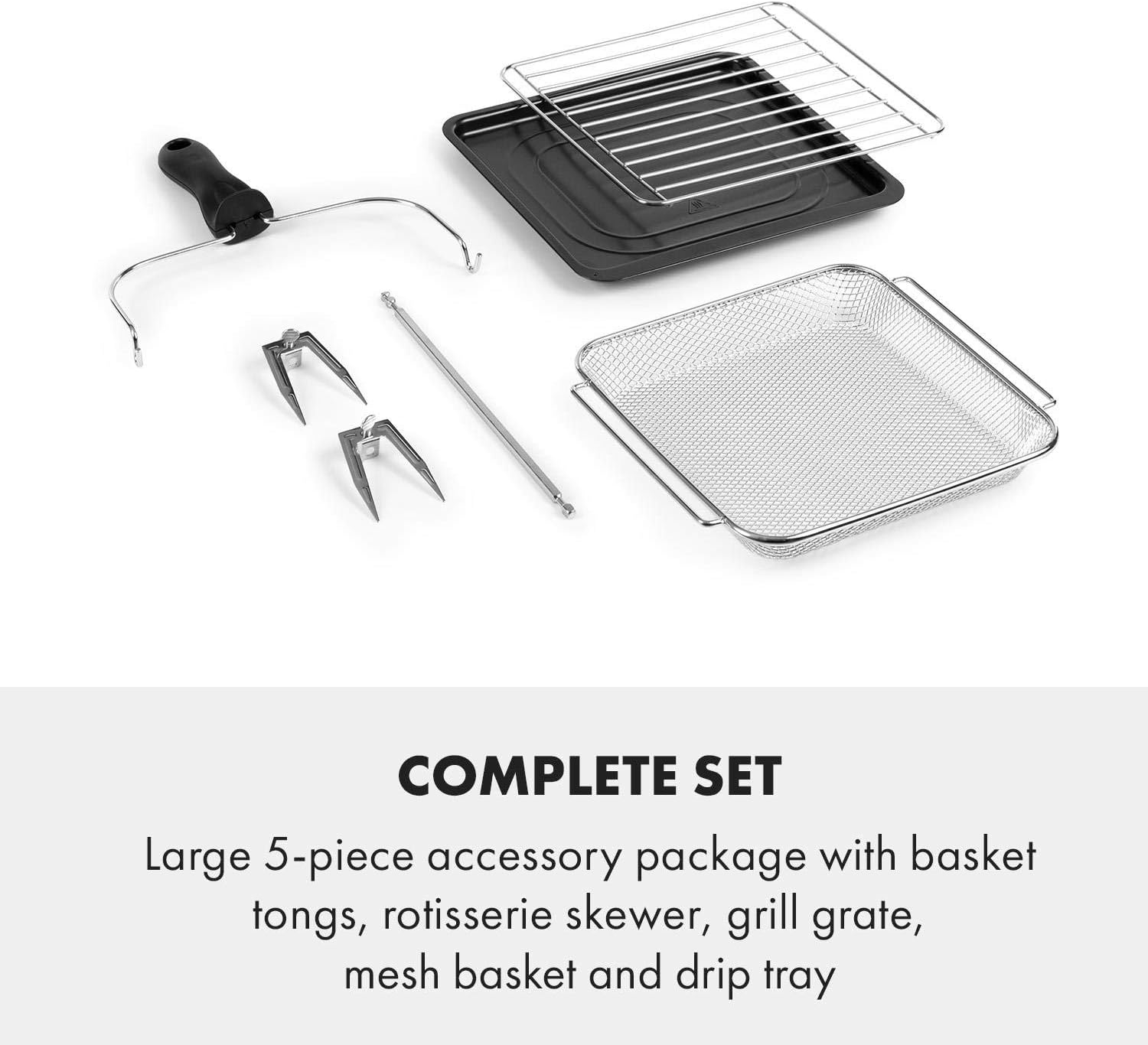
Image: Included accessories for the AeroVital Cube Chef hot air fryer.
3. Setup and First Use
3.1 Unpacking
- Carefully remove all packaging materials from the appliance and its accessories.
- Check for any damage during transit. If damaged, do not use and contact customer support.
- Remove any stickers or labels from the appliance.
3.2 Cleaning Before First Use
- Wipe the exterior of the appliance with a damp cloth.
- Wash all accessories (drip tray, grill grate, grill basket, rotisserie skewer, skewer lever) with warm soapy water. Rinse thoroughly and dry completely.
- Wipe the interior of the appliance with a damp cloth.
3.3 Placement
- Place the air fryer on a stable, level, and heat-resistant surface.
- Ensure there is at least 10 cm (4 inches) of clear space around the back and sides of the appliance, and 20 cm (8 inches) above, for proper ventilation.
- Do not place the appliance near flammable materials or heat sources.
3.4 Initial Operation (Burn-in)
It is recommended to run the appliance empty for about 15-20 minutes before first use to burn off any manufacturing residues. This may produce a slight odor or smoke, which is normal.
- Plug the appliance into a grounded power outlet (220-240 V~ | 50/60 Hz).
- Set the temperature to 200 °C and the time to 20 minutes.
- Allow the appliance to run. Ensure the area is well-ventilated.
- After the cycle, unplug the appliance and let it cool down completely.
4. Operating Instructions
The AeroVital Cube Chef features a digital touch screen control panel for easy operation.

Image: Digital control panel.
4.1 Control Panel Functions
- Power Button (On/Off): Activates and deactivates the appliance.
- Preset Programs: 16 pre-programmed settings for various dishes (e.g., fries, fish, steak, cake, chicken, wings, pizza, popcorn, vegetables, dehydrate, keep warm, toast, proof, cookie, defrost, skewer).
- Temperature (TEMP): Adjusts cooking temperature (50-220 °C).
- Time (TIME): Adjusts cooking duration (up to 9 hours and 50 minutes).
- Top Heating: Activates/deactivates the top heating element.
- Bottom Heating: Activates/deactivates the bottom heating element.
- Rotisserie: Activates/deactivates the rotisserie function.
- Light: Turns the internal light on/off.
- Manual: Allows manual setting of temperature and time.
4.2 Basic Operation
- Place food inside the air fryer using the appropriate accessory (grill basket, grill grate, or rotisserie skewer).
- Close the front door securely.
- Press the Power button to turn on the appliance.
- Using Preset Programs: Select one of the 16 preset icons. The appliance will automatically set the recommended temperature and time. You can adjust these settings manually if desired.
- Manual Operation: Press the "Manual" button, then use the "TEMP" and "TIME" buttons to set your desired temperature and cooking duration.
- Press the Power button again to start cooking.
- The internal light can be turned on/off during cooking to monitor progress.
- When the cooking cycle is complete, the appliance will beep and turn off automatically.
- Carefully remove cooked food using heat-resistant gloves and the rotisserie skewer lever if applicable.
4.3 DuoHeating Technology
The DuoHeating Technology utilizes both top and bottom heating elements for thorough and even cooking. You can activate or deactivate these elements independently using the "Top Heating" and "Bottom Heating" buttons on the control panel, allowing for customized cooking.

Image: DuoHeating Technology with top and bottom heat.
4.4 Using the Rotisserie Function
The rotisserie function is ideal for roasting whole chickens or other large cuts of meat, ensuring even browning and crispy results.

Image: Rotisserie function in use.
- Thread the food onto the rotisserie skewer, securing it with the forks. Ensure the food is centered and balanced.
- Insert the pointed end of the skewer into the rotisserie drive socket on the right side of the oven interior.
- Place the notched end of the skewer onto the support on the left side of the oven interior.
- Close the door. Select a preset program or set temperature and time manually.
- Press the "Rotisserie" button to activate the rotation.
- To remove, use the rotisserie skewer lever to lift the skewer from the left support and carefully pull it out of the drive socket.
5. Maintenance and Cleaning
Regular cleaning ensures optimal performance and extends the lifespan of your air fryer.
- Always unplug the appliance and allow it to cool completely before cleaning.
- Exterior: Wipe the exterior with a soft, damp cloth. Do not use abrasive cleaners or scouring pads.
- Interior: Wipe the interior walls with a damp cloth and mild detergent. For stubborn food residues, a non-abrasive sponge can be used. Ensure the interior is dry before next use.
- Accessories: Wash the drip tray, grill grate, grill basket, rotisserie skewer, and skewer lever in warm soapy water. Rinse thoroughly and dry completely. These accessories are not dishwasher safe.
- Do not immerse the main unit in water or any other liquid.
6. Troubleshooting
If you encounter issues with your air fryer, refer to the following common problems and solutions:
| Problem | Possible Cause | Solution |
|---|---|---|
| Appliance does not turn on. | Not plugged in; power outlet malfunction; appliance malfunction. | Ensure plug is securely in a working outlet. Test outlet with another appliance. If still not working, contact customer support. |
| Food is not cooked evenly. | Overcrowding; incorrect temperature/time; food not rotated. | Do not overcrowd the basket/grate. Adjust temperature/time as needed. For rotisserie, ensure it's rotating. For other foods, shake or turn halfway through cooking. Ensure both top and bottom heating elements are active if desired. |
| White smoke coming from the appliance. | Fat/oil residue from previous use; cooking fatty foods. | Clean the drip tray and interior thoroughly after each use. For fatty foods, ensure the drip tray is in place. |
| Rotisserie skewer not rotating. | Skewer not properly installed; food too heavy/unbalanced; rotisserie function not activated. | Ensure skewer is correctly seated in both the drive socket and support. Balance food evenly. Activate the "Rotisserie" button. |
If the problem persists, please contact Klarstein customer support.
7. Technical Specifications
| Feature | Specification |
|---|---|
| Model Name | AeroVital Cube Chef |
| Brand | KLARSTEIN |
| Power Output | 1700 Watts |
| Voltage | 220-240 V~ | 50/60 Hz |
| Capacity | 14 Liters |
| Temperature Range | 50 - 220 °C |
| Time Selection | Up to 9 hours and 50 minutes |
| Control Method | Touch Screen Digital Panel |
| Material | Stainless Steel (housing and interior) |
| Product Dimensions (WxHxD) | Approx. 33 x 38.5 x 37.5 cm (12.99"W x 15.16"H x 14.76"D) |
| Internal Dimensions (WxHxD) | Approx. 26 x 20.5 x 27 cm |
| Weight | Approx. 8.8 kg |

Image: Appliance dimensions.
8. Warranty and Customer Support
Klarstein products are manufactured with care and undergo strict quality control. This product is covered by a manufacturer's warranty against defects in materials and workmanship.
For warranty claims, technical support, or any questions regarding your appliance, please contact Klarstein customer support. Please have your model number (AeroVital Cube Chef) and purchase information ready when contacting support.
Contact information can typically be found on the Klarstein official website or on your purchase receipt.
