
amFilm Galaxy S20 Ultra
amFilm Ultra Glass Screen Protector for Samsung Galaxy S20 Ultra
Installation and User Manual
1. Introduction
This manual provides detailed instructions for the installation and proper use of your amFilm Ultra Glass Screen Protector for the Samsung Galaxy S20 Ultra. This tempered glass protector is designed to be fully compatible with the ultrasonic fingerprint scanner, offering robust protection without compromising device functionality.
2. What's Included
Your amFilm Ultra Glass Screen Protector package includes all necessary components for a successful installation:
- 2x amFilm Full Screen Adhesive Glass Screen Protectors
- 1x Application Tray (with 2 absorption pads pre-installed)
- Dust Removal Stickers
- Microfiber Cloth
- Installation Manual (this guide)
- Wet/Dry Wipes
- 2x Adhesive Tubes
- 1x Metal Cylinder
- 1x Bubble Level
- 1x Plastic Pin
- Speaker Stickers
- 1x UV Light
- Levelling Pads
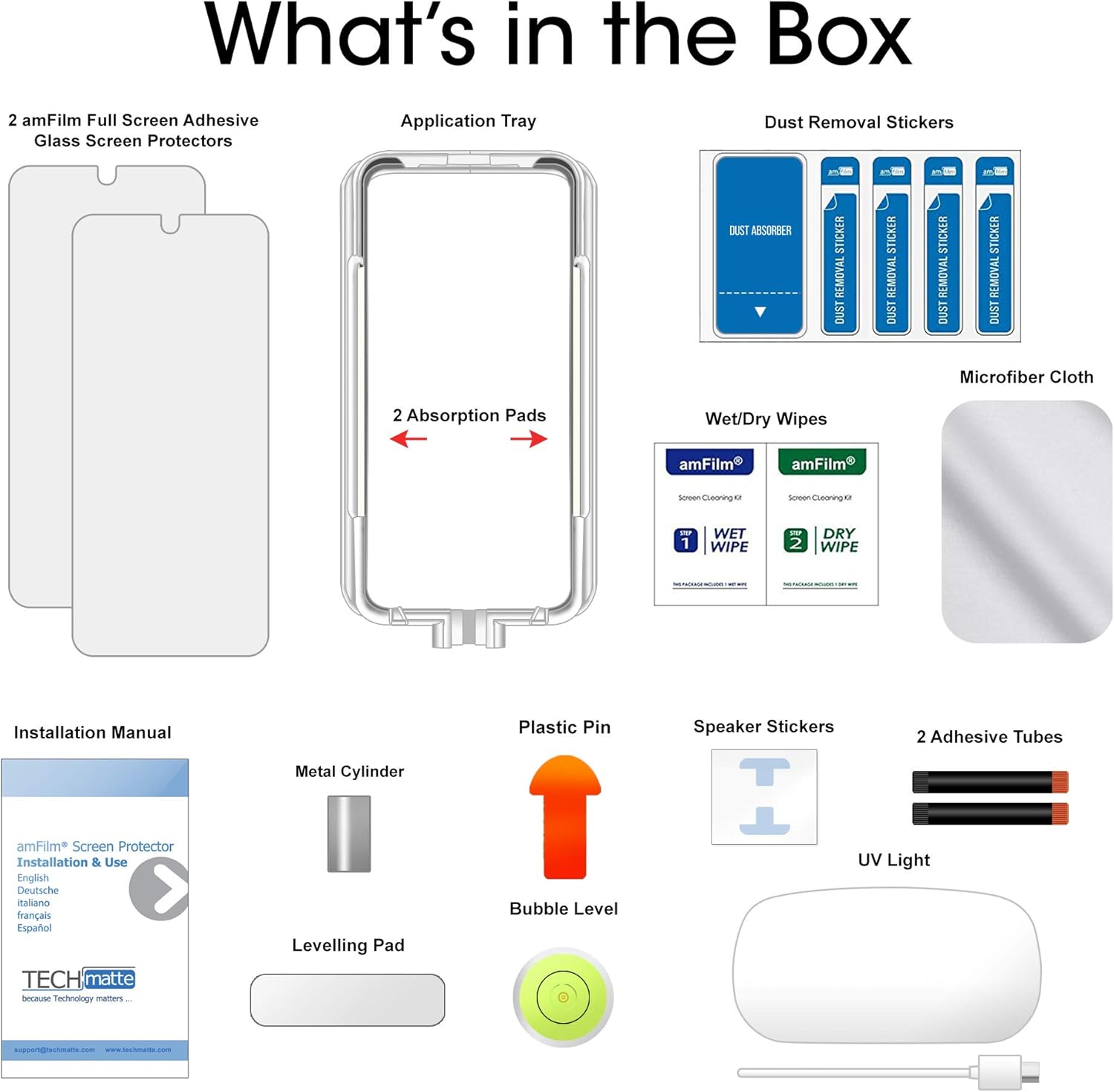
Image: All components included in the amFilm Ultra Glass Screen Protector package.
3. Compatibility
This screen protector is specifically designed for the Samsung Galaxy S20 Ultra. It is not compatible with other phone models such as the Galaxy S20 or S20 Plus.

Image: Visual guide illustrating compatibility with the Samsung Galaxy S20 Ultra only.
4. Installation Instructions
Follow these steps carefully for optimal installation. It is recommended to watch the official installation video before beginning.
Video: Official amFilm Ultra Glass Screen Protector Installation Guide.
- Prepare Your Device:
- Turn off your Samsung Galaxy S20 Ultra.
- Clean the screen thoroughly using the provided wet and dry wipes. Ensure no dust or smudges remain.
- Apply the levelling pads to the back of your phone to ensure it remains flat during installation.
- Set Up Application Tray:
- Place the application tray on your phone. Ensure the open cut on the tray is positioned at the top of the phone. Verify that the four internal pins of the tray are in direct contact with the phone screen.
- Peel one speaker sticker from its film and place it over the device's speaker through the open cut at the top of the tray. Press firmly to adhere the tab to the speaker, preventing adhesive from entering.
- Insert the plastic pin into the slot at the bottom of the tray, opposite the speaker protecting tab.
- Ensure your installation surface is completely flat. Use the bubble level provided to confirm the surface is level.
- Apply Adhesive:
- Remove the red cap from an adhesive tube. Hold it directly over the middle of the device with the open end facing downwards.
- Unscrew the other end of the tube to release the adhesive onto the center of the phone screen. You may gently tilt the phone to ensure the adhesive forms a single, centered drop.
- Position Screen Protector:
- Remove the mask film from the screen protector.
- Carefully place the top edge of the screen protector onto the phone, and the bottom edge onto the plastic pin. Ensure all sides of the screen protector are within the four pins of the application tray.
- Slowly pull the plastic pin from the bottom of the tray. This will allow the screen protector to gradually lower and make contact with the adhesive. Once contact is made, quickly finish pulling the pin out.
- Allow the adhesive to spread naturally across the screen. This may take 2-3 minutes or longer. Do not touch the screen protector or the metal cylinder during this process.
- Cure Adhesive with UV Light:
- Plug in the UV light and extend its legs. Suspend it over the phone.
- Cure the top, middle, and bottom sections of the screen for 15 seconds each.
- Place the metal cylinder on the fingerprint scanner area (approximately one inch from the bottom of your device). Cure this specific area for an additional 30 seconds using the UV light.
- Remove the metal cylinder.
- Repeat the full curing process: 60 seconds on the top, 60 seconds on the middle, and 60 seconds on the bottom sections.

Image: UV light being used to cure the adhesive.

Image: Explanation of strategically placed UV dots for even adhesive spread.
- Final Steps:
- Remove your phone from the application tray and carefully remove the speaker protecting tab.
- Re-scan Fingerprint: If you had a fingerprint registered before installation, it may no longer work. We recommend re-scanning each fingerprint twice to ensure optimal accuracy with the new screen protector.

Image: Prompt to re-scan your fingerprint after screen protector installation.
5. Key Features
The amFilm Ultra Glass Screen Protector offers several key advantages:
- Premium Tempered Glass: Constructed from high-quality tempered glass for superior durability and scratch resistance.
- Full Screen Adhesive: Utilizes full screen adhesive for a secure fit and enhanced touch sensitivity.
- No Dot Matrix or Sensitivity Loss: Designed to provide clear visibility and maintain original screen sensitivity, unlike some other protectors.
- Ultrasonic Fingerprint Scanner Compatible: Fully functional with the device's ultrasonic fingerprint scanner after re-registration.
- Case Friendly Design: The protector is designed to be slightly smaller than the actual screen size to ensure compatibility with most phone cases.

Image: The amFilm Ultra screen protector applied to a Samsung Galaxy S20 Ultra, showcasing its features.

Image: Illustration of the screen protector's case-friendly dimensions.
6. Maintenance
To maintain the clarity and effectiveness of your screen protector:
- Clean the screen protector regularly with a soft, lint-free cloth, such as the microfiber cloth provided.
- For stubborn smudges, lightly dampen the cloth with water or a screen cleaner specifically designed for electronics. Avoid harsh chemicals.
- Do not use abrasive materials or excessive force when cleaning, as this may damage the protector's surface.
7. Troubleshooting
If you encounter issues after installation, consider the following:
- Fingerprint Scanner Issues: If the ultrasonic fingerprint scanner is not working correctly, ensure you have re-registered your fingerprints after applying the screen protector. It is recommended to register each fingerprint twice for improved accuracy.
- Bubbles or Uneven Adhesive: Small bubbles may disappear over 24-48 hours. If large bubbles or uneven adhesive persist, it may indicate an issue during the initial adhesive spread or curing process. Review the installation video and instructions carefully for your next attempt.
- Screen Sensitivity: If touch sensitivity is reduced, ensure the screen protector is fully adhered without any lifting edges. Re-curing with the UV light on affected areas might help.
8. Specifications
| Attribute | Detail |
|---|---|
| Brand | amFilm |
| Compatible Devices | Samsung Galaxy S20 Ultra |
| Material | Tempered Glass |
| Item Hardness | 9H |
| Product Dimensions | 8"L x 4"W |
| Special Feature | 9H Surface Hardness, Ultrasonic Fingerprint Compatible |
| Finish Type | Glossy |
| Water Resistance Level | Waterproof |
| Unit Count | 2 Count |
| Screen Size | 6.9 Inches |
| Clarity | 9 (High Clarity) |
| Manufacturer | TechMatte |
| Model Number | Galaxy S20 Ultra |
9. Warranty & Support
amFilm is committed to providing high-quality products and excellent customer service.
- Customer Support: We offer round-the-clock customer support for all our products. If you encounter any issues during or after the application, please contact us via email, and our professional service team will be happy to assist you within 24 hours.
- Quality Assurance: Every amFilm product undergoes rigorous quality testing to ensure a top-quality experience for the end-user.
For further assistance, please refer to the contact information provided with your product packaging or visit the official amFilm website.
Related documentsGalaxy S20 Ultra


Ask a question about this manual
Ask about setup, troubleshooting, compatibility, parts, safety, or missing instructions. Manuals+ will review the question and use this page’s manual context to help answer it.