
Baseus Baseus Encok W09
Baseus Encok W09 Bluetooth Touch Earphones User Manual
Model: Baseus Encok W09 | Manufacturer No: TWS-W09
1. Introduction
Welcome to the user manual for your new Baseus Encok W09 Bluetooth Touch Earphones. This guide will help you understand the features, set up your device, operate it effectively, and maintain it for optimal performance. Please read this manual carefully before using the product.
2. Product Overview
The Baseus Encok W09 are wireless in-ear earphones designed for convenience and high-quality audio. They feature touch controls, a built-in microphone for calls, and come with a portable charging case.

Figure 2.1: Earphones and Charging Case
This image shows the Baseus Encok W09 earphones removed from their charging case, highlighting their sleek white design and compact form factor.
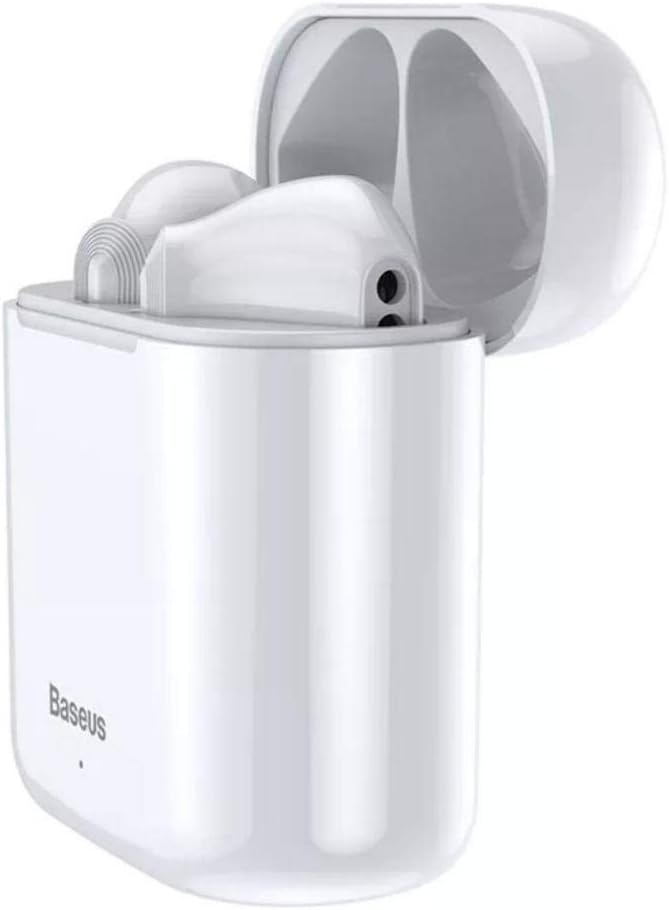
Figure 2.2: Earphones in Open Charging Case
The earphones are shown nestled within their open charging case, demonstrating how they are stored and charged. The case is also white, matching the earphones.

Figure 2.3: Closed Charging Case
This image displays the Baseus Encok W09 charging case in its closed state, showing its compact and portable design. The Baseus logo is visible on the front.
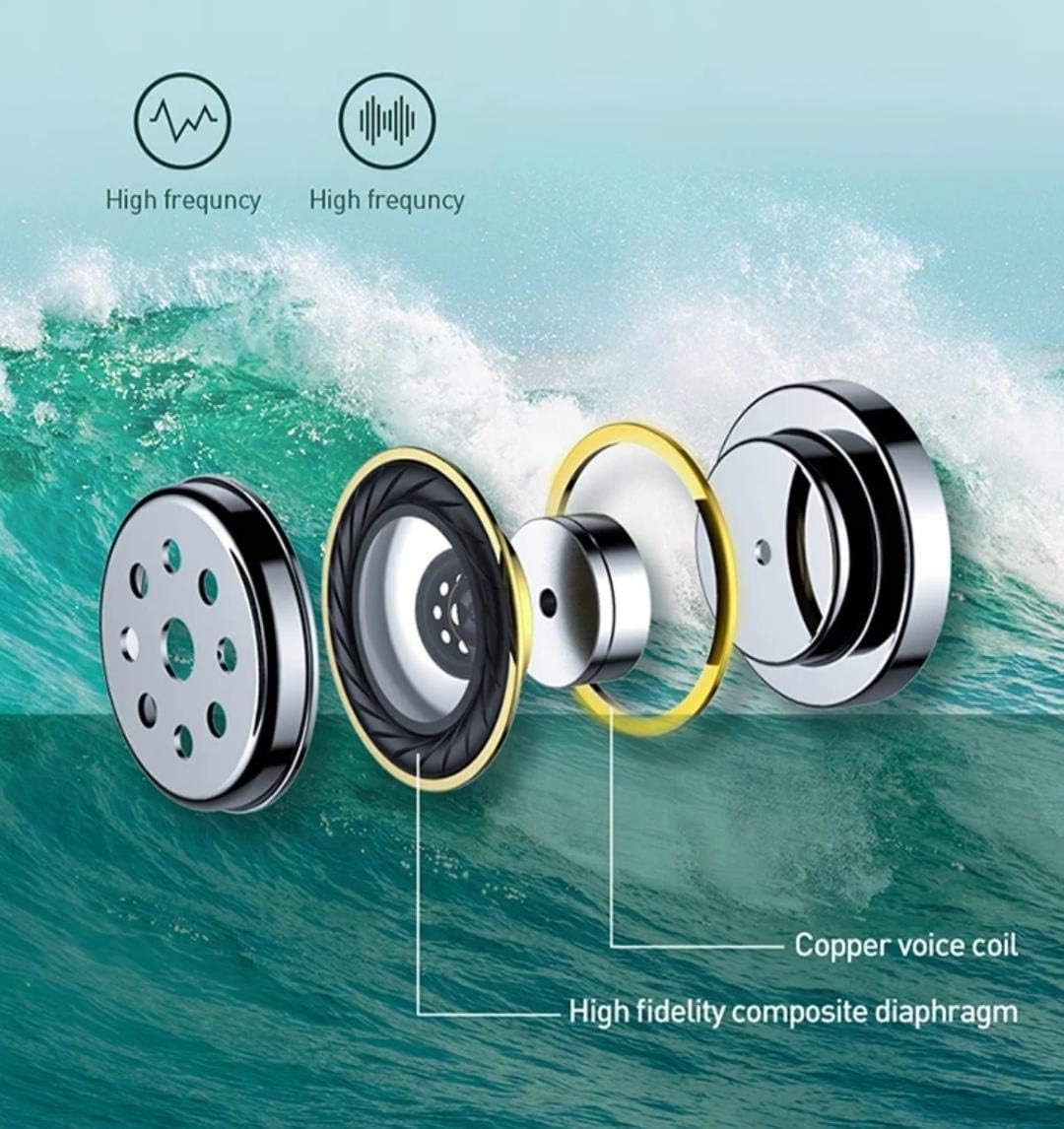
Figure 2.4: Internal Component Diagram
An exploded view diagram illustrating the internal components of the earphone, including the copper voice coil and high-fidelity composite diaphragm, which contribute to sound quality.
3. Setup
3.1 Charging the Earphones and Case
Before first use, fully charge the earphones and the charging case. The charging case has a 450mAh battery capacity.
- Place both earphones into the charging case. Ensure they are correctly seated in their respective slots.
- Connect the charging case to a power source using a compatible USB cable (not included).
- The indicator light on the charging case will show the charging status. Refer to the indicator light guide in the packaging for specific light behaviors.
- Once fully charged, disconnect the charging cable.
3.2 Bluetooth Pairing
The Baseus Encok W09 earphones support automatic connection for easy pairing.
- Ensure the earphones are charged.
- Open the charging case. The earphones will automatically power on and enter pairing mode.
- On your device (smartphone, tablet, etc.), enable Bluetooth.
- Search for available Bluetooth devices. Select "Baseus Encok W09" from the list.
- Once connected, you will hear a confirmation tone, and the earphones will be ready for use.
- For subsequent uses, the earphones will automatically connect to the last paired device when removed from the case and Bluetooth is enabled on your device.
4. Operating Instructions
4.1 Power On/Off
- Power On: Open the charging case, and the earphones will automatically power on.
- Power Off: Place the earphones back into the charging case and close the lid. They will automatically power off and begin charging.
4.2 Touch Controls
The Baseus Encok W09 earphones feature intuitive touch controls on each earbud.
- Play/Pause: Single tap on either earbud.
- Next Track: Double tap on the right earbud.
- Previous Track: Double tap on the left earbud.
- Answer/End Call: Single tap on either earbud during an incoming call or active call.
- Reject Call: Press and hold either earbud for 2 seconds during an incoming call.
- Activate Voice Assistant: Triple tap on either earbud.
4.3 Making and Receiving Calls
The built-in microphone allows for clear hands-free communication.
- Ensure earphones are connected to your phone.
- To answer an incoming call, single tap either earbud.
- To end an active call, single tap either earbud.
- To reject an incoming call, press and hold either earbud for 2 seconds.
5. Maintenance
Proper maintenance ensures the longevity and performance of your earphones.
- Cleaning: Use a soft, dry, lint-free cloth to clean the earphones and charging case. Do not use abrasive cleaners, alcohol, or chemical solvents.
- Storage: When not in use, store the earphones in their charging case to protect them from dust and damage. Store in a cool, dry place away from direct sunlight and extreme temperatures.
- Battery Care: To preserve battery life, avoid fully discharging the earphones and charging case frequently. Charge them regularly, even if not in use for extended periods.
- Water Resistance: These earphones are not waterproof. Avoid exposure to water, sweat, or high humidity.
6. Troubleshooting
If you encounter issues with your Baseus Encok W09 earphones, try the following solutions:
- Earphones not pairing:
- Ensure both earphones are charged.
- Turn off Bluetooth on your device and turn it back on.
- Forget/delete "Baseus Encok W09" from your device's Bluetooth list and try pairing again.
- Place earphones back in the case, close the lid, wait a few seconds, then open to re-enter pairing mode.
- No sound from one earbud:
- Ensure both earbuds are charged.
- Place both earbuds back in the charging case, close the lid, then take them out again.
- Try resetting the earphones (refer to the product packaging or manufacturer's website for specific reset instructions if needed).
- Charging case not charging:
- Check the charging cable and power adapter. Try a different cable or adapter.
- Ensure the charging port on the case is clean and free of debris.
- Touch controls not responding:
- Ensure the earphones are powered on and connected.
- Clean the touch sensitive area on the earbuds.
- Restart the earphones by placing them in the case and taking them out again.
7. Specifications
| Brand | Baseus |
| Model Name | Baseus Encok W09 |
| Manufacturer Part Number | TWS-W09 |
| Color | White |
| Connectivity Technology | Wireless (Bluetooth) |
| Headphones Form Factor | In Ear |
| Microphone Included | Yes |
| Noise Control | Active Noise Cancellation |
| Charging Case Battery | 450mAh |
| Compatible Devices | All devices with Bluetooth capability |
| Material | Plastic |
| Included Components | Ear Cushions |
| Product Dimensions | 7.8 x 4.3 x 0.7 cm |
| Item Weight | 20 grams |
8. Safety Information
Please read and follow these safety guidelines to prevent injury or damage to your device:
- Do not disassemble, repair, or modify the product. This may cause fire, electric shock, or complete damage to the product.
- Keep the product away from extreme temperatures (hot or cold), direct sunlight, and high humidity.
- Avoid dropping or subjecting the earphones to strong impacts.
- Do not expose the earphones or charging case to water or other liquids.
- Use only approved charging cables and adapters.
- Prolonged exposure to loud sounds may cause hearing damage. Adjust volume to a safe level.
- Keep out of reach of children and pets. Small parts may pose a choking hazard.
9. Warranty and Support
Baseus products are designed with quality and reliability in mind. For warranty information, technical support, or service inquiries, please refer to the warranty card included with your product or visit the official Baseus website. Keep your purchase receipt as proof of purchase for warranty claims.
For further assistance, you may contact Baseus customer support through their official channels.
Related documentsBaseus Encok W09


Ask a question about this manual
Ask about setup, troubleshooting, compatibility, parts, safety, or missing instructions. Manuals+ will review the question and use this page’s manual context to help answer it.