1. Safety Information
This product is a sophisticated hobby model and not a toy. It requires careful operation and basic mechanical ability. Failure to operate this product in a safe and responsible manner could result in injury or damage to the product or property.
- Age Restriction: Do not give this model to children under 14 years of age. Only allow children to play under direct adult supervision.
- Operating Environment: Operate the vehicle in open areas, away from people, pets, vehicles, and water. Avoid public roads and crowded spaces.
- Water Exposure: While the vehicle may have some water-resistant components, it is not fully waterproof. Avoid submerging the vehicle in water to prevent damage to electronics.
- Battery Safety: Always follow battery manufacturer's instructions for charging, handling, and storage. Use only approved chargers and batteries.
- Moving Parts: Keep fingers, hair, and loose clothing away from all moving parts, especially the wheels and drivetrain, to prevent injury.
- Heat: The motor and electronic speed controller (ESC) can become hot during operation. Allow components to cool before handling.
2. Package Contents
Please inspect the package contents carefully to ensure all items are present and undamaged.
- 1 x Amewi AMXRock RCX10B Scale Crawler (fully assembled)
- 4 x Tyres / Rims (diameter: 110 mm, super soft)
- 1 x 2.4 GHz Remote Control
- 1 x User Manual (German/English)
Note: Batteries for the vehicle and remote control are typically sold separately unless specified as 'RTR' (Ready-to-Run) with included batteries. Please check your specific product variant.
3. Setup
3.1 Initial Inspection
Before first use, visually inspect the vehicle for any loose screws, damaged wires, or misaligned parts that may have occurred during shipping. Ensure all linkages and suspension components move freely.
3.2 Battery Installation (Vehicle)
Locate the battery compartment, typically under the vehicle body. Securely connect your charged Li-Po battery to the ESC (Electronic Speed Controller) using the Deans connector. Ensure the battery is properly secured within the compartment to prevent movement during operation.
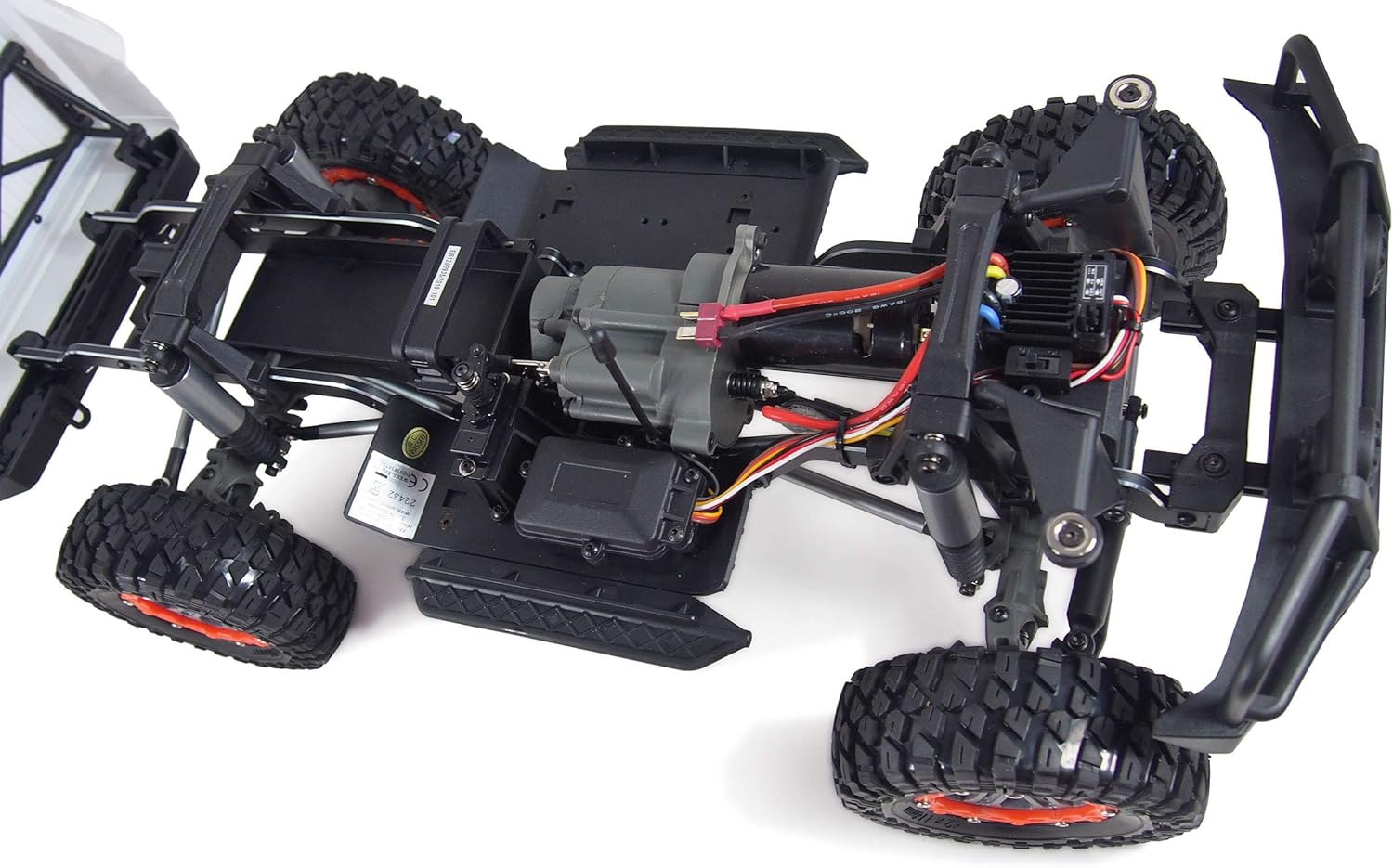
Image: Top view of the chassis, highlighting the battery placement area and electronic components.
3.3 Battery Installation (Remote Control)
Open the battery compartment on the back of the 2.4 GHz remote control. Insert the required batteries (usually AA or AAA, not included) according to the polarity markings. Close the compartment securely.
3.4 Pairing the Remote Control
Most 2.4 GHz systems automatically pair. Turn on the remote control first, then the vehicle. If pairing is not automatic, refer to the specific remote control manual for binding instructions. Ensure the vehicle's wheels are off the ground during initial power-up to prevent accidental movement.
4. Operating Instructions
4.1 Basic Controls
- Throttle Trigger: Pull to move forward, push to brake/reverse.
- Steering Wheel: Turn left or right to steer the vehicle. The unique steering damping system provides precise control over rough terrain.
- Trim Adjustments: Use the steering trim dial on the remote to ensure the wheels are straight when the steering wheel is centered. Use the throttle trim if the vehicle creeps forward or backward when the trigger is neutral.

Image: Detail of the damped steering system and front suspension.
4.2 2-Speed Manual Transmission
The AMXRock RCX10B features a unique 2-speed manual transmission. A dedicated switch or button on your remote control (refer to your remote's manual) allows you to shift between high and low gears. Use low gear for maximum torque and control on challenging climbs and technical terrain. Use high gear for faster speeds on flatter surfaces. It is recommended to stop the vehicle or reduce speed before shifting gears to prevent damage to the transmission.
4.3 Driving Tips for Crawling
- Slow and Steady: Crawlers excel at slow, controlled movements. Avoid sudden throttle inputs.
- Line Choice: Observe the terrain and choose the best line to navigate obstacles.
- Weight Transfer: Use subtle throttle and steering inputs to shift the vehicle's weight and maintain traction.
- Portal Axles: The portal axles provide increased ground clearance, allowing the vehicle to clear larger obstacles.
- Locked Diffs: The permanently locked axles (differentials) ensure maximum traction on uneven surfaces.

Image: Underside view of the chassis, showing the robust drivetrain and portal axles.
5. Maintenance
5.1 Cleaning
After each use, especially in dirty or wet conditions, clean the vehicle. Use a soft brush or compressed air to remove dirt, dust, and debris from the chassis, suspension, and motor area. Avoid using water directly on electronics.
5.2 Inspection
Regularly inspect the following components:
- Screws and Fasteners: Check for any loose screws, especially on the wheels, suspension, and chassis. Tighten as necessary.
- Drivetrain: Inspect CVD drive shafts and gears for wear or damage.
- Suspension: Check the oil pressure shock absorbers for leaks or damage. Ensure they move smoothly.
- Wiring: Look for frayed or damaged wires, especially around the motor and ESC.
- Tires: Check for wear, tears, or punctures.

Image: Detail of the wheel and hub assembly.
5.3 Lubrication
Apply a small amount of appropriate RC-grade lubricant to moving metal parts, such as universal joints and bearings, as needed. Avoid over-lubrication, which can attract dirt.
5.4 Storage
When not in use, store the vehicle in a cool, dry place away from direct sunlight. Remove batteries from both the vehicle and the remote control for long-term storage.
6. Troubleshooting
| Problem | Possible Cause | Solution |
|---|---|---|
| Vehicle does not respond | Low or uncharged batteries (vehicle/remote); Remote not paired; Power switch off. | Charge/replace batteries; Re-pair remote; Ensure power switches are ON. |
| Poor performance/lack of power | Low battery charge; Motor/ESC overheating; Obstruction in drivetrain. | Charge battery; Allow components to cool; Check for debris in gears. |
| Steering not straight | Steering trim incorrect; Damaged steering servo/linkage. | Adjust steering trim on remote; Inspect steering components for damage. |
| Vehicle makes unusual noises | Debris in gears; Worn bearings; Loose components. | Inspect and clean gears; Check bearings; Tighten loose screws. |
If you encounter issues not listed here, or if the problem persists after attempting these solutions, please contact Amewi customer support.
7. Specifications
| Feature | Detail |
|---|---|
| Model Number | 22433 |
| Scale | 1:10 |
| Product Dimensions | 27.56 x 10.24 x 9.06 inches (700 x 260 x 230 mm) |
| Item Weight | 6.82 pounds (3.1 kg) |
| Frame | 5 mm CNC milled 6061 aluminum |
| Bearings | Fully ball bearing mounted |
| Drive Shafts | CVD drive shafts |
| Shock Absorbers | Unique oil pressure design with dust protection sleeves |
| Steering System | Unique damped steering system |
| Axles | Permanently locked portal axles (differentials) |
| Transmission | Unique 2-speed manual transmission with protective function |
| Body | High-quality 1.2 mm PVC with magnetic closure |
| ESC | Hobbywing WP-1060 (Li-Po compatible, Deans connector) |
| Motor | 550 crawler motor (brushed) |
| Recommended Age | 14 years and up |

Image: Dimensional diagram of the Amewi AMXRock RCX10B.
8. Warranty and Support
For warranty information, technical support, or spare parts, please refer to the official Amewi website or contact your authorized dealer. Keep your proof of purchase for warranty claims.
Amewi is committed to providing high-quality products and customer satisfaction. Do not attempt to modify or repair the vehicle beyond the scope of this manual, as this may void your warranty.


