
Product Overview
The Delta Lenta Kitchen Faucet with Touch2O Technology offers advanced functionality and a modern design for your kitchen. This faucet features touch activation, a pull-down sprayer, and durable construction designed for long-lasting performance.

Image: The Delta Lenta Kitchen Faucet in Champagne Bronze, showcasing its elegant gooseneck design and pull-down sprayer.
Key features include Delta's Touch2O Technology for easy on/off with a simple touch, TempSense LED light to indicate water temperature, ShieldSpray Technology for powerful cleaning with reduced splatter, and DIAMOND Seal Technology for leak-free operation.
Setup and Installation
This faucet is designed for single-hole installation and includes an optional deck plate for 1 or 3-hole 8-inch center installations. Proper installation is crucial for optimal performance and to prevent leaks.
Pre-Installation Checklist
- Ensure all components listed in the packaging are present.
- Verify that the mounting surface is clean and free of debris.
- Confirm water supply lines are accessible and can be shut off.
- Prepare the sink hole: Minimum clearance to backsplash is 2.5 inches, and hole size should be 1.31-1.5 inches.
- 6 AA batteries are required and included for the Touch2O functionality.

Image: Diagram illustrating the faucet's dimensions, including height (16.75 inches), spout reach (9.13 inches), and hole requirements for installation. It also shows the optional deck plate for 1 or 3-hole installations.
Installation Steps (Summary)
For detailed installation instructions, please refer to the official Installation Manual PDF provided by Delta Faucet Company. A link to this document is available in the Support section of this manual.
- Shut off the main water supply.
- Assemble the faucet components according to the manual.
- Mount the faucet onto the sink or countertop, using the deck plate if necessary.
- Connect the water supply lines to the faucet and the main water supply.
- Install the battery pack for the Touch2O system.
- Test for leaks and proper operation.
Operating Instructions
Touch2O Technology
The Touch2O Technology allows you to activate or deactivate the water flow with a simple touch. Touch anywhere on the spout or handle with your wrist or forearm to start or stop the water. The single lever handle can also be used manually for traditional operation.

Image: A hand touching the faucet spout to activate water flow, demonstrating the Touch2O Technology. The image also highlights the TempSense LED light changing color based on water temperature (80°F blue, 95°F magenta, 110°F red).
TempSense LED Indicator
The TempSense LED light, located at the base of the faucet, changes color to indicate the water temperature, providing a visual cue to prevent surprises:
- Blue: Cold water (approx. 80°F)
- Magenta: Warm water (approx. 95°F)
- Red: Hot water (approx. 110°F)
Pull-Down Sprayer and Spray Modes
The integrated pull-down sprayer offers extended reach and multiple spray patterns for various tasks. The sprayer head is securely docked by Magnatite Docking technology when not in use.

Image: A hand demonstrating the Magnatite Docking feature, showing the magnetic connection that holds the pull-down sprayer firmly in place.
The faucet features ShieldSpray Technology, which provides a powerful stream of water for cleaning while containing splatter. This helps reduce mess and scrubbing time.
Image: A visual representation of ShieldSpray Technology, showing a concentrated water stream within a protective shield, designed to minimize splashback during cleaning.
The faucet also offers a 360-degree swivel for enhanced flexibility and reach within the sink area.
Maintenance and Care
Cleaning the Faucet
To maintain the finish and functionality of your Delta Lenta faucet, follow these cleaning guidelines:
- Use a soft, damp cloth and mild soap. Avoid abrasive cleaners, harsh chemicals, or polishes, as these can damage the finish.
- For the Champagne Bronze finish, regular cleaning with a soft cloth will help preserve its appearance.
Touch-Clean Spray Holes
The spray holes are designed with Touch-Clean technology, allowing for easy removal of mineral build-up. Simply wipe away calcium and lime build-up from the soft rubber spray holes with the touch of a finger.
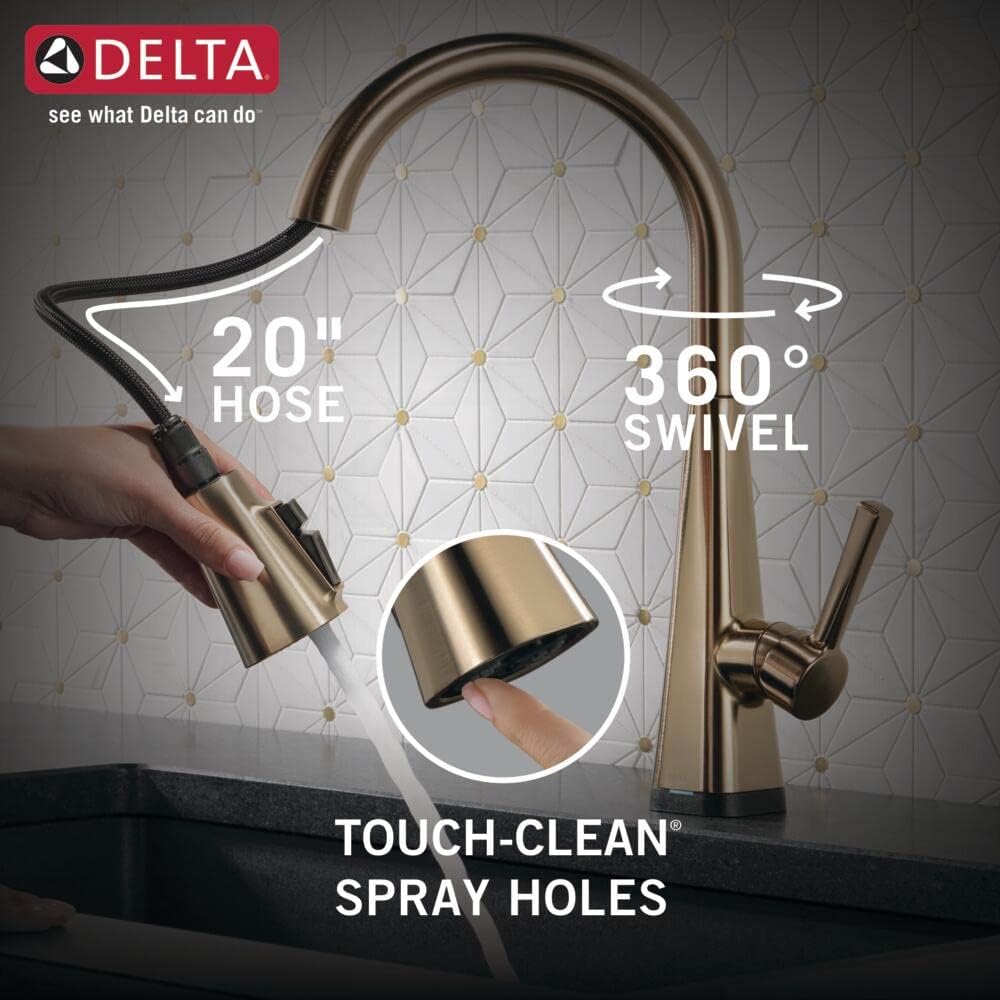
Image: A finger demonstrating the ease of cleaning the soft rubber Touch-Clean spray holes on the faucet head, along with illustrations of the 20-inch hose and 360-degree swivel.
Battery Replacement
The Touch2O system is powered by 6 AA batteries. When the batteries are low, the faucet's touch functionality may become inconsistent or stop working. Replace all 6 batteries simultaneously with new alkaline batteries. Refer to the installation manual for specific battery compartment location and replacement steps.
Troubleshooting
If you encounter issues with your Delta Lenta Kitchen Faucet, consult the following common troubleshooting steps:
| Problem | Possible Cause | Solution |
|---|---|---|
| No water flow or low flow. | Water supply is off; clogged aerator; kinked hose. | Check water supply valves; clean or replace aerator; straighten hose. |
| Touch2O feature not working. | Low or dead batteries; loose connections; sensor interference. | Replace batteries; check all electrical connections; ensure no metal objects are touching the faucet body. |
| Water temperature inconsistent. | Improper hot/cold water supply connection; issue with mixing valve. | Verify hot and cold water line connections; consult a plumber if issue persists. |
| Leaking from faucet base or connections. | Loose connections; worn O-rings or seals. | Tighten connections; inspect and replace O-rings/seals if damaged. |
| Sprayer does not retract fully. | Obstruction in hose path; weight not properly attached. | Clear any obstructions under the sink; ensure the hose weight is correctly positioned. |
If these steps do not resolve the issue, please contact Delta Faucet customer support for further assistance.
Specifications
Detailed technical specifications for the Delta Lenta Kitchen Faucet (Model: 19802TZ-CZ-DST):
| Feature | Detail |
|---|---|
| Brand | DELTA |
| Model Name | Lenta™ |
| Model Number | 19802TZ-CZ-DST |
| Color | Champagne Bronze |
| Finish Type | Gold (Champagne Bronze) |
| Material | Zinc |
| Mounting Type | Deck Mount |
| Installation Type | Single Hole (fits 1 or 3-hole installations with included deck plate) |
| Number of Handles | 1 |
| Spout Design | Pull-Down |
| Spout Height | 9 Inches |
| Spout Reach | 20 Inches |
| Hose Length | 54 Inches |
| Maximum Flow Rate | 1.8 Gallons Per Minute |
| Special Features | 360 Swivel, Lead Free, Pull Down Sprayer, Touch2O Technology, TempSense LED, ShieldSpray Technology, Magnatite Docking, DIAMOND Seal Technology, Touch-Clean Spray Holes |
| Item Weight | 8 Pounds |
| Product Dimensions | 11.5"D x 11.5"W x 16.75"H |
| Batteries | 6 AA batteries required (included) |
| UPC | 034449946551 |
Durable Technologies
- DIAMOND Seal Technology: Patented design reduces leak points and ensures leak-free operation for the life of the faucet, lasting twice as long as the industry standard.
- Brilliance Finishes: Engineered for durability and tested for corrosion resistance to at least 2 times industry standards, ensuring years of dependable use without cracking, peeling, chipping, blistering, or changing color.

Image: An X-ray view of the faucet highlighting the DIAMOND Valve, which eliminates wear on seals for leak-free operation, and InnoFlex PEX supply lines for fewer leak points.
Warranty Information
Delta Faucet Company stands behind the quality of its products. The Delta Lenta Kitchen Faucet is backed by a comprehensive warranty:
- Lifetime Limited Warranty: Covers the faucet and its finish for the original consumer purchaser.
- 5-Year Electronic Parts Warranty: Specifically covers the electronic components of the faucet, such as the Touch2O system.

Image: A shield icon with an asterisk, representing the Lifetime Limited Warranty provided by Delta Faucet.
For full details regarding warranty terms, conditions, and limitations, please refer to the official warranty documentation included with your product or visit the Delta Faucet website.
Support and Contact
For additional assistance, technical support, or to purchase replacement parts, please use the following resources:
- Installation Manual: A detailed PDF installation manual is available for download. Download Installation Manual (PDF)
- Delta Faucet Store: Visit the official Delta Faucet store for product information and accessories. Visit Delta Faucet Store
- Customer Service: For direct support, you can contact Delta Faucet customer service at 1-800-345-3358.

Image: A customer service representative wearing a headset, indicating available support for Delta Faucet products.


