
1. Introduction
This manual provides comprehensive instructions for the setup, operation, and maintenance of your Behringer Q802USB Premium 8-Input 2-Bus Mixer. The Q802USB is a versatile and feature-packed analog mixer designed for various audio applications, including small project recording, rehearsals, and podcasting. It features 8 inputs, including 2 mono channels with XENYX mic preamps and 2 stereo channels, along with a built-in USB/audio interface.
Please read this manual thoroughly before operating the device to ensure proper use and to maximize its performance and longevity.
2. Key Features
- Premium ultra-low noise, high headroom analog mixer.
- Two state-of-the-art XENYX mic preamps, comparable to stand-alone boutique preamps.
- Studio-grade compressors with super-easy "one-knob" functionality and control LED for professional vocal and instrumental sound.
- Built-in stereo USB/Audio Interface for direct connection to your computer.
- 8 total input channels.
- Compact and durable design.
3. What's in the Box
Upon unpacking, please verify that all components listed below are present and in good condition:
- Behringer Q802USB 8-Input 2-Bus Mixer
- Power Adapter
- USB Cable
- User Manual (this document)
If any items are missing or damaged, please contact your retailer or Behringer customer support immediately.
4. Product Overview

Figure 4.1: Front view of the Behringer Q802USB mixer, showing all input channels, controls, and the main section.
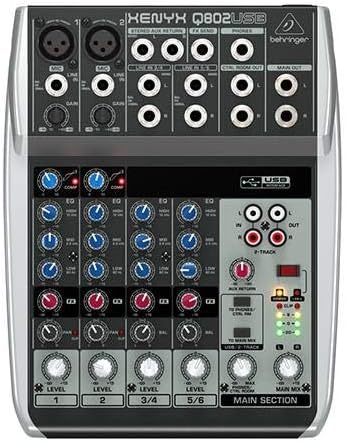
Figure 4.2: Top-down view of the Behringer Q802USB mixer, highlighting the layout of knobs, faders, and input/output jacks.

Figure 4.3: Rear view of the Behringer Q802USB mixer, showing the power input, USB port, and serial number label.
5. Setup
5.1 Power Connection
- Ensure the mixer's power switch is in the OFF position.
- Connect the included power adapter to the "AC POWER IN" port on the rear of the mixer.
- Plug the power adapter into a suitable electrical outlet.
5.2 Audio Connections
The Q802USB offers various input and output options:
- Microphone Inputs (Channels 1-2): Use XLR cables to connect microphones to the MIC inputs. Ensure phantom power (+48V) is only enabled if your microphones require it (e.g., condenser microphones).
- Line Inputs (Channels 1-2): Use 1/4" TRS or TS cables for line-level instruments or devices.
- Stereo Line Inputs (Channels 3/4, 5/6): Use 1/4" TS cables for stereo instruments or playback devices.
- Main Outputs: Connect your main speakers or amplifier to the MAIN OUT (1/4" TRS) jacks.
- Control Room Outputs: Connect studio monitors to the CTRL ROOM OUT (1/4" TS) jacks.
- Headphone Output: Connect headphones to the PHONES (1/4" TRS) jack.
5.3 USB Connection
To use the Q802USB as an audio interface with your computer:
- Connect one end of the USB cable to the USB port on the rear of the mixer.
- Connect the other end of the USB cable to an available USB port on your computer.
- The mixer should be recognized automatically by most modern operating systems. For advanced features or specific drivers, visit Behringer's official website.
6. Operating Instructions
6.1 Basic Operation
- Power On: After all connections are made, switch the mixer's power to ON.
- Gain Control: Adjust the GAIN knob for each input channel to set the input level. Aim for the signal to peak around 0 dB on the level meters during the loudest parts of your audio.
- Compressor (Channels 1-2): Use the COMP knob to apply compression to microphone inputs. Turn clockwise to increase compression.
- Equalization (EQ): Use the HIGH, MID, and LOW knobs on each channel to adjust the tonal balance.
- Level Faders/Knobs: Adjust the LEVEL faders (or rotary knobs for stereo channels) to control the volume of each channel in the main mix.
- Main Mix: Use the MAIN MIX fader to control the overall output volume of the mixer.
- Headphone/Control Room Level: Adjust the PHONES/CTRL ROOM knob to set the monitoring volume.
6.2 USB Audio Interface Usage
When connected to a computer via USB, the Q802USB acts as a 2-in/2-out audio interface:
- Recording: The main mix output of the mixer is sent to your computer via USB. You can record this stereo signal in your digital audio workstation (DAW) software.
- Playback: Audio from your computer can be routed back to the mixer via USB. Use the 2-TRACK/USB TO MAIN MIX button to send this audio to the main mix, or 2-TRACK/USB TO PHONES/CTRL ROOM to send it only to your headphones/control room monitors.
7. Maintenance
Proper maintenance ensures the longevity and optimal performance of your Behringer Q802USB mixer.
- Cleaning:
- Always disconnect the power before cleaning.
- Use a soft, dry, lint-free cloth to wipe down the exterior.
- For stubborn dirt, a slightly damp cloth with mild soap can be used, followed by a dry cloth.
- Avoid abrasive cleaners, solvents, or waxes, as they can damage the finish.
- Storage:
- Store the mixer in a cool, dry place away from direct sunlight and extreme temperatures.
- Protect it from dust and moisture when not in use, ideally with a dust cover.
- Ventilation: Ensure proper airflow around the unit. Do not block ventilation openings.
- Cable Management: Avoid tightly bending or crimping cables, especially near connectors, to prevent damage.
8. Troubleshooting
If you encounter issues with your Q802USB mixer, refer to the following common problems and solutions:
| Problem | Possible Cause | Solution |
|---|---|---|
| No power | Power cable not connected; power outlet faulty; mixer power switch off. | Check power cable connection; try a different outlet; ensure power switch is ON. |
| No sound output | Main Mix fader down; channel level knobs down; output cables disconnected; incorrect input selection. | Increase Main Mix fader; increase channel level knobs; check all audio cable connections; ensure correct input is selected. |
| Distorted sound | Input gain too high; output level too high; faulty cable. | Reduce input GAIN; reduce Main Mix fader; try different cables. |
| USB audio not working | USB cable disconnected; incorrect audio settings on computer; driver issue. | Check USB cable connection; verify audio input/output settings in your computer's sound preferences and DAW; install/update Behringer drivers if necessary. |
If the problem persists after trying these solutions, please contact Behringer customer support.
9. Specifications
| Feature | Detail |
|---|---|
| Product Dimensions | 14 x 12.2 x 4.3 inches |
| Item Weight | 2.2 pounds (approx. 1 Kilogram) |
| Number of Channels | 8 (2 mono, 2 stereo) |
| Mic Preamps | 2 x XENYX |
| Compressors | Studio-grade "one-knob" on mono channels |
| USB Interface | Built-in stereo USB/Audio Interface |
| Connectivity Technology | USB |
| Power Source | Corded Electric |
| Model Number | Q802USB |
10. Warranty and Support
For detailed warranty information, please refer to the warranty card included with your product or visit the official Behringer website. Behringer provides comprehensive support for its products.
- Online Support: Visit Behringer Support for FAQs, driver downloads, and product registration.
- Product Registration: Register your product online to receive the latest updates and warranty information.
- Contact: For technical assistance or service, please contact Behringer customer service through their website.
You can also visit the official Behringer store on Amazon for more information and related products: Behringer Store.


