
1. Introduction
The Fender Passport Event Series 2 is a portable audio system designed for amplifying voices, instruments, and background music. It features full-range speakers, a powered mixer with front-panel controls, and 375 watts of power. This system is suitable for various applications including educational settings, sporting events, worship services, meetings, presentations, and small live performances. Connectivity options include combination XLR/¼” jacks.
2. Product Overview
2.1 Key Features
- All-in-one PA system with seven-channel powered mixer and full-range speakers
- 375 watts of output power
- Bluetooth audio streaming capability
- Nine inputs: four XLR/¼” combination jacks, two ¼” instrument/line inputs, two ¼” stereo inputs, one 1/8” stereo input, and stereo Bluetooth input
- Sub output with automatic high-pass filter for powered subwoofer use
2.2 Included Components
- Portable PA System (mixer and two speakers)
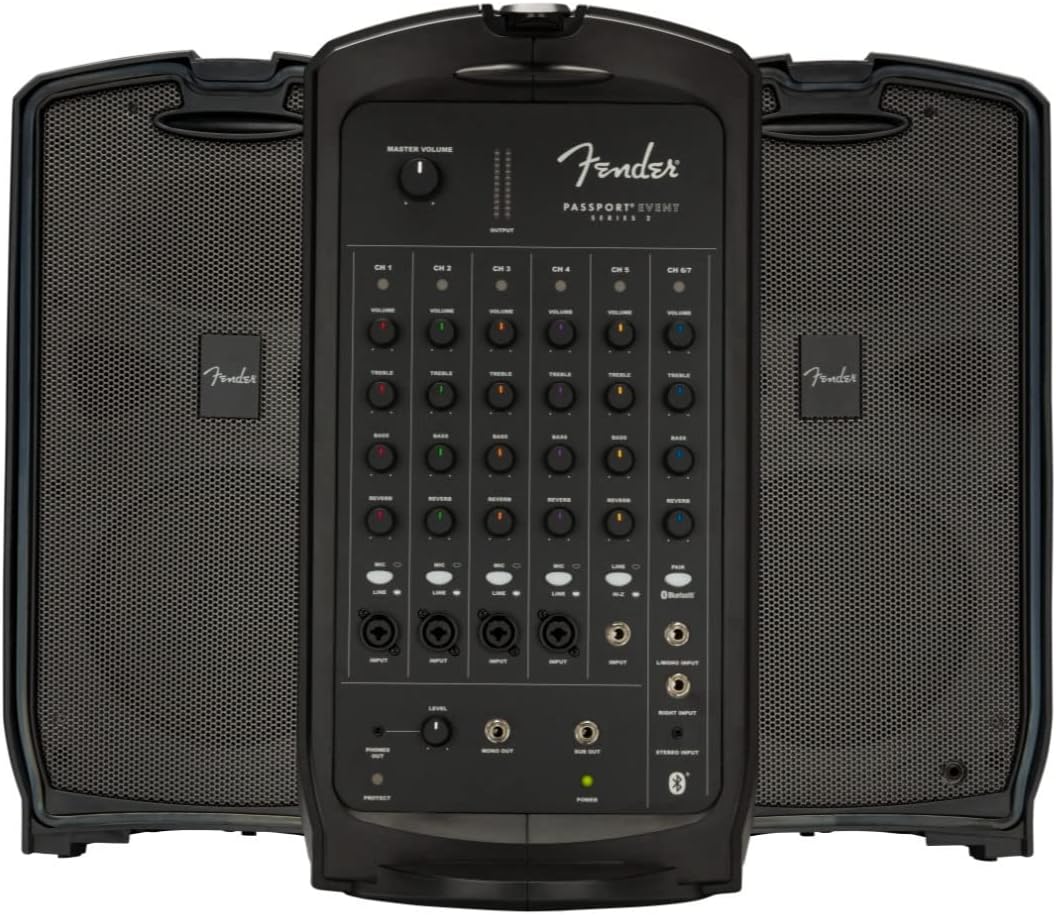
Figure 1: The Fender Passport Event Series 2 PA System in its assembled configuration, showcasing the central mixer unit flanked by two speakers.
3. Setup
3.1 Unpacking and Assembly
The Passport Event Series 2 is designed for easy transport and quick setup. The two speakers detach from the central mixer unit for deployment. To separate the components, release the latches securing the speakers to the mixer. Place the mixer on a stable surface and position the speakers as desired, ensuring they are connected to the mixer using appropriate speaker cables (not included).

Figure 2: The Passport Event Series 2 with its speakers detached from the central mixer, ready for setup.
3.2 Connecting Components
- Power Connection: Connect the power cable to the AC inlet on the rear of the mixer and then to a suitable power outlet.
- Speaker Connection: Connect the left and right speakers to the corresponding speaker outputs on the mixer using standard speaker cables.
- Input Devices: Connect microphones, instruments, or other audio sources to the available input channels on the front panel. The system supports XLR, ¼” instrument/line, and stereo inputs.
- Subwoofer (Optional): If using an external powered subwoofer, connect it to the dedicated sub output on the mixer.

Figure 3: The Passport Event Series 2 in its compact, closed configuration, ideal for transport and storage.
4. Operation
4.1 Powering On/Off
After all connections are made, locate the power switch on the rear panel of the mixer. Flip the switch to the 'ON' position to power on the system. Ensure the master volume is set to a low level before powering on to prevent sudden loud noises. To power off, set the master volume to minimum and then flip the power switch to 'OFF'.
4.2 Input Channels
The mixer features seven input channels, each with independent volume, treble, bass, and reverb controls. Adjust these controls to achieve the desired sound for each connected device.
- Channels 1-4: XLR/¼” combination inputs for microphones or line-level instruments.
- Channels 5-6: ¼” instrument/line inputs.
- Channel 7: Stereo inputs (¼” or 1/8”) and Bluetooth input for connecting external audio players.
4.3 Volume and Tone Controls
Each channel has dedicated controls for volume, treble, bass, and reverb. The master volume control adjusts the overall output level of the system. Experiment with these controls to find the optimal sound balance for your environment and audio sources.
4.4 Bluetooth Connectivity
To stream audio via Bluetooth, activate Bluetooth on your device and select the Passport Event Series 2 from the list of available devices. The system will indicate a successful connection. Adjust the Bluetooth volume on your device and the mixer's Channel 7 volume for optimal playback.
5. Maintenance
To ensure the longevity and optimal performance of your Fender Passport Event Series 2 PA System, follow these maintenance guidelines:
- Cleaning: Regularly wipe down the exterior surfaces with a soft, dry cloth. Avoid using abrasive cleaners or solvents, which can damage the finish.
- Storage: When not in use, store the system in its compact, closed configuration in a cool, dry place away from direct sunlight and extreme temperatures.
- Cable Management: Ensure all cables are properly coiled and stored to prevent damage. Avoid sharp bends or kinks in cables.
- Ventilation: Ensure that the mixer unit's ventilation openings are not obstructed during operation to prevent overheating.
6. Troubleshooting
If you encounter issues with your Passport Event Series 2, refer to the following common troubleshooting steps:
- No Sound: Check all power and audio connections. Ensure the master volume and individual channel volumes are turned up. Verify that input devices are functioning correctly.
- Distorted Sound: Reduce the input gain for the affected channel and/or the master volume. Check for damaged cables or faulty input devices.
- Bluetooth Connection Issues: Ensure Bluetooth is enabled on your device and the system is in pairing mode. Try unpairing and re-pairing the device. Ensure no other devices are actively connected to the PA system via Bluetooth.
- Humming/Buzzing Noise: Check for proper grounding of all equipment. Try plugging the PA system into a different power outlet. Ensure audio cables are not running parallel to power cables.
If problems persist after attempting these steps, contact Fender customer support for further assistance.
7. Specifications
| Feature | Specification |
|---|---|
| Mounting Type | Floor Standing |
| Model Name | Event |
| Speaker Type | Full-range (Subwoofer output available) |
| Special Feature | Bass Boost |
| Recommended Uses | Music, Public Address |
| Compatible Devices | Smartphone, Microphones, Instruments |
| Unit Count | 1.0 Count (System includes 2 speakers and 1 mixer) |
| Color | Black |
| Included Components | Portable PA System |
| Product Dimensions | 24.7"D x 31.6"W x 14.5"H |
| Is Waterproof | FALSE |
| Number of Items | 5 (System components) |
| Control Method | Manual (Front Panel) |
| Power Source | Corded Electric |
| UPC | 885978347315 |
| Manufacturer | Fender Audio |
| Item Weight | 51 pounds |
| ASIN | B084Q98R29 |
| Item model number | 6943000000 |
| Date First Available | February 14, 2020 |
| Connector Type | XLR, 1/4 inch, 1/8 inch |
| Speaker Amplification Type | Active |
| Output Wattage | 375 Watts |
| Frequency Response | 20 KHz |
| Connectivity Technology | XLR, Bluetooth |
| Audio Output Mode | Stereo |
8. Warranty and Support
8.1 Warranty Information
The Fender Passport Event Series 2 PA System typically includes a 2-Year Warranty. Additional protection plans, such as a 3-Year Protection Plan or a monthly Complete Protect plan, may be available for purchase to extend coverage. Please refer to your purchase documentation for specific warranty terms and conditions.
8.2 Customer Support
For technical assistance, service, or any questions regarding your Fender Passport Event Series 2, please contact Fender customer support. You can find contact information on the official Fender website or through your product's registration materials.
For information regarding returns or shipping, please refer to the policies of your retailer, such as Austin Bazaar, which handles shipping and returns for this product.


